 19
ASUS ROG Crosshair X870E Glacial Review - A Masterpiece
Performance »SSD Temperatures
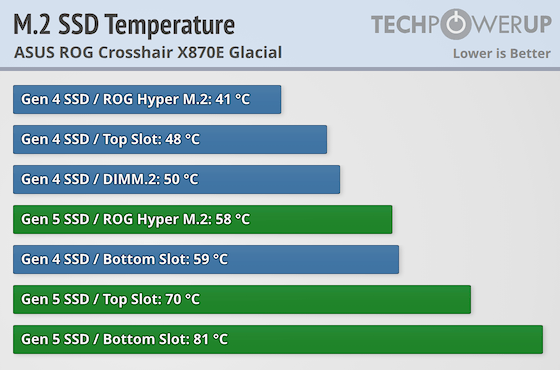
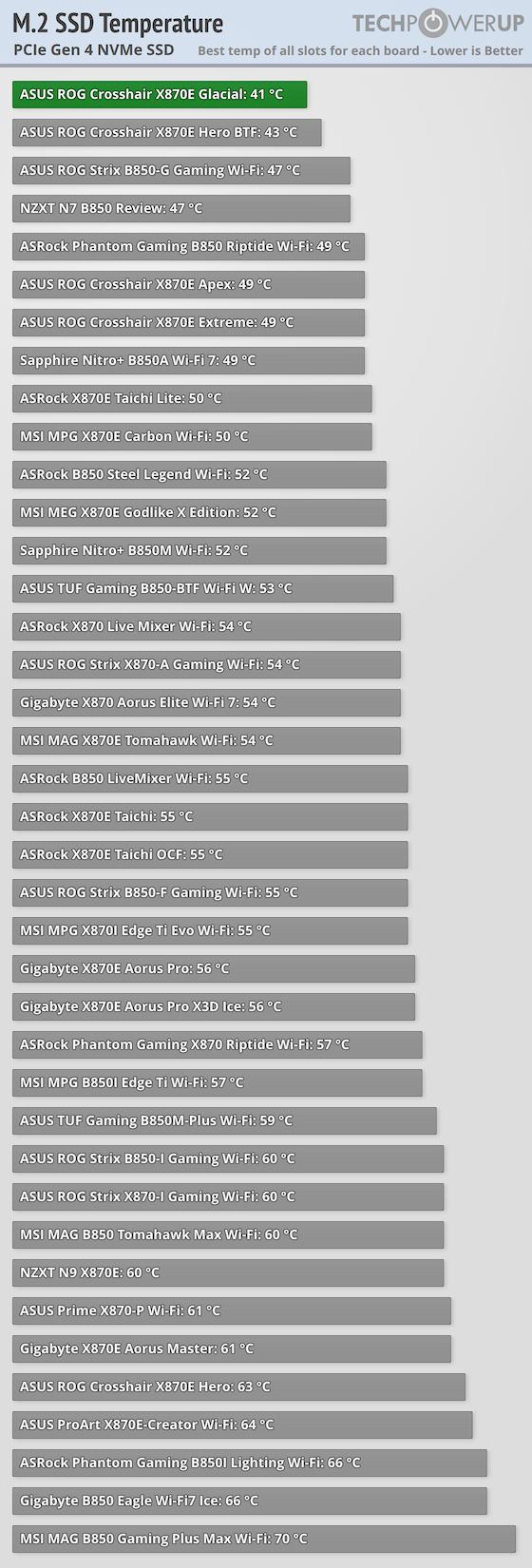
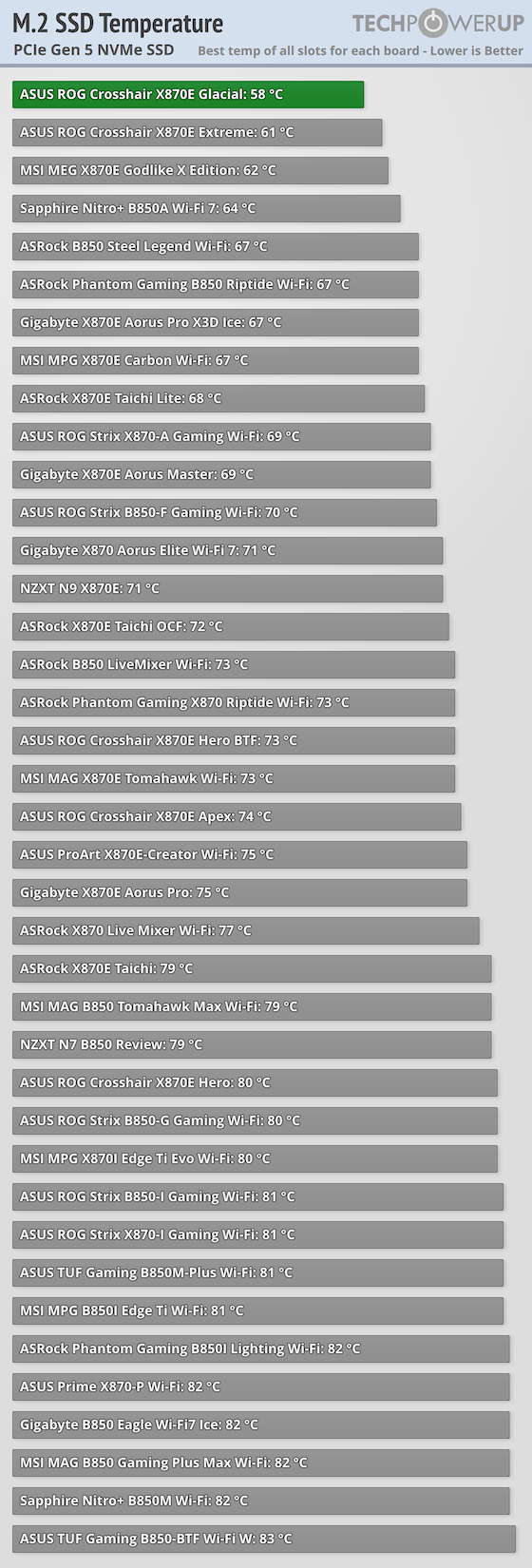
As well as the three onboard M.2 ports we have the PCIe expansion card and DIMM.2 module to test here and for the comparison with other motherboards, we've included the best results of the three locations. The only disappointment was the lower M.2 heatsink, which did result in minor throttling with our PCIe Gen 5 SSD and seems to be more of a contact issue rather than cooling capacity as our Gen 4 SSD also saw its highest temperature here and by a wide margin.Thankfully, the rest of the results are exceptional, with the ROG Crosshair X870E Glacial topping both our PCIe Gen 4 and Gen 5 charts. This was thanks to the ROG Hyper M.2 expansion card, allowing the Glacial to become the first motherboard to get under 60 °C with our PCIe Gen 5 SSD, and beating ASUS' own ROG Crosshair X870E Hero BTF and ROG Crosshair X870E Extreme, which slip to second place.
The top M.2 heatsink on the PCB and DIMM.2 module also did well with our PCIe Gen 4 SSD, gaining the equivalent of top ten spots, while the top heatsink's 70 °C result with our PCIe Gen 5 SSD was fairly decent and well away from throttling, but it's proximity to our graphics card meant that we have seen better. In short, for PCIe Gen 4 SSDs, any location will do, while for PCIe Gen 5, either the ROG Hyper M.2 card or top M.2 are the best and lower heatsink for those SSDs should be avoided, especially for double-sided SSDs, unless your own testing shows otherwise.
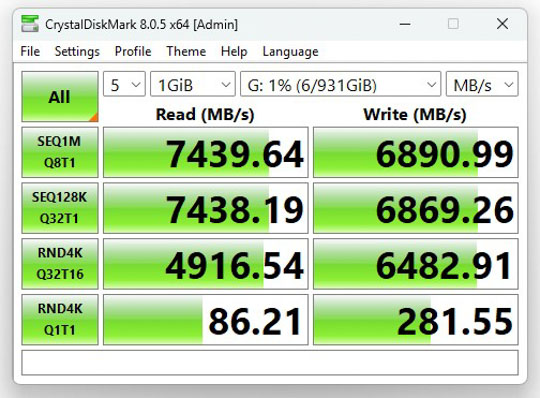
PCIe Gen 4 Performance (Samsung 990 Pro)
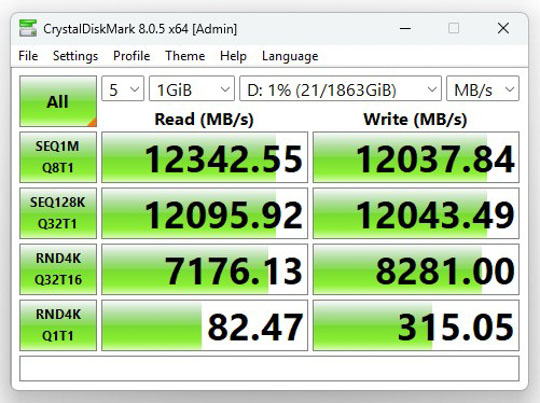
PCIe Gen 5 Performance (Team Group T-Force Z540)
Nov 14th, 2026 12:05 CST
change timezone
Latest GPU Drivers
New Forum Posts
- Slow SSD read speeds - help! (7)
- What can the FX 8320 do today? Here is the answer. (29)
- What card do I get for VR? (29)
- Tell me about your favourite graphics card (55)
- Ddr4 instead of ddr5 for 9060xt 8 gb over 5060 8 gb (7)
- Your PC ATM (36414)
- TPU's Nostalgic Hardware Club (22161)
- Microsoft Exchange/365 outages? (62)
- Opinion on Monitor Replacement (7)
- Show us your collections thread!! (366)
Popular Reviews
- AMD Zen 6 Technical Deep Dive
- Corsair HX1000i Shift Crystal Review
- ASUS ROG Strix B850-I Gaming Wi-Fi7 W Review
- NZXT C1200 Platinum Review
- Upcoming Hardware Launches 2027 (Updated Nov 2026)
- Montech King 95 3D PRO Review
- NZXT H7 RGB+ Review
- NZXT H5 Review
- Phantom Blade Zero Performance Benchmark Review - 35 GPUs Tested
- XPG NIMBUS PLUS Review - Mid-range Chair With Strong Competitors
TPU on YouTube
Controversial News Posts
- NVIDIA Co-Founder and CEO Jensen Huang Officially Resigns (399)
- OpenAI CEO Argues Home PCs Waste the World's Limited DRAM Supply (152)
- NVIDIA Launches Investigation Into Jensen Huang's Relationship With Suspected Chinese Spy (136)
- Intel "Raptor Lake Next" 16-Core and 20-Core CPUs Surface (130)
- Legendary Game Studio BioWare Shuts Down Following EA Layoffs (104)
- Dell CEO Says the Memory Shortage Will Get Worse in 2027 (95)
- NVIDIA GeForce RTX 50-Series Scheduled for up to $500 Price Hike This Week (89)
- Modder Fits RTX 5090 With Four 8-Pin Connectors, Halving Current per Wire (80)