 21
Borderlands 4 Handheld Performance Review
Out-of-Box Experience »Graphics Settings
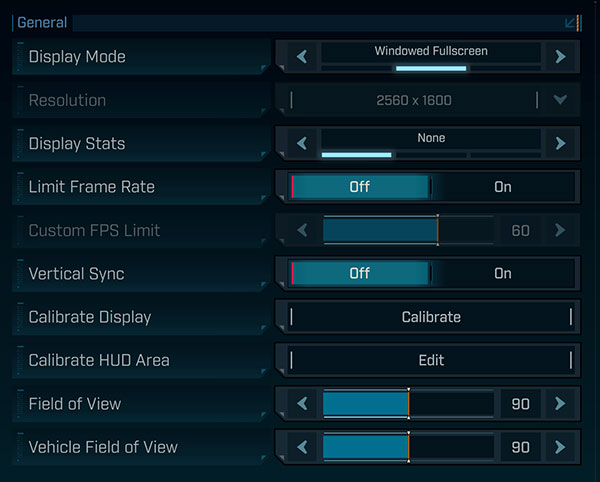
- The first settings screen has mostly monitor related options
- Window mode options are "windowed," "fullscreen" and "borderless"
- You may enable an FPS counter in-game, optionally with additional detail showing GPU frametime and ping latency
- The FPS cap can be set to either 30, 40, 50, 60, 70, 80 FPS
- V-Sync can be disabled completely
- The field of view range goes from 70 to 110 degrees, with the default at 90. I played the game on my PC with a FOV of 96 but kept the default 90 FOV on both the Steam Deck and ROG Ally X
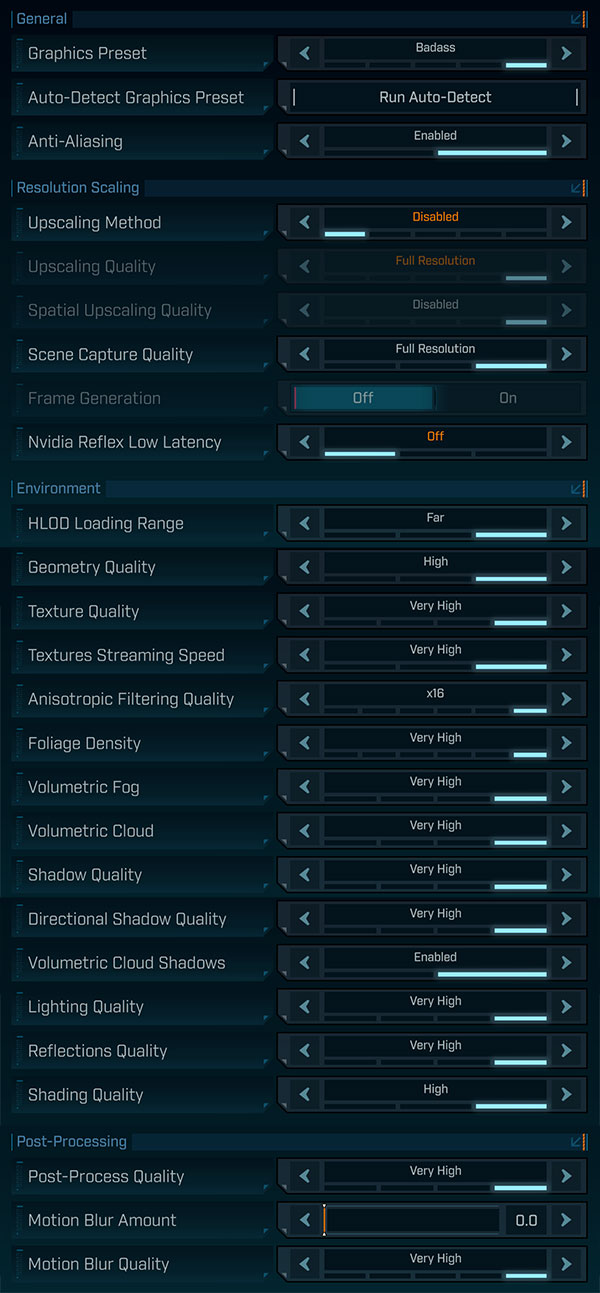
- The second screen called "Advanced" deal with more hardware related settings
- The graphics presets available are "Low," "Medium," "High," "Very High" and "Badass"
- Anti-Aliasing can be disabled when you select upscaler "Disabled"—it looks terrible
- Upscaling methods available are: "Disabled," "DLSS," "FSR," "TSR" and "XeSS"
- "Spatial Upscaling Quality" can only be enabled when you use any upscaler other than FSR, it offers a bit of additional performance at the loss of quality
- "Scene Capture Quality" controls how the in-game map and menus look like
- Frame generation can be enabled only when FSR is enabled, thus not allowing you to combine frame generation with the "Spacial Upscaling" option.
- In addition to that, there's an excellent amount of additional options to fine-tune the performance
- You can disable motion blur completely
Test Devices

We tested the public Steam release of Borderlands 4. The Steam Deck LCD was running SteamOS version 3.7.13, build 20250630.1. Our ROG Ally X had the latest Armoury Crate version installed at the time of testing (1.6.8.0), along with BIOS 312.
| Gaming Handhelds Used for Testing | |
|---|---|
| Steam Deck LCD | SteamOS version 3.7.13 build 20250630.1 |
| ROG Ally X | Armoury Crate 1.6.8.0 BIOS 312 GPU driver version: 32.0.21013.11001 Windows 11 Home 24H2 VBS disabled |
Nov 25th, 2026 17:30 CST
change timezone
Latest GPU Drivers
New Forum Posts
- Sexy Hardware Close-Up Pic Clubhouse. (10345)
- AAF Optimus Modded Driver For Windows 10 & 11 - Only for HDAUDIO Chips [WINDOWS 11 RECOMMENDED] (1155)
- Which ryzen am5 cpu ? (219)
- {NA} 2026 Black November prices / deal (7)
- TPU's Nostalgic Hardware Club (22208)
- UPS what one to get? (74)
- More Nova Lake specs (5)
- Share your CPUZ Benchmarks! (2680)
- X79 and/or rampage IV OC'ing thread for those of us still left.... (2457)
- Asus Rog Maximus Z890 Extreme. (Various questions). (38)
Popular Reviews
- ASRock X870E Challenger Wi-Fi White Review
- Microsoft Surface Laptop Ultra Review - The Next-gen Arm Laptop
- VZMORE AX9 Max Review
- Upcoming Hardware Launches 2027 (Updated Nov 2026)
- AMD Ryzen 7 9800X3D Review - The Best Gaming Processor
- AMD Zen 6 Technical Deep Dive
- Corsair RM1200e (Second Generation) Review
- Phantom Blade Zero Performance Benchmark Review - 35 GPUs Tested
- Pulsar Office Tour & First Look at P1 Dual-Sensor Mouse
- Ocypus lota P1000 Review
TPU on YouTube
Controversial News Posts
- Jensen Huang Reinstated as CEO of NVIDIA (571)
- NVIDIA Co-Founder and CEO Jensen Huang Officially Resigns (492)
- Report: Jensen Huang Eyes NVIDIA Comeback (281)
- Open Letter Asking NVIDIA to Reinstate Jensen Huang Passes 115,000 Signatures (184)
- OpenAI CEO Argues Home PCs Waste the World's Limited DRAM Supply (152)
- NVIDIA Launches Investigation Into Jensen Huang's Relationship With Suspected Chinese Spy (136)
- Intel "Raptor Lake Next" 16-Core and 20-Core CPUs Surface (130)
- Intel Razor Lake Gets a 12 P-Core bLLC Chip With No E-Cores, Per Leak (94)