 10
Death Stranding 2 Handheld Performance Review
Out-of-Box Experience »Graphics Settings
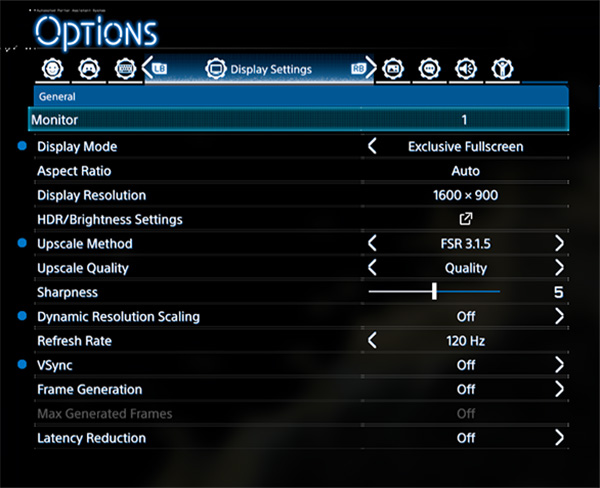
- There are two graphics settings screens, the first one includes display-related settings.
- Display mode can be set to "Windowed," "Fullscreen," and "Exclusive Fullscreen."
- We couldn't change resolution even when selecting the "exclusive fullscreen" option. The only way to change it was in Windows before entering the game, which is quite annoying.
- Vertical synchronization can be toggled on or off.
- When enabling frame generation, the game also automatically enables the associated vendor-specific latency reduction method.
- You can set different refresh rate limits, but we couldn't test whether the game has a frame cap, since we only tested it on handhelds.
- The game doesn't include TAA, you can use any of the upscalers set to "Native AA" as antialiasing instead.
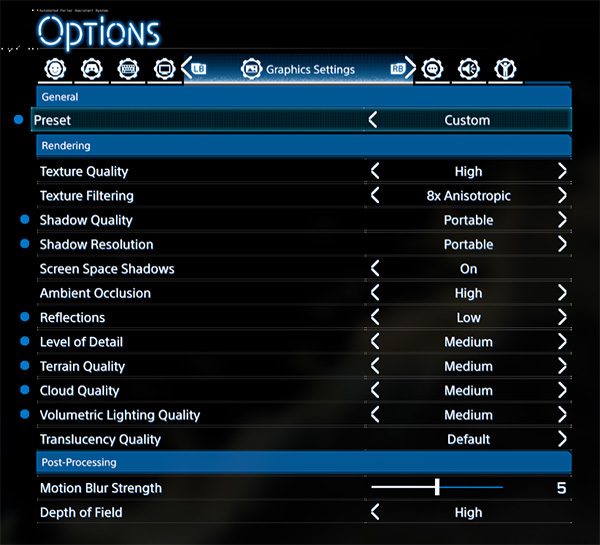
- Under the Graphics Settings screen you can find the usual assortment of graphics options, along with multiple graphical presets.
- There are five graphics presets in total: "Portable," "Low," "Medium," "High," and "Very High."
- Even though the game supports ray traced reflections and ambient occlusion, we couldn't enable them on handhelds with which we tested the game.
- Ambient occlusion only has one ray tracing level (Ray Tracing), while reflections have two (Ray Tracing High, and Ray Tracing Very High).
- You can disable Depth of Field and Motion Blur, but you cannot disable Chromatic Aberration, at least not to our knowledge.
- Some settings have five quality levels (Portable, Low, Medium, High, Very High), but the following have fewer: Texture Quality, Ambient Occlusion, Terrain Quality, Cloud Quality, Volumetric Lighting Quality, and Translucency Quality.
- You can adjust Texture Filtering from Trilinear, all the way up to x16 Anisotropic (2x, 4x, 8x, and 16x)
Test Devices
We tested the public Steam release version of Death Stranding 2.- The Steam Deck LCD was running SteamOS version 3.7.20, build 20260108.1
- Our ROG Xbox Ally X had Armoury Crate 2.1.21.0 installed along with BIOS 316.
- The MSI Claw 8 AI+ A2VM had MSI Center M 2.0.2601.2301 installed along with BIOS E1T52IMS.112
- The ROG Ally X had the latest Armoury Crate version installed at the time of testing (2.1.21.0), along with BIOS 312.
- The ROG Ally with SteamOS was running SteamOS version 3.7.20, build 20260108.1.
| Gaming Handhelds Used for Testing | |
|---|---|
| Steam Deck LCD | SteamOS version 3.7.20 build 20260108.1 |
| ASUS ROG Xbox Ally X | Armoury Crate 2.1.21.0 BIOS 316 GPU driver version: 32.0.23027.4002 Windows 11 Home 25H2 VBS disabled |
| Claw 8 AI+ A2VM | MSI Center M 2.0.2601.2301 BIOS E1T52IMS.112 GPU driver version: 32.0.101.8626 Windows 11 Home 25H2 VBS disabled |
| ASUS ROG Ally X | Armoury Crate 2.1.21.0 BIOS 312 GPU driver version: 32.0.22029.13001 Windows 11 Home 25H2 VBS disabled |
| ASUS ROG Ally Z1E with SteamOS | SteamOS version 3.7.20 build 20260108.1 |
Nov 23rd, 2026 20:22 CST
change timezone
Latest GPU Drivers
New Forum Posts
- DTS DCH Driver for Realtek HDA [DTS:X APO4 + DTS Interactive] (2819)
- WarpCoreBench scores! (96)
- Increasing Power Limit? (20)
- Gacha Games - Discussions, Pulls, Updates, etc. (1162)
- RX 580 2048SP 8GB - SK Hynix - Ardiyes - BIOS Needed (4)
- UPS what one to get? (59)
- Your PC ATM (36480)
- 6502-based superscalar core (logisim) progress updates (1)
- GTA VI (27)
- Last game you purchased? (1419)
Popular Reviews
- Microsoft Surface Laptop Ultra Review - The Next-gen Arm Laptop
- ASRock X870E Challenger Wi-Fi White Review
- Upcoming Hardware Launches 2027 (Updated Nov 2026)
- Corsair RM1200e (Second Generation) Review
- AMD Ryzen 7 9800X3D Review - The Best Gaming Processor
- AMD Zen 6 Technical Deep Dive
- AMD Ryzen 7 7700X3D Review
- Pulsar Office Tour & First Look at P1 Dual-Sensor Mouse
- Ugreen NASync DXP4800 GT Review
- Phantom Blade Zero Performance Benchmark Review - 35 GPUs Tested
TPU on YouTube
Controversial News Posts
- NVIDIA Co-Founder and CEO Jensen Huang Officially Resigns (492)
- Jensen Huang Reinstated as CEO of NVIDIA (387)
- Report: Jensen Huang Eyes NVIDIA Comeback (278)
- Open Letter Asking NVIDIA to Reinstate Jensen Huang Passes 115,000 Signatures (184)
- OpenAI CEO Argues Home PCs Waste the World's Limited DRAM Supply (152)
- NVIDIA Launches Investigation Into Jensen Huang's Relationship With Suspected Chinese Spy (136)
- Intel "Raptor Lake Next" 16-Core and 20-Core CPUs Surface (130)
- NVIDIA GeForce RTX 50-Series Scheduled for up to $500 Price Hike This Week (89)