 15
GEEKOM A9 Max Review
Value & Conclusion »Power and Noise Levels
Power and efficiency are just as important as raw performance in a compact system, so I measured how much the A9 Max draws at idle, under CPU stress, during GPU-heavy tests, and while gaming. I also measured its noise levels while in an idle state and when the system is under a heavy workload.Idle Power Draw
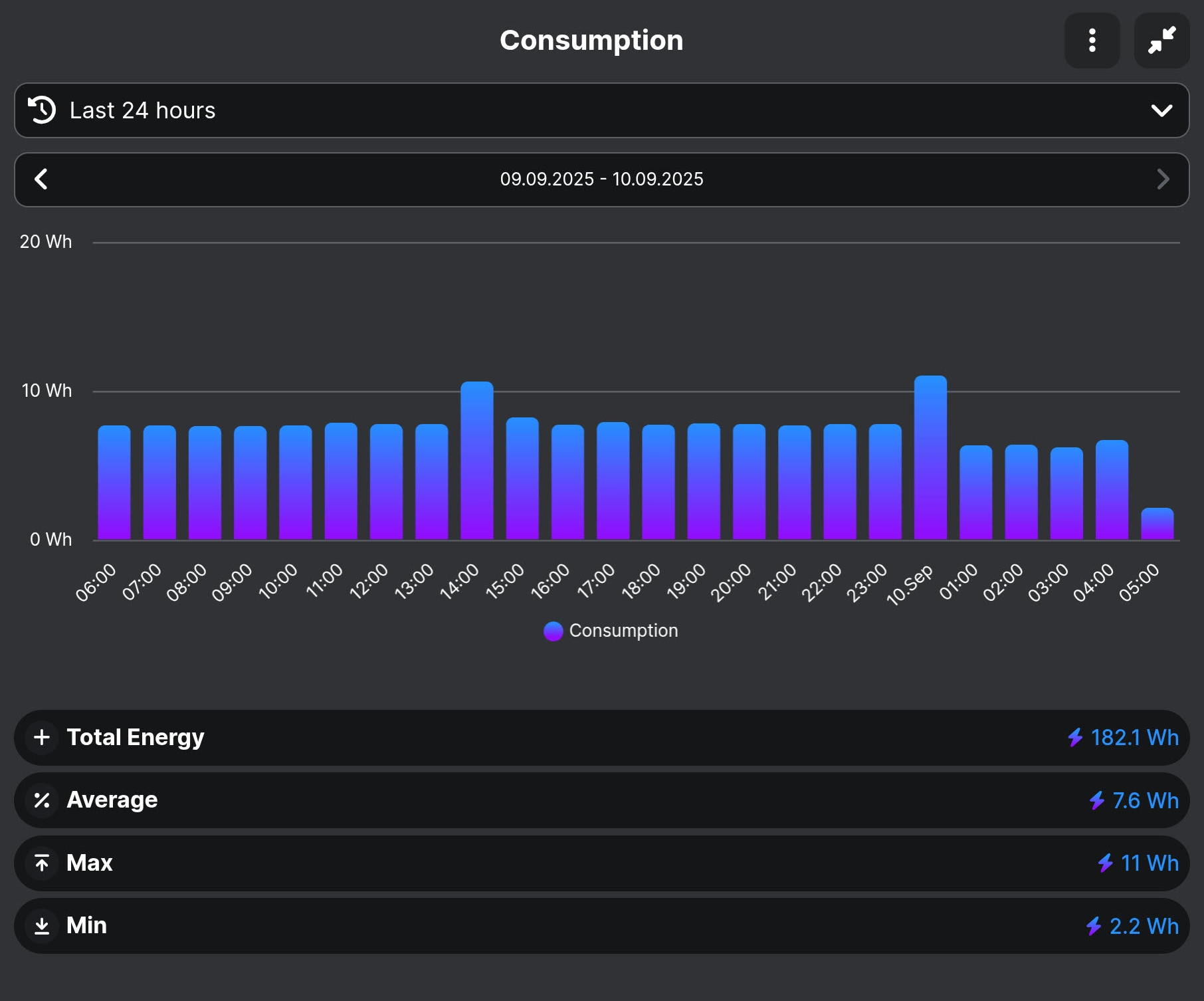
When the A9 Max is just sitting there syncing files or waiting for input, it hardly sips power. Over a full 24-hour day the system used only about 0.18 kWh, which averages to around 7–10 watts. On a typical electricity plan that's only a few cents per day. Of course, this cost varies depending on where you live, but you likely won't have to worry about your bill if you keep it running for updates or downloads.
CPU and GPU Power Draw
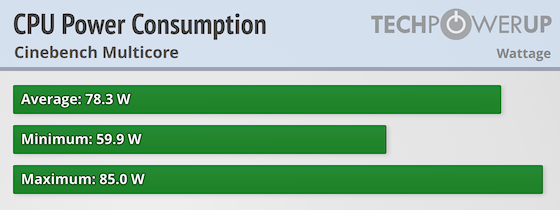
CPU Load (Cinebench Multicore)
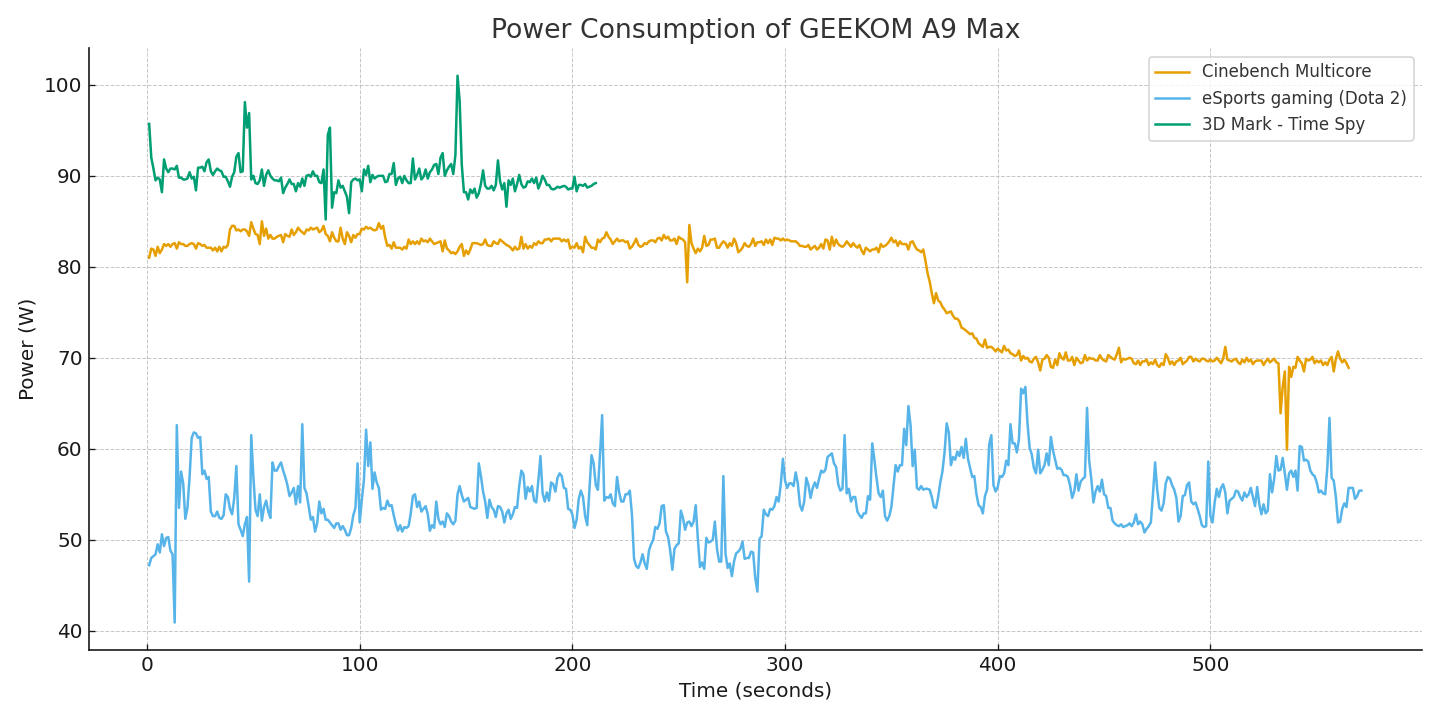
The system averaged 78 W, with a minimum of 59.9 W and a peak of 85 W. That range is normal for the Ryzen AI 9 HX 370 under a sustained multicore load and indicates the CPU is running somewhat near its intended 45–65 W window.
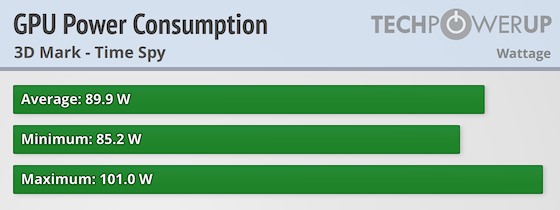
GPU Load (3D Mark – Time Spy)
During this GPU-heavy benchmark, the system averaged 89.9 W, stayed above 85 W, and peaked at 101 W. These values are what you'd expect from the Radeon 890M when pushed, and they confirm the GPU can scale up cleanly under stress without unusual spikes. For heavier gaming, this puts the A9 Max well below desktop GPU power territory while still delivering capable performance.
eSports Gaming (Dota 2)
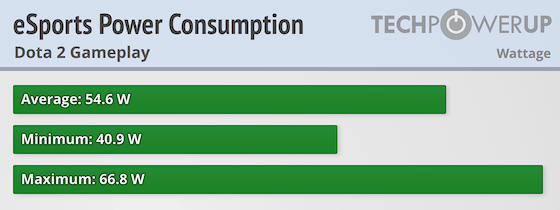
In Dota 2, the system averaged 54.6 W, with lows of 40.9 W and peaks of 66.8 W. This is consistent with how the 890M behaves in lighter titles, staying well under 70 W even during big battle moments. It means long esports sessions remain both efficient and cost-effective, with stable power use throughout.
Here's a more detailed looking, comparing all three profiles:
Noise Levels
During idle or light use, the system remains effectively silent, with no measurable fan noise intruding on the workspace. This makes it easy to work or edit without distraction when the card and system are not under sustained load.When pushed into heavier workloads, however, the fans do spin up to keep thermals in check. With the Windows power plan set to Balanced and the system running on the default BIOS fan profile, noise levels peaked at 54.2 dB(A) (with the mic roughly 30 cm away). While it can be noticeable in a quiet room under load, this is normal levels from a compact system.
Nov 25th, 2026 22:07 CST
change timezone
Latest GPU Drivers
New Forum Posts
- Claude credits purchased on or after Dec. 7 now have an expiry date (15)
- AI generated images... (235)
- Exploring Local LLMs: Models, Hardware and Setup Experiences (1)
- What's your main Black Friday / Cyber Monday purchase? (10)
- Smokin Hot Lappy (10)
- Gacha Games - Discussions, Pulls, Updates, etc. (1165)
- Linpack Xtreme Released (511)
- Sexy Hardware Close-Up Pic Clubhouse. (10345)
- AAF Optimus Modded Driver For Windows 10 & 11 - Only for HDAUDIO Chips [WINDOWS 11 RECOMMENDED] (1155)
- Which ryzen am5 cpu ? (219)
Popular Reviews
- ASRock X870E Challenger Wi-Fi White Review
- VZMORE AX9 Max Review
- Upcoming Hardware Launches 2027 (Updated Nov 2026)
- Microsoft Surface Laptop Ultra Review - The Next-gen Arm Laptop
- AMD Ryzen 7 9800X3D Review - The Best Gaming Processor
- AMD Zen 6 Technical Deep Dive
- Corsair RM1200e (Second Generation) Review
- Phantom Blade Zero Performance Benchmark Review - 35 GPUs Tested
- Pulsar Office Tour & First Look at P1 Dual-Sensor Mouse
- Ocypus lota P1000 Review
TPU on YouTube
Controversial News Posts
- Jensen Huang Reinstated as CEO of NVIDIA (573)
- NVIDIA Co-Founder and CEO Jensen Huang Officially Resigns (492)
- Report: Jensen Huang Eyes NVIDIA Comeback (281)
- Open Letter Asking NVIDIA to Reinstate Jensen Huang Passes 115,000 Signatures (184)
- OpenAI CEO Argues Home PCs Waste the World's Limited DRAM Supply (152)
- NVIDIA Launches Investigation Into Jensen Huang's Relationship With Suspected Chinese Spy (136)
- Intel "Raptor Lake Next" 16-Core and 20-Core CPUs Surface (130)
- Intel Razor Lake Gets a 12 P-Core bLLC Chip With No E-Cores, Per Leak (94)