 2
Gigabyte Z890I Aorus Ultra Review
(2 Comments) »Introduction

There are some very attractive options for Mini-ITX motherboards for Intel's current socket, and Gigabyte's Z890I Aorus Ultra is the company's flagship motherboard. Gigabyte also boasts options in this form factor for AMD's X870 chipset, as well as both AMD and Intel B-series chipsets.
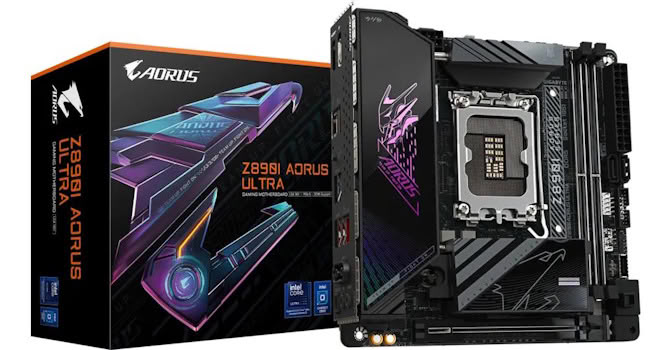
Of course, with Intel's current socket firmly in the second half of its lifespan and likely not seeing any more CPU launches, you'd hope for some bargains when it comes to Z890 motherboards. But the Z890I Aorus Ultra stubbornly refuses to drop below $300. However, the same can be said for ASRock's, ASUS's, and MSI's equivalent motherboards, with the former two costing quite a bit more than this. The question is whether it offers enough to justify its price premium over B860 options if you're dead-set on Intel over AMD, and whether pricier options are worth the premium.
Specifications
| Specifications | |
|---|---|
| CPU Support: | Intel Core Ultra Series 2 (Arrow Lake) |
| Power Design: | CPU Power: 8-phase/Renesas RAA22010540/105 A iGPU Power:1-phase/Renesas ISL99360/80 A VCCSA Power: 2-phase/Onsemi ISL99360/40 A |
| Chipset: | Intel Z890 |
| Integrated Graphics: | Supported 1× DisplayPort 1.4 via Type-C 1× DisplayPort 1.4 1× HDMI 2.1 |
| Memory: | 2× DIMM, Supports up to 128 GB Up to DDR5-9200 (OC) |
| BIOS: | 256 Mbit (32 MB) AMI UEFI |
| Expansion Slots: | 1× PCIe Gen 5 x16 slot (x16, x8/x8, x8/x4/x4) |
| Storage: | 1× M.2 (PCIe Gen 5 x4) 1× M.2 (PCIe Gen 4 x4) 2× SATA 6 Gb/s |
| Networking: | 1× Realtek RTL8125 2.5 Gbps Ethernet 1× Intel BE202 Wi-Fi 7 |
| Rear Ports: | USB BIOS Flashback button 1× 2.5 Gbps Ethernet 1× Thunderbolt 4 40 Gbps (Type-C) 3× USB 3.2 Gen 2 10 Gbps (Type-A) 2× USB 3.2 Gen 1 5 Gbps (Type-A) 1× Wi-Fi antenna connectors 2× Audio jacks 1× Optical S/PDIF Out port |
| Audio: | 1× Realtek ALC897 Codec |
| Fan / Thermistor headers: | 3× 4-pin /0 |
| Form Factor: | Mini-ITX Form Factor 6.69 × 6.69 in./17.0 × 17.0 cm |
| Exclusive Features: |
|
Packaging and Contents


Gigabyte continues to use smaller headers for fans and includes two mini 4-pin adapters that convert them into standard 4-pin fan connectors. We also have a Wi-Fi EZ-Plug antenna, two SATA cables, an Aorus sticker set and two motherboard mounting screws to cater to the fascias on the PCB.
The full list of accessories is:
- 1× Quick start guide
- 1× Wi-Fi antenna
- 2× SATA cables
- 1× Sticker set
- 2× Motherboard screws
- 1× M.2 screw
- 2× Fan adapter cables
Our Patreon Silver Supporters can read articles in single-page format.
Nov 11th, 2026 04:12 CST
change timezone
New Forum Posts
- High performance power plan is worse than balanced on 12 th CPUs? (84)
- budget home NAS – X79, X99 or another platform? (126)
- When you could finally run Crysis maxed out? (21)
- My dell g15 5510 is stuck at 210 mhz while pulling impossible wattage (21)
- Planning for Prolonged High Prices and Maintaining What You Already Have (62)
- Excessively high prices for RAM (90)
- I cannot download games that are larger than 30–40 GB. (82)
- Meeting point of those who broke their GPUs. Please share what GPUs you've burned, shattered, ionized or melted accidentally. (33)
- Warning for Windows 10 and 11 users running newer AMD GPU drivers (42)
- What are you playing? (26204)
Popular Reviews
- AMD Zen 6 Technical Deep Dive
- Upcoming Hardware Launches 2027 (Updated Nov 2026)
- Gigabyte Z890I Aorus Ultra Review
- INNOCN 45C1R Review - Two QHD Screens, Zero Bezels
- XPG NIMBUS PLUS Review - Mid-range Chair With Strong Competitors
- Phantom Blade Zero Performance Benchmark Review - 35 GPUs Tested
- NZXT H7 RGB+ Review
- Gears of War: E-Day Performance Benchmark Review - 35 GPUs Tested
- NZXT H5 Review
- be quiet! Light Mount TKL Keyboard Review
TPU on YouTube
Controversial News Posts
- OpenAI CEO Argues Home PCs Waste the World's Limited DRAM Supply (152)
- NVIDIA Launches Investigation Into Jensen Huang's Relationship With Suspected Chinese Spy (136)
- Intel "Raptor Lake Next" 16-Core and 20-Core CPUs Surface (130)
- Legendary Game Studio BioWare Shuts Down Following EA Layoffs (104)
- Dell CEO Says the Memory Shortage Will Get Worse in 2027 (95)
- NVIDIA GeForce RTX 50-Series Scheduled for up to $500 Price Hike This Week (88)
- Modder Fits RTX 5090 With Four 8-Pin Connectors, Halving Current per Wire (80)
- AMD Radeon Owners Can Now Run Nearly Every DLSS Feature Through Fan-Made Mod (80)