 13
INNOCN 45C1R Review - Two QHD Screens, Zero Bezels
Response Time, Input Lag & Motion Blur »Picture Quality
The INNOCN 45C1R uses a 44.5-inch VA panel with a native resolution of 5120×1440 and a pixel density of about 120 PPI. The panel is 8-bit, and INNOCN claims 99% sRGB and 95% DCI-P3 color gamut coverage, with a 3,000:1 static contrast ratio. As expected from VA technology, contrast is the panel's strong suit. In my measurements, the ratio of peak white to black luminance consistently landed at around 3,200:1 in all tested modes, slightly above the specification. That's roughly three times what a typical IPS panel delivers, and it shows. Dark scenes and dark-themed interfaces look reasonably deep and solid, without the grayish glow typical for IPS panels.To test picture quality, I used an X-Rite i1Display Pro colorimeter with both Calman Ultimate, the industry-standard suite for display testing and calibration, and DisplayCAL, a free, powerful display calibration and profiling tool.
Picture Quality at Factory Settings
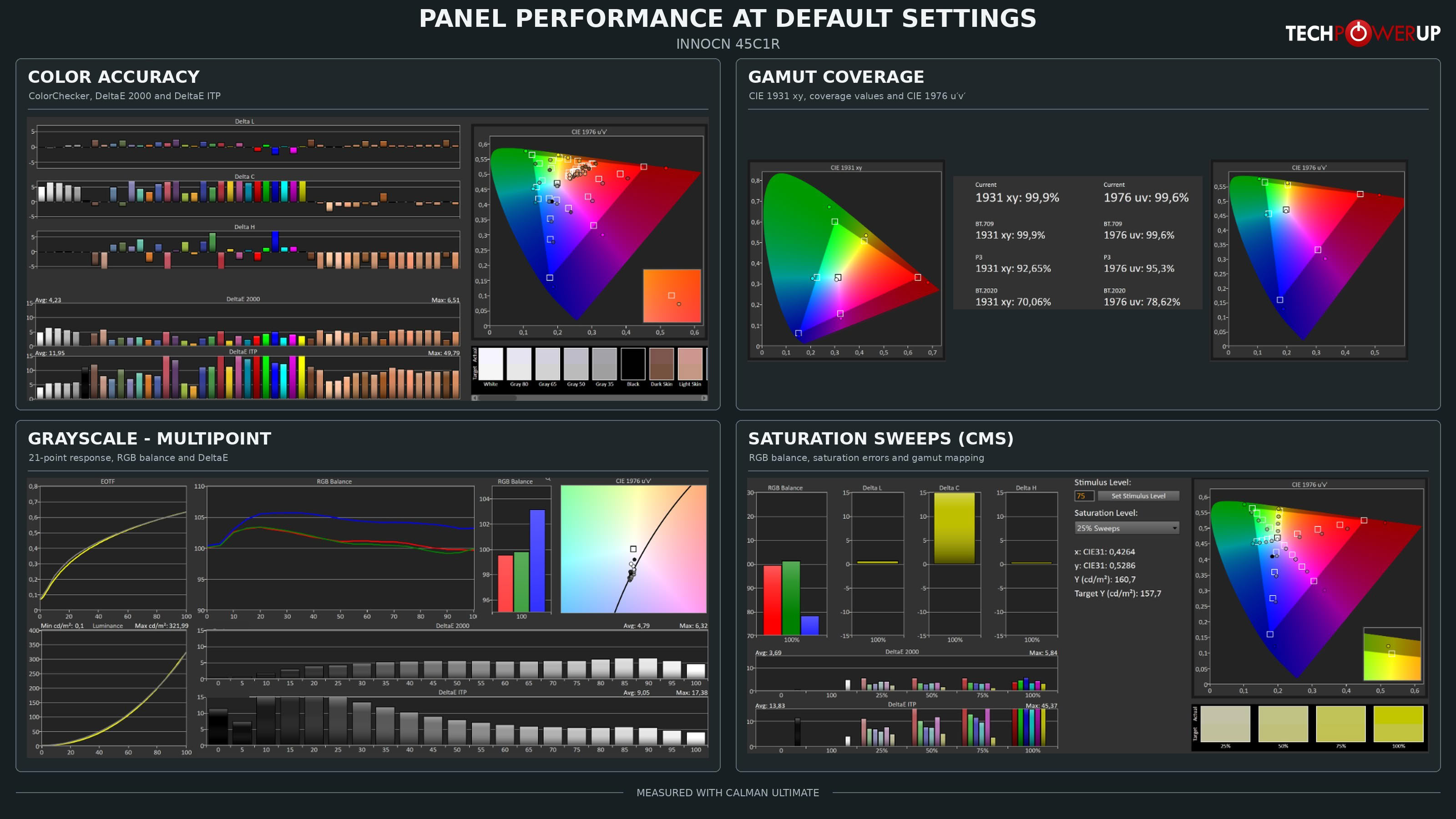
The INNOCN 45C1R ships with the Standard picture mode active and color temperature set to Natural. In this mode, the monitor runs its panel in the full native color gamut. Measured coverage reaches 99.9% of sRGB in CIE 1931 xy (99.6% in CIE 1976 uv), 92.65% of DCI-P3 (95.3% uv), and 70.06% of BT.2020 (78.62% uv), which confirms INNOCN's 95% DCI-P3 claim when measured in the uv color space. That's a very wide gamut for a VA panel in this price range. The downside is that standard sRGB content, which covers most of what you see on a desktop, looks oversaturated. The color accuracy test returns an average ∆E of 4.23 with a maximum of 6.51, and the chroma error graph clearly shows most saturated patches landing well beyond their targets. Saturation sweeps paint a similar picture, with an average ∆E of 3.69 and a maximum of 5.84. Grayscale tracking is the weakest part of the factory experience. The average grayscale ∆E is 4.79 with a maximum of 6.32, and the RGB balance graph shows blue sitting above red and green across the entire luminance range, which results in a white point that is visibly cooler than the 6,500 K reference. Gamma, on the other hand, tracks the 2.2 target closely. Peak luminance at default settings measured 321.99 cd/m². The factory settings are fine for gaming and movies, where a bit of extra saturation is often welcome, but not for anything where color accuracy matters.
Picture Quality with sRGB Profile
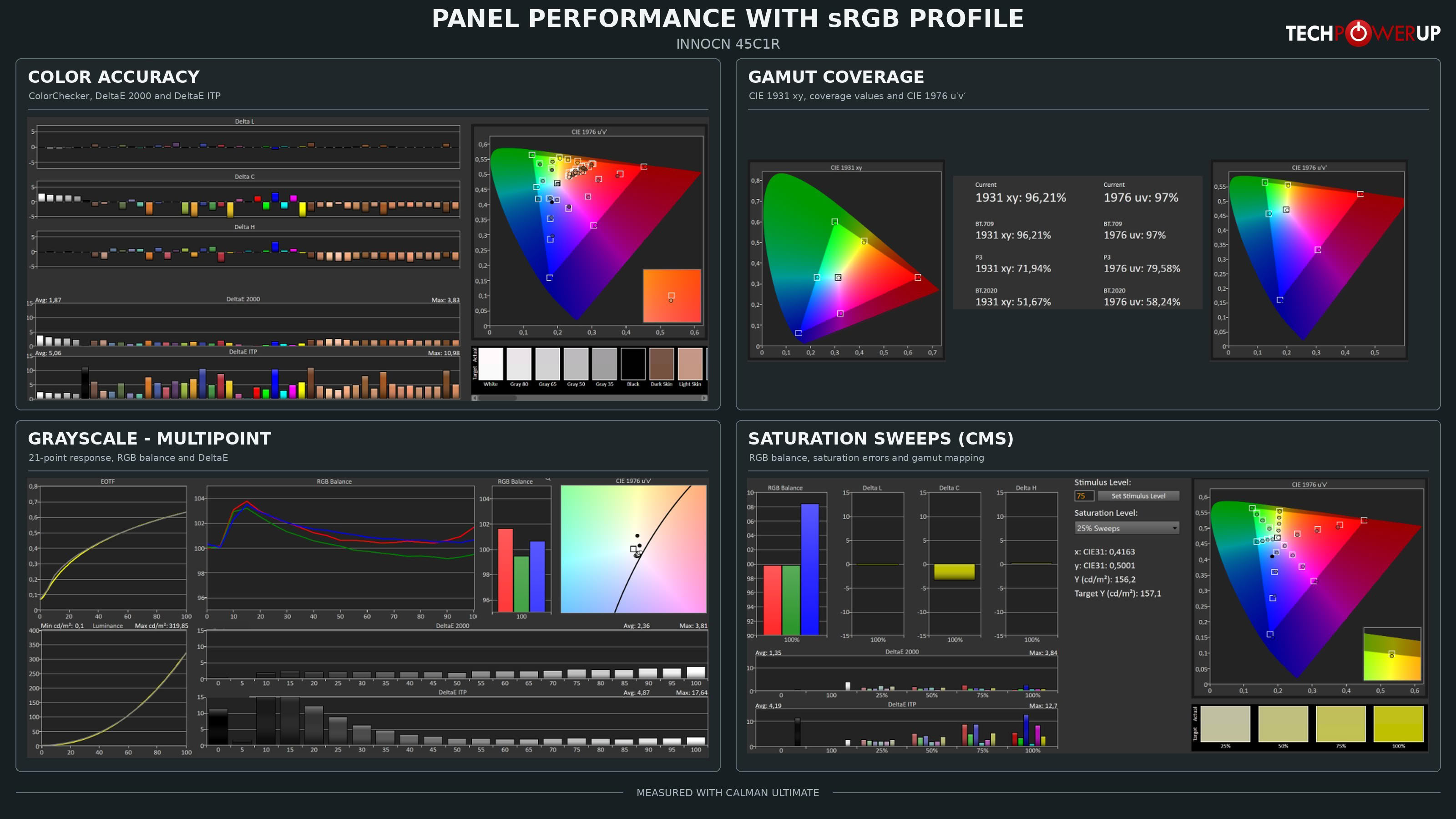
Switching to the sRGB mode (Professional > sRGB Mode) changes the picture completely, and for the better. The gamut clamp works as it should. Coverage drops to 96.21% of sRGB (97% uv), with DCI-P3 falling to 71.94% (79.58% uv) and BT.2020 to 51.67% (58.24% uv), which means the panel is now closely matching the sRGB color space instead of overshooting it. Color accuracy improves dramatically. The ColorChecker test returns an average ∆E of 1.87 with a maximum of 3.83, and saturation sweeps average 1.35 ∆E with a maximum of 3.84. A few yellow and orange patches are slightly undersaturated, which is consistent with the gamut coverage stopping just short of 100%, but the errors are small. Grayscale tracking is also much better than in the default mode. The average ∆E is 2.36 with a maximum of 3.81, gamma follows the target closely, and the RGB balance stays within a couple of percent of neutral throughout most of the range, with a slight magenta lean only in the brightest shades. Unlike many other monitors, the INNOCN 45C1R doesn't cripple brightness in sRGB mode. Peak luminance measured 319.85 cd/m², so there's plenty of headroom. It seems that this is the mode INNOCN put most of its factory calibration effort into, and it shows. If you work with sRGB content, this is the mode to use.
Picture Quality with Modified Settings
For those who prefer to keep the native wide gamut, I tried to get the most out of the Standard mode with a few OSD adjustments, aiming at a target brightness of around 250 cd/m²:Professional > Standard Mode
Professional > C.T. Settings > Use C.T1 > On > R 48 / G 50 / B 47
Picture Settings > Brightness > 72
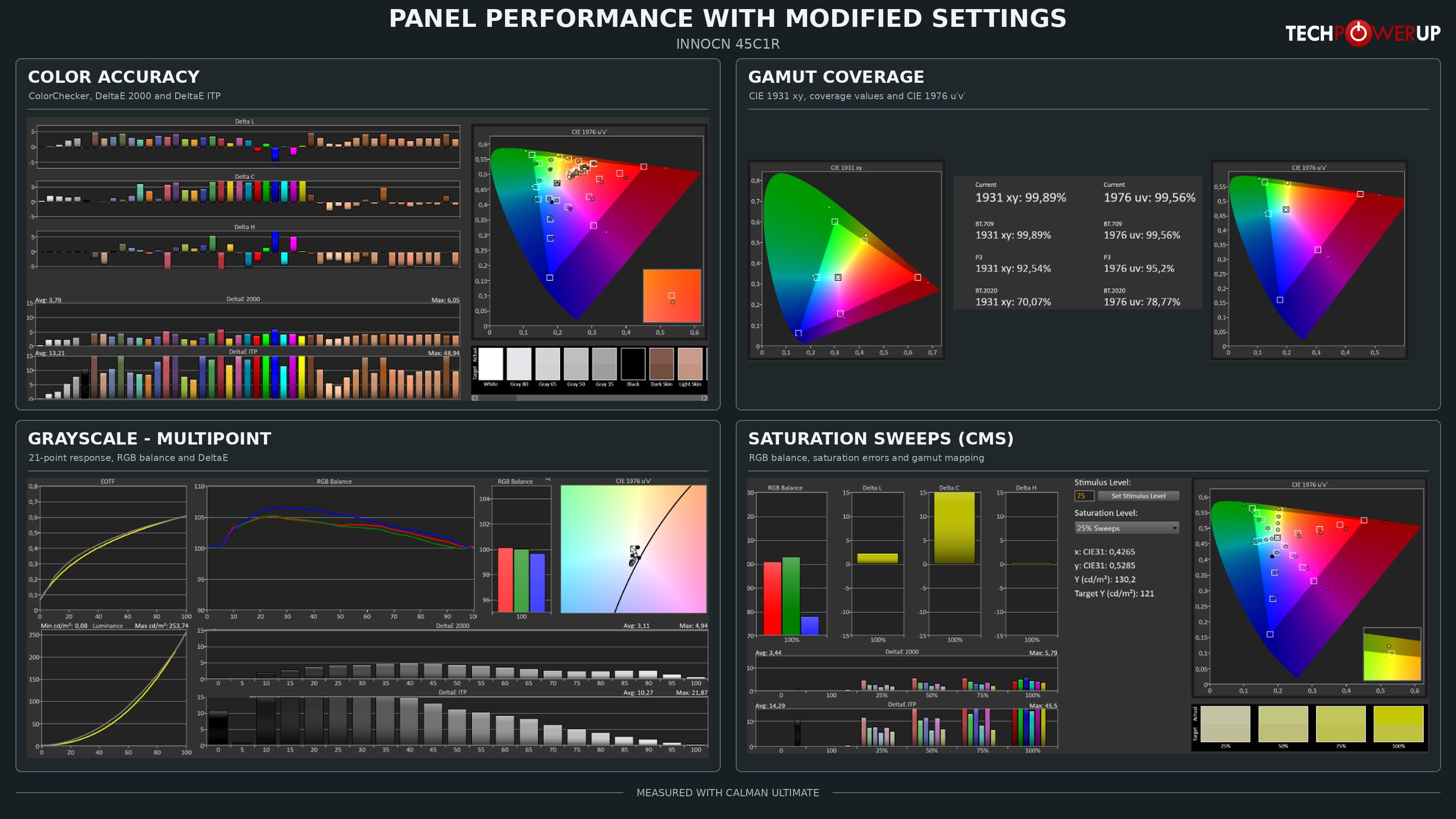
The results improve, but not as much as I had hoped. The white point is now close to the reference at the top of the luminance range, and the average grayscale ∆E drops from 4.79 to 3.11, with the maximum falling from 6.32 to 4.94. However, the errors are concentrated in the mid-tones, between roughly 30% and 55% stimulus, where the RGB balance still shows a slight blue bias and the luminance runs a bit below the 2.2 gamma target, making mid-tones slightly darker than they should be. RGB gain controls alone can't correct this, as they mostly affect the upper part of the luminance range. Since the full native gamut remains active, color errors against sRGB targets stay relatively high, with the color accuracy test averaging 3.79 ∆E (6.05 maximum) and saturation sweeps averaging 3.44 ∆E (5.79 maximum). These errors are mainly caused by oversaturation rather than hue shifts, which is expected from a wide gamut display measured against the sRGB standard. Gamut coverage is unchanged, at 99.89% of sRGB and 92.54% of DCI-P3 (95.2% uv), and peak luminance landed at 253.74 cd/m², right on target.
Subjectively, the modified Standard mode delivers a cleaner, more neutral white than the factory settings while keeping the saturated look of the native gamut, so it's a good choice for gaming and media. For work, however, the sRGB mode strikes me as better.
Luminance, Contrast and Color Uniformity
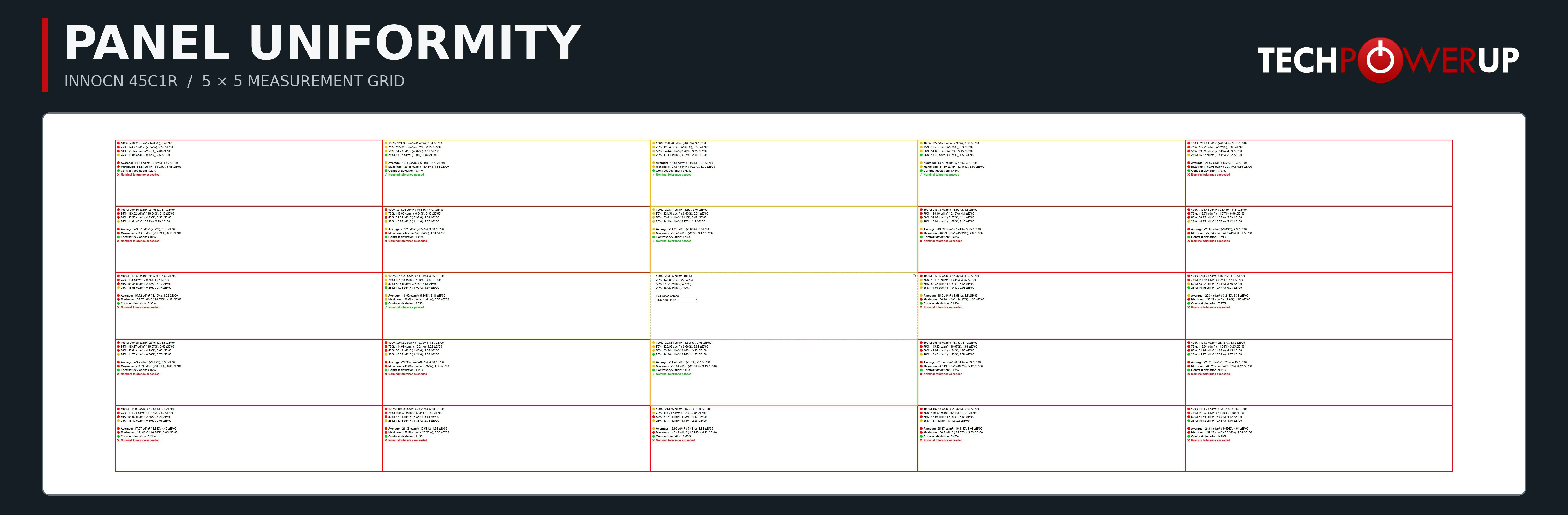
Uniformity is the weakest aspect of the 45C1R's picture quality. The center of the screen is the brightest area, and luminance falls off toward the edges, with most of the outer zones measuring between 10% and 25% darker than the center. Only the zones in the central column stay within DisplayCAL's nominal tolerance, while color deviation follows a similar pattern, increasing toward the edges. The darkening of the left and right edges is noticeable in daily use, particularly on bright, uniform backgrounds such as a white web page or a document stretched across the full width of the screen. It's worth pointing out that the colorimeter sits flat against the panel during this test, so the measured falloff is a genuine uniformity issue and not a viewing angle effect. In real use, the two add up. Even with the 1500R curve, you look at the far edges of the screen at an angle of around 20° from a normal sitting position, and VA panels lose some brightness and contrast even at such moderate angles.
Backlight Uniformity
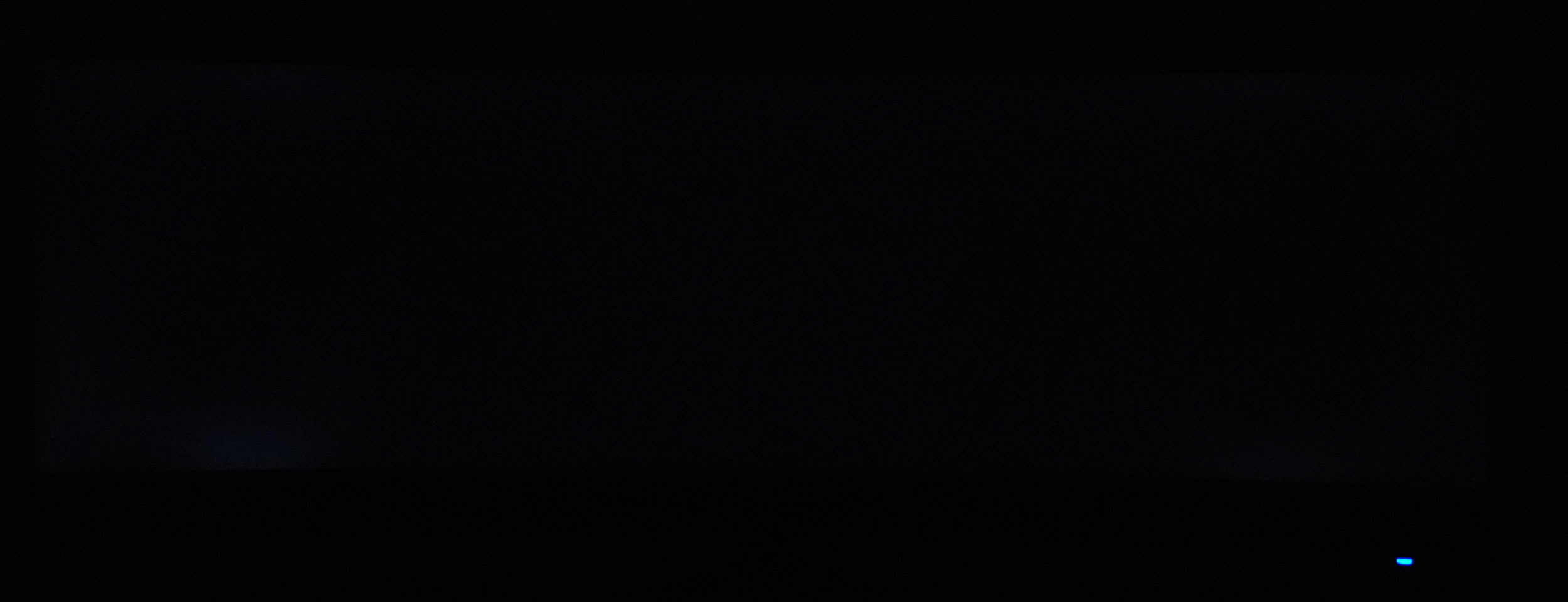
To check for backlight bleed, I displayed a full-screen black image in a dark room, with brightness set to deliver 250 cd/m² on a white image. Keep in mind that the photo was taken with a long exposure, which makes any leakage look more pronounced than it appears to the naked eye. Most of the panel looks even and dark, as you'd expect from a VA panel with a native contrast of around 3,200:1. There are a few areas of visible leakage, though. The most noticeable hotspot sits along the bottom edge in the lower left part of the screen. A weaker, similar patch appears near the lower right corner, and the left side of the panel is slightly brighter overall than the rest of the screen. This pattern is typical for edge-lit LCD panels, where light escapes near the edges and corners, and it's harder to avoid on a curved panel of this size. In everyday use, with normal content and some ambient light, the leakage isn't noticeable. It only becomes visible in dark scenes viewed in a dark room, for example in movies with letterboxing or in dark game levels.
Viewing Angles
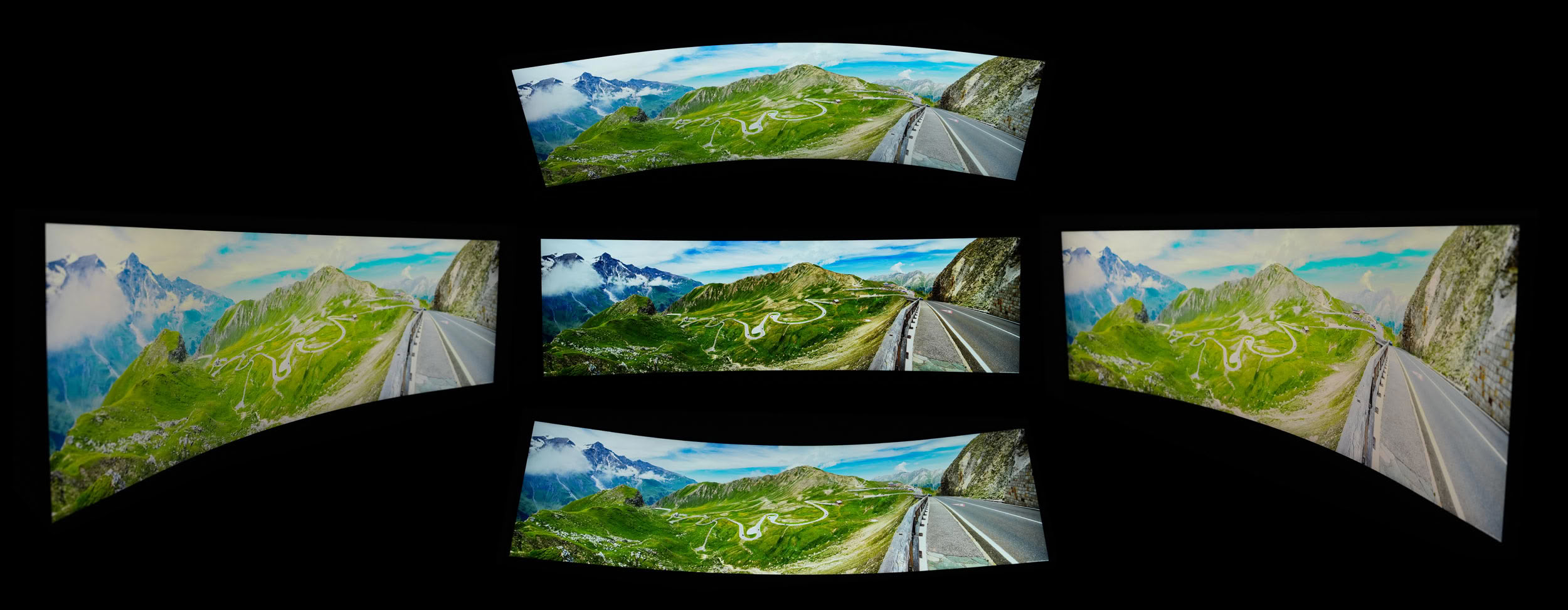
As expected from a VA panel, viewing angles are the technology's weak spot. Colors hold up reasonably well, but gamma and brightness shift as you move away from the center, and dark shades lose contrast when viewed from the side. The 1500R curvature does a lot to keep the edges of the screen as close to perpendicular as possible from the central sitting position, but it can't eliminate the effect completely on a panel this wide, which is why the edges of the image appear slightly darker than the center even when you're sitting right in front of the monitor. It's not something that ruins the experience, but you will notice it, especially on light backgrounds.
Nov 27th, 2026 15:54 CST
change timezone
Latest GPU Drivers
New Forum Posts
- The TPU UK Clubhouse (27308)
- Dell Dimension E510 Retro Gaming PC Upgrade & Modification (5)
- Samsung TV screen care: check the finish before choosing a cleaning method (5)
- -18C on GPU by moving it to the front of the case. (15)
- What's your main Black Friday / Cyber Monday purchase? (40)
- Wireless Internet sharing between PC and router both-ways, is it possible? (34)
- Gigabyte RX 6800 XT Gaming OC and I would like to test the BIOS version 020.001.000.071.000000. (18)
- Mouse Pad advice - Shidenkai out of production? (21)
- Anthrophics IPO (47)
- Exit Adobe - PDF reader, and PDF editor recommendations (9)
Popular Reviews
- VZMORE AX9 Max Review
- Upcoming Hardware Launches 2027 (Updated Nov 2026)
- AMD Ryzen 7 9800X3D Review - The Best Gaming Processor
- ASRock X870E Challenger Wi-Fi White Review
- Microsoft Surface Laptop Ultra Review - The Next-gen Arm Laptop
- AMD Zen 6 Technical Deep Dive
- Montech CyberFlow ARGB 360 Review
- Phantom Blade Zero Performance Benchmark Review - 35 GPUs Tested
- Moaiplay Ora Pro G1 850 Review
- ORICO Obook15 AI Review
TPU on YouTube
Controversial News Posts
- Jensen Huang Reinstated as CEO of NVIDIA (622)
- NVIDIA Co-Founder and CEO Jensen Huang Officially Resigns (492)
- Report: Jensen Huang Eyes NVIDIA Comeback (281)
- Open Letter Asking NVIDIA to Reinstate Jensen Huang Passes 115,000 Signatures (184)
- OpenAI CEO Argues Home PCs Waste the World's Limited DRAM Supply (152)
- NVIDIA Launches Investigation Into Jensen Huang's Relationship With Suspected Chinese Spy (136)
- Intel Razor Lake Gets a 12 P-Core bLLC Chip With No E-Cores, Per Leak (94)
- NVIDIA GeForce RTX 50-Series Scheduled for up to $500 Price Hike This Week (89)