 19
MSI GeForce RTX 5060 Ti Gaming OC 16 GB Review
(19 Comments) »Introduction

We have with us the MSI GeForce RTX 5060 Ti Gaming 16 GB, a powerful and compact variant of the MSI RTX 5060 Ti Gaming Trio 16 GB, which we've separately reviewed for you today. This card comes with reduced 25 cm length, compared to the 30 cm of the Gaming Trio, but doesn't compromise on cooling performance, because while the Gaming Trio has a 2-slot thickness and uses slightly smaller fans, the twin-fan gaming is 3-slots thick, is taller by a centimeter, and uses larger fans. MSI is giving you an interesting choice between two very similar cards to suit your gaming PC build. Both cards come with the same factory overclocked speeds, and the same amount of RGB LED bling. This card is about $10 cheaper than the Gaming Trio. The new GeForce RTX 5060 Ti is an interesting new GPU from NVIDIA that occupies the gray area between mid-range and performance segment. It is recommended for 1080p maxed out gaming by NVIDIA, but is capable of 1440p in many scenarios, if you can get the game settings right, or can tap into the awesome power of DLSS 4 and Multi Frame Generation.

The GeForce RTX 5060 Ti is powered by the latest GeForce Blackwell graphics architecture, which introduces Neural Rendering, a potentially revolutionary new concept in consumer 3D graphics, which leverages generative AI to create richly detailed visual assets in real time, combining it with the rest of the conventionally rendered game, just like it combines ray traced assets. This relies on the GPU being able to accelerate AI models and render 3D graphics in tandem, and making it possible is the AI Management Processor (AMP), a new hardware scheduler that's being introduced with Blackwell. DLSS 4 replaces the convoluted neural networks (CNN) based AI models driving the various components of DLSS with newer Transformer-based models, which are more accurate, and improve image quality at every performance tier. Multi Frame Generation is a new Blackwell-exclusive feature that lets the GPU create up to 3 frames succeeding every conventionally rendered frame using AI, effectively quadrupling frame-rates. This relies on hardware flip-metering, which is being introduced with the new updated display engine.
NVIDIA is building the Blackwell generation of gaming GPUs on the same NVIDIA 4N foundry node as the RTX 40-series Ada generation, so all efficiency improvements you see are purely a function of the architecture. The new Blackwell SM comes with concurrent FP32+INT32 execution capability on all CUDA cores in the SM, not just half of them. The new CUDA cores and shader execution reordering components come with awareness for Neural Shaders. The new 5th Gen Tensor core comes with FP4 capability for even more throughput. The new 4th Gen RT core improves performance and comes with even more fixed-function hardware, which enables Mega Geometry, or the concept of increasing the poly counts of ray traced objects using hierarchical memory structures, just like with Mega Textures. The new display engine supports DisplayPort 2.1 with UHBR20, while the new NVENC and NVDEC video accelerators come with support for 4:2:2 color formats.
The GeForce RTX 5060 Ti introduces the new GB206 silicon, which it maxes out, enabling all 36 SM present on the silicon, working out to 4,608 CUDA cores, 144 Tensor cores, 36 RT cores, 144 TMUs, and 48 ROPs. While the memory sizes aren't changed compared to the previous RTX 4060 Ti, and the memory bus width remains the same at 128-bit, NVIDIA switched to the newer GDDR7 memory. With a memory speed of 28 Gbps (GDDR7-effective), this results in a massive 55% increase in bandwidth compared to the 18 Gbps GDDR6 used for the RTX 4060 Ti. NVIDIA also generationally increased the GPU clock speeds to around the 2500 MHz-mark; all of which results in a TGP of 180 W, which can be met with a single 8-pin PCIe power input, although most board partners have implemented 16-pin 12V-2x6 power inputs for their premium custom designs, including the MSI RTX 5060 Ti Gaming OC 16 GB.
This card comes with a dual-fan variant of MSI's latest generation of Gaming cooling solutions, included a compacted albeit thicker aluminium fin-stack heatsink, and a pair of axial airflow fans. The RGB LED lighting setup is similar to the Gaming Trio. The card offers the same 2647 MHz factory overclock as the Gaming Trio, while the memory speed is left untouched at 28 Gbps. The card is being offered at $540, or $10 less than the Gaming Trio, although this is still a pretty steep 27% premium over the NVIDIA baseline price for the RTX 5060 Ti 16 GB.
| Price | Cores | ROPs | Core Clock | Boost Clock | Memory Clock | GPU | Transistors | Memory | |
|---|---|---|---|---|---|---|---|---|---|
| RX 7600 | $250 | 2048 | 64 | 2250 MHz | 2625 MHz | 2250 MHz | Navi 33 | 13300M | 8 GB, GDDR6, 128-bit |
| Arc B570 | $220 | 2304 | 80 | 2500 MHz | N/A | 2375 MHz | BMG-G21 | 19600M | 10 GB, GDDR6, 160-bit |
| RX 7600 XT | $400 | 2048 | 64 | 2470 MHz | 2755 MHz | 2250 MHz | Navi 33 | 13300M | 16 GB, GDDR6, 128-bit |
| RTX 4060 | $270 | 3072 | 48 | 1830 MHz | 2460 MHz | 2125 MHz | AD107 | 18900M | 8 GB, GDDR6, 128-bit |
| Arc A770 | $250 | 4096 | 128 | 2100 MHz | N/A | 2187 MHz | ACM-G10 | 21700M | 16 GB, GDDR6, 256-bit |
| Arc B580 | $250 | 2560 | 80 | 2670 MHz | N/A | 2375 MHz | BMG-G21 | 19600M | 12 GB, GDDR6, 192-bit |
| RTX 4060 Ti | $380 | 4352 | 48 | 2310 MHz | 2535 MHz | 2250 MHz | AD106 | 22900M | 8 GB, GDDR6, 128-bit |
| RX 7700 XT | $450 | 3456 | 96 | 2171 MHz | 2544 MHz | 2250 MHz | Navi 32 | 26500M | 12 GB, GDDR6, 192-bit |
| RTX 5060 Ti | $380 | 4608 | 48 | 2407 MHz | 2572 MHz | 1750 MHz | GB206 | 21900M | 8 GB, GDDR7, 128-bit |
| RTX 5060 Ti 16 GB | $430 | 4608 | 48 | 2407 MHz | 2572 MHz | 1750 MHz | GB206 | 21900M | 16 GB, GDDR7, 128-bit |
| MSI RTX 5060 Ti 16 GB Gaming OC | $540 | 4608 | 48 | 2407 MHz | 2647 MHz | 1750 MHz | GB206 | 21900M | 16 GB, GDDR7, 128-bit |
| RTX 4070 | $400 | 5888 | 64 | 1920 MHz | 2475 MHz | 1313 MHz | AD104 | 35800M | 12 GB, GDDR6X, 192-bit |
| RX 7800 XT | $540 | 3840 | 96 | 2124 MHz | 2430 MHz | 2425 MHz | Navi 32 | 28100M | 16 GB, GDDR6, 256-bit |
| RTX 4070 Super | $600 | 7168 | 80 | 1980 MHz | 2475 MHz | 1313 MHz | AD104 | 35800M | 12 GB, GDDR6X, 192-bit |
| RX 7900 GRE | $650 | 5120 | 160 | 1880 MHz | 2245 MHz | 2250 MHz | Navi 31 | 57700M | 16 GB, GDDR6, 256-bit |
| RTX 4070 Ti | $700 | 7680 | 80 | 2310 MHz | 2610 MHz | 1313 MHz | AD104 | 35800M | 12 GB, GDDR6X, 192-bit |
| RTX 5070 | $600 | 6144 | 80 | 2325 MHz | 2512 MHz | 1750 MHz | GB205 | 31100M | 12 GB, GDDR7, 192-bit |
| RTX 4070 Ti Super | $860 | 8448 | 96 | 2340 MHz | 2610 MHz | 1313 MHz | AD103 | 45900M | 16 GB, GDDR6X, 256-bit |
| RX 7900 XT | $720 | 5376 | 192 | 2000 MHz | 2400 MHz | 2500 MHz | Navi 31 | 57700M | 20 GB, GDDR6, 320-bit |
| RX 9070 | $625 | 3584 | 128 | 2070 MHz | 2520 MHz | 2518 MHz | Navi 48 | 53900M | 16 GB, GDDR6, 256-bit |
NVIDIA Blackwell Architecture

NVIDIA does not provide a block diagram for the GB206 GPU (we asked), so we had to quickly hack one out from the GB202 diagram. This is accurate just not as pretty.
The GeForce Blackwell graphics architecture heralds NVIDIA's 4th generation of RTX, the late-2010s re-invention of the modern GPU that sees a fusion of real time ray traced objects with conventional raster 3D graphics. With Blackwell, NVIDIA is helping add another dimension, neural rendering, the ability for the GPU to leverage a generative AI to create portions of a frame. This is different from DLSS, where an AI model is used to reconstruct details in an upscaled frame based on its training date, temporal frames, and motion vectors. Today we are reviewing NVIDIA's fifth GPU from this generation, the RTX 5060 Ti. At the heart of this graphics card is the new GB206 silicon. This chip has a unique die-size and SM count that doesn't have a predecessor from the previous Ada generation. With the GeForce Blackwell generation, NVIDIA tailored the SM counts of its GPUs closer to those of the actual SKUs, to minimize wasted die-space. The GB206 is maxed out by the RTX 5060 Ti. This is NVIDIA's fourth gaming GPU based on this architecture. It is built on the same NVIDIA 4N foundry node as the previous generation AD106. It is a tiny, somewhat square die measuring 181 mm², with a transistor count of 21.9 billion.
The GB206 silicon is laid out essentially in the same component hierarchy as past generations of NVIDIA GPUs, but with a few notable changes. The GPU features a PCI-Express 5.0 x8 host interface. PCIe Gen 5 has been around since Intel's 12th Gen Core "Alder Lake" and AMD's Ryzen 7000 "Zen 4," so there is a sizable install-base of systems that can take advantage of it. The GPU is of course compatible with older generations of PCIe. The GB206 also features the new GDDR7 memory interface that's making its debut with this generation. The chip features a 128-bit wide memory bus. NVIDIA is using this to drive 16 GB of memory at 28 Gbps speeds, yielding 448 GB/s of memory bandwidth, which is a 55% increase over the RTX 4060 Ti and its 18 Gbps GDDR6.
The GigaThread Engine is the main graphics rendering workload allocation logic on the GB206, but there's a new addition, a dedicated serial processor for managing all AI acceleration resources on the GPU, NVIDIA calls this AMP (AI management processor). Other components at the global level are the Optical Flow Processor, a component involved in older versions of DLSS frame generation and for video encoding; and an updated media acceleration engine consisting of one each of NVDEC and NVENC video accelerators. The new 9th Gen NVENC video encode accelerators come with 4:2:2 AV1 and HEVC encoding support. The central region of the GPU has the single largest common component, the 32 MB L2 cache, which the RTX 5060 Ti maxes out.
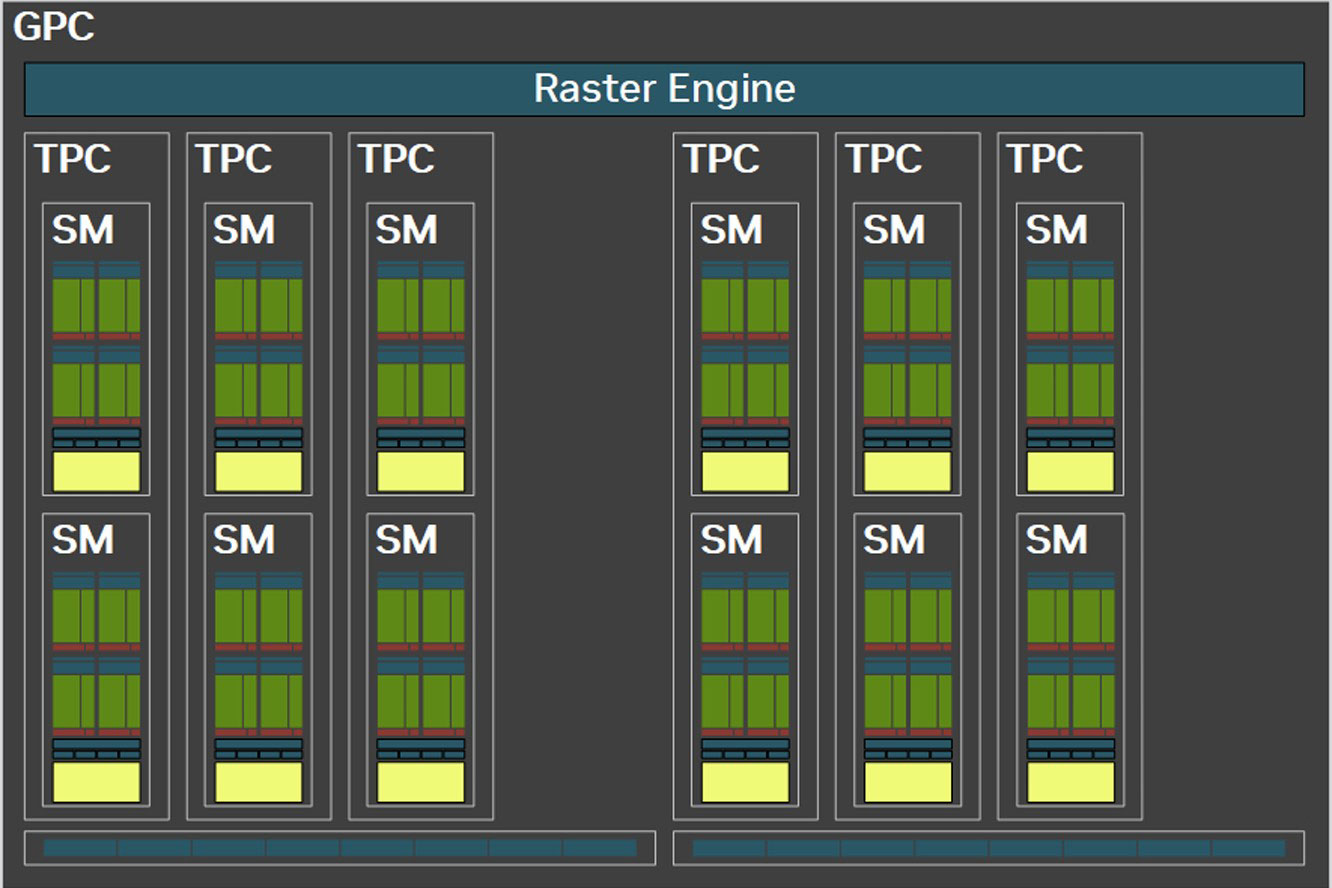

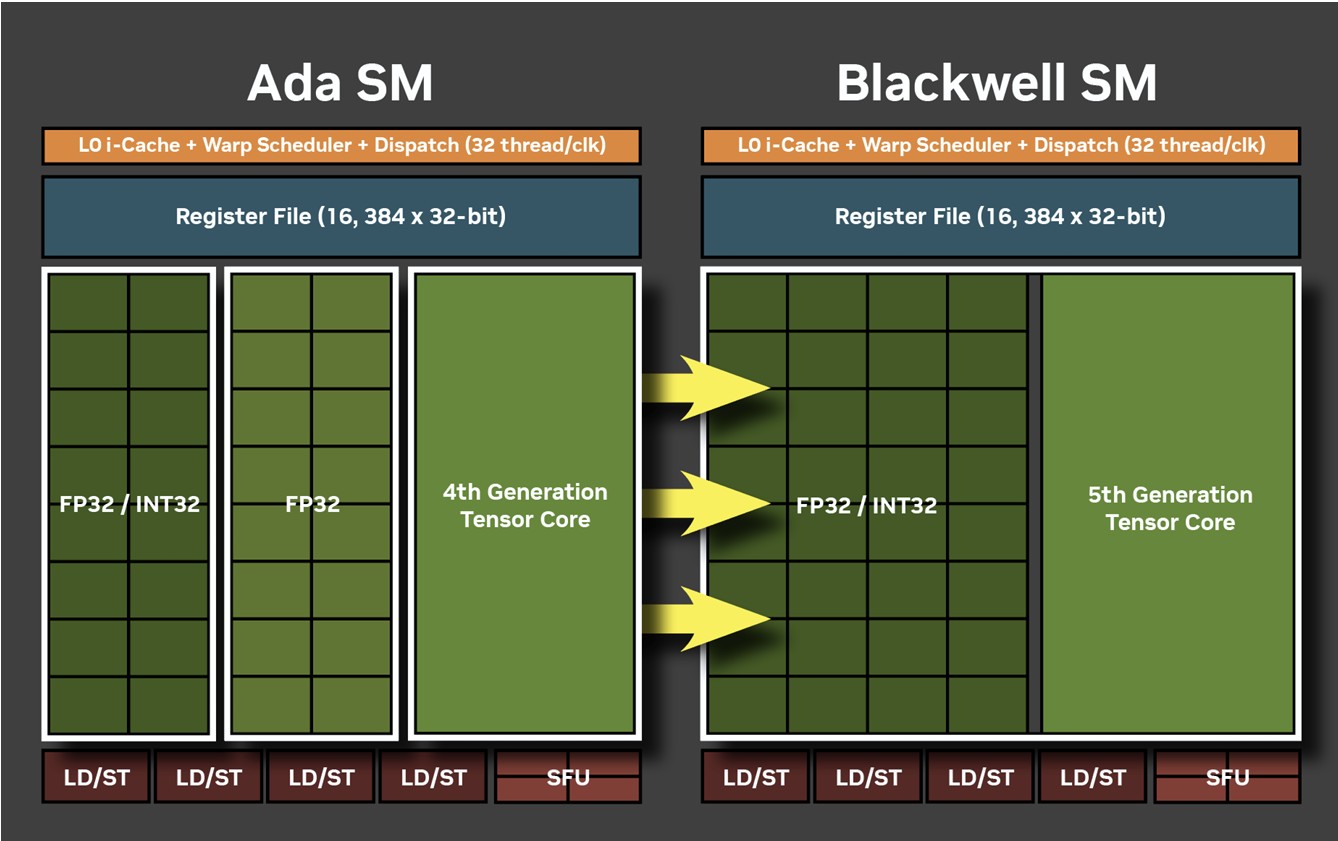
There are three graphics processing clusters (GPC) on the GB206. Each of these contains 12 streaming multiprocessors (SM) across 6 texture processing clusters (TPCs), resulting in 36 SM. Every GPC also contains a ROP partition with 12 ROPs, each, working out to 48 ROPs on the silicon. Within each SM, you'll find 128 CUDA cores. Unlike the Ada generation SM that each had 64 FP32+INT32 and 64 purely-FP32 SIMD units, the new Blackwell generation SM features concurrent FP32+INT32 capability on all 128 SIMD units. These 128 CUDA cores are arranged in four slices, each with a register file, a level-0 instruction cache, a warp scheduler, two sets of load-store units, and a special function unit (SFU) handling some special math functions such as trigonometry, exponents, logarithms, reciprocals, and square-root. The four slices share a 128 KB L1 data cache, and four TMUs. The most exotic components of the Blackwell SM are the four 5th Gen Tensor cores, and a 4th Gen RT core.
With 3 GPCs containing 6 TPCs each, there are a total of 36 SM, worth 4,608 CUDA cores, 144 Tensor cores, 36 RT cores, and 144 TMUs, on the GB206 silicon. The GB206 silicon is endowed with 48 ROPs, all of which are enabled on the RTX 5060 Ti. The RTX 5060 Ti also maxes out all 32 MB of L2 cache present on the die.
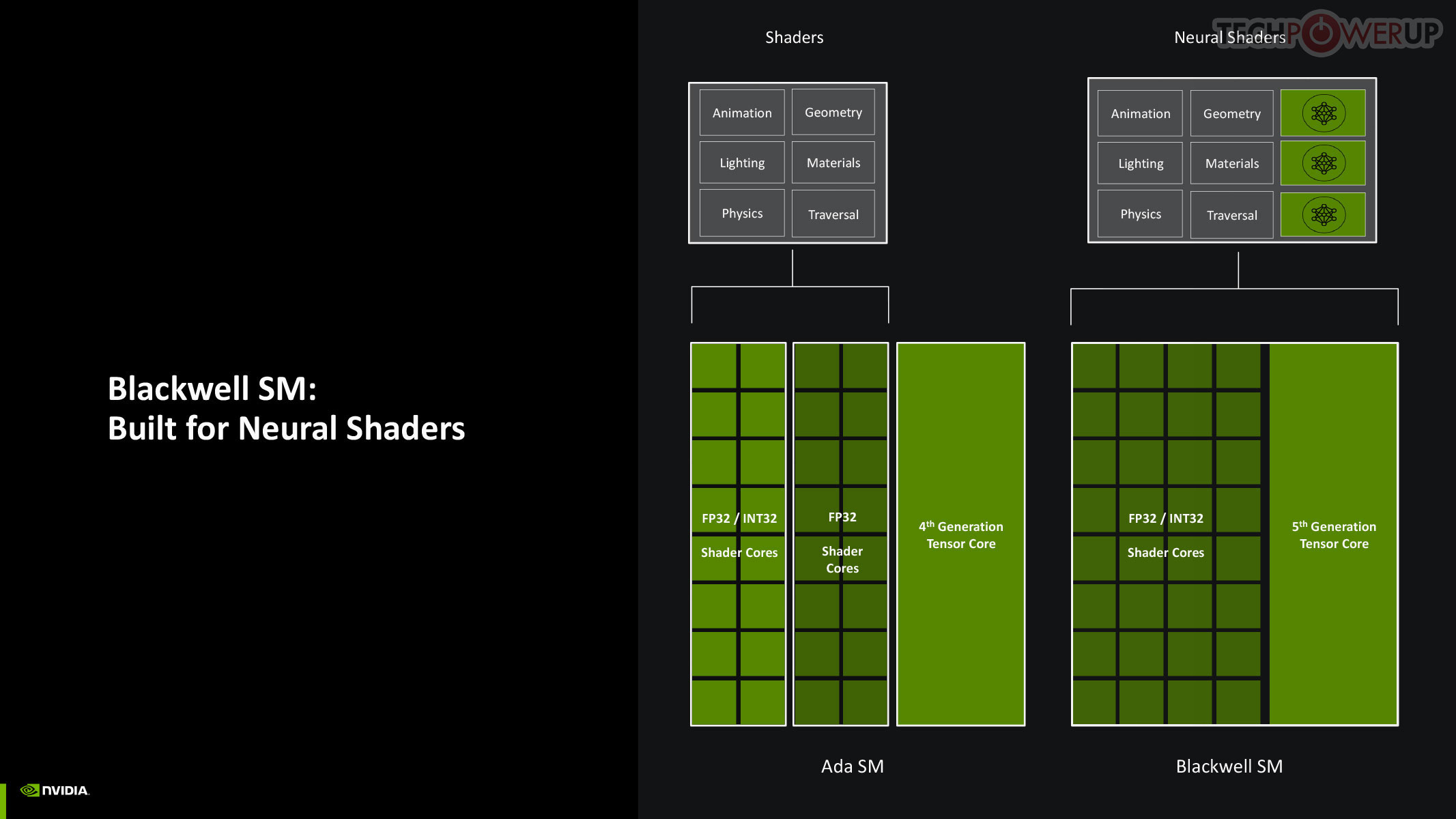

Perhaps the biggest change to the way the SM handles work, introduced with Blackwell, is the concept of neural shaders—treating portions of the graphics rendering workload done by a generative AI model as shaders. Microsoft has laid the groundwork for standardization of neural shaders with its Cooperative Vectors API, in the latest update to DirectX 12. The Tensor cores are now accessible for workloads through neural shaders, and the shader execution reordering (SER) engine of the Blackwell SM is able to more accurately reorder workloads for the CUDA cores and the Tensor core in an SM.


The new 5th Gen Tensor core introduces support for FP4 data format (1/8 precision) to fast moving atomic workloads, providing 32 times the throughput of the very first Tensor core introduced with the Volta architecture. Over the generations, AI models leveraged lesser precision data formats, and sparsity, to improve performance. The AI management processor (AMP) is what enables simultaneous AI and graphics workloads at the highest levels of the GPU, so it could be simultaneously rendering real time graphics for a game, while running an LLM, without either affecting the performance of the other. AMP is a specialized hardware scheduler for all the AI acceleration resources on the silicon. This plays a crucial role for DLSS 4 multi-frame generation to work.
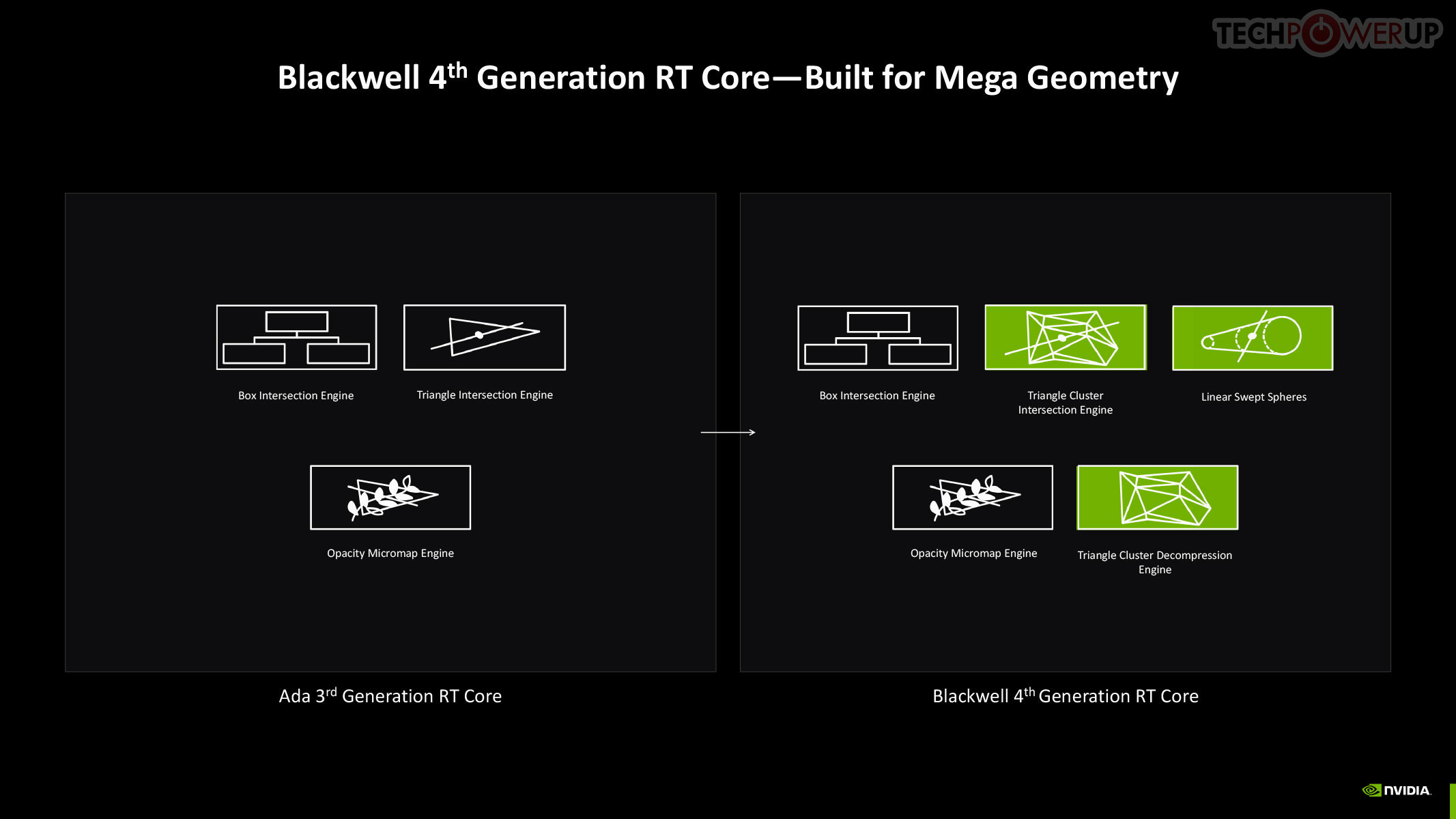
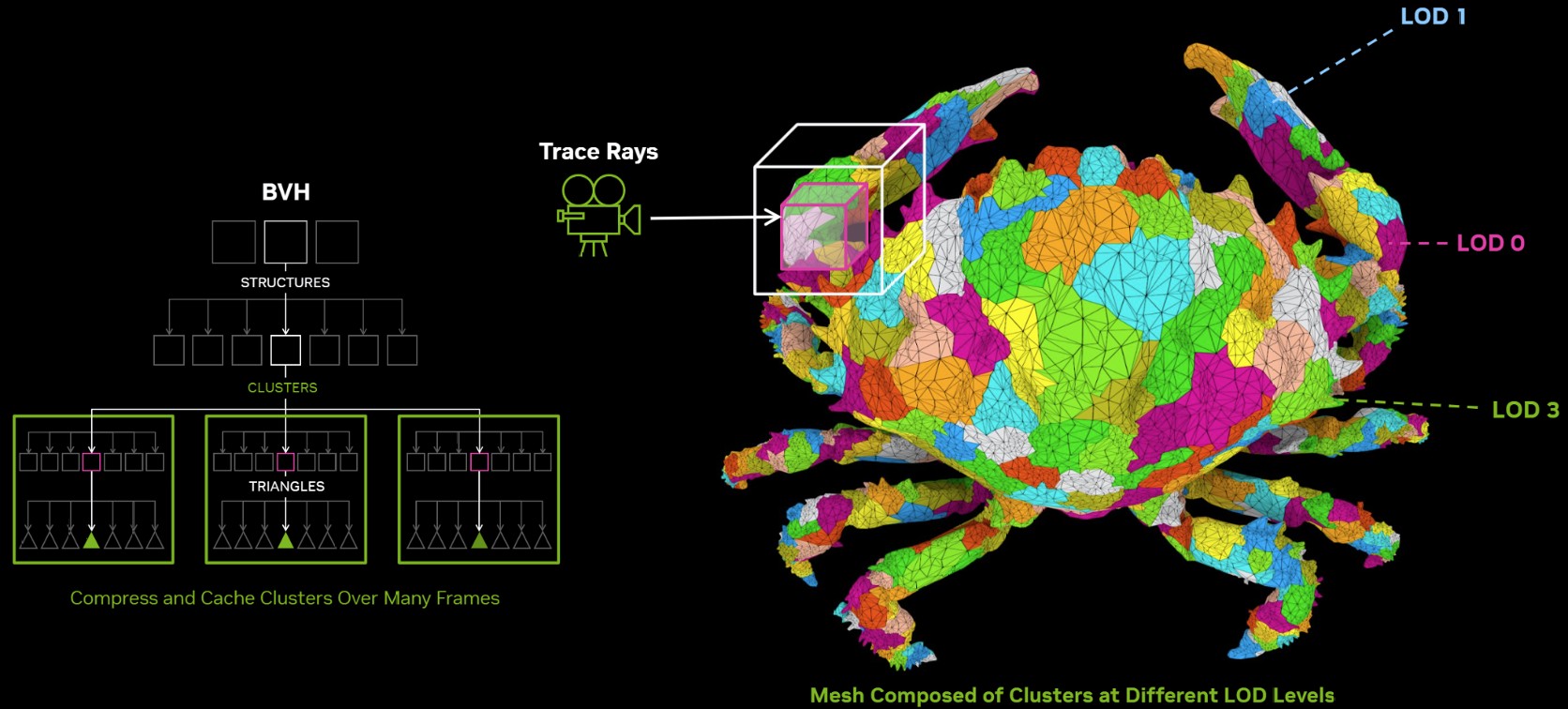
The 4th Gen RT core not just offers a generational increase in ray testing and ray intersection performance, which lowers the performance cost of enabling path tracing and ray traced effects; but also offers a potential generational leap in performance with the introduction of Mega Geometry. This allows for ray traced objects with extremely high polygon counts, increasing their detail. Poly count and ray tracing present linear increases in performance costs, as each triangle has to intersect with a ray, and there should be sufficient rays to intersect with each of them. This is achieved by adopting clusters of triangles in an object as first-class primitives, and cluster-level acceleration structures. The new RT cores introduce a component called a triangle cluster intersection engine, designed specifically for handling mega geometry. The integration of a triangle cluster compression format and a lossless decompression engine allows for more efficient processing of complex geometry.


The GB206 and the rest of the GeForce Blackwell GPU family is built on the exact same TSMC "NVIDIA 4N" foundry node, which is actually 5 nm, as previous-generation Ada, so NVIDIA directed efforts to finding innovative new ways to manage power and thermals. This is done through a re-architected power management engine that relies on clock gating, power gating, and rail gating of the individual GPCs and other top-level components. It also worked on the speed at which the GPU makes power-related decisions.
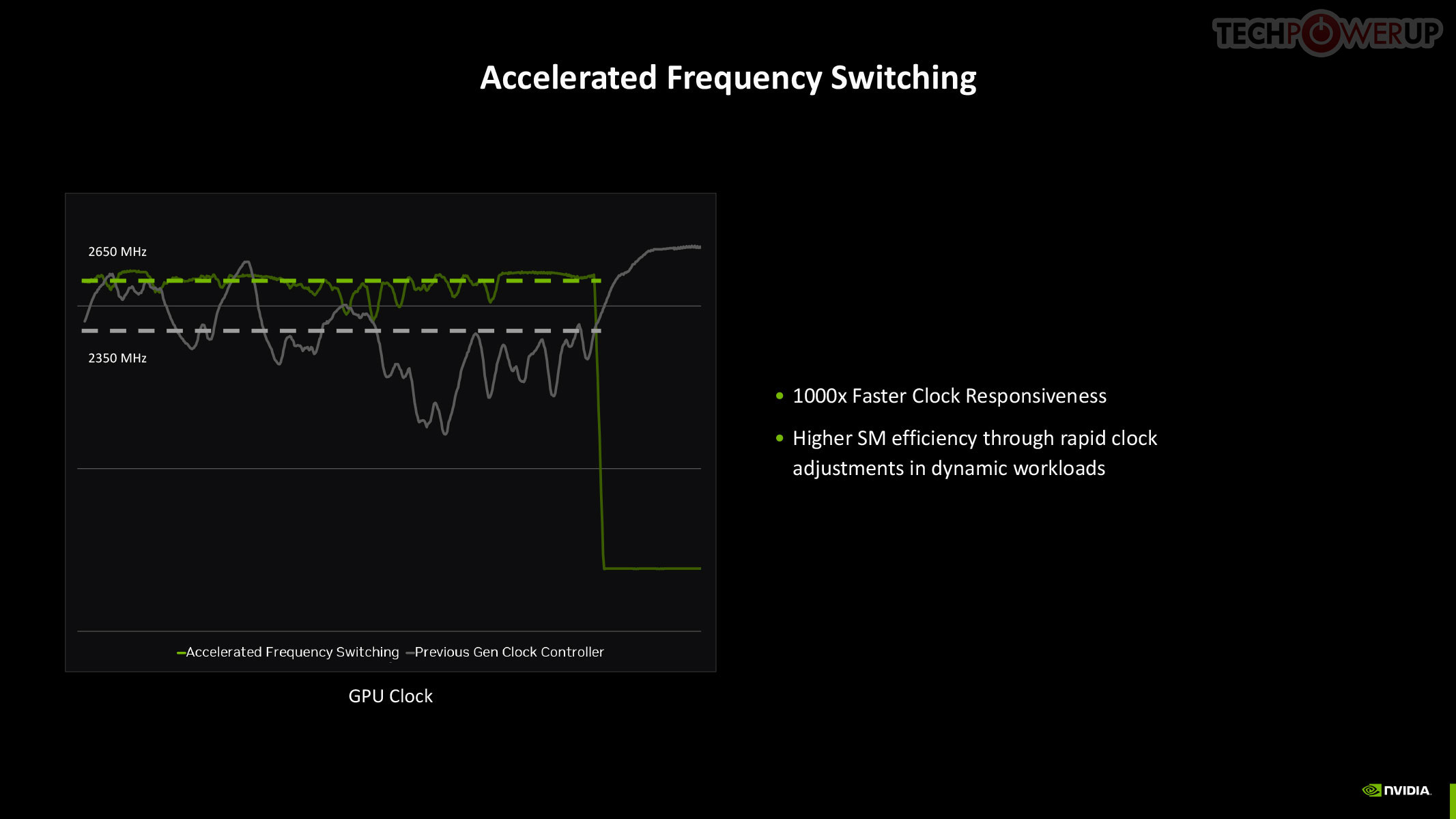
The quickest way to drop power is by adjusting the GPU clock speed, and with Blackwell, NVIDIA introduced a means for rapid clock adjustments at the SM-level.

NVIDIA updated both the display engine and the media engine of Blackwell over the previous generation Ada, which drew some flack for holding on to older display I/O standards such as DisplayPort 1.4, while AMD and Intel had moved on to DisplayPort 2.1. The good news is that Blackwell supports DP 2.1 with UHBR20, enabling 8K 60 Hz with a single cable. The company also updated NVDEC and NVENC, which now support AV1 UHQ, double the H.264 decode performance, MV-HEVC, and 4:2:2 formats.
Neural Rendering


Neural Rendering promises to be as transformative to modern graphics as programmable shaders itself. 3D Graphics rendering evolved from fixed-function over the turn of the century, to programmable shaders, HLSL, geometry shaders, compute shaders, and ray tracing, over the past couple of decades. In 2025, NVIDIA is writing the next chapter in this journey with Blackwell neural shaders. This allows for a host of neural-driven effects, including neural materials, neural volumes, and even neural radiance fields. Microsoft introduced the new Cooperative Vectors API for DirectX in a recent update, making it possible to access Tensor cores within a graphics API. Combined with a new shading language, Slang, this breakthrough enables developers to integrate neural techniques directly into their workflows, potentially replacing parts of the traditional graphics pipeline. Slang splits large, complex functions into smaller pieces that are easier to handle. Given that this is a DirectX standard API feature, there is nothing that stops AMD and Intel from integrating Neural Rendering (Cooperative Vectors) into their graphics drivers.
RTX Neural Materials works to significantly reduce the memory footprint of materials in 3D scenes. Under conventional rendering, the memory footprint of a material is bloated from complex shader code. Neural materials convert shader code and texture layers into a compressed neural representation. This results in up to a 7:1 compression ratio and enables small neural networks to generate stunning, film-like materials in real-time. For example, silk rendered with traditional shaders might lack the multicolored sheen seen in real life. Neural materials, however, capture intricate details like color variation and reflections, bringing such surfaces to life with unparalleled realism—and at a fraction of the memory cost.

The new Neural Radiance Cache, which dynamically trains a neural network during gameplay using the user's GPU, allowing light transport to be cached spatially, enabling near-infinite light bounces in a scene. This results in realistic indirect lighting and shadows with minimal performance impact. NRC partially traces 1 or 2 rays before storing them in a radiance cache, and infers an infinite amount of rays and bounces for a more accurate representation of indirect lighting in the game scene.
DLSS 4 and Multi Frame Generation


DLSS 4 introduces a major leap in image quality and performance. It isn't just a version bump with the introduction of a new feature, namely Multi Frame Generation, but introduces updates to nearly all DLSS sub-features. DLSS from its very beginning relied on AI to reconstruct details in super resolution, and with DLSS 4, NVIDIA is introducing a new transformer-based AI model to succeed the convolutional neural networks previous used, for double the parameters, four times the compute performance, and significantly improved image quality. Ray Reconstruction, introduced with DLSS 3.5, gets a significant image quality update with the new transformer-based model.


To understand Multi Frame Generation, you need to understand how DLSS Frame Generation, introduced with GeForce Ada, works. An Optical Flow Accelerator component gives the DLSS algorithm data to generate an entire frame using a neural network, using information from a previous rendered frame, effectively doubling frame rate. In Multi Frame Generation, AI takes over the functions of optical flow, to predict up to three frames following a conventionally rendered frame, effectively drawing four frames form the rendering effort of one.


Now, assuming this rendered frame is a product of Super Resolution, with the maximum performance setting generating 4x the pixels from a single rendered pixel, you're looking at a possibility where the rendering effort of 1/4th a frame goes into drawing 4 frames, or 15 in every 16 pixels being generated entirely by DLSS. When generating so many frames, Frame Pacing becomes a problem—irregular frame intervals impact smoothness. DLSS 4 addresses these issues by using a dedicated hardware unit inside Blackwell, which takes care of flip metering, reducing frame display variability by 5-10x. The Display Engine of Blackwell contains the hardware for flip metering.
NVIDIA Reflex 2


The original NVIDIA Reflex brought about a significant improvement to the responsiveness of maxed out graphics in competitive online gameplay, by compacting the rendering queue with the goal of reducing the whole system latency by up to 50%. Reflex is mandatory in DLSS 3 Frame Generation, given the latency cost imposed by the technology. Multi-frame generation calls for an equally savvy piece of technology, so we hence have Reflex 2. NVIDIA claims to have achieved a 75% reduction in latency with Frame Warp, which updates the camera (viewport) positions based on user inputs in real-time, and then uses temporal information to reconstruct the frame to display.
Packaging


The Card


The MSI RTX 5060 Ti Gaming OC is a compact design with a clean color theme that's dominated by black and various shades of gray. Semi-transparent plastic envelops the fans, serving as an additional highlight. On the back you'll find a metal backplate with a large cutout and a shiny dragon logo.


Dimensions of the card are 25.0 x 13.5 cm, and it weighs 771 g.


Installation requires three slots in your system. We measured the card's width to be 51 mm.

Display connectivity includes three standard DisplayPort 2.1b and one HDMI 2.1b.
All GeForce RTX 50-series Blackwell cards feature a new display engine supporting DisplayPort 2.1b with UHBR20, as well as HDMI 2.1a. Both interfaces support DSC (display stream compression). With DSC enabled, a single DisplayPort on this card can drive 4K 12-bit HDR at 480 Hz; or 8K 12-bit HDR at up to 165 Hz. The RTX 5060 Ti features an updated media acceleration engine with support for 4:2:2 video formats, AV1 UHQ, and MV-HEVC. Unlike the bigger RTX 50 models, which have two, there is a single NVENC and NVDEC unit each.

The card uses a single 16-pin connector, which, theoretically, allows a maximum power draw of 600 W. The card's power limit is set to 180 W, with up to 220 W allowed with manual increases.


MSI has installed an RGB lighting zone near the fans of the card, and a second one on the logo near the back. The dragon is not illuminated, that's a reflection.
Our Patreon Silver Supporters can read articles in single-page format.
Nov 12th, 2026 00:09 CST
change timezone
New Forum Posts
- So I fixed the r36s “k36” variant and clone with an Onn 128gb sd card and the Onn sd card reader and it BOOTED..so real neat! Take a look. (0)
- 3050 Ti 120W TGP Shunt Mod Result [Legion 5 2021] (2)
- My dell g15 5510 is stuck at 210 mhz while pulling impossible wattage (28)
- Steam Deck Owners Clubhouse (622)
- Case to fit 2X Alphacool NexXxoS UT60 Rads (6)
- Your PC ATM (36404)
- Request - revert LFC behaviour to old patch. (1)
- Unallocated space in ssd , is it normal? (6)
- GPU database: Incorrect Pixel Rate on all GeForce GTX 780 Ti entries – 50+ cards affected (6)
- Gacha Games - Discussions, Pulls, Updates, etc. (1150)
Popular Reviews
- AMD Zen 6 Technical Deep Dive
- Upcoming Hardware Launches 2027 (Updated Nov 2026)
- XPG NIMBUS PLUS Review - Mid-range Chair With Strong Competitors
- NZXT H7 RGB+ Review
- NZXT C1200 Platinum Review
- NZXT H5 Review
- Montech King 95 3D PRO Review
- Phantom Blade Zero Performance Benchmark Review - 35 GPUs Tested
- Gigabyte Z890I Aorus Ultra Review
- INNOCN 45C1R Review - Two QHD Screens, Zero Bezels
TPU on YouTube
Controversial News Posts
- OpenAI CEO Argues Home PCs Waste the World's Limited DRAM Supply (152)
- NVIDIA Launches Investigation Into Jensen Huang's Relationship With Suspected Chinese Spy (136)
- Intel "Raptor Lake Next" 16-Core and 20-Core CPUs Surface (130)
- Legendary Game Studio BioWare Shuts Down Following EA Layoffs (104)
- Dell CEO Says the Memory Shortage Will Get Worse in 2027 (95)
- NVIDIA GeForce RTX 50-Series Scheduled for up to $500 Price Hike This Week (89)
- AMD Radeon Owners Can Now Run Nearly Every DLSS Feature Through Fan-Made Mod (80)
- Modder Fits RTX 5090 With Four 8-Pin Connectors, Halving Current per Wire (80)