 97
MSI GeForce RTX 5090 Lightning Z Review - Up to 1000 W
Value & Conclusion »Overclocking
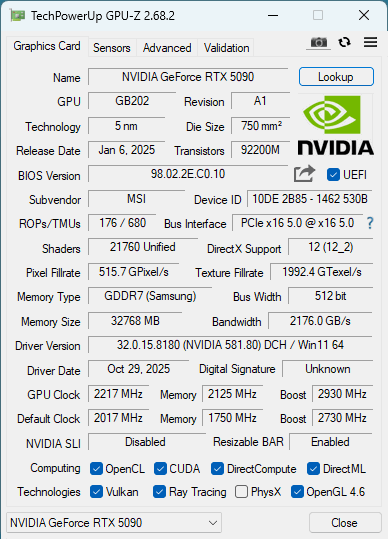
Overclocking works basically the same as on previous NVIDIA GeForce graphics cards.
With Blackwell, NVIDIA has removed the "Hot Spot" sensor, you still have access to "GPU Temperature" and "Memory Temperature." While there was always some drama around Hot Spot, it was useful to diagnose a misaligned cooler or waterblock.
Another Blackwell change is that NVIDIA is now blocking memory OC if it's higher than +375 MHz (+6000 MT/s). Setting any higher value will result in a maximum frequency of +375 getting applied, no matter how high the requested value.
MSI's Afterburner has extended voltage control support for the Lightning Z. You may adjust the voltages for GPU (NVVDD), memory (FBVDD), AUX (MSVDD) and AUX2 (PEXVDD). Pushing GPU voltage to max yielded another 100 MHz real measured clock during benchmarking.
| Maximum Overclock Comparison | |||||
|---|---|---|---|---|---|
| Avg. GPU Clock | Max. Memory Clock | Performance | Pwr Limit Def/Max | OC Perf at Max Pwr | |
| ASUS RTX 5090 TUF | 3046 MHz | +375 MHz | 169.4 FPS | 575/600 W | 170.5 FPS |
| ASUS RTX 5090 Astral LC | 3149 MHz | +375 MHz | 175.3 FPS | 600/600 W | 175.3 FPS * |
| ASUS RTX 5090 Astral OC | 3086 MHz | +375 MHz | 173.1 FPS | 600/600 W | 173.1 FPS * |
| Gigabyte RTX 5090 Gaming OC | 3044 MHz | +375 MHz | 169.2 FPS | 600/600 W | 172.8 FPS * |
| LYNK+ RTX 5090 | 3111 MHz | +375 MHz | 173.2 FPS | 600/600 W | 173.2 FPS * |
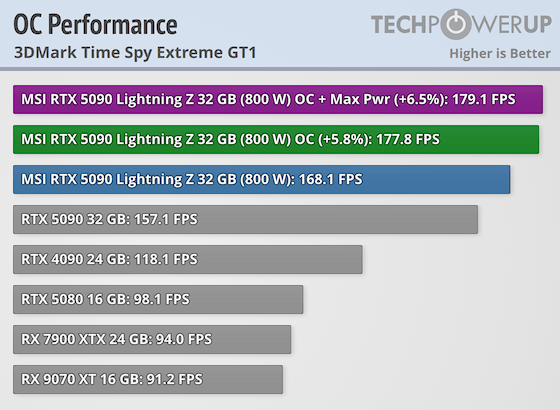
| MSI RTX 5090 Lightning Z | 3218 MHz | +375 MHz | 177.8 FPS | 800/1000 W | 179.1 FPS/180.2 FPS at max voltage |
| MSI RTX 5090 Suprim SOC | 2993 MHz | +375 MHz | 170.4 FPS | 575/600 W | 172.5 FPS |
| MSI RTX 5090 Suprim Liquid SOC | 3069 MHz | +375 MHz | 175.8 FPS | 600/600 W | 175.8 FPS * |
| Palit RTX 5090 GameRock | 2947 MHz | +375 MHz | 168.7 FPS | 575/575 W | 168.7 FPS * |
| NVIDIA RTX 5090 FE | 2938 MHz | +375 MHz | 166.7 FPS | 575/600 W | 166.9 FPS |
Nov 14th, 2026 15:04 CST
change timezone
Latest GPU Drivers
New Forum Posts
- Ddr4 instead of ddr5 for 9060xt 8 gb over 5060 8 gb (8)
- Tell me about your favourite graphics card (79)
- What can the FX 8320 do today? Here is the answer. (38)
- Your PC ATM (36426)
- Windows 11 General Discussion (7728)
- WarpCoreBench scores! (30)
- AMD Software: Adrenalin Edition 26.10.1 Driver (6)
- 9070 GRE 3.9ghz validation reached. (9)
- Bios Soyo rx580 8g (13)
- auto-closed by somethings by actions (1)
Popular Reviews
- AMD Zen 6 Technical Deep Dive
- ASUS ROG Strix B850-I Gaming Wi-Fi7 W Review
- Corsair HX1000i Shift Crystal Review
- NZXT C1200 Platinum Review
- Upcoming Hardware Launches 2027 (Updated Nov 2026)
- Montech King 95 3D PRO Review
- NZXT H7 RGB+ Review
- NZXT H5 Review
- Phantom Blade Zero Performance Benchmark Review - 35 GPUs Tested
- XPG NIMBUS PLUS Review - Mid-range Chair With Strong Competitors
TPU on YouTube
Controversial News Posts
- NVIDIA Co-Founder and CEO Jensen Huang Officially Resigns (403)
- OpenAI CEO Argues Home PCs Waste the World's Limited DRAM Supply (152)
- NVIDIA Launches Investigation Into Jensen Huang's Relationship With Suspected Chinese Spy (136)
- Intel "Raptor Lake Next" 16-Core and 20-Core CPUs Surface (130)
- Legendary Game Studio BioWare Shuts Down Following EA Layoffs (104)
- Dell CEO Says the Memory Shortage Will Get Worse in 2027 (95)
- NVIDIA GeForce RTX 50-Series Scheduled for up to $500 Price Hike This Week (89)
- Modder Fits RTX 5090 With Four 8-Pin Connectors, Halving Current per Wire (80)