 11
Portable Encrypted Storage for the USB Interface
(11 Comments) »Introduction

This is a touch out of the usual coverage I do here on TechPowerUp, but somehow things worked in a specific manner that led to this article you are now reading. For one, there were multiple inquiries from companies about security products in the portable storage realm, but all were outside of the storage reviews we do, which happen to be internal SSDs in particular. Secondly, I have been traveling internationally a lot for various reasons lately, carrying with me sensitive information in the form of digital files that would have benefited from encryption.
There clearly was not enough to dedicate an article to every single product, especially given one option only becomes an external storage device via the use of an accessory from yet another company, so here we are with an overview that will hopefully benefit others who find themselves in a similar situation as yours truly.

The image above showcases the primary products of interest covered in this article, including three USB drives, an M.2 SSD, and a portable disk drive. Three of the products came from Kingston, which no doubt is a brand our readers will be familiar with, and the other two are from Securedata, a relatively new company started in 2007 with a focus on all things secure and data. Their Securedrive business unit in particular is responsible for the two devices here, although they also cater to data recovery, forensics, and back up alike.
Thanks to the two companies for making this overview a possibility, and thanks also to Silverstone for providing an M.2 to USB adapter that will come into play as well.
Kingston Ironkey D300
Kingston sells an absolute boat-load of different USB drives as seen here, and they clearly wanted more when they acquired Ironkey in early 2016. This specific brand of encrypted USB storage is available in different capacity options ranging from 4 to 128 GB, with specific combinations coming either standard (D300), serialized (D300S), managed (D300M), or serialized + managed (D300SM).The serialized models, including the 32 GB D300S I have here, come with a unique serial number and bar code on the device for quick and easy inventory tracking, especially useful for corporate IT departments. The managed versions support Ironkey EMS and SafeConsole software for central management of all devices, including usage across every drive registered to a company. As far as individuals go, the standard version will do just fine in that it still has the primary encryption and decryption features that are shared across the portfolio.


Kingston does operate a web shop in the USA; however, the review sample arrived from a different location. As such, we begin with the product packaging itself, which is of a good size for what is ultimately a USB thumb drive. The packaging uses a gray background with all print in black. On the front, we see the product name with the brand in large lettering, as well as salient specifications which let you know that the included drive is compliant with USB 3.0 (3.1 Gen 1) and backwards compatible with USB 2.0 controllers and ports. It is only on the back that the Kingston name and logo make a showing, and here, we also see a warranty disclaimer, along with regulatory information and an identification sticker for logistics. There is nothing else to look at on the box, with the lack of real estate available preventing more technical specifications and/or marketing features from making a showing. Instead, we get to a double flap in the center that keeps the contents inside in place.
Opening the box, we see the IronKey D300 USB drive comes well packaged in place inside a plastic clamshell that offers good protection during shipping and handling. Underneath the drive is a metal ring that comes as an accessory and is locked out of the box. This ring can be unlocked by simply turning the thicker section, which then allows the USB drive to be slipped through and carried on a key chain or similar. It is extremely durable for what it is meant to be, making it an indicator of the good build quality of the device as a whole.


As with everything else so far, the IronKey D300S USB drive is fairly understated in appearance. Featuring a thick zinc alloy case that gets a brushed, black finish and minimal printing in white, it is a drive that is at home in an office just as much as in your house. It measures in at 78 mm x 22 mm x 12 mm, and Kingston rates it IEC 60529 IPX8 waterproof (up to 4 feet submerged) with the cap closed. There is also a tamper-evident epoxy coating seal for when you need to be absolutely sure the drive has not been compromised physically. On the front is again the product name, along with the capacity of the drive near an LED activity indicator, which in turn is present next to a hook where the metal ring goes through. On the back, as with the packaging, is the Kingston logo and regulatory information. Consistency is definitely high here, if nothing else. The cap fits in snugly and securely, but note that the IPX8 rating does not mean you can take it swimming with you as there is no O-ring seal or equivalent for a higher water-resistance rating.

When a new IronKey D300 (S/M/SM) drive is first inserted into a compatible USB port on a system with a compatible OS, two drive letters will show up. The first is for the onboard driver used to set up encryption and the second for the actual drive, wherein contents are seen as with any other such device. Seen above is a GIF that goes through the IronKey Initialization Wizard, which allows for the creation of a custom password that is FIPS 140-2 Level 3 certified and TAA compliant owing to the specific rules required—8–16 characters long and of three unique groups. This allows for 256-bit AES encryption, which with the TAA compliance means IT departments in businesses and government agencies will be happy.

For those wondering what happens if the password is forgotten or drive stolen, the drive locks down and re-formats after 10 intrusion attempts. This is a good middle ground as it allows the owner to remember the correct password while ensuring that at least the confidential contents on the device will not be accessed by someone else. There is also a digitally signed firmware that is recognized by the system in use, which in turn helps against the BadUSB exploit many USB drives on the market currently are vulnerable to. If you are interested in reading up on BadUSB, I refer you to this link from DataLocker. As mentioned above, the D300M and D300SM drives are also compatible with DataLocker's IronKey EMS, an enterprise solution for those who want to "establish a secure storage command center for administering and policing the use" of compatible devices. The takeaway here is that these drives not only come with onboard encryption support as said support is also compliant with most industry requirements, which is what allows them to actually be used.

Given this is more a discussion of the encryption of things and not a full review, I only tested the drive in my usual work environment, but did run some synthetic benchmarks for comparisons with the other entries coming up. Kingston rates this 32 GB drive at 250 MB/s read and 40 MB/s write on USB 3.1 Gen 1, and those numbers mean little without more context on the testing methodology. For what it is worth, seen above is a representative CrystalDiskMark 5 result summary for a 1 GB dataset in x64 operation on an Intel Z390-based system with Windows 10 OS and native USB 3.1 Gen 1 support via the chipset. Writing multiple gigabytes of sequential data did show some slowdown, with the controller cache likely being the limitation here, but this is far beyond the typical use case for a portable USB drive, so I have no concerns about it.
The Kingston Ironkey D300 series costs between $60–$300 depending on the options noted previously, with this specific 32 GB D300S coming in at $169 from the Kingston store and official resellers alike.
Kingston DataTraveler DT2000
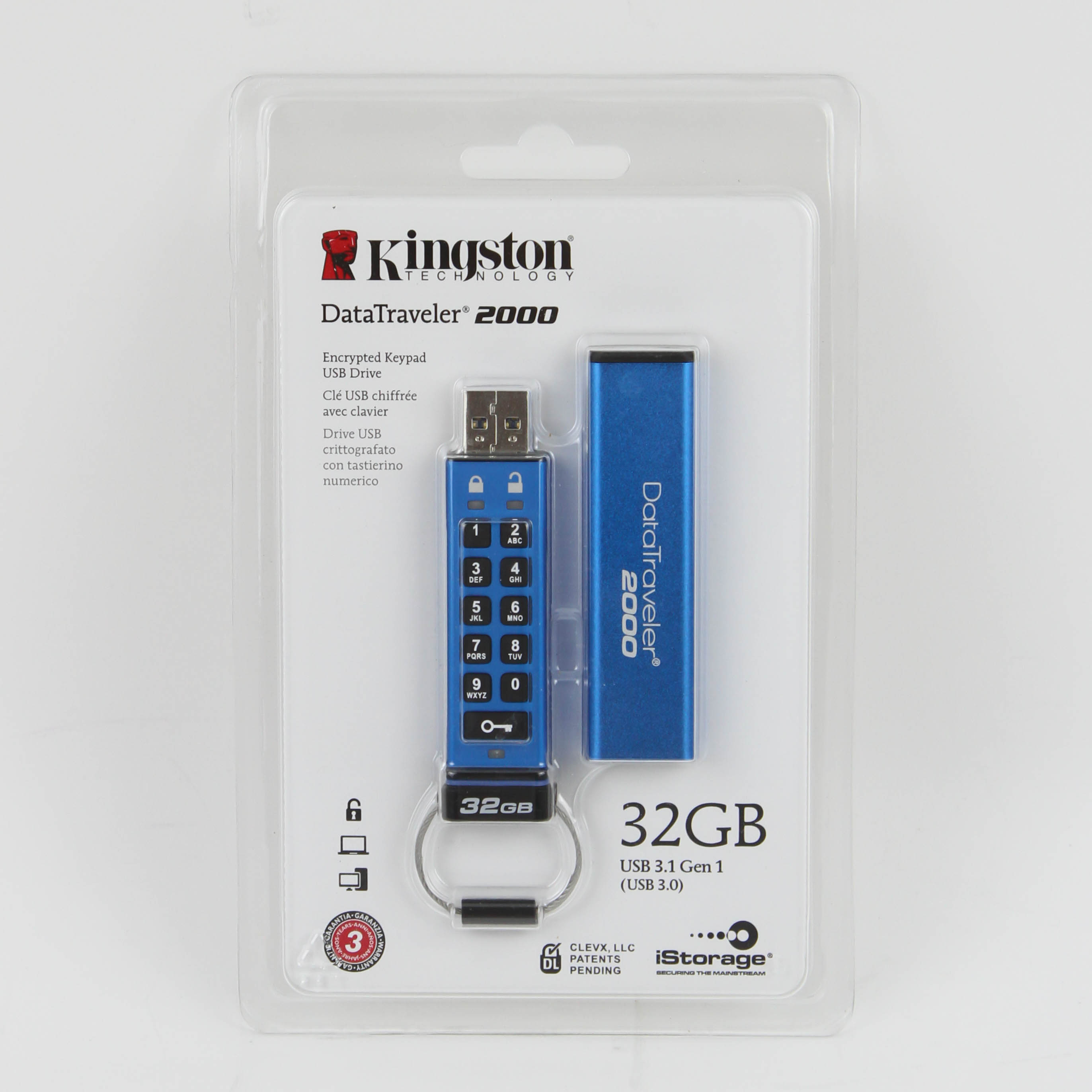

The DataTraveler series from Kingston has been around for longer and indeed shares its DNA with very similar hardware-encrypted USB drives from other companies, including CORSAIR and SecureData. These drives are all licensed from ClevX's DataLock KP series, which is as close to an OEM as any in this field. Kingston's versions come in a plastic pouch, which is of the irritating type, needing a sharp knife to cut open as it is shaped around the USB drive on the front to showcase it fully. The company and product name are also on the front, alongside salient specifications and more features and a super quick start guide on the back.


At 80 mm x 20 mm x 10.5 mm, the Kingston DataTraveler DT2000 is larger-than-average for a USB drive as a result of the onboard alphanumeric keypad for the built-in hardware encryption. It comes packaged in two pieces, a sleeve with the product name and Kingston logo on the two sides, and the drive itself with a keyring already attached. The two pieces have an aluminium casing with a bright metallic blue finish. The drive's storage capacity is mentioned on the end by the keyring, which also has an O-ring for an IP57 rating as far as dust and fluid resistance goes. There is a blue LED on this end for drive activity, and two other LEDs on the other end to denote lock/unlock when in use, as well as a few other things this drive is capable of. The iStorage mark on the bottom is extremely weird and to an extent confusing in terms of how much Kingston has added to the product given iStorage is another customer of ClevX that sells the datAshur PRO.

Given the drive has an internal battery to help with all the onboard programming features, you may want to plug it in and leave it running for a while (Kingston recommends 30 minutes for the first time) to ensure a fully charged battery. The drive does not lose any programmed security settings or the pin codes if the battery runs out because these are written to an onboard memory module. It features full-disk AES 256Bit hardware encryption across any OS that supports a male USB Type A 3.1 Gen 1 port, which is to say you can use it with Windows, macOS, Linux, or even ChromeOS, for that matter. Everything being onboard also means no software drivers or firmware updates to worry about, and it is FIPS 140-2 Level 3 compliant to keep your friendly neighborhood IT admin happy.
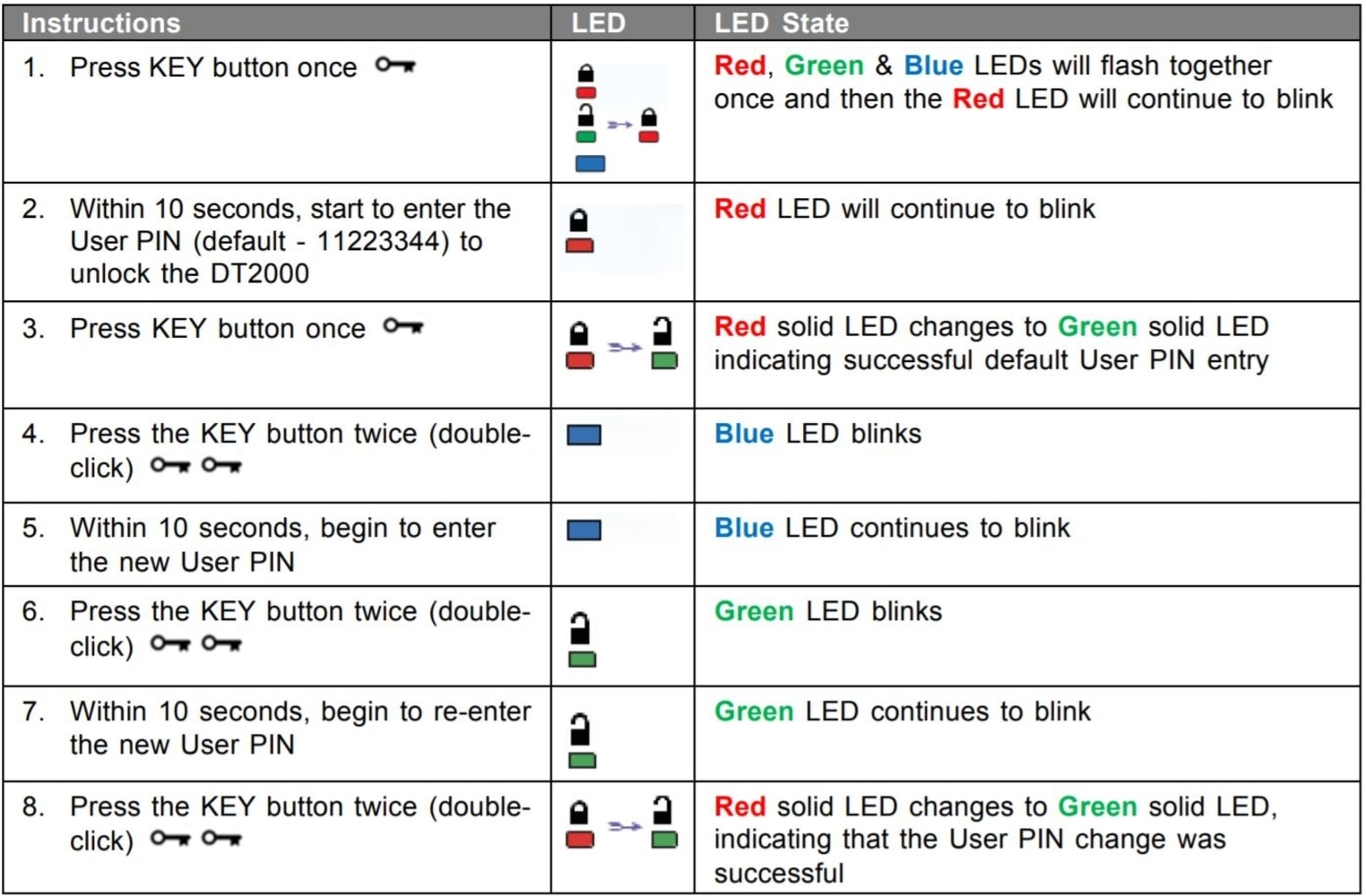

Using the DataTraveler DT2000 is simple for all the day-to-day functions, and yet there are a plethora of onboard programmability options that would rival a keyboard from Ducky or Vortexgear. Unlocking the drive is as simple as pressing the lock key, entering the default pin within 10 seconds (11223344), and pressing the lock key again. The red and green LEDs at the top flash and change status accordingly, as seen in the instruction set above. But then the drive offers the end user the capability to set up more privacy features, including an admin-only mode, read-only mode, and timeout mode, all of which help keep the chain of command of the sensitive data as much in your control as you wish it to be. There is a comprehensive user manual available online which goes through these features in multiple languages, and I highly recommend reading through it initially, and perhaps a few more times as you get used to the drive.
Given all the available options, which all happen to be hardware-based, you may run the risk of forgetting your pin, the admin pin, user pin, and so on. My point is that there are quite a few numbers to be aware of, with a minimum of a single pin that is 7–15 digits in length without any repeating or consecutive numbers. The presence of an alphanumeric keypad does help in using letters instead of a series of numbers, but keep in mind that the drive has brute force detection as with the Ironkey DT300 and will delete all data after 10 incorrect attempts. Depending on the types of pins set, they may get reset to a default configuration as well. There is also a way to reset the drive entirely without going through this process if you plan to no longer use it and want to hand it over to someone else, for example. For all this and more read the manual as I did.

This is an older drive with older hardware, which shows in the performance tests. Kingston rates this 32 GB variant at 135 MB/s read and 40 MB/s write in USB 3.1 Gen 1 mode, and 30 MB/s read and 20 MB/s write in USB 2.0 mode. As before, these numbers mean little without more context on the testing methodology. For what it is worth, seen above is a representative CrystalDiskMark 5 result summary for a 1 GB dataset in x64 operation on an Intel Z390-based system with Windows 10 OS and native USB 3.1 Gen 1 support via the chipset. Writing multiple gigabytes of consequent data did result in severe slowdown with this drive showing its read and write limitations relative to the others when copying files large and small alike.
The Kingston DataTraveler DT2000 series comes in 4–64 GB size offerings and costs between $58.50–$162.50, with this specific 32 GB D300S coming in at $130 from the Kingston store and official resellers alike. I would personally go with the Ironkey offering for an additional $30, if only for the more compact and discrete look and more software-based options, but as clearly seen by the various companies selling them, there is a large market for keypad USB drives.
Our Patreon Silver Supporters can read articles in single-page format.
Nov 14th, 2026 09:55 CST
change timezone
Latest GPU Drivers
New Forum Posts
- What can the FX 8320 do today? Here is the answer. (7)
- No screen and keyboard with mouse not being powered on (12)
- What are you playing? (26220)
- Windows new update 26H2 - Throttlestop (11)
- Tell me about your favourite graphics card (49)
- Gacha Games - Discussions, Pulls, Updates, etc. (1154)
- 3D Printer Club (851)
- Folding Pie and Milestones!! (10202)
- a note from zachary85's son (9)
- Have you got pie today? (17083)
Popular Reviews
- AMD Zen 6 Technical Deep Dive
- Corsair HX1000i Shift Crystal Review
- ASUS ROG Strix B850-I Gaming Wi-Fi7 W Review
- NZXT C1200 Platinum Review
- Upcoming Hardware Launches 2027 (Updated Nov 2026)
- Montech King 95 3D PRO Review
- NZXT H7 RGB+ Review
- NZXT H5 Review
- Phantom Blade Zero Performance Benchmark Review - 35 GPUs Tested
- XPG NIMBUS PLUS Review - Mid-range Chair With Strong Competitors
TPU on YouTube
Controversial News Posts
- NVIDIA Co-Founder and CEO Jensen Huang Officially Resigns (388)
- OpenAI CEO Argues Home PCs Waste the World's Limited DRAM Supply (152)
- NVIDIA Launches Investigation Into Jensen Huang's Relationship With Suspected Chinese Spy (136)
- Intel "Raptor Lake Next" 16-Core and 20-Core CPUs Surface (130)
- Legendary Game Studio BioWare Shuts Down Following EA Layoffs (104)
- Dell CEO Says the Memory Shortage Will Get Worse in 2027 (95)
- NVIDIA GeForce RTX 50-Series Scheduled for up to $500 Price Hike This Week (89)
- Modder Fits RTX 5090 With Four 8-Pin Connectors, Halving Current per Wire (80)