 1
Star Wars Zero Company Handheld Performance Review
Out-of-Box Experience »Graphics Settings
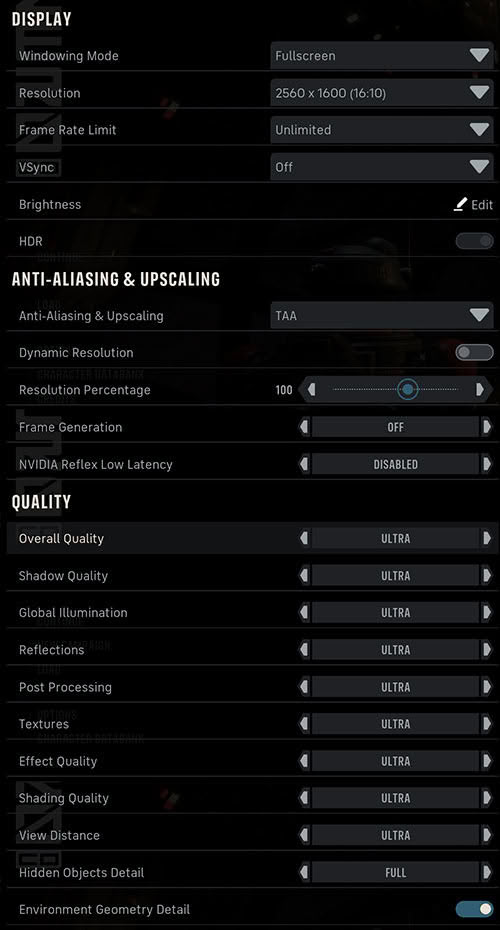
- You may run in dedicated fullscreen, borderless and windowed.
- V-Sync can be disabled completely, there is no hidden FPS lock. Cutscenes aren't capped either, they run at whatever frame rate your hardware can deliver. The game is quite susceptible to being CPU-limited, which might limit your FPS in its own way.
- The framerate limit can be set to a range of options between 30 and 240 FPS, or "unlimited."
- Anti-aliasing and Upscaling options are: FXAA, TAA, TSR, DLSS, FSR and XeSS—so everything is supported.
- Dynamic resolution can be switched on, with a Frame Rate Target for it to aim for, between 30 and 240 FPS.
- There's also a resolution percentage slider that lets you manually adjust the upscaling, it's also synced with the upscaler. So, if you pick DLSS Quality, this will go to 66%. At that point the slider can't be changed manually anymore, so you can't invent your own DLSS resolutions.
- Frame generation is supported for NVIDIA, AMD and Intel. On Intel we didn't see any FPS gain after enabling it and we also experienced a few crashes after we enabled frame gen, so it looks like frame gen doesn't work on Intel handhelds and GPUs.
- You may choose between four presets: "Low," "Medium," "High" and "Ultra." Ultra is really maxing out everything.
- Nanite virtualized geometry is used, and there's even a toggle for it, labeled "Environment Geometry Detail."
Test Devices
We tested the public Steam version of Star Wars Zero Company.- The Steam Deck LCD was running SteamOS version 3.8.16, build 20260716.1.
- Our ROG Xbox Ally X had Armoury Crate 2.2.17.0 installed along with BIOS 317.
- The ROG Ally X had the latest Armoury Crate version installed at the time of testing (2.2.17.0), along with BIOS 312.
- The MSI Claw 8 AI+ A2VM had MSI Center M 2.0.2606.2501 installed along with BIOS E1T52IMS.112.
- The MSI Claw 8 EX AI+ CG3EM had MSI Center M 2.0.2608.1201 installed along with BIOS E1T91IMS.10A
| Gaming Handhelds Used for Testing | |
|---|---|
| Steam Deck LCD | SteamOS version 3.8.16 build 20260716.1 |
| ASUS ROG Xbox Ally X | Armoury Crate 2.2.13.0 BIOS 317 GPU driver version: 32.0.31019.2002 Windows 11 Home 25H2 VBS disabled |
| ASUS ROG Ally X | Armoury Crate 2.2.13.0 BIOS 312 GPU driver version: 32.0.31007.6002 Windows 11 Home 25H2 VBS disabled |
| Claw 8 AI+ A2VM | MSI Center M 2.0.2606.2501 BIOS E1T52IMS.112 GPU driver version: 32.0.101.8991 Windows 11 Home 25H2 VBS disabled |
| Claw 8 AI+ EX CG3EM | MSI Center M 2.0.2608.1201 E1T91IMS.10A GPU driver version: 32.0.101.8991 Windows 11 Home 25H2 VBS disabled |
Nov 25th, 2026 08:01 CST
change timezone
Latest GPU Drivers
New Forum Posts
- WarpCoreBench scores! (104)
- Increasing Power Limit? (34)
- Sexy Hardware Close-Up Pic Clubhouse. (10344)
- {NA} 2026 Black November prices / deal (6)
- Smokin Hot Lappy (1)
- What is the latest game you finished or 100% (205)
- Ryzen Owners Zen Garden (8565)
- The time has come to upgrade...my desktop (20)
- Can you guess Which game it is? (358)
- Without Jensen, PC gaming will be (59)
Popular Reviews
- ASRock X870E Challenger Wi-Fi White Review
- Microsoft Surface Laptop Ultra Review - The Next-gen Arm Laptop
- VZMORE AX9 Max Review
- Upcoming Hardware Launches 2027 (Updated Nov 2026)
- AMD Ryzen 7 9800X3D Review - The Best Gaming Processor
- AMD Zen 6 Technical Deep Dive
- Corsair RM1200e (Second Generation) Review
- Phantom Blade Zero Performance Benchmark Review - 35 GPUs Tested
- Pulsar Office Tour & First Look at P1 Dual-Sensor Mouse
- Ocypus lota P1000 Review
TPU on YouTube
Controversial News Posts
- Jensen Huang Reinstated as CEO of NVIDIA (555)
- NVIDIA Co-Founder and CEO Jensen Huang Officially Resigns (492)
- Report: Jensen Huang Eyes NVIDIA Comeback (281)
- Open Letter Asking NVIDIA to Reinstate Jensen Huang Passes 115,000 Signatures (184)
- OpenAI CEO Argues Home PCs Waste the World's Limited DRAM Supply (152)
- NVIDIA Launches Investigation Into Jensen Huang's Relationship With Suspected Chinese Spy (136)
- Intel "Raptor Lake Next" 16-Core and 20-Core CPUs Surface (130)
- Intel Razor Lake Gets a 12 P-Core bLLC Chip With No E-Cores, Per Leak (94)