 6
The Outer Worlds 2 Handheld Performance Review
Out-of-Box Experience »Graphics Settings
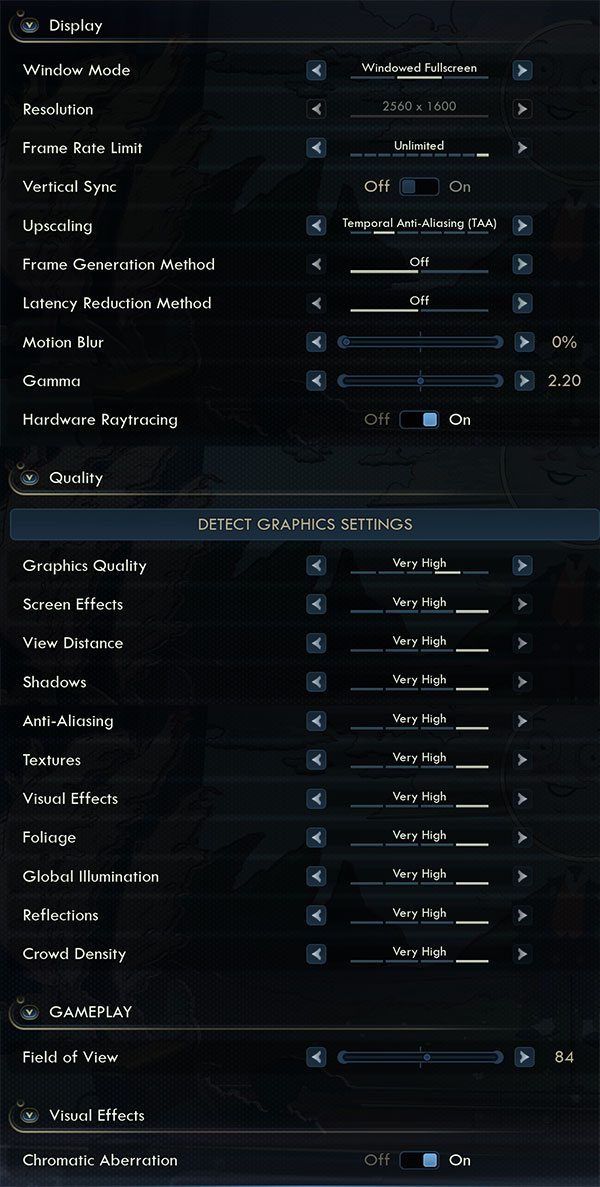
- There is just a single big graphics settings screen
- Here you can find the usual monitor settings, "fullscreen," "borderless" and "windowed" are all supported
- V-Sync can be disabled completely, there is no hidden FPS cap, the game is quite CPU limited though in some open areas, especially when hardware ray tracing is enabled
- You may also set an FPS limit between 30 and 240 FPS
- The upscalers available are: "Off," "TAA," "TSR," "FSR," "XeSS" and "DLSS"
- Please note: when using TAA, there is a bug, that hides the scaling factor UI right below the upscaler list, and it defaults to 66%! So if you want to use TAA, make sure to enable TSR first, set upscaling to 100% or what you prefer, then switch back to TAA, so the right upscaling is applied.
- Frame generation is available for NVIDIA and Intel but not for AMD, even though FSR 4 is supported for upscaling
- Motion blur can be disabled
- "Hardware Ray tracing" switches from the shader-based UE5 Lumen code to a hardware-accelerated approach. This is quite buggy though. For example, there will be lots of noise in the RT images as you can see on our screenshots, also the performance differences are quite small, but you are very heavily CPU limited in many areas, probably because of the BVH RT structure being rebuilt or updated too often
- Graphics quality presets are: "low," "medium," "high" and "very high"
- In addition to that there are the typical UE5 settings options
- At the bottom you can adjust the FOV, between 46 and 115 degrees
- Chromatic Aberration can be disabled as well
Test Devices
We tested the public Steam release of The Outer Worlds 2.- The Steam Deck LCD was running SteamOS version 3.7.15, build 20250903.1
- Our ROG Ally X had the latest Armoury Crate version installed at the time of testing (2.1.10), along with BIOS 312
- The ROG Xbox Ally X had Armoury Crate 2.1.10 installed along with BIOS 310
- The ROG Ally with SteamOS was running SteamOS version 3.7.16, build 20250929.1
| Gaming Handhelds Used for Testing | |
|---|---|
| Steam Deck LCD | SteamOS version 3.7.15 build 20250903.1 |
| ASUS ROG Ally X | Armoury Crate 2.1.10 BIOS 312 GPU driver version: 32.0.21013.11001 Windows 11 Home 24H2 VBS disabled |
| ASUS ROG Ally Z1E with SteamOS | SteamOS version 3.7.16 build 20250929.1 |
| ASUS ROG Xbox Ally X | Armoury Crate 2.1.10 BIOS 310 GPU driver version: 32.0.21025.17000 Windows 11 Home 24H2 VBS disabled |
Nov 14th, 2026 19:17 CST
change timezone
Latest GPU Drivers
New Forum Posts
- Honestly, do you care about GTA VI? (20)
- AI generated images... (226)
- What is in your fleet, size and contents? (28)
- WarpCoreBench scores! (33)
- 9070 GRE 3.9ghz validation reached. (10)
- X79 and/or rampage IV OC'ing thread for those of us still left.... (2452)
- Can you guess Which game it is? (317)
- What can the FX 8320 do today? Here is the answer. (43)
- Ryzen 7 8700G OC (8)
- auto-closed by somethings by actions (2)
Popular Reviews
- AMD Zen 6 Technical Deep Dive
- ASUS ROG Strix B850-I Gaming Wi-Fi7 W Review
- Corsair HX1000i Shift Crystal Review
- Upcoming Hardware Launches 2027 (Updated Nov 2026)
- Montech King 95 3D PRO Review
- NZXT C1200 Platinum Review
- NZXT H7 RGB+ Review
- NZXT H5 Review
- Phantom Blade Zero Performance Benchmark Review - 35 GPUs Tested
- AMD Ryzen 7 9800X3D Review - The Best Gaming Processor
TPU on YouTube
Controversial News Posts
- NVIDIA Co-Founder and CEO Jensen Huang Officially Resigns (406)
- OpenAI CEO Argues Home PCs Waste the World's Limited DRAM Supply (152)
- NVIDIA Launches Investigation Into Jensen Huang's Relationship With Suspected Chinese Spy (136)
- Intel "Raptor Lake Next" 16-Core and 20-Core CPUs Surface (130)
- Legendary Game Studio BioWare Shuts Down Following EA Layoffs (104)
- Dell CEO Says the Memory Shortage Will Get Worse in 2027 (95)
- NVIDIA GeForce RTX 50-Series Scheduled for up to $500 Price Hike This Week (89)
- Modder Fits RTX 5090 With Four 8-Pin Connectors, Halving Current per Wire (80)