 1
Thermaltake ARGENT M5 Wireless RGB Review
Software, Lighting & Battery Life »Sensor and Performance
The Thermaltake ARGENT M5 Wireless RGB is equipped with the PixArt PAW3335. According to specifications, the 3335 is capable of up to 16,000 CPI, as well as a maximum tracking speed of 400 IPS, which equals 10.16 m/s. Out of the box, five pre-defined CPI steps are available: 800, 1600, 3200, 6400, and 12,000 CPI.CPI Accuracy
"CPI" (short for counts per inch) describes the number of counts registered by the mouse if it is moved exactly an inch. There are several factors (firmware, mounting height of the sensor not meeting specifications, mouse feet thickness, mousing surface, among others) which may contribute to nominal CPI not matching actual CPI. It is impossible to always achieve a perfect match, but ideally, nominal and actual CPI should differ as little as possible. In this test, I'm determining whether this is the case or not. However, please keep in mind that said variance will still differ from unit to unit, so your mileage may vary.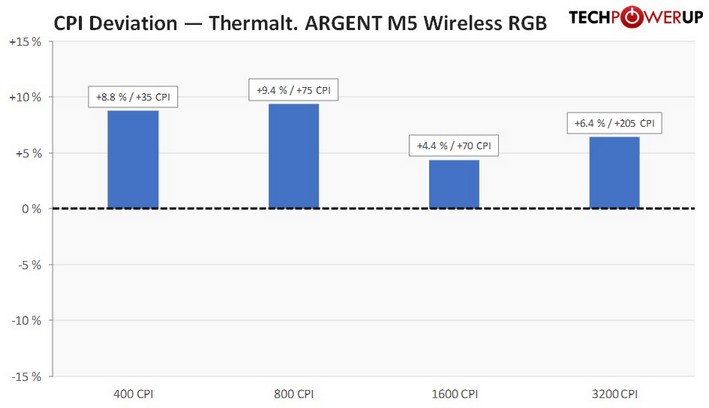
I've restricted my testing to the four most common CPI steps, which are 400, 800, 1600, and 3200. As you can see, deviation is all over the place and rather significant, which is a below average result. In order to account for the measured deviation, adjusted but still inaccurate steps of 400, 800, 1500, and 3000 CPI have been used for testing.
Motion Delay
"Motion delay" encompasses all kinds of sensor lag. Any further sources of input delay will not be recorded in this test. The main thing I'll be looking for in this test is sensor smoothing, which describes an averaging of motion data across several capture frames in order to reduce jitter at higher CPI values, increasing motion delay along with it. The goal here is to have as little smoothing as possible. As there is no way to accurately measure motion delay absolutely, it can only be done by comparison with a control subject that has been determined to have the lowest possible motion delay. In this case, the control subject is a G403, whose 3366 has no visible smoothing across the entire CPI range. Note that the G403 is moved first and thus receives a slight head start.Testing is restricted to 2.4 GHz mode as Bluetooth is not suitable for non-casual gaming applications.
Wired testing
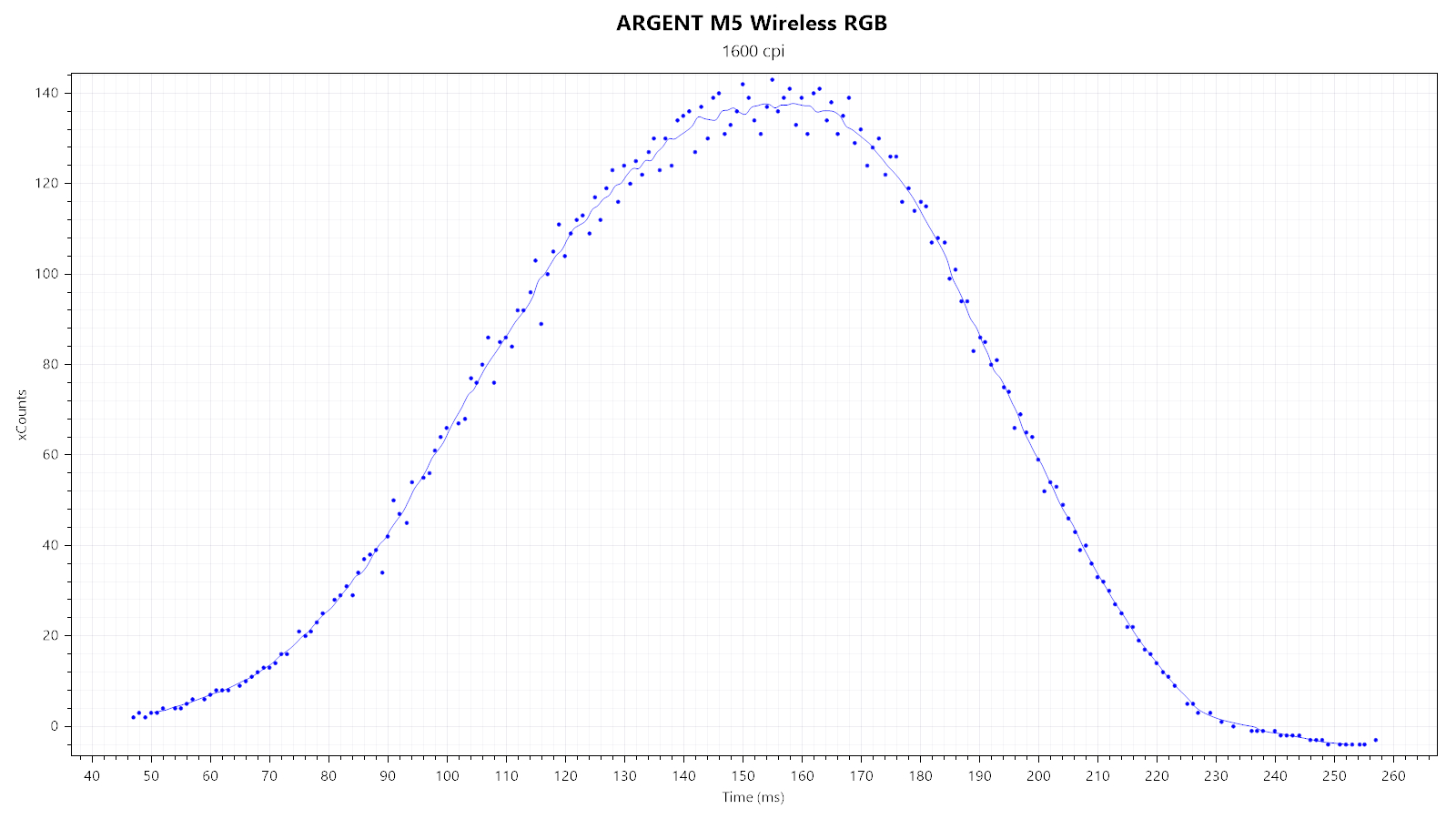
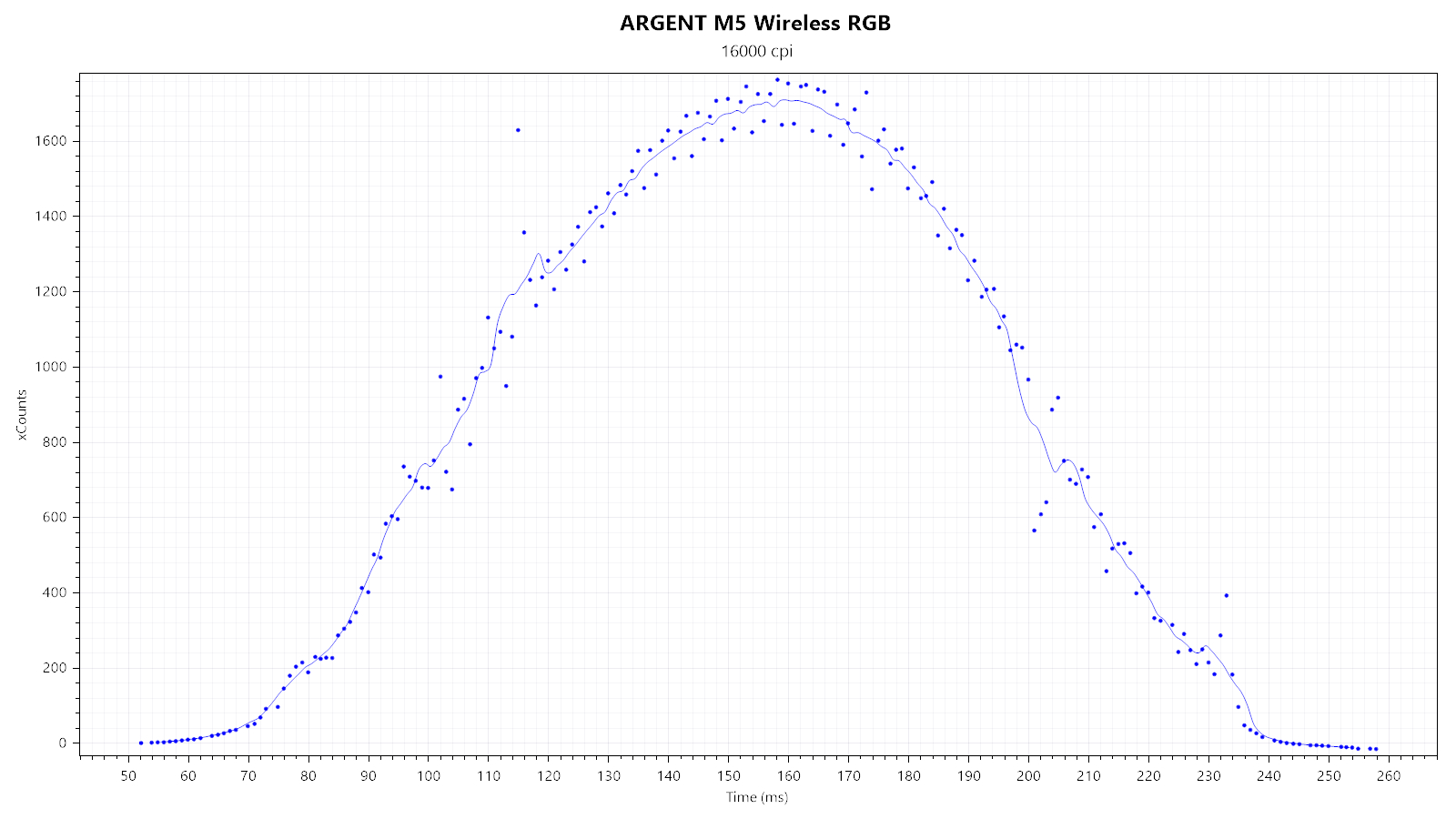
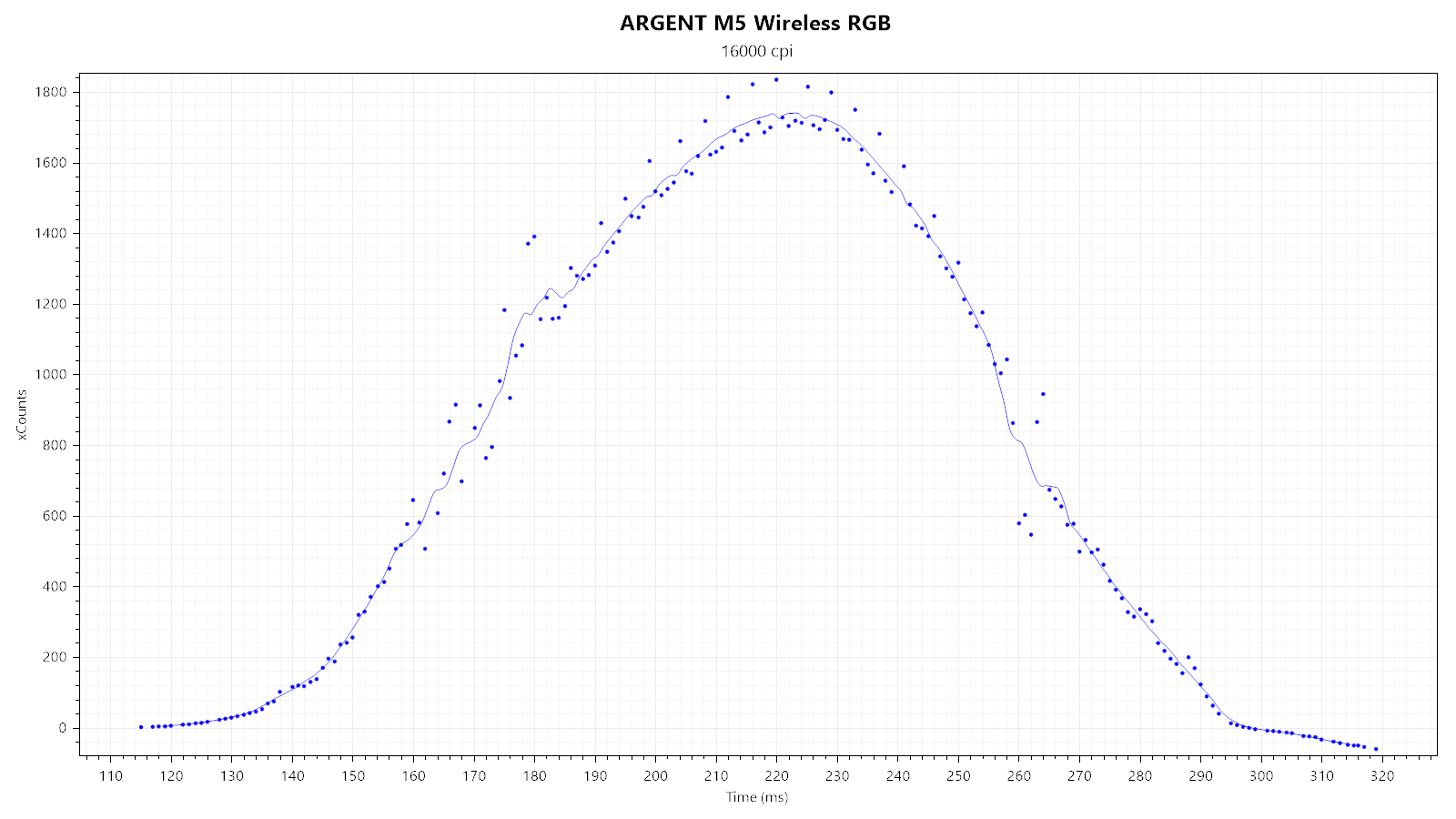
First, I'm looking at two xCounts plots—generated at 1600 and 16,000 CPI—to quickly gauge whether there is any smoothing, which would be indicated by any visible "kinks." Whereas the 1600 CPI plot does not show any kinks, the 16,000 CPI one sure does, indicating smoothing at higher CPI steps. We'll have to turn to xSum testing to determine the exact amount and transition point. SPI timing jitter is appreciably low.
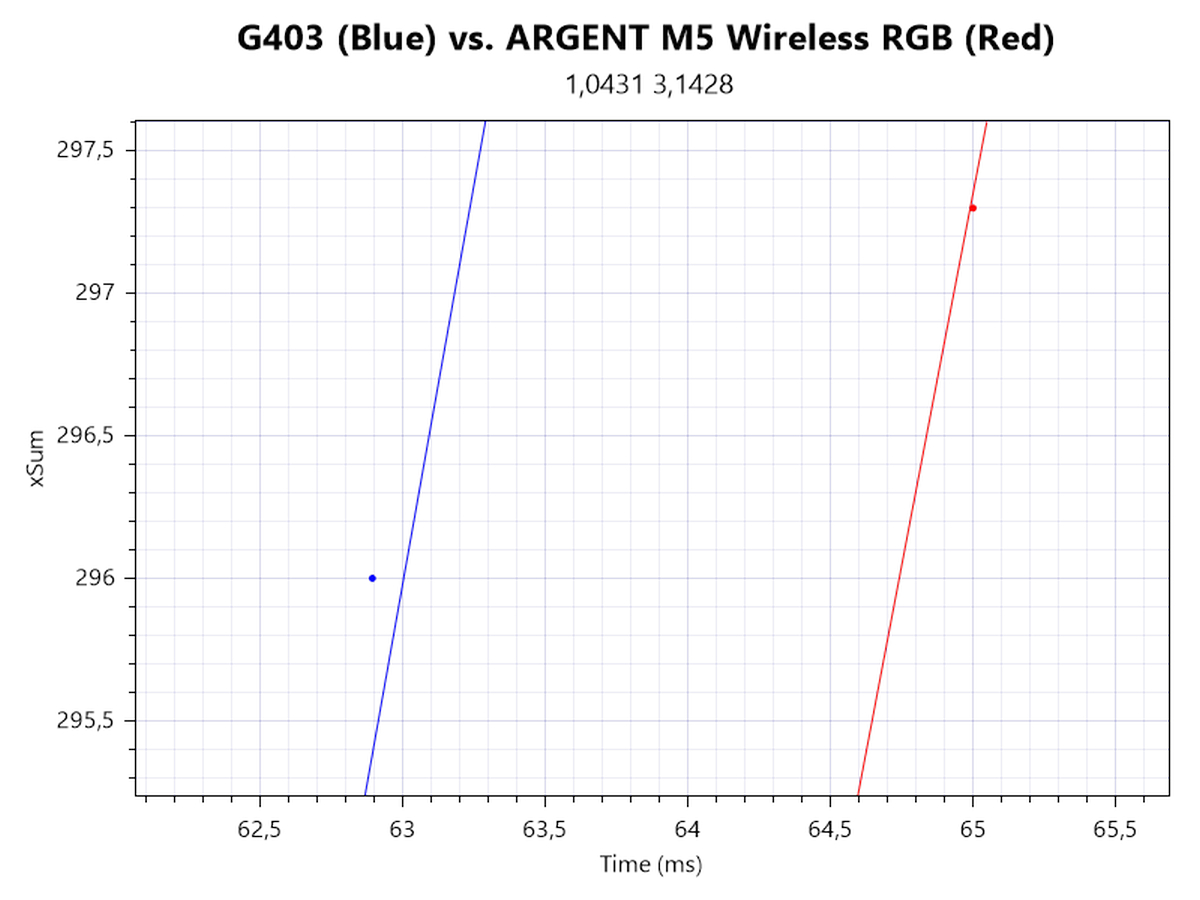
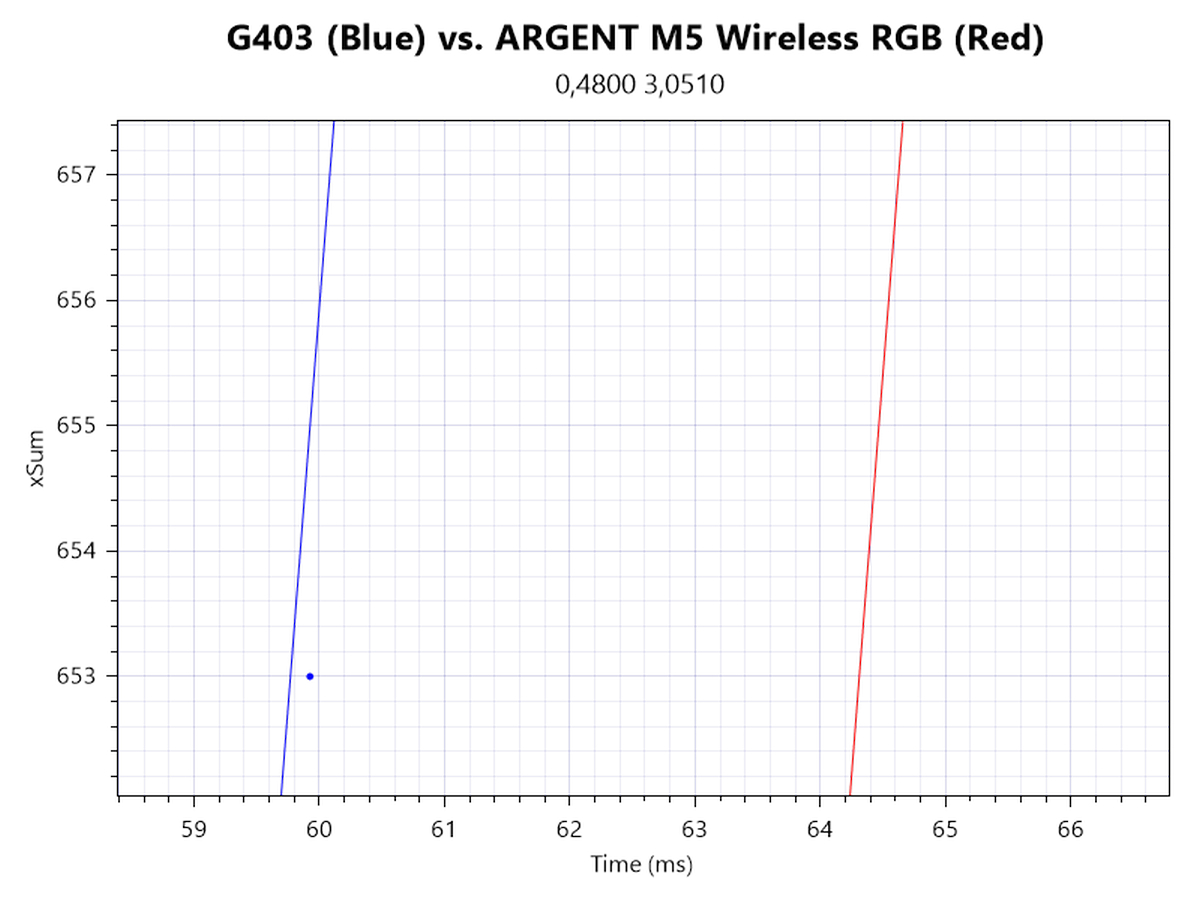
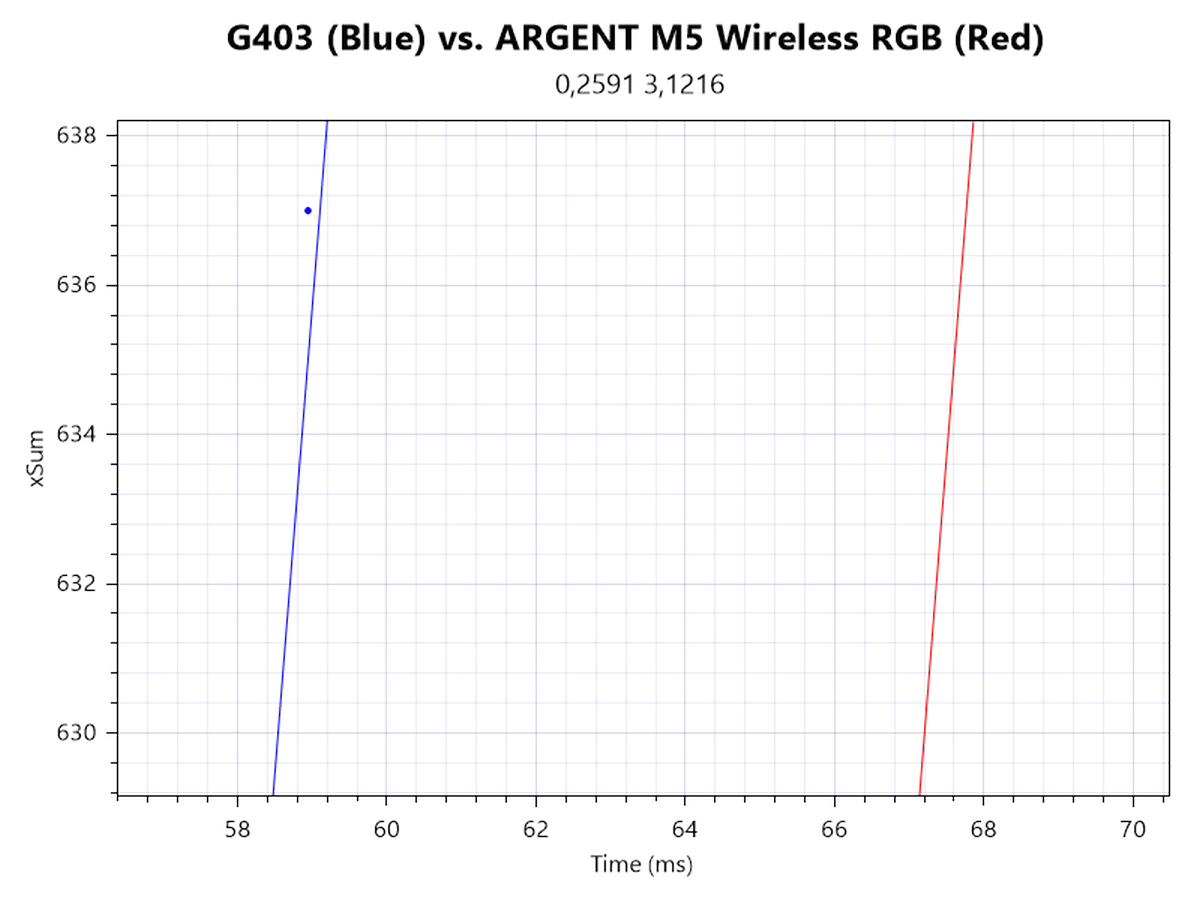
In order to determine motion delay, I'm looking at xSum plots generated at 1600, 6200, and 11,700 CPI. The line further to the left denotes the sensor with less motion delay. 1600 CPI shows a base delay of roughly 1.5 ms. At and above 6200 CPI, the first level of smoothing is applied, resulting in an overall motion delay differential of roughly 4 ms. The second level of smoothing is applied at and above 11,700 CPI, which ups the motion delay differential to roughly 9 ms. For the record: The behavior whereby motion delay is greatest at the onset of motion encountered on other 3335 mice isn't present on the M5 Wireless RGB. Instead, a base delay is present across the entire range. This is similar to the ROCCAT Kain 200 AIMO, which is why I believe the M5 Wireless RGB runs on the same, older SROM.
Wireless testing
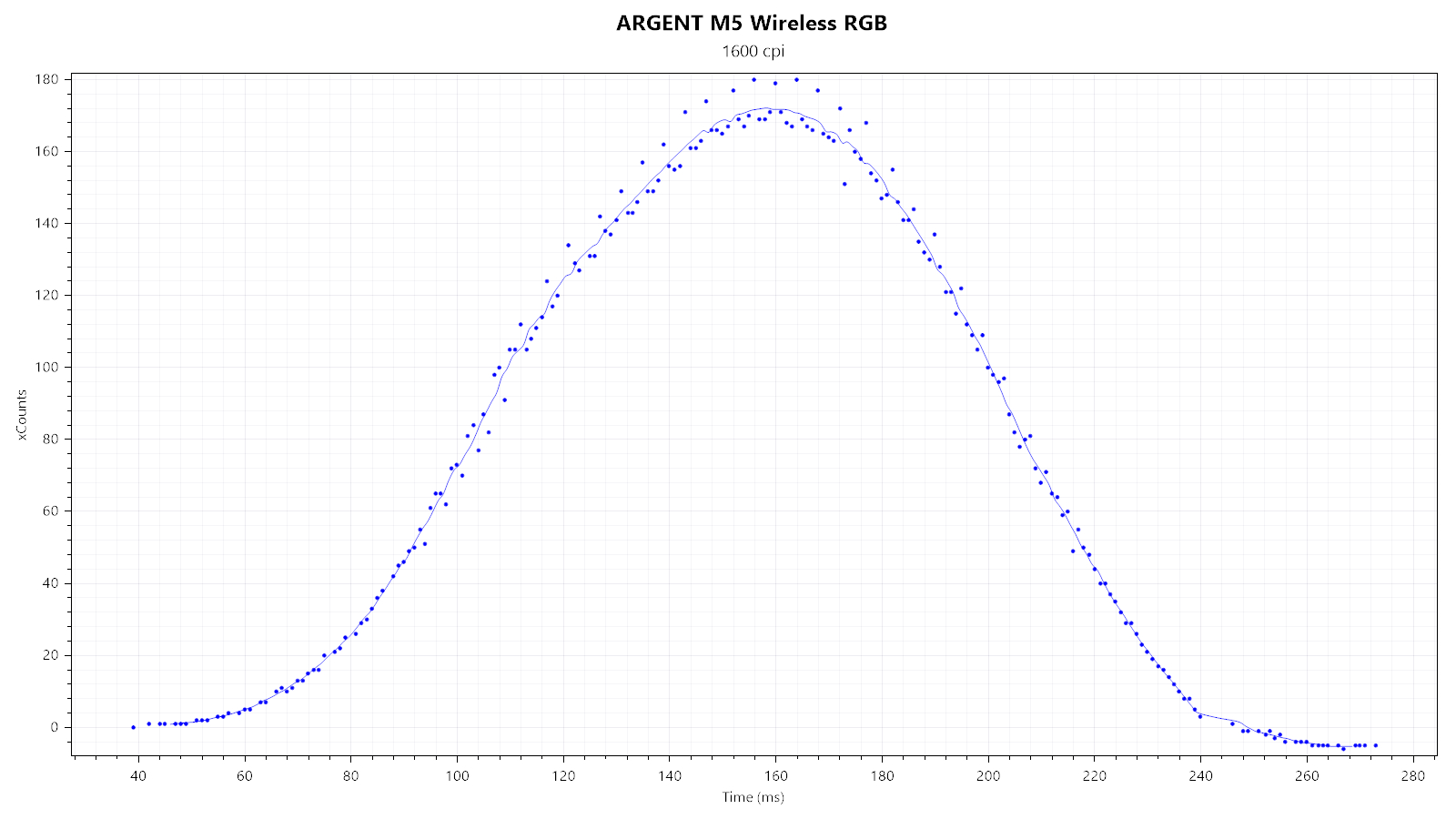
Tracking is virtually unaffected by the switch to wireless, which is commendable.
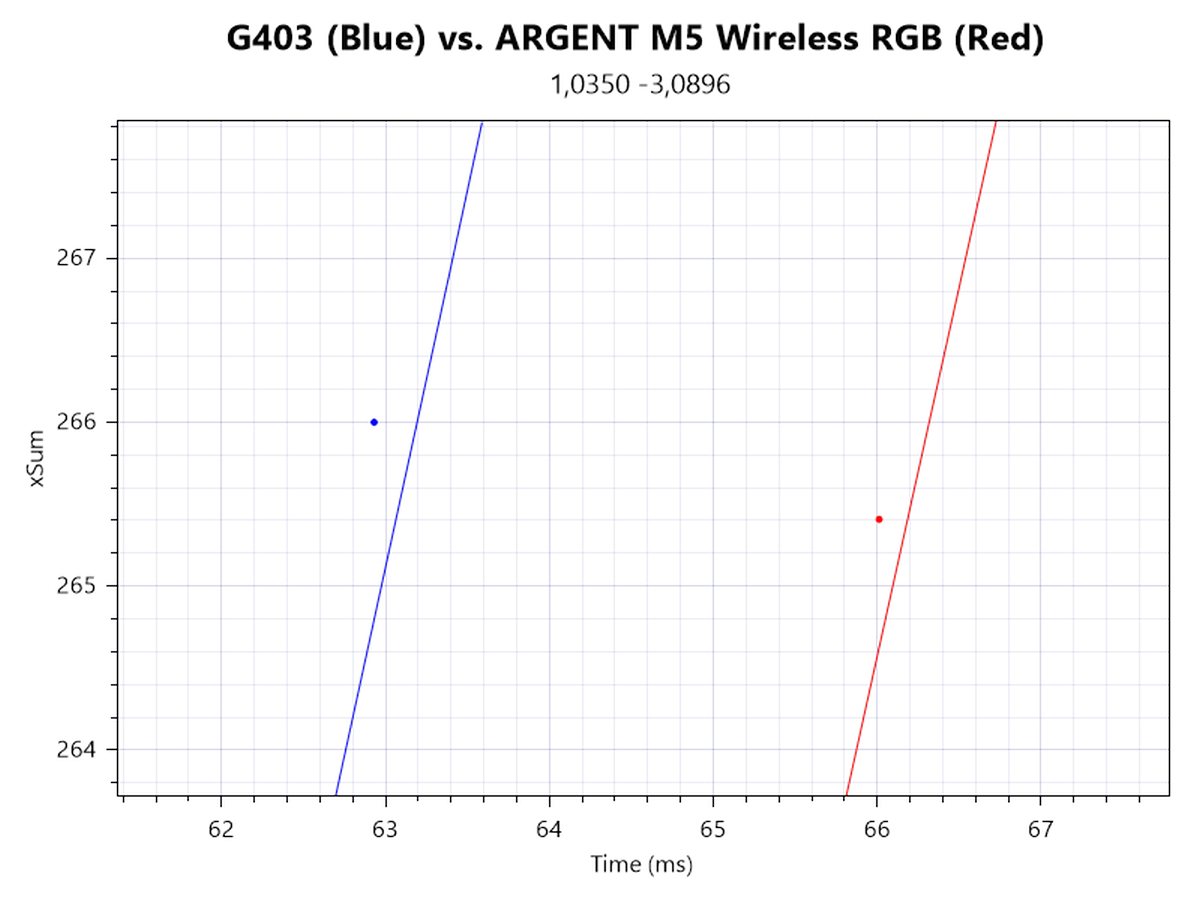
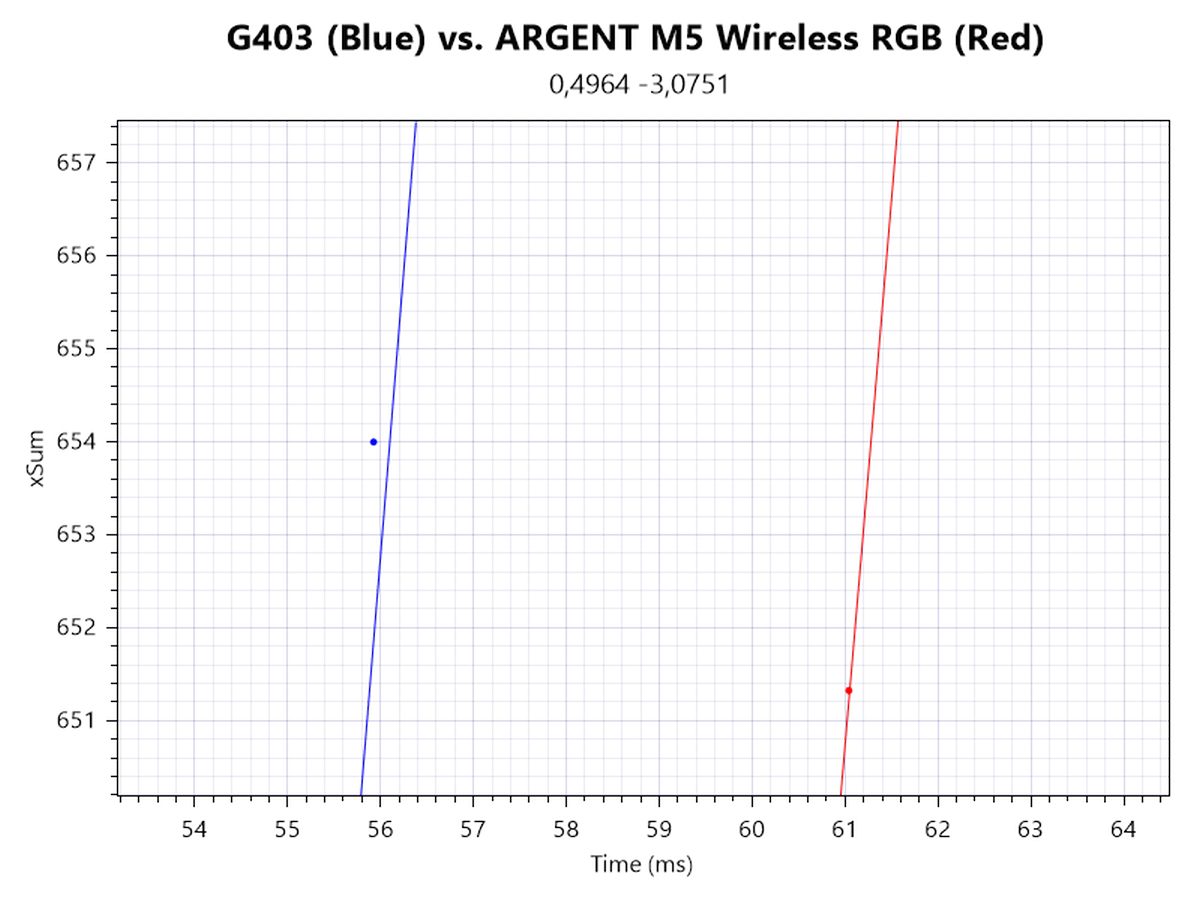
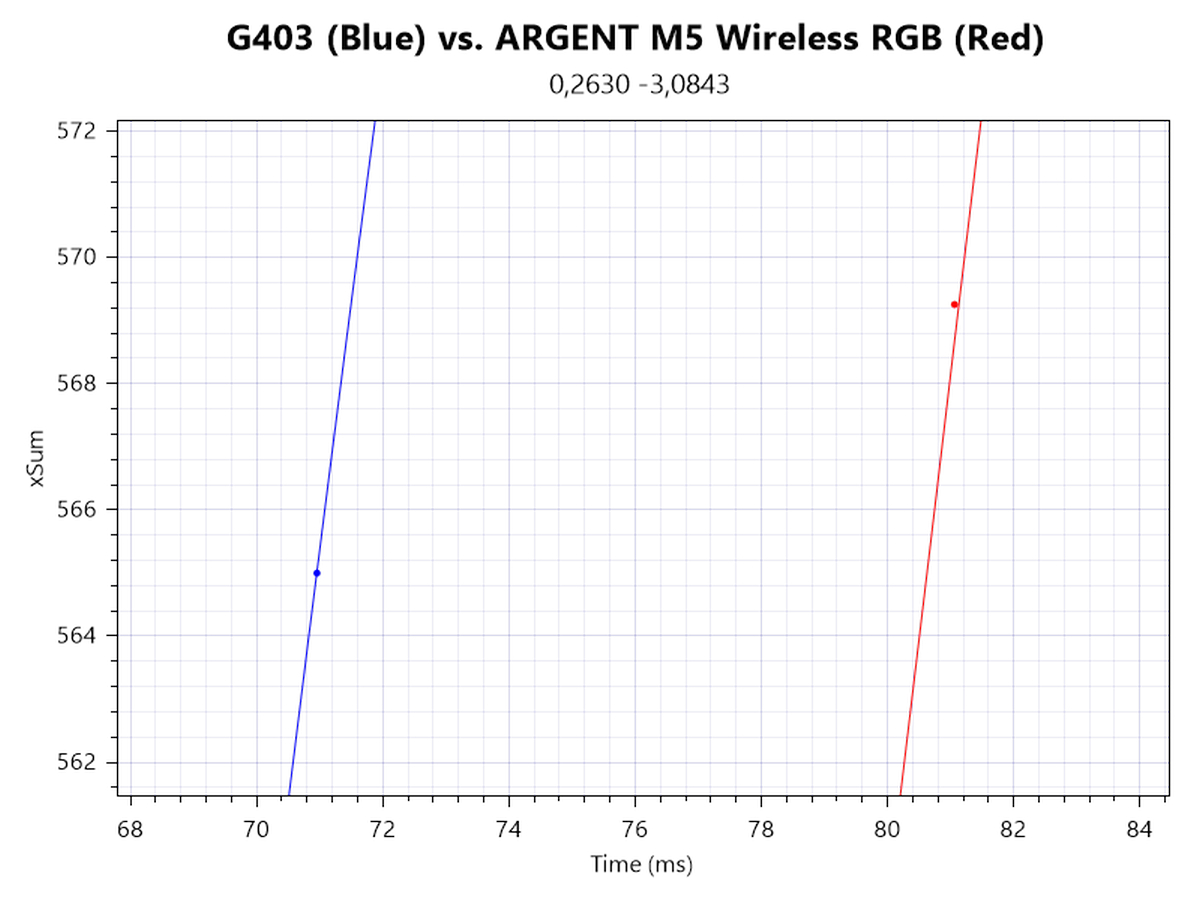
Keeping the motion delay differentials established above in mind, I can measure an isolated wireless motion delay of roughly 1–1.5 ms.
Speed-related Accuracy Variance (SRAV)
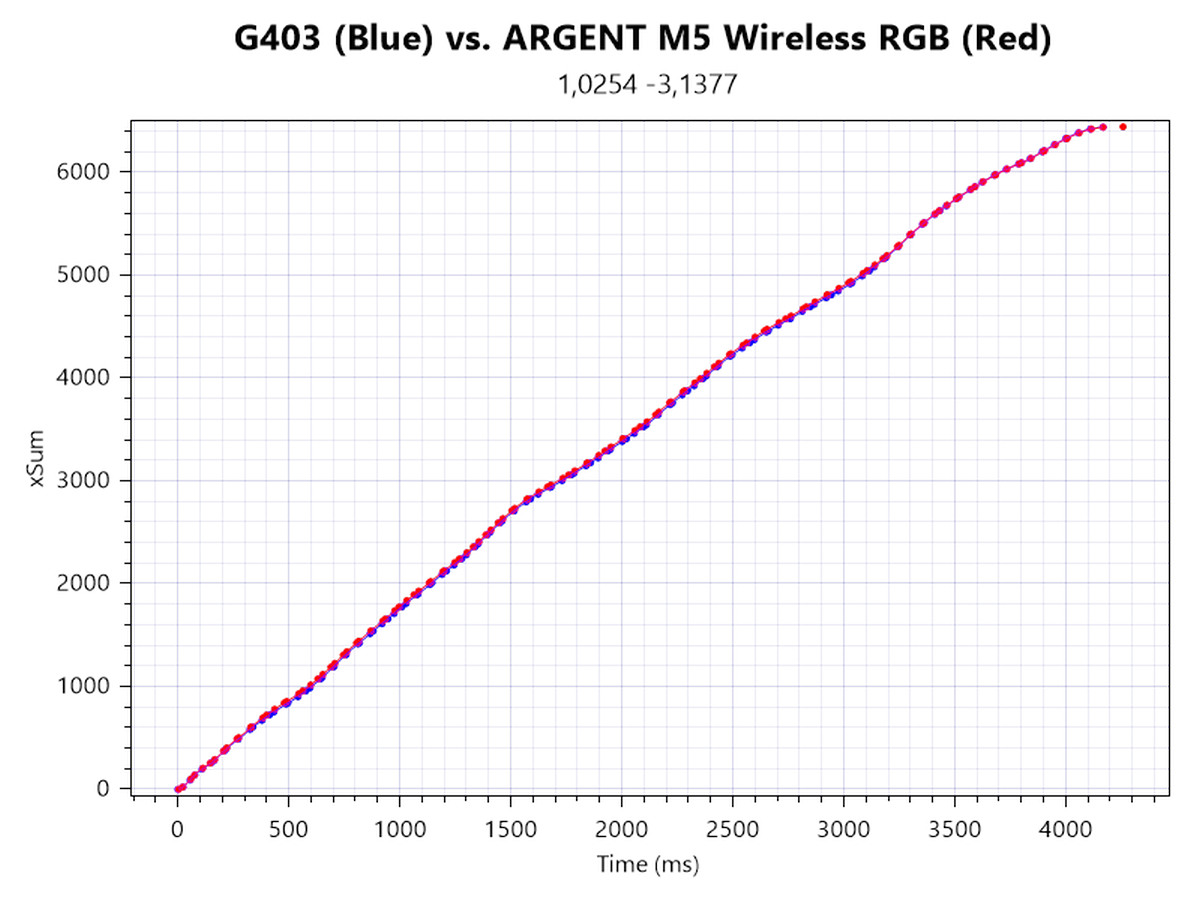
What people typically mean when they talk about "acceleration" is speed-related accuracy variance (or short SRAV). It's not about the mouse having a set amount of inherent positive or negative acceleration, but about the cursor not traveling the same distance if the mouse is moved the same physical distance at different speeds. The easiest way to test this is by comparison with a control subject that is known to have very low SRAV, which in this case is the G403. As you can see from the plot, no displacement between the two cursor paths can be observed, which confirms that SRAV is very low.
Perfect Control Speed
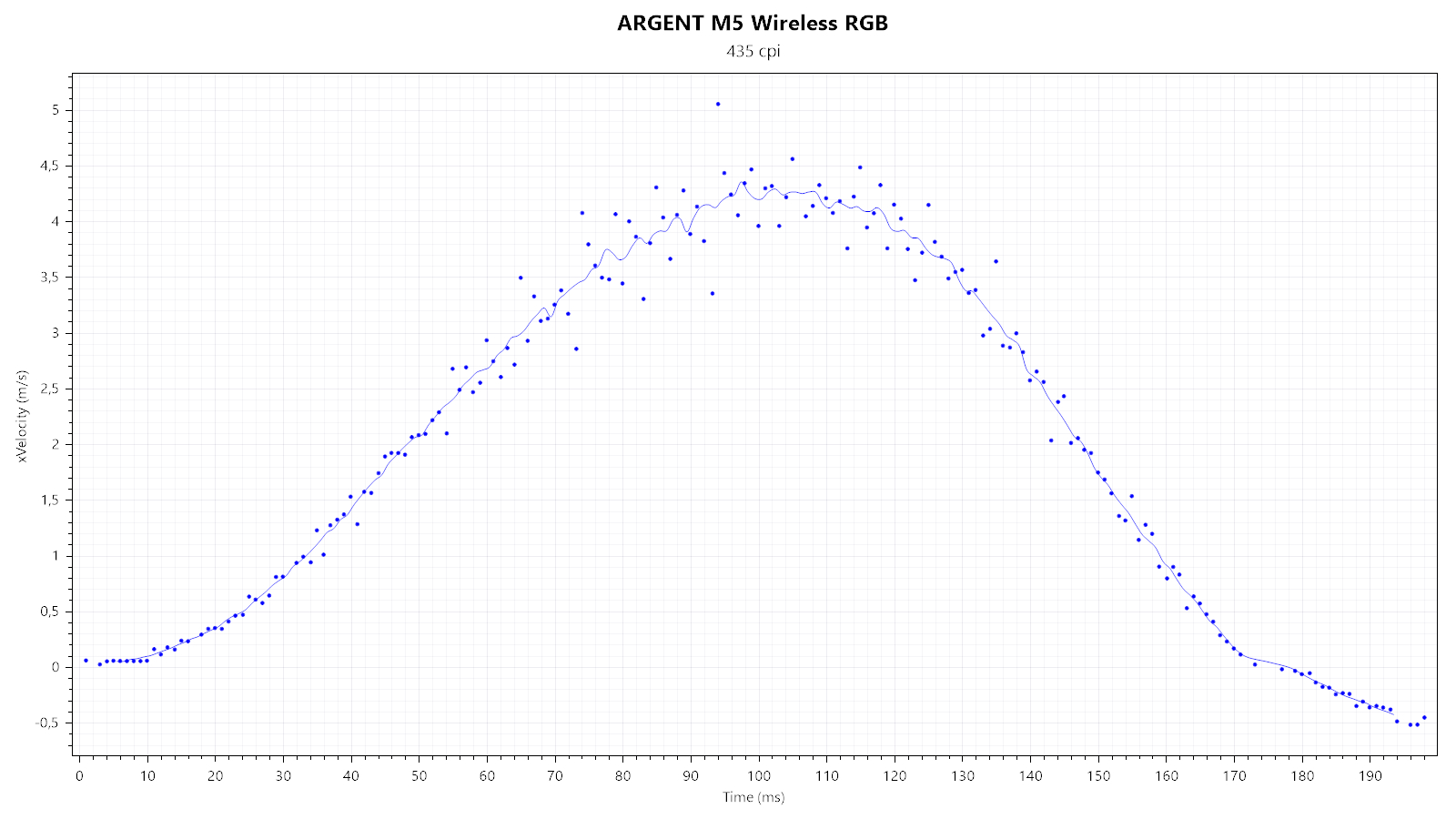
Perfect Control Speed (or PCS for short) is the maximum speed up to which the mouse and its sensor can be moved without the sensor malfunctioning in any way. I've only managed to hit a measly 4.5 m/s (which is within the proclaimed PCS range), at which no sign of the sensor malfunctioning can be observed.
Polling Rate Stability
Considering the ARGENT M5 Wireless RGB is usable as a regular wired mouse as well, I'll be testing polling-rate stability for both wired and wireless use.Wired testing
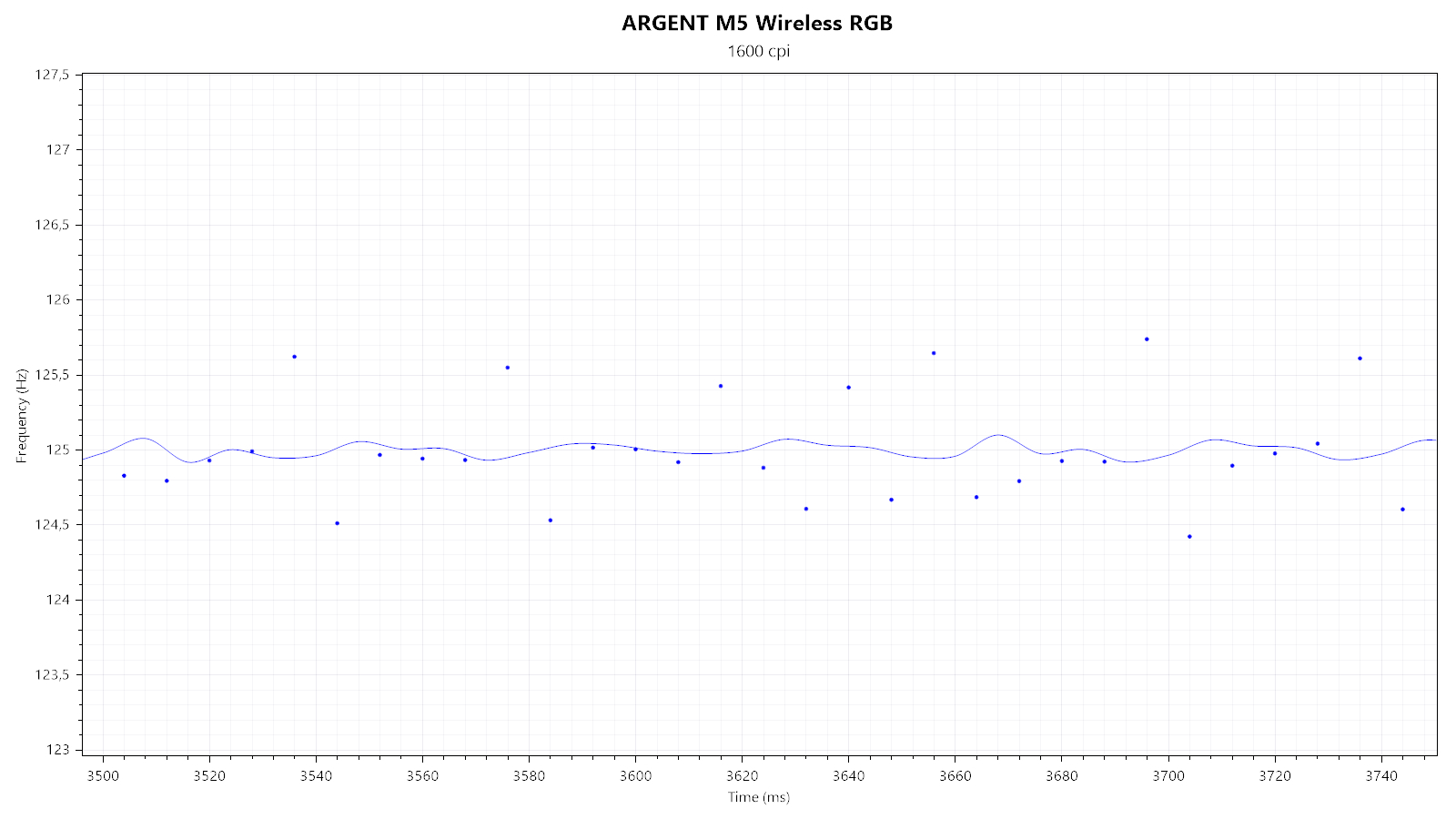
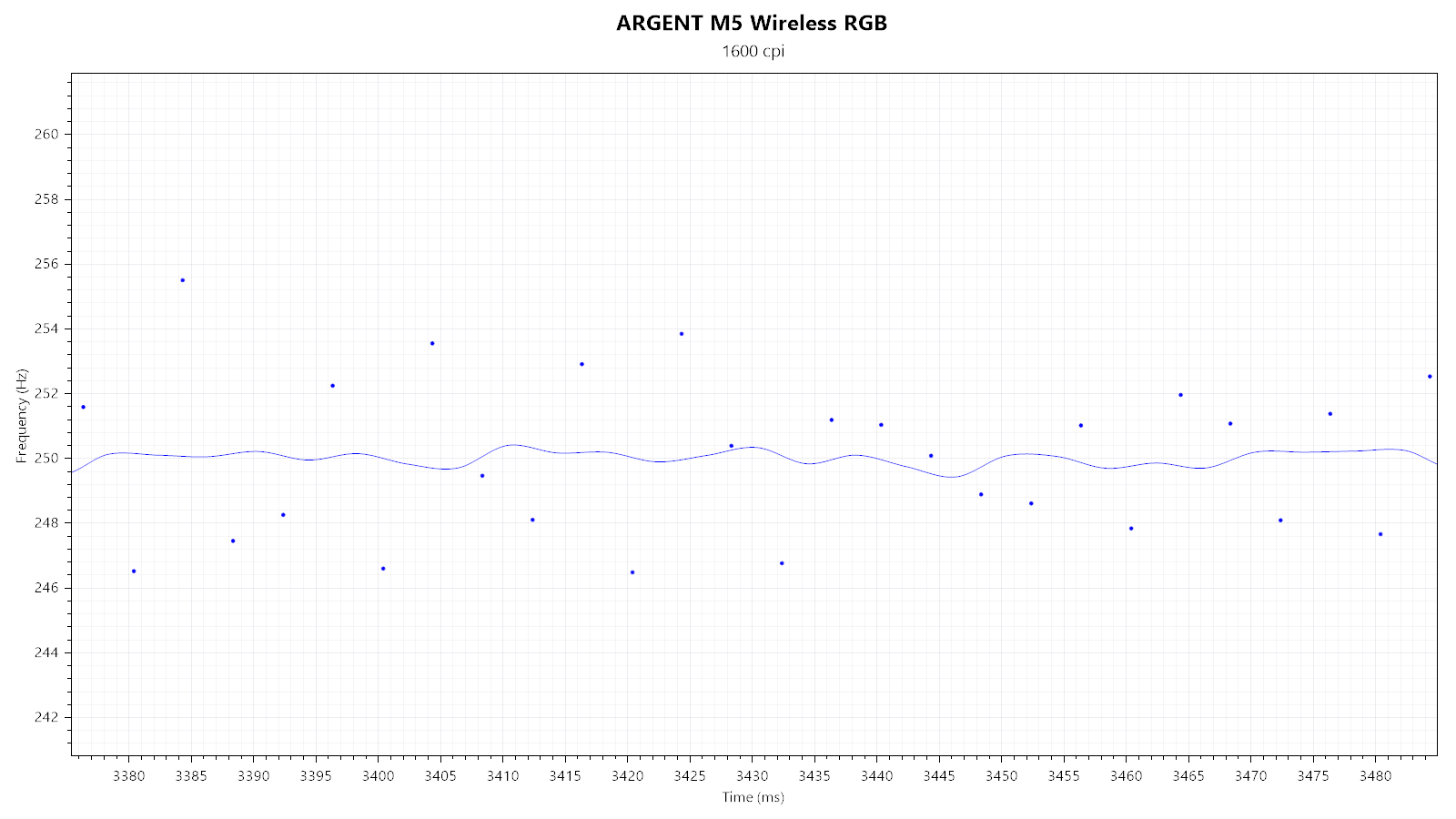
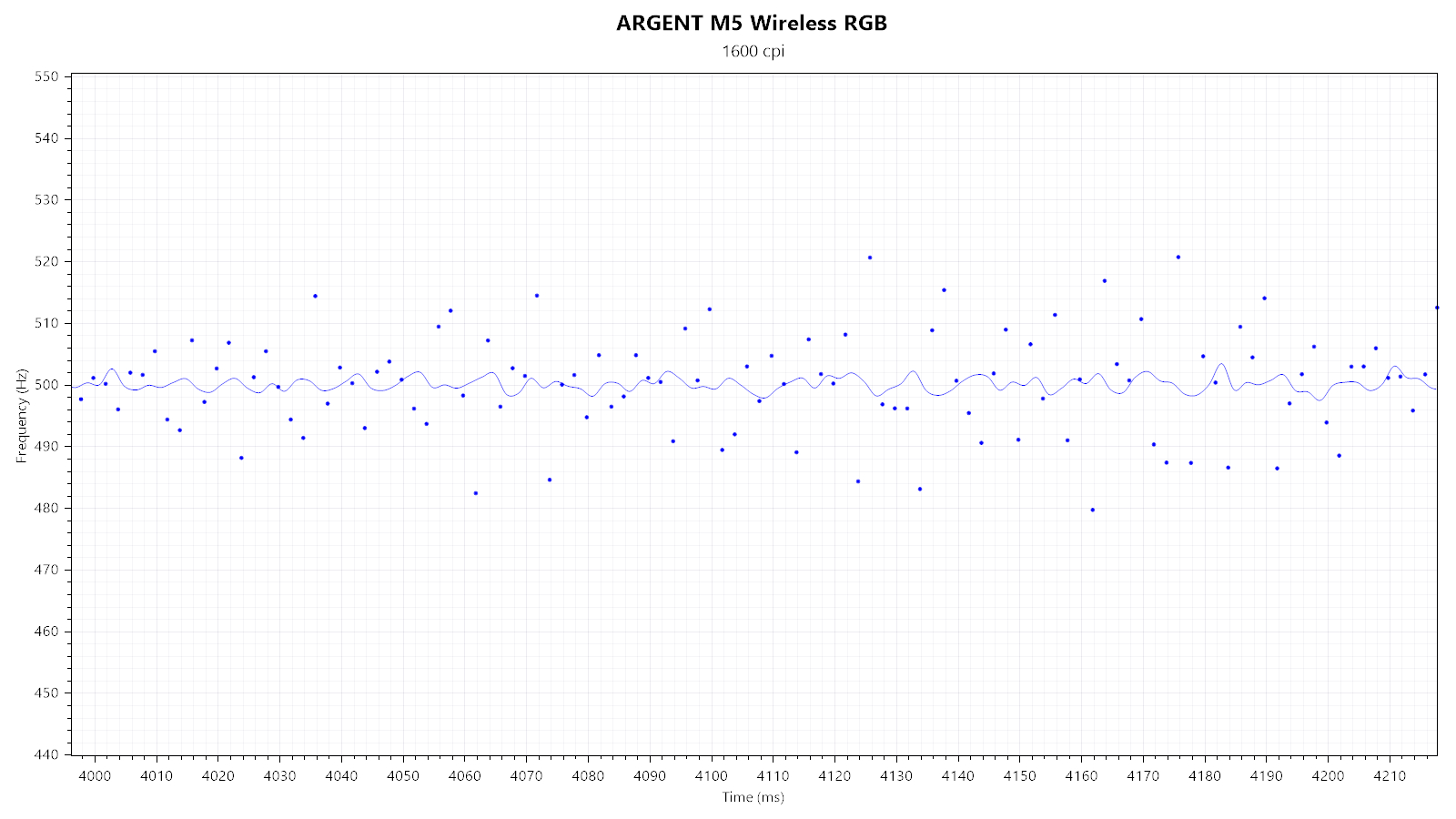
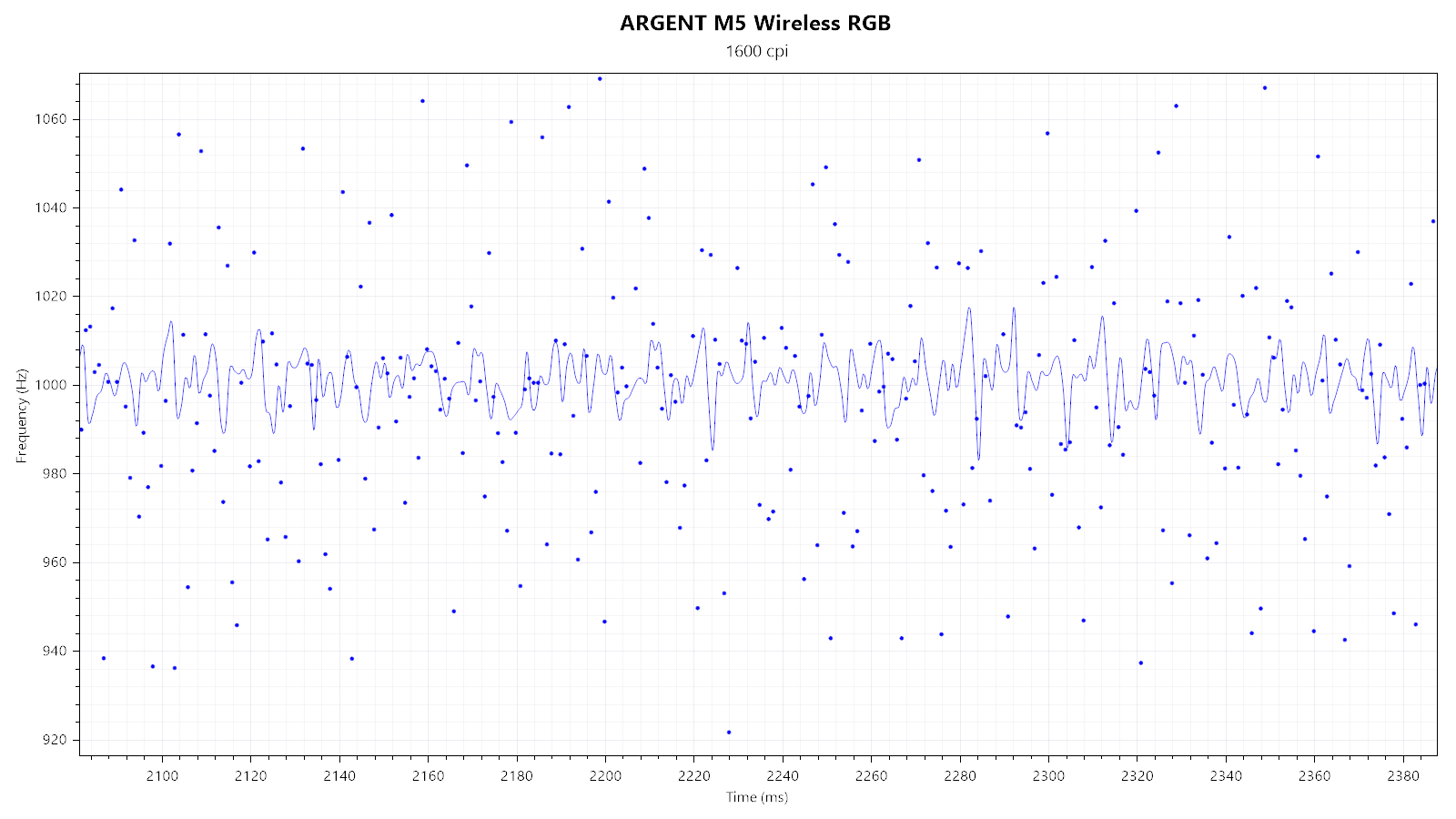
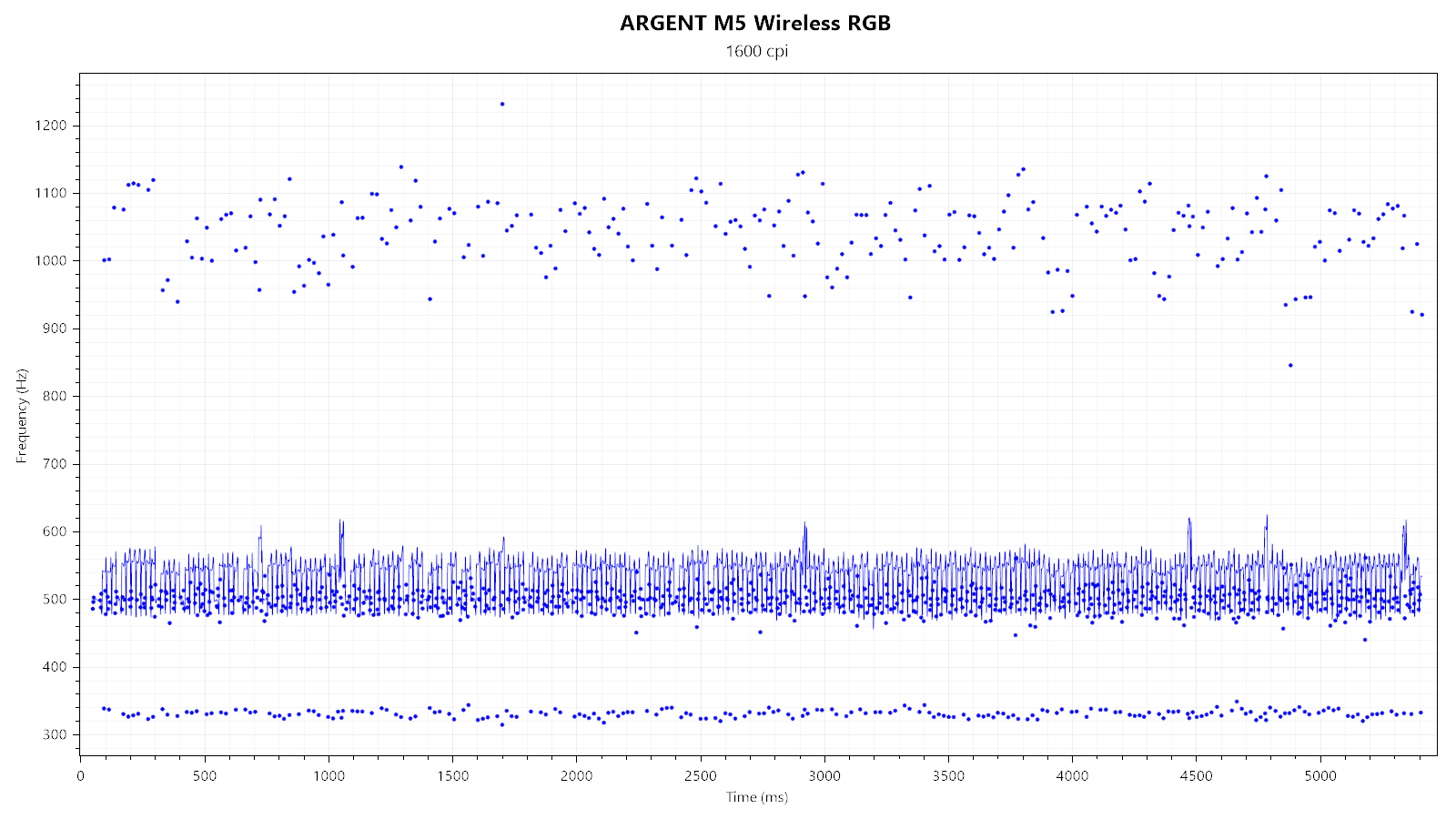
All available polling rates (125, 250, 500, and 1000 Hz) look and perform fine; that is, except for 500 Hz when the Wave lighting effect is active:
Wireless testing
For wired mice, polling-rate stability merely concerns the wired connection between the mouse (SPI communication) and the USB. For wireless mice, another device that needs to be kept in sync between the first two is added to the mix: the wireless dongle/wireless receiver. I'm unable to measure all stages of the entire end-to-end signal chain individually, so testing polling-rate stability at the endpoint (the USB) has to suffice here.
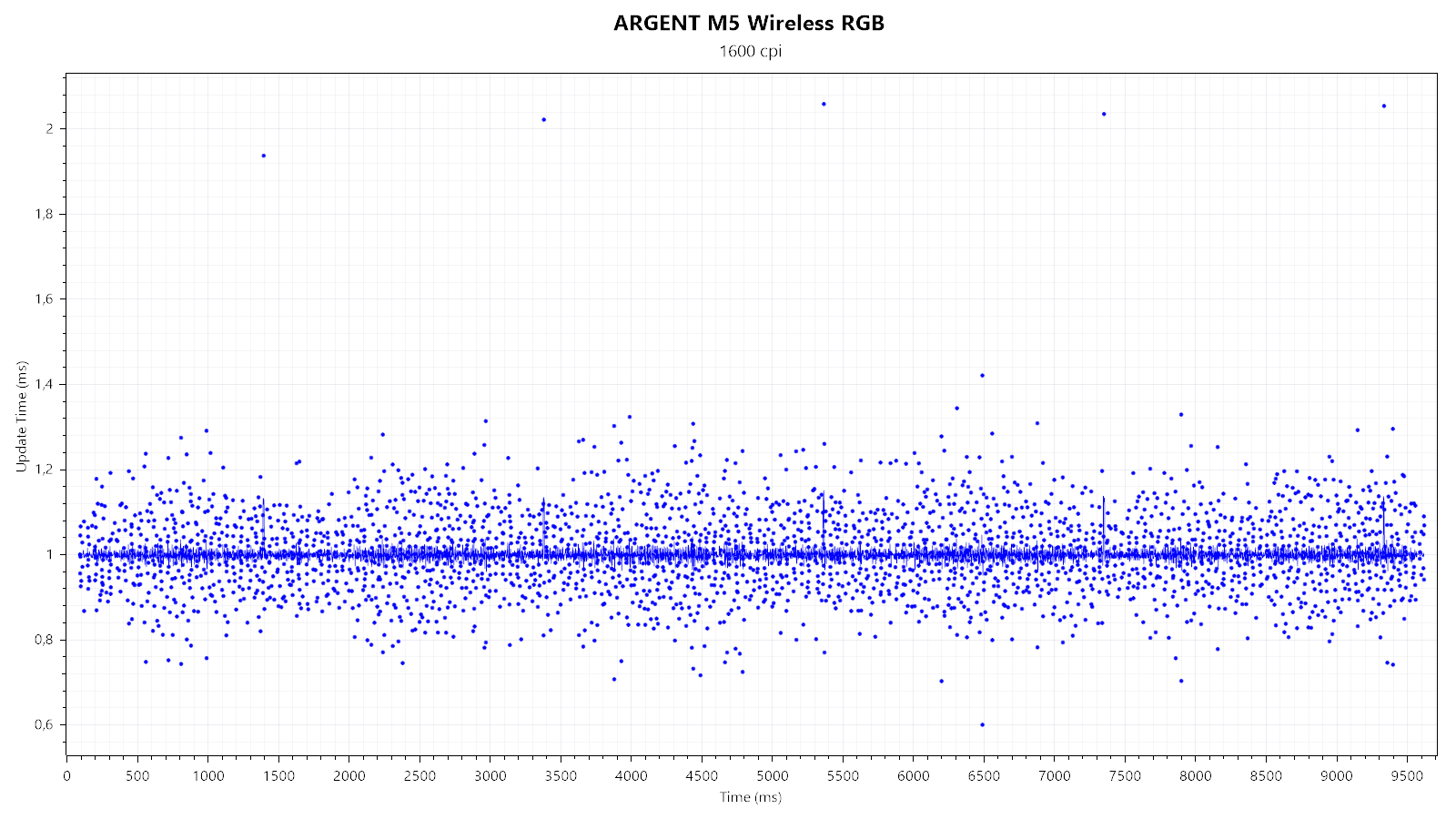
First, I'm testing whether SPI, wireless, and USB communication are synchronized. Any of these being out of sync would be indicated by at least one 2 ms report, which would be the result of any desynchronization drift accumulated over time. Multiple 2 ms reports are visible, indicating desynchronization drift.
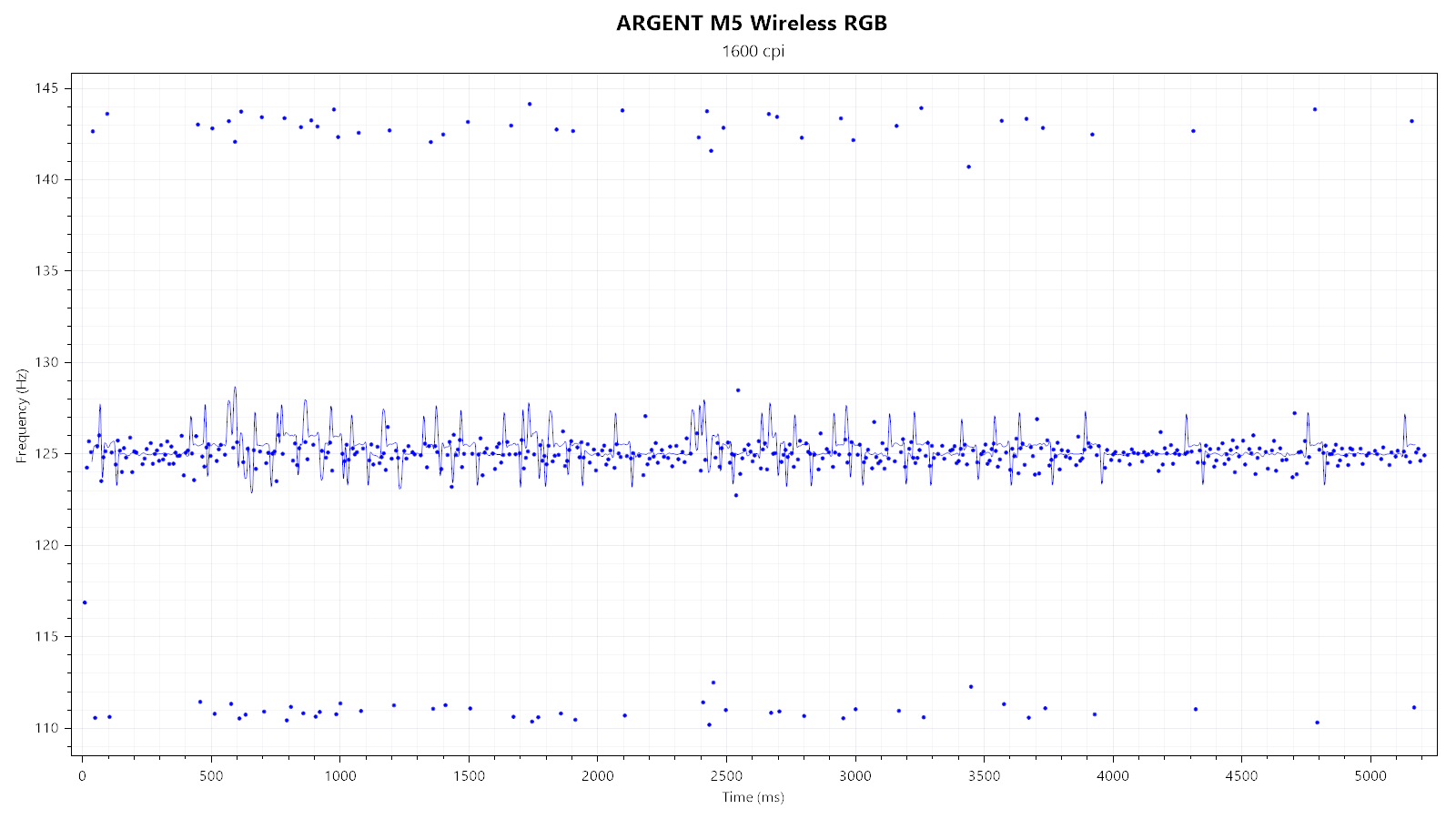
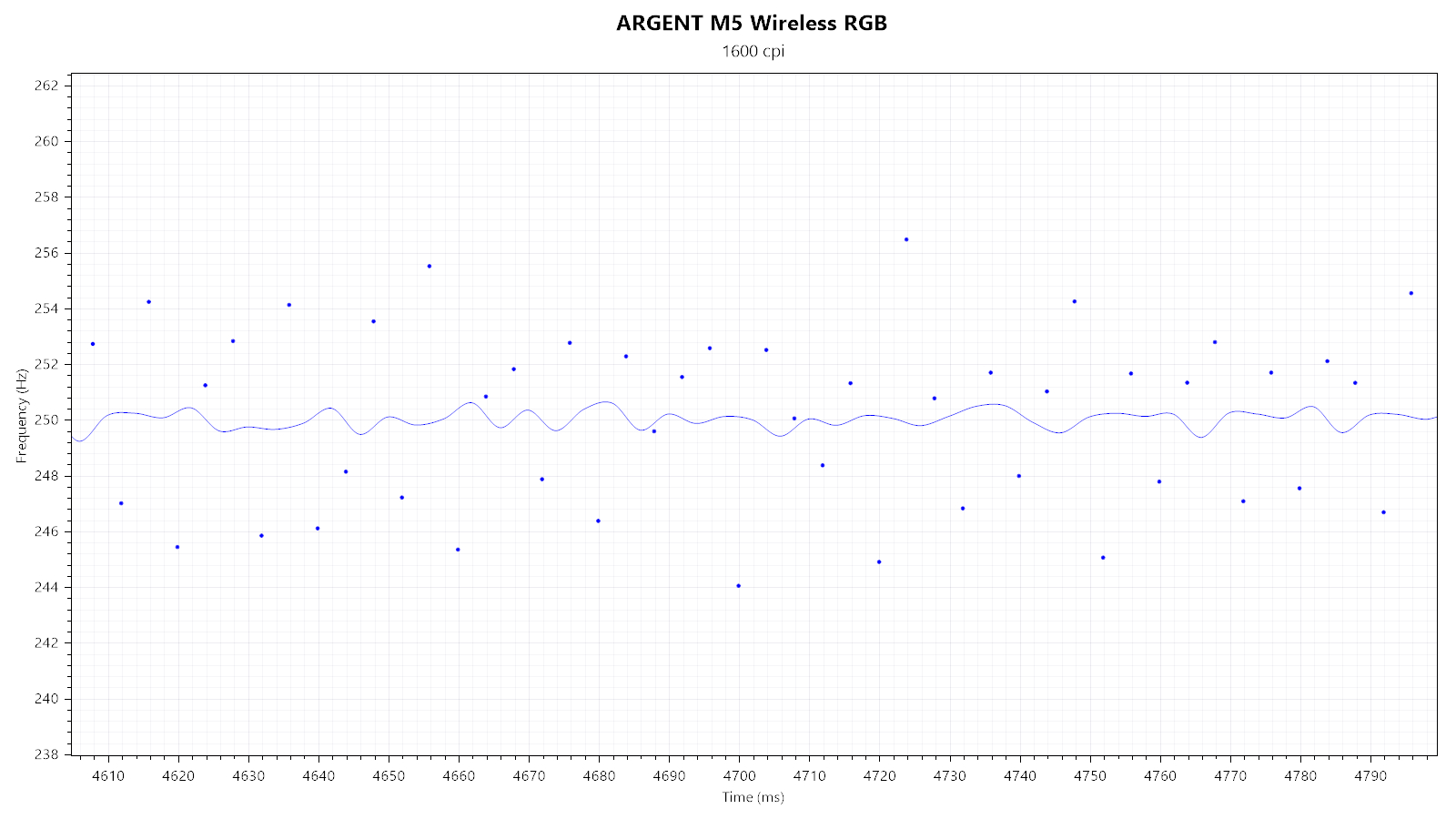
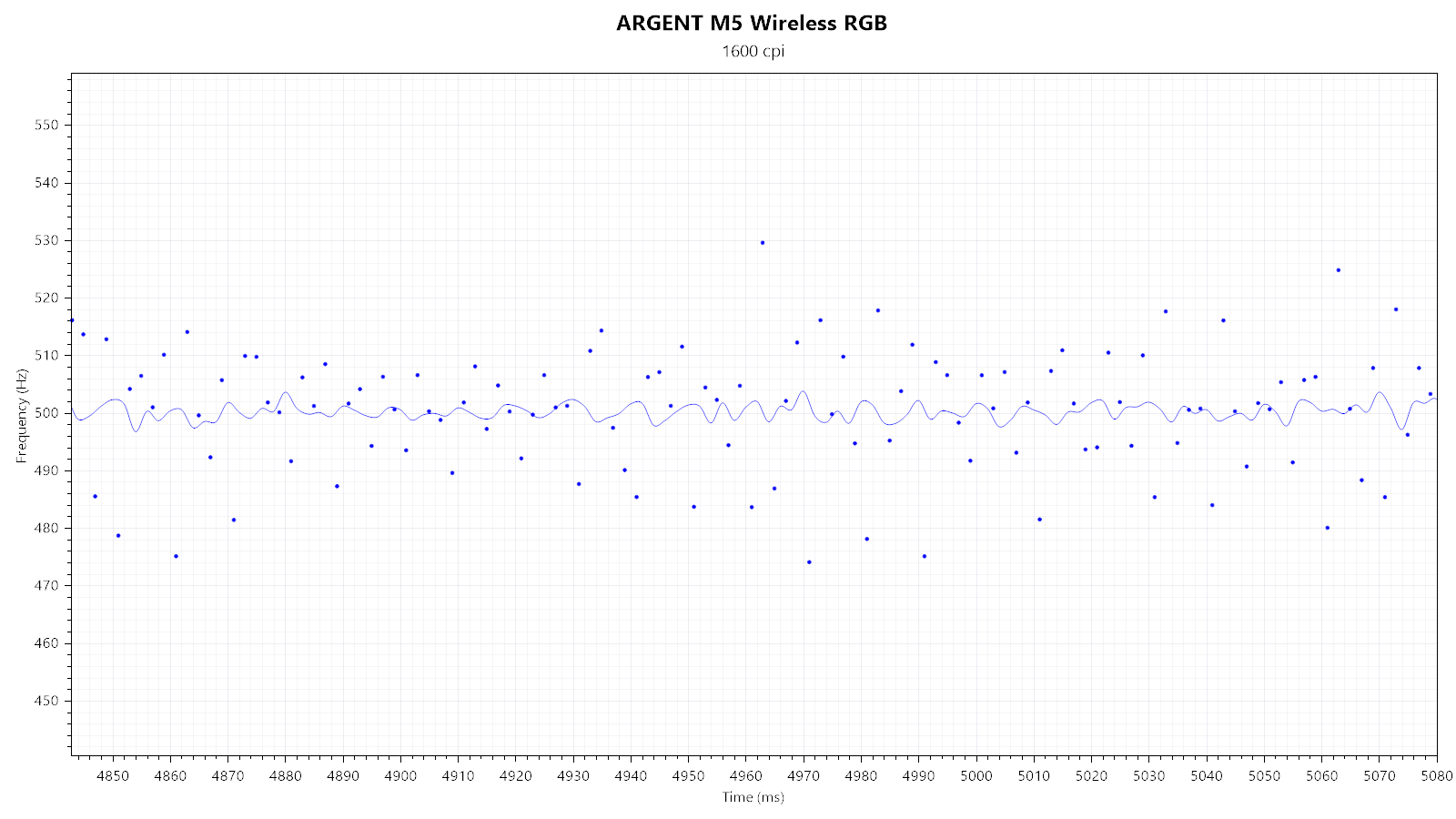
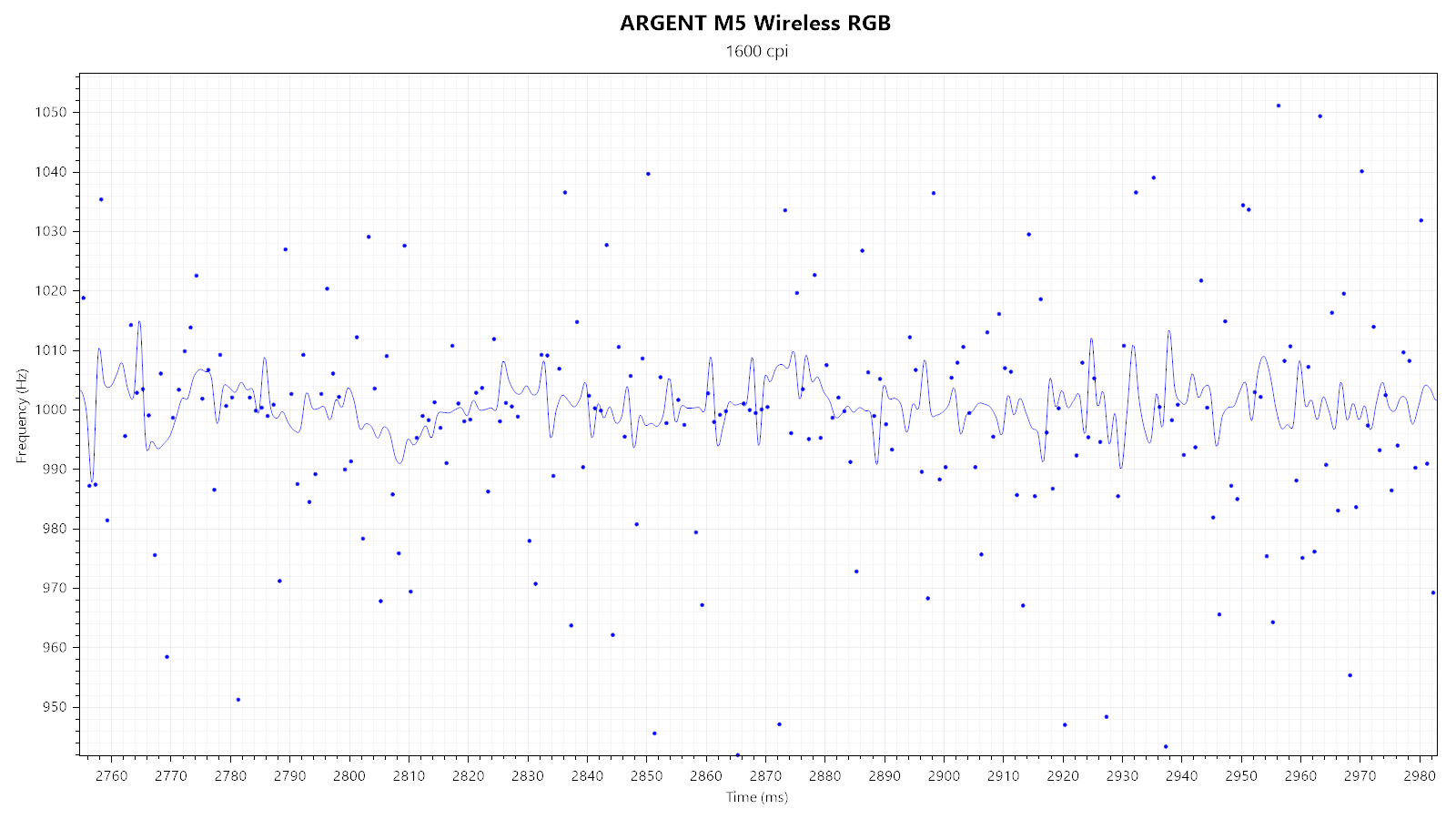
Second, I'm testing the general polling-rate stability of the individual polling rates in wireless mode. Running the ARGENT M5 Wireless RGB at a lower polling rate can have the benefit of extending battery life. Whereas 250, 500, and 1000 Hz look and perform fine, 125 Hz is entirely broken. Additionally, 500 Hz still doesn't gel well with the Wave lighting effect.
Paint Test
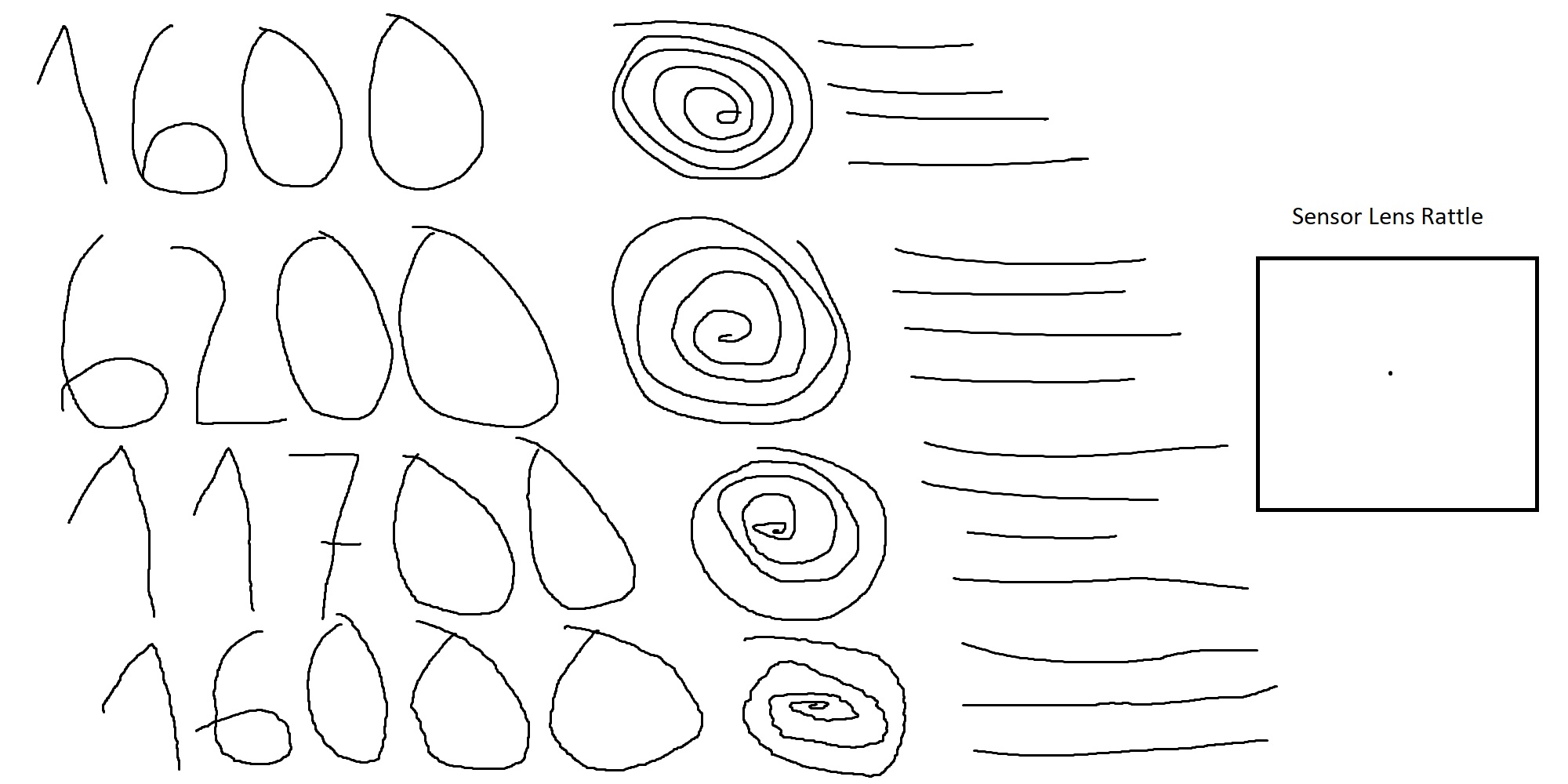
This test is used to indicate any potential issues with angle snapping (non-native straightening of linear motion) and jitter, along with any sensor lens rattle. As you can see, no issues with angle snapping can be observed. No jitter is visible at 1600 CPI. 6200 CPI has the first level of smoothing applied and barely shows any jitter. The second level of smoothing is applied at 11,700 CPI, which displays some jitter regardless. 16,000 CPI has major jitter. Lastly, there is no lens movement.
Lift-off Distance
The ARGENT M5 Wireless RGB does not offer any LOD adjustment options. This is unfortunate as the 3335 would be fully capable of it. The sensor tracks at a height of 1 DVD, but not at a height of 2 DVDs (1.2 mm<x<2.4 mm, x being LOD height). Keep in mind that LOD may vary slightly depending on the mousing surface (pad) it is being used on.Click Latency
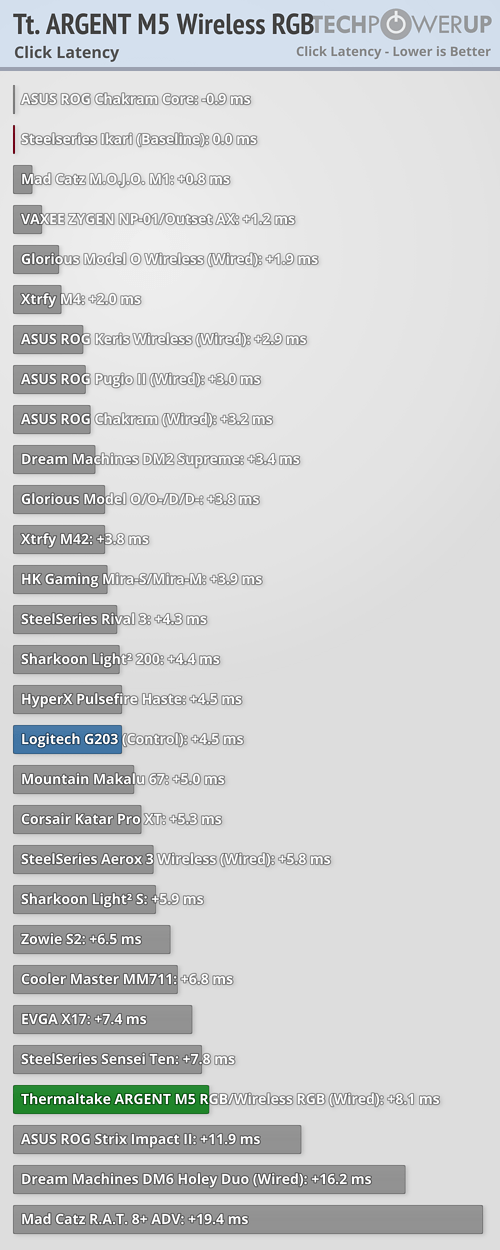
Since mechanical switches are being used for the buttons in most computer mice, debouncing is required in order to avoid unintended double clicks. Debouncing typically adds a delay (along with any potential processing delay), which shall be referred to as click latency. As there is no way to measure said delay directly, it has to be done by comparing it to a control subject, which in this case is the Logitech G203. In wired mode and with button response time set to 8 ms, click latency has been measured to be roughly +8.1 ms when compared to the SteelSeries Ikari, which is considered as the baseline with 0 ms. Please keep in mind that the measured value is not the absolute click latency. Comparison data comes from this thread as well as my own testing, using qsxcv's program.
The main button switches were measured to be running at 1.83 V. Given the same switches were running at 3.3 V in the wired M5 RGB, it is possible these switches may not be running within specifications.
Nov 15th, 2026 08:55 CST
change timezone
Latest GPU Drivers
New Forum Posts
- budget home NAS – X79, X99 or another platform? (149)
- WireView Pro II GPU Alignment: Wired | Variant: Black (1)
- Planning for Prolonged High Prices and Maintaining What You Already Have (74)
- Technical Issues - TPU Main Site & Forum (2026) (409)
- What generation of Wi-Fi do you use at home (98)
- I'll flash a ASUS ROG Strix RX480 O8G in Cause of Code 43, as a Newbie (5)
- Honestly, do you care about GTA VI? (58)
- Recommendations Wanted - Affordable Enterprise SSD for Boot (4)
- Is this anyhow possible, that a GPU (ROG Strix RX480 O8G) can crash the whole PC after "ReFlash" in normal Mode? (2)
- WarpCoreBench scores! (47)
Popular Reviews
- AMD Zen 6 Technical Deep Dive
- ASUS ROG Strix B850-I Gaming Wi-Fi7 W Review
- Corsair HX1000i Shift Crystal Review
- Upcoming Hardware Launches 2027 (Updated Nov 2026)
- Montech King 95 3D PRO Review
- NZXT C1200 Platinum Review
- NZXT H7 RGB+ Review
- NZXT H5 Review
- Phantom Blade Zero Performance Benchmark Review - 35 GPUs Tested
- AMD Ryzen 7 9800X3D Review - The Best Gaming Processor
TPU on YouTube
Controversial News Posts
- NVIDIA Co-Founder and CEO Jensen Huang Officially Resigns (412)
- OpenAI CEO Argues Home PCs Waste the World's Limited DRAM Supply (152)
- NVIDIA Launches Investigation Into Jensen Huang's Relationship With Suspected Chinese Spy (136)
- Intel "Raptor Lake Next" 16-Core and 20-Core CPUs Surface (130)
- Open Letter Asking NVIDIA to Reinstate Jensen Huang Passes 115,000 Signatures (109)
- Legendary Game Studio BioWare Shuts Down Following EA Layoffs (104)
- Dell CEO Says the Memory Shortage Will Get Worse in 2027 (95)
- NVIDIA GeForce RTX 50-Series Scheduled for up to $500 Price Hike This Week (89)