 0
Ugreen NASync DXP4800 GT Review
Software & the mobile app »The setup


Since we reviewed the NASync DXP4800 Plus, the setup process has been streamlined and takes a lot less time. That said, there are still several steps to take once your NAS is ready to use, but this is somewhat par for course when it comes to pre-built NAS devices, regardless of brand.

At this point the initial setup is done and as we're familiar with the basics of UGOS, we can skip past the somewhat annoying steps for new users. We really wish there was an option to skip past this part, but technically this isn't something you'd see more than maybe once or twice when you buy a NAS, as you don't keep re-installing the OS.
Storage setup
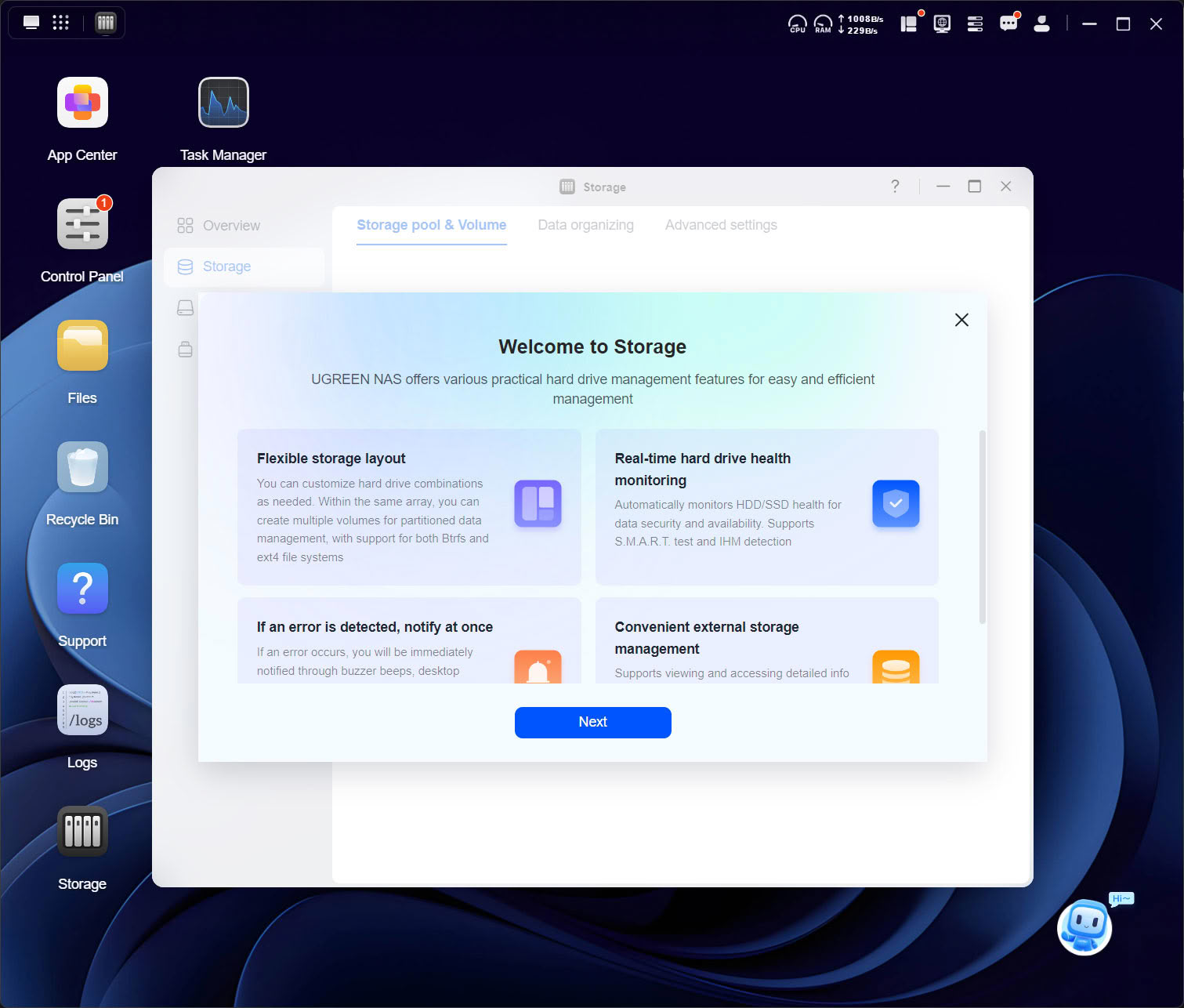
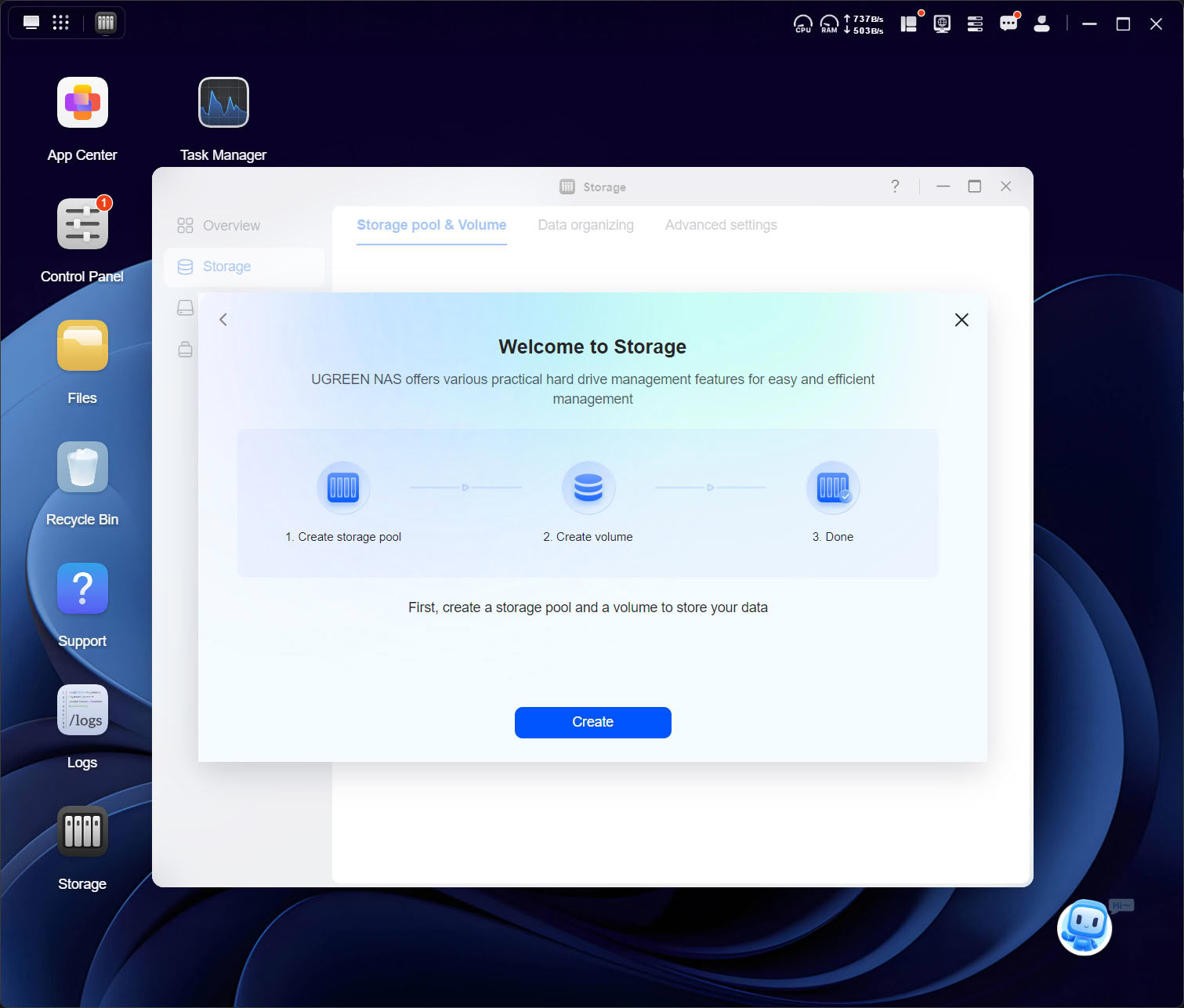
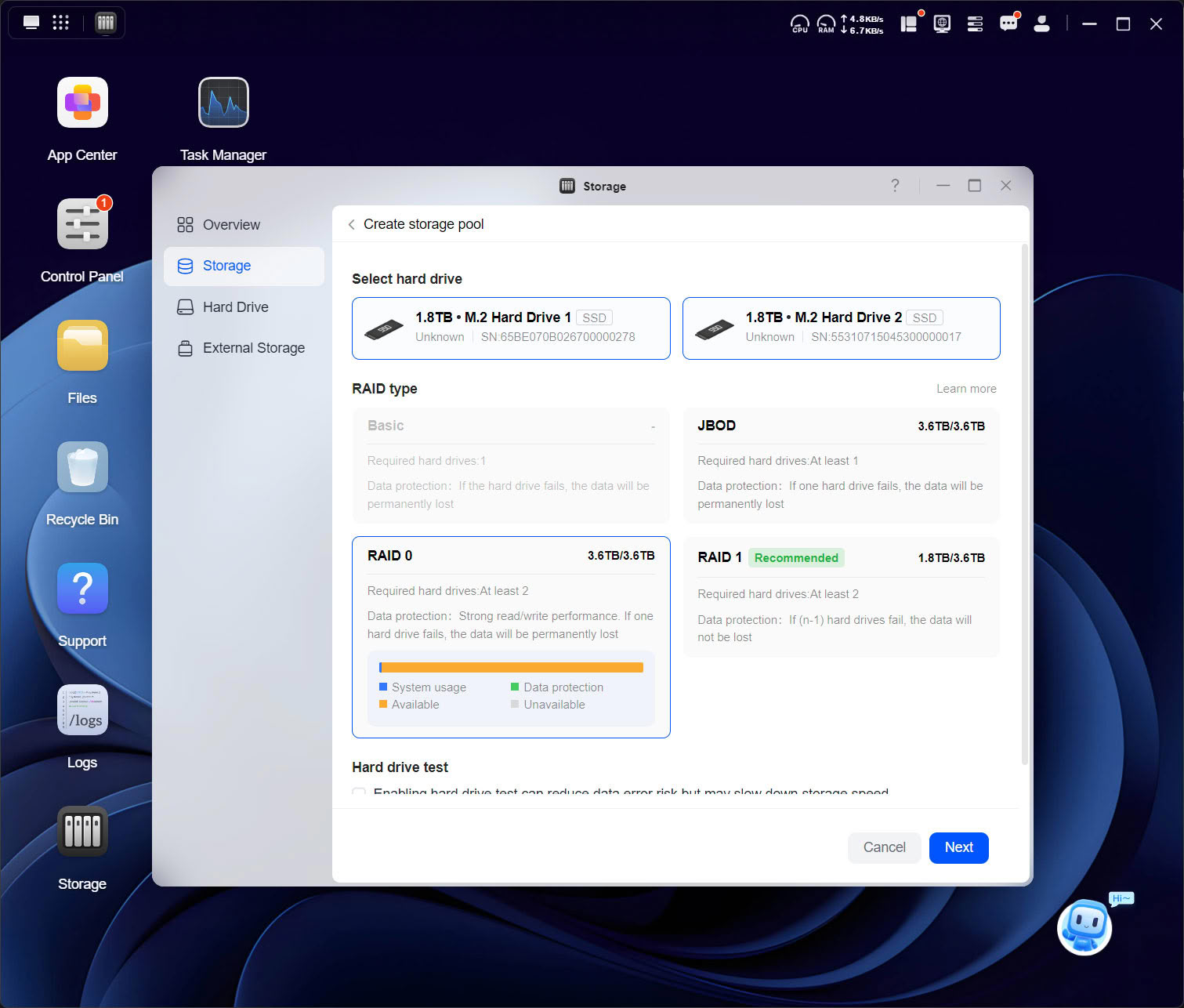
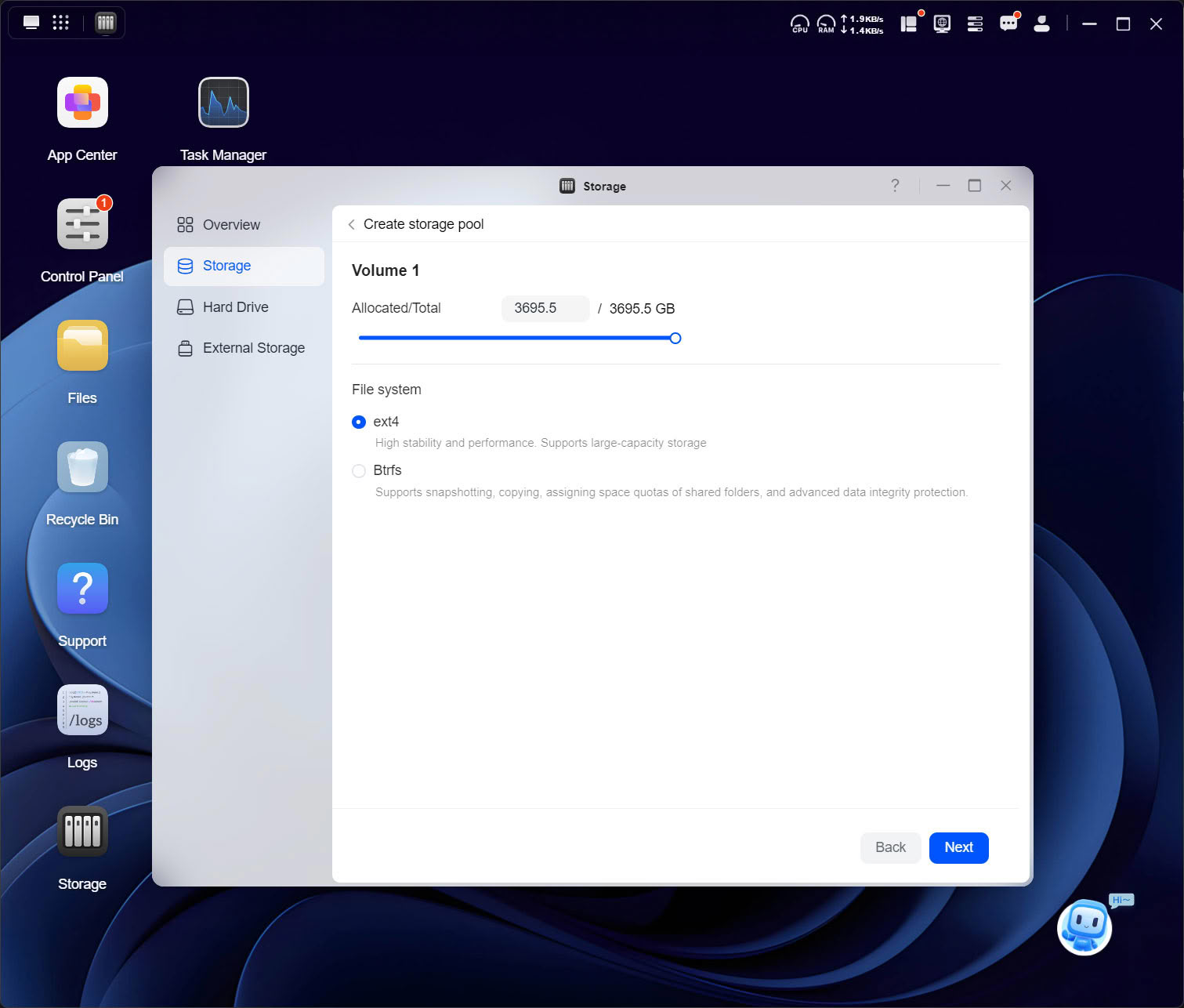
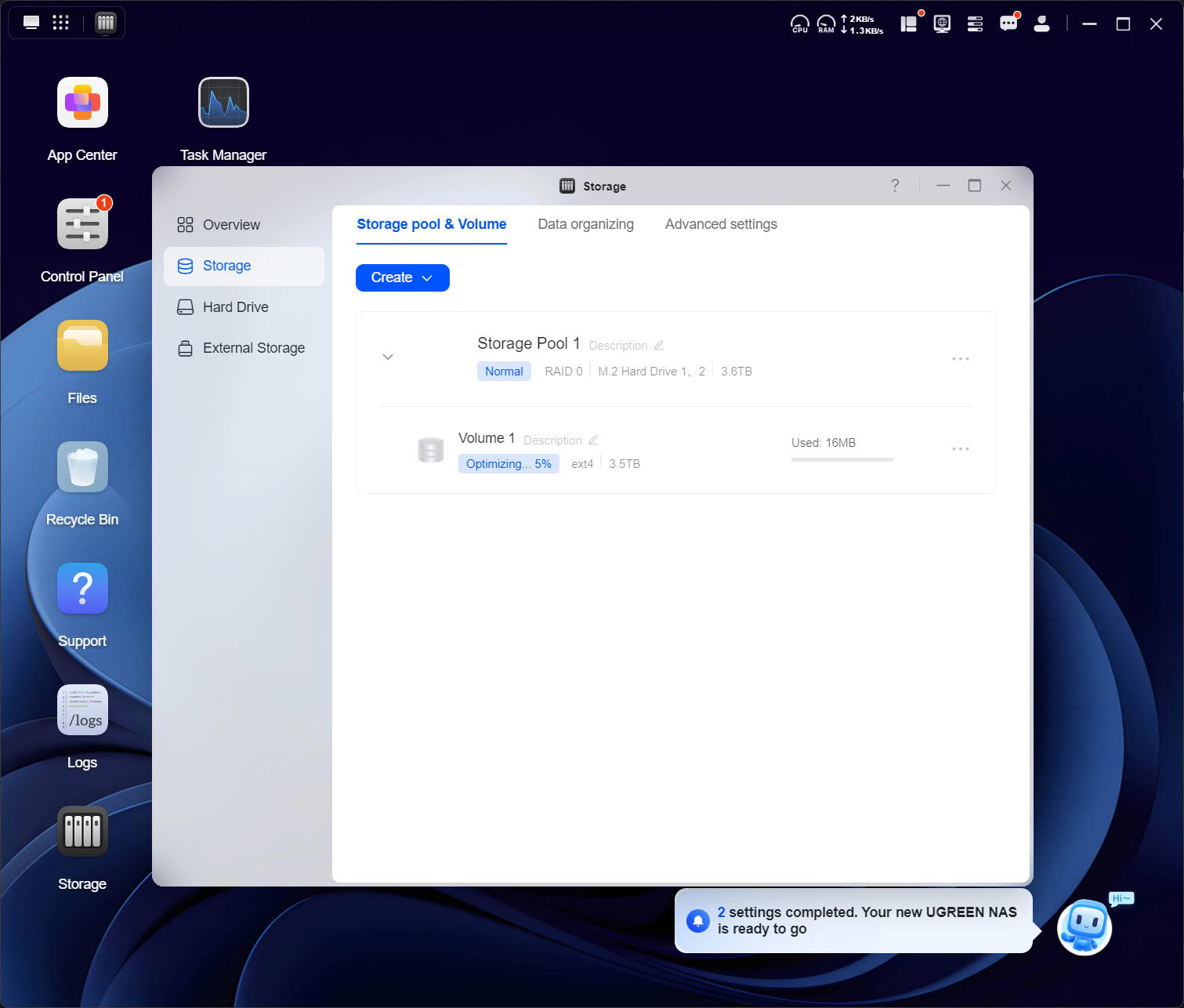
Once the basic setup is done, you're prompted by Ugreen's bot to "Create volume for using Storage," which brings us to the storage setup. Nothing has really changed here, and you simply pick the drives you want to configure and the file system you want to use.
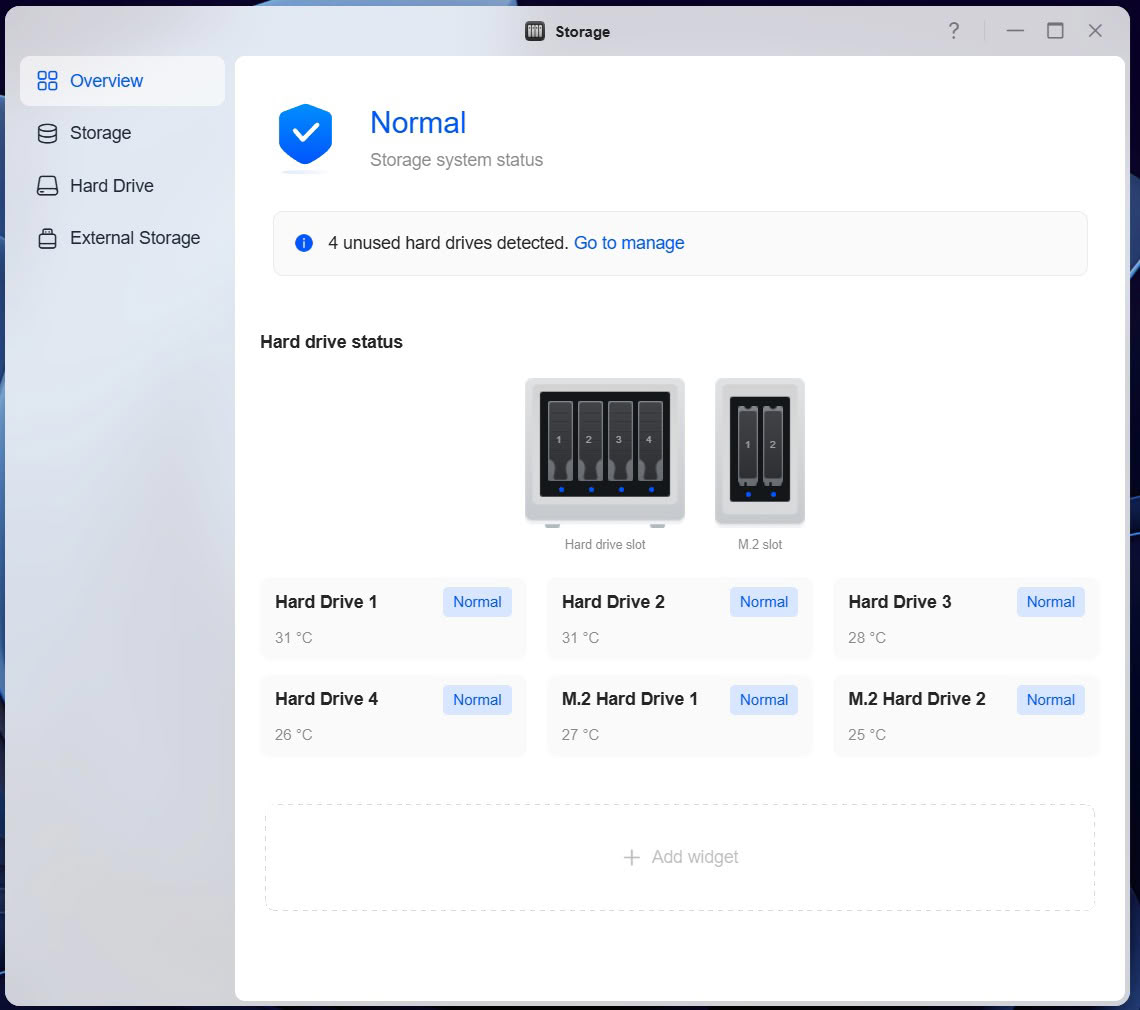
Once done, you get an overview of your drives with temperatures reported for each drive. While on the subject of temperatures, the SSDs don't get much in terms of fresh air from the fans, but the extra thick thermal pads appear to do their job, even though they only touch the small hatch in the chassis, which ends up being used as a heatsink.
Disk Configuration
Below is the output from the lsblk command on Linux, where mmcblk0 is the eMMC OS drive.NAME MAJ:MIN RM SIZE RO TYPE MOUNTPOINTS
loop0 7:0 0 755.1M 1 loop /rootfs/base
loop1 7:1 0 82.5M 1 loop /rootfs/kernel
loop2 7:2 0 144.3M 1 loop /rootfs/apt
loop3 7:3 0 324.5M 1 loop /rootfs/fw
loop4 7:4 0 4K 1 loop /rootfs/oem
sda 8:0 0 3.6T 0 disk
├─sda1 8:1 0 15.3G 0 part
└─sda2 8:2 0 3.6T 0 part
└─md1 9:1 0 3.6T 0 raid1
└─ug_AC5A51_1791559486_pool1-volume1 253:2 0 3.6T 0 lvm
└─ug_AC5A51_1791559486_pool1-volume1_bcache_data 253:3 0 3.6T 0 dm
└─bcache0 251:0 0 3.6T 0 disk /volume1
sdb 8:16 0 3.6T 0 disk
├─sdb1 8:17 0 15.3G 0 part
└─sdb2 8:18 0 3.6T 0 part
sdc 8:32 0 3.6T 0 disk
├─sdc1 8:33 0 15.3G 0 part
└─sdc2 8:34 0 3.6T 0 part
sdd 8:48 0 3.6T 0 disk
├─sdd1 8:49 0 15.3G 0 part
└─sdd2 8:50 0 3.6T 0 part
└─md1 9:1 0 3.6T 0 raid1
└─ug_AC5A51_1791559486_pool1-volume1 253:2 0 3.6T 0 lvm
└─ug_AC5A51_1791559486_pool1-volume1_bcache_data 253:3 0 3.6T 0 dm
└─bcache0 251:0 0 3.6T 0 disk /volume1
mmcblk0 179:0 0 58.3G 0 disk
├─mmcblk0p1 179:1 0 256M 0 part /boot
├─mmcblk0p2 179:2 0 2G 0 part
├─mmcblk0p3 179:3 0 10M 0 part /mnt/factory
├─mmcblk0p4 179:4 0 2G 0 part /rootfs
├─mmcblk0p5 179:5 0 2G 0 part [SWAP]
├─mmcblk0p6 179:6 0 4G 0 part /ugreen
├─mmcblk0p7 179:7 0 48G 0 part /overlay
└─mmcblk0p128 179:128 0 239K 0 part
zram0 252:0 0 924M 0 disk [SWAP]
zram1 252:1 0 924M 0 disk [SWAP]
zram2 252:2 0 924M 0 disk [SWAP]
zram3 252:3 0 924M 0 disk [SWAP]
nvme1n1 259:0 0 1.8T 0 disk
├─nvme1n1p1 259:2 0 976M 0 part
└─nvme1n1p2 259:3 0 1.8T 0 part
└─md2 9:2 0 1.8T 0 raid1
├─ug_AC5A51_1791559486_pool1_bcache-volume1_bmeta 253:0 0 4M 0 lvm
│ └─ug_AC5A51_1791559486_pool1-volume1_bcache_data 253:3 0 3.6T 0 dm
│ └─bcache0 251:0 0 3.6T 0 disk /volume1
└─ug_AC5A51_1791559486_pool1_bcache-volume1_bdata 253:1 0 1000G 0 lvm
└─bcache0 251:0 0 3.6T 0 disk /volume1
nvme0n1 259:1 0 1.8T 0 disk
├─nvme0n1p1 259:4 0 976M 0 part
└─nvme0n1p2 259:5 0 1.8T 0 part
└─md2 9:2 0 1.8T 0 raid1
├─ug_AC5A51_1791559486_pool1_bcache-volume1_bmeta 253:0 0 4M 0 lvm
│ └─ug_AC5A51_1791559486_pool1-volume1_bcache_data 253:3 0 3.6T 0 dm
│ └─bcache0 251:0 0 3.6T 0 disk /volume1
└─ug_AC5A51_1791559486_pool1_bcache-volume1_bdata 253:1 0 1000G 0 lvm
└─bcache0 251:0 0 3.6T 0 disk /volume1
mmcblk0boot0 179:256 0 4M 1 disk
mmcblk0boot1 179:512 0 4M 1 disk
Nov 18th, 2026 14:06 CST
change timezone
Latest GPU Drivers
New Forum Posts
- Very unusual two gaming-pc scenarios. (9)
- Free Games Thread (5382)
- WarpCoreBench scores! (66)
- RX 580 2048SP 8GB Samsung – Black Screens in Games, Looking for a Compatible BIOS (3)
- DTS DCH Driver for Realtek HDA [DTS:X APO4 + DTS Interactive] (2813)
- Honestly, do you care about GTA VI? (143)
- All Final Fantasy Discussion Thread (123)
- [Poll] 12V-2x6 Connector Protection: What Are You Using? (WireView / Ampinel / Equalizer / Other / Nothing) (38)
- Wireless Internet sharing between PC and router both-ways, is it possible? (18)
- ProArt X870E-CREATOR WIFI - Bifurcation~Complication (15)
Popular Reviews
- Acemagic Retro X3 Review
- Upcoming Hardware Launches 2027 (Updated Nov 2026)
- AMD Zen 6 Technical Deep Dive
- ASUS ROG Strix B850-I Gaming Wi-Fi7 W Review
- Corsair HX1000i Shift Crystal Review
- Biwin Black Opal NV7400 2 TB Review
- Chieftec Iceberg PRO 360 DARK Review
- AMD Ryzen 7 9800X3D Review - The Best Gaming Processor
- Phantom Blade Zero Performance Benchmark Review - 35 GPUs Tested
- Pulsar Office Tour & First Look at P1 Dual-Sensor Mouse
TPU on YouTube
Controversial News Posts
- NVIDIA Co-Founder and CEO Jensen Huang Officially Resigns (477)
- Report: Jensen Huang Eyes NVIDIA Comeback (186)
- Open Letter Asking NVIDIA to Reinstate Jensen Huang Passes 115,000 Signatures (184)
- OpenAI CEO Argues Home PCs Waste the World's Limited DRAM Supply (152)
- NVIDIA Launches Investigation Into Jensen Huang's Relationship With Suspected Chinese Spy (136)
- Intel "Raptor Lake Next" 16-Core and 20-Core CPUs Surface (130)
- Legendary Game Studio BioWare Shuts Down Following EA Layoffs (104)
- Dell CEO Says the Memory Shortage Will Get Worse in 2027 (95)