 57
Ugreen NASync iDX6011 Pro Review
Performance: Synthetic Benchmarks Cont. »Some changes
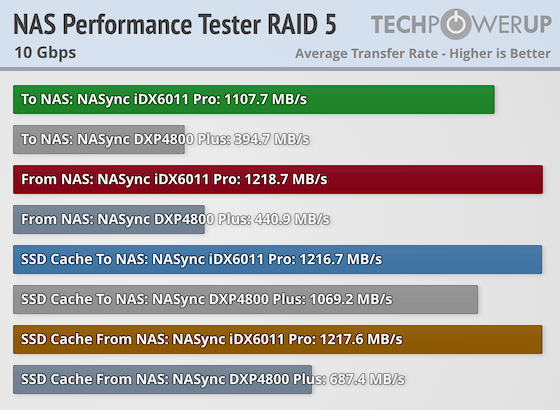
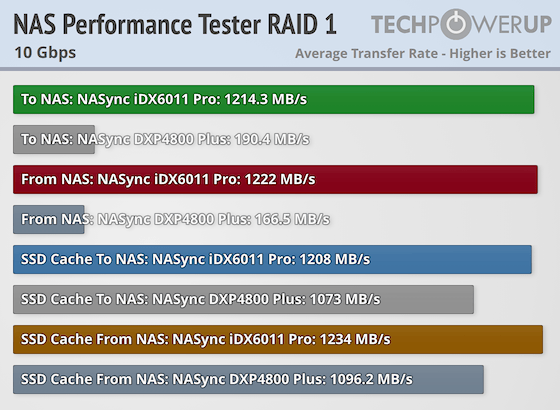
As you'll see, we've started to add comparisons in the graphs, this time we've only added the Ugreen DXP4800 Plus, which we chose due to it having a 2.5 Gbps and a 10 Gbps Ethernet interface. We will be adding a second NAS to these comparisons, but we simply didn't have time to finish testing it ahead of the NASync iDX6011 Pro deadline. We've also changed around the graphs a little bit, which will hopefully make it easier to read them. Feedback is welcome on these changes, and we'll be making adjustments over time this year to try and present the data in a clearer way than we have in the past.CrystalDiskMark
RAID 5
RAID 1
RAID 0
SSD RAID 0
Thunderbolt 4 Networking SSD RAID 0
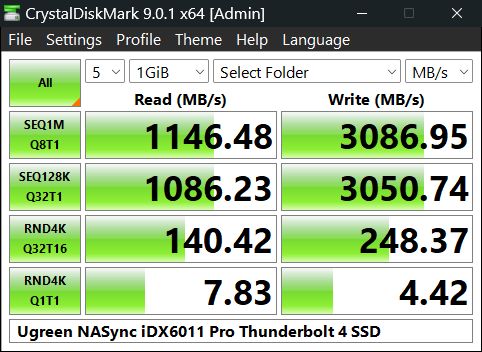
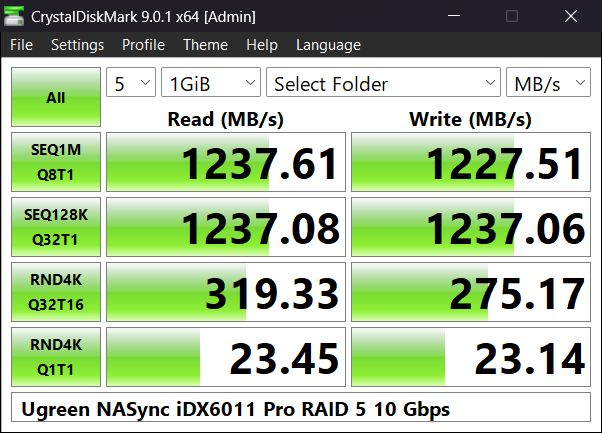
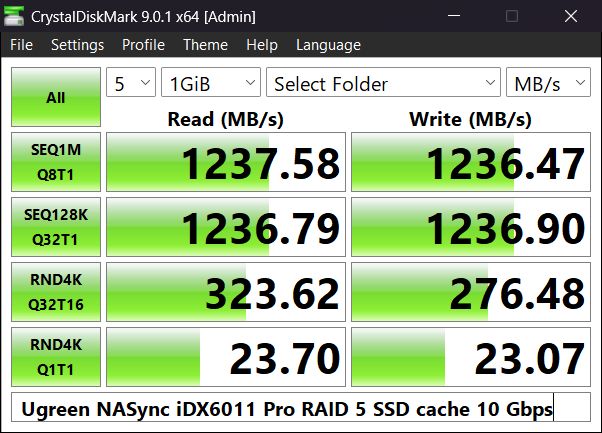
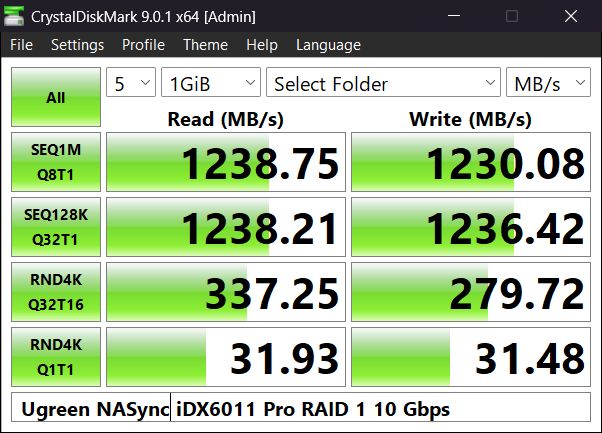
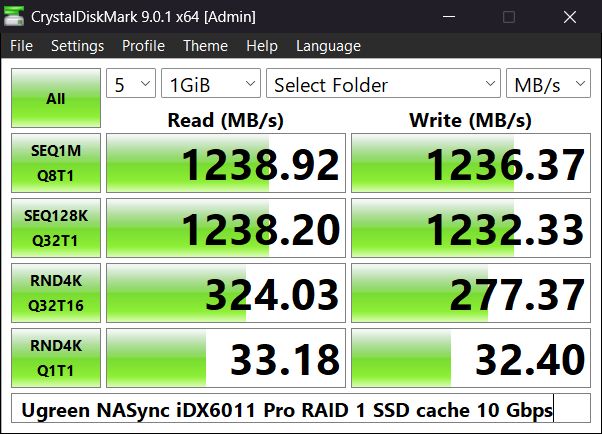
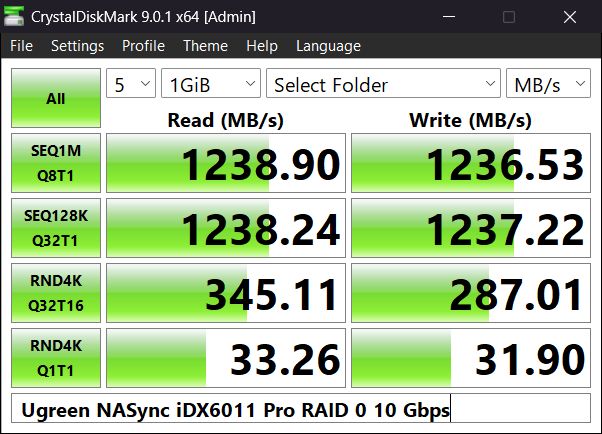
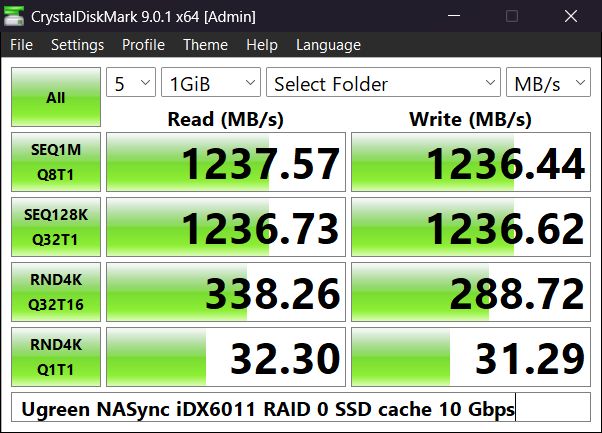
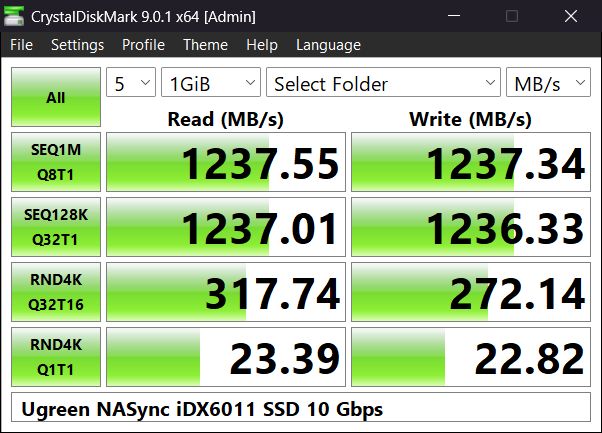
CrystalDiskMark is a simple drive benchmark that gives us a quick and easy baseline for the drive performance. We ran the benchmark using RAID 0, 1, and 5, but we also ran it on a pair of NVMe SSDs in RAID 0 to see if that made any difference. It seems like the 64 GB of RAM in the NASync iDX6011 Pro makes sure there are no bottlenecks for the sequential drive tests, but the random 4K test with low queue depths performed a bit unexpectedly, with RAID 5 and the SSDs being the slower ones, oddly enough. We also ran a test using Thunderbolt networking, but the results are not quite what we expected. Sequential write speeds are as you can see, very fast, at twice the speed compared to 10 Gbps Ethernet, but the read speeds were actually slower than over Ethernet. The random 4K results are also terrible, for lack of a better word, considering we tested against two SSDs in RAID 0. We should point out that Windows 11 reports the network interface as a "USB4 P2P Network Adapter," but that shouldn't make any difference, as the Acer laptop used is all Intel based.
iPerf3
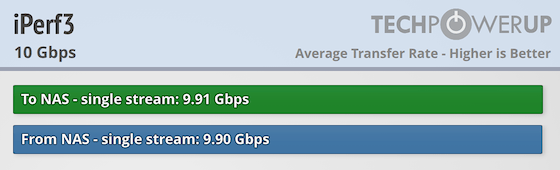
To make sure that the networking interface is working as intended, we ran a quick test with iPerf3. Nothing really stood out here, as we expected.
NAS Performance Tester
RAID 5
RAID 1
RAID 0
SSD RAID 0
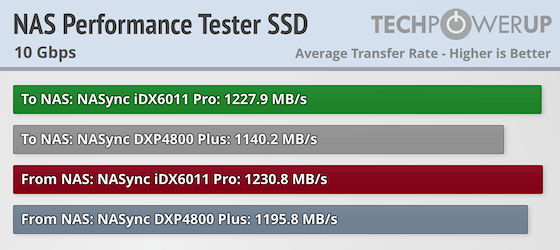
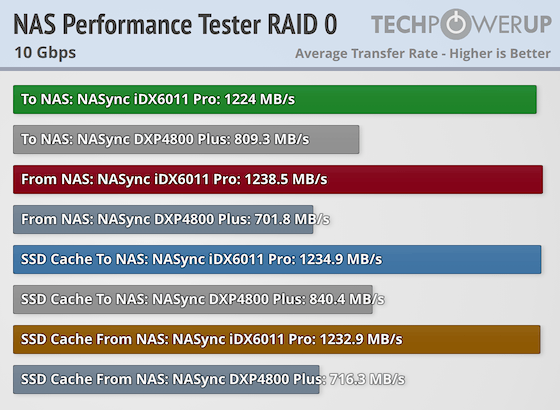
This test is simply called the NAS performance tester, and this is where we normally get to the first proper drive benchmarks. The NAS performance tester is configured to use an 8 GB dataset—which is the largest dataset available in the benchmark—that is deleted and re-created during each iteration of the test. The test runs five iterations for the read and write operations. The reason the test data is deleted between each test run is to prevent any kind of caching from taking place. However, in the case of the iDX6011, with its 64 GB of RAM, it seems like this test went straight to cache. Admittedly the data is still written to the drives, but there's lag between the test and the drive utilization, something we haven't seen on any NAS we've tested to date.
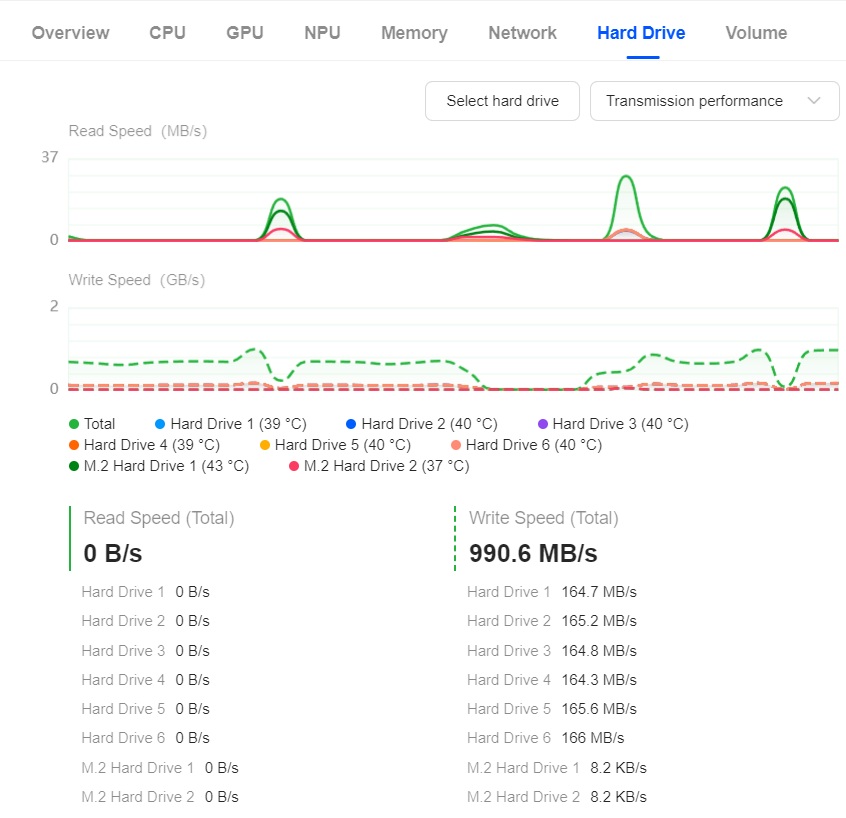
This is quite clear in the Task Manager, although we can't show you the network interface and drive utilization in parallel, we had to wait to run the next test until the drives had finished writing the data, to try and get somewhat accurate test results. In real-world usage, this is actually a good thing in most scenarios, since the cache will allow for faster copying of data to the NAS. That said, it might be worth investing in a UPS for the NASync iDX6011 Pro, since in the case of a power outage, you'd end up losing the data sitting in the cache, which could be a lot more data than what you'd lose when writing to mechanical drives or SSDs.
Nov 13th, 2026 23:22 CST
change timezone
Latest GPU Drivers
New Forum Posts
- no "PhysX" workable (9)
- What are you playing? (26215)
- Tell me about your favourite graphics card (32)
- AI generated images... (224)
- Crimson Desert (31)
- RenoDX HDR - how to view the differnce Before&After in game? (0)
- Displayport DP80 3M (10ft) cable that can achieve 80gbps stable? (5)
- I'll flash a ASUS ROG Strix RX480 O8G in Cause of Code 43, as a Newbie (1)
- Opinion on Monitor Replacement (6)
- TMOG - post your benchmark results here (16)
Popular Reviews
- AMD Zen 6 Technical Deep Dive
- Corsair HX1000i Shift Crystal Review
- NZXT C1200 Platinum Review
- Upcoming Hardware Launches 2027 (Updated Nov 2026)
- ASUS ROG Strix B850-I Gaming Wi-Fi7 W Review
- Montech King 95 3D PRO Review
- NZXT H7 RGB+ Review
- NZXT H5 Review
- Phantom Blade Zero Performance Benchmark Review - 35 GPUs Tested
- XPG NIMBUS PLUS Review - Mid-range Chair With Strong Competitors
TPU on YouTube
Controversial News Posts
- NVIDIA Co-Founder and CEO Jensen Huang Officially Resigns (380)
- OpenAI CEO Argues Home PCs Waste the World's Limited DRAM Supply (152)
- NVIDIA Launches Investigation Into Jensen Huang's Relationship With Suspected Chinese Spy (136)
- Intel "Raptor Lake Next" 16-Core and 20-Core CPUs Surface (130)
- Legendary Game Studio BioWare Shuts Down Following EA Layoffs (104)
- Dell CEO Says the Memory Shortage Will Get Worse in 2027 (95)
- NVIDIA GeForce RTX 50-Series Scheduled for up to $500 Price Hike This Week (89)
- Modder Fits RTX 5090 With Four 8-Pin Connectors, Halving Current per Wire (80)