 57
Ugreen NASync iDX6011 Pro Review
Power, Noise & Thermals »Game Data
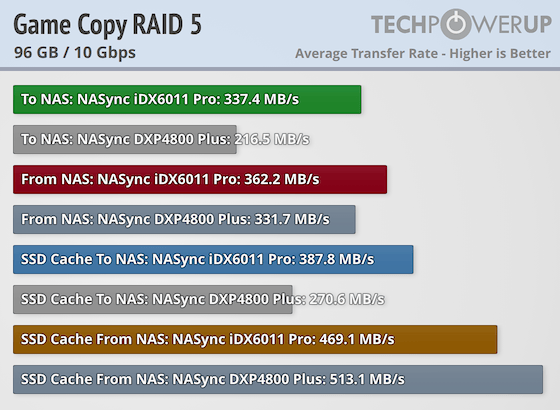
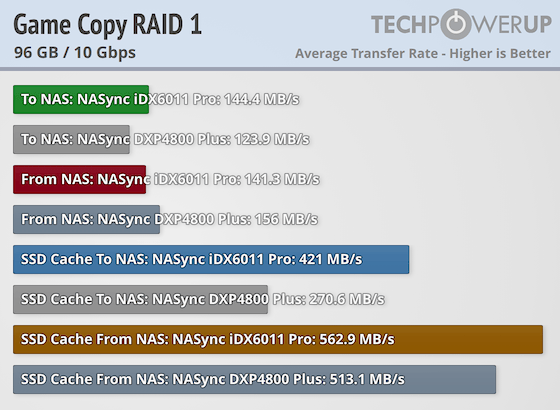
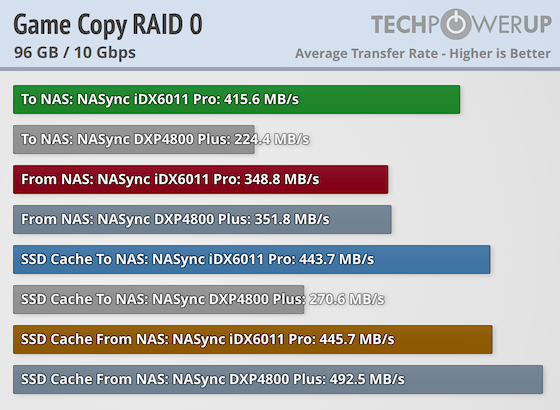
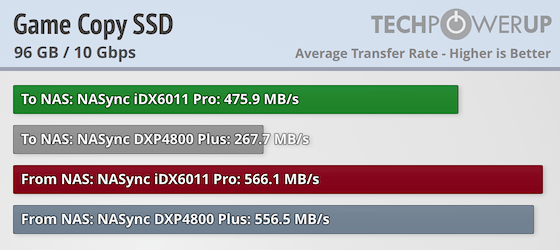
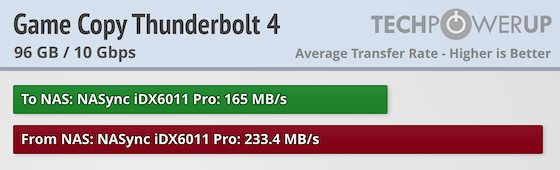
Since most people use their NAS for storing and retrieving data, we run a set of file copying tests that should help demonstrate how well a NAS handles different types of real world data. The first dataset is a 96.2 GB game library, which is copied as is from an NVMe SSD on the host computer to the NAS. This is then copied back from the NAS to the host PC. Everything is timed and converted to transfer speeds in MB/s. As is the case with every NAS we've tested so far, this is where the throughput drops. The NASync iDX6011 Pro is no slouch here by any means, but we ran into several odd behaviors. The first peculiarity was that it ended up being slower than the DPX4800 Plus when reading data from the SSD cache in combination with the drives in RAID 5, and we ran this test multiple times to make sure that the data has been cached properly.
In RAID 1, the performance dropped off as expected, but we were still surprised to see that the iDX6011 Pro ended up behind the DXP4800 Plus when reading data in both RAID 1 and RAID 0, plus in RAID 0 mode with SSD caching. We can only assume this is some kind of SSD caching glitch in UGOS. Moving over to the SSD tests, the iDX6011 Pro is ahead, but the much less powerful DXP4800 Plus isn't far behind when it comes to copying data from the NAS, once again. Finally, the Thunderbolt 4 networking results are disappointing, and we re-ran these tests multiple times, as we expected much better throughput here, especially as we copied the data to and from SSDs.
Single Large File
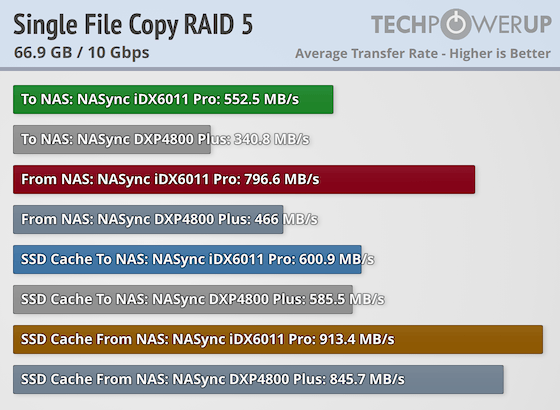
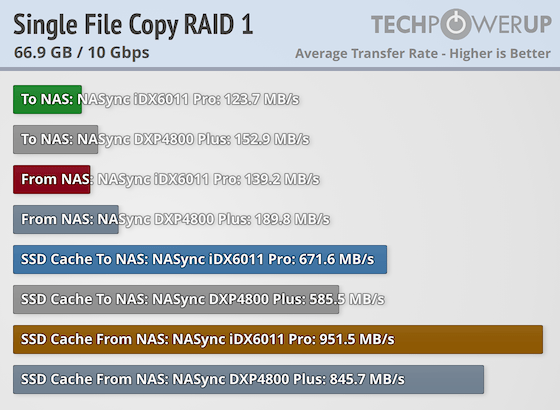
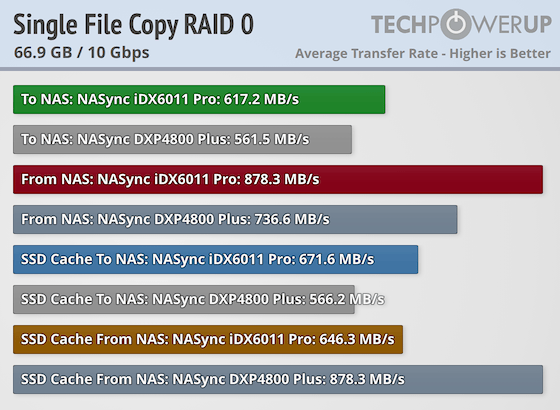
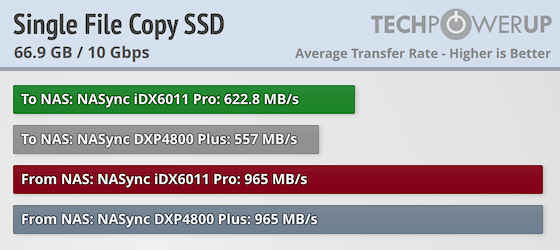
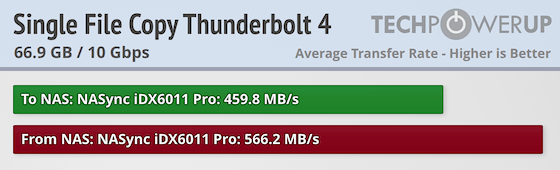
The next test consists of copying a single 66.9 GB file to simulate something like a large video file or a compressed backup file being copied to and from the NAS. Once again we see some oddities we didn't expect, especially in RAID 1, where the DXP4800 Plus is quite a bit faster when it comes to both copying data to and from the NAS. The gains when enabling SSD caching puts the iDX6011 Pro ahead of the DXP4800 Plus, except in RAID 0 mode, where the SSD caching causes it to be slower than without caching. Once again, we re-ran this test multiple times and couldn't get a better result. Moving over to SSD only mode, it's a dead race between the two units when reading data from the NAS, with the iDX6011 Pro being slightly faster when writing data to the NAS. With the single large file, the Thunderbolt 4 networking results are slightly better, but still lagging behind the 10 Gbps Ethernet results.
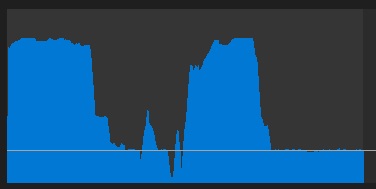
What you see above is a graph of the data being copied to the NAS, and although we couldn't say for certain, it looks like the NASync iDX6011 Pro runs out of cache, as between the peaks and the flat line, there's a difference of about 400 MB/s. This is not something we've observed on any other NAS we've tested to date, as this test normally peaks and then stays pretty stable. Once again, this might be UGOS related, but the DXP4800 Plus doesn't display this kind of behavior. This also shows that the performance should be better than what the test results show, but due to the strange dips to speeds well below what we expected from the iDX6011 Pro, the results are what they are. Hopefully this is something Ugreen can address from the software side of things.
Photos
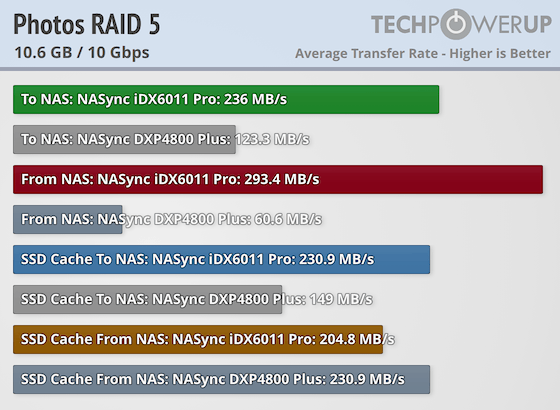
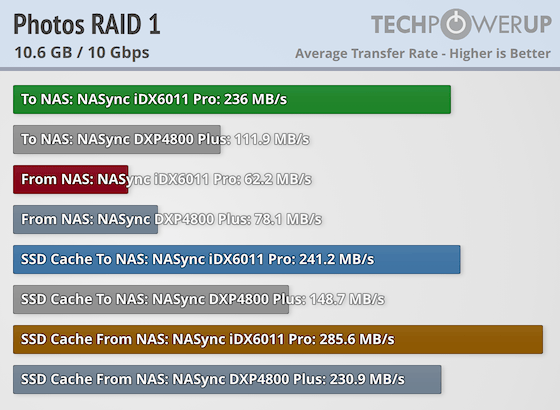
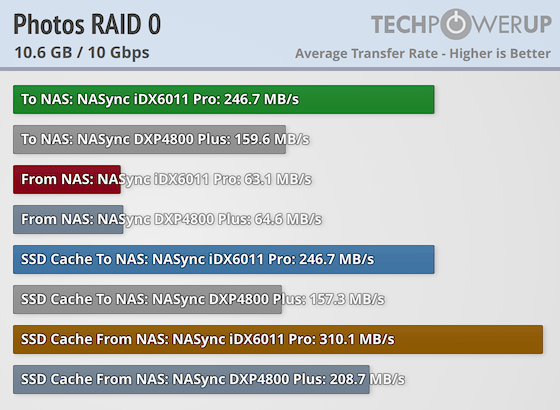
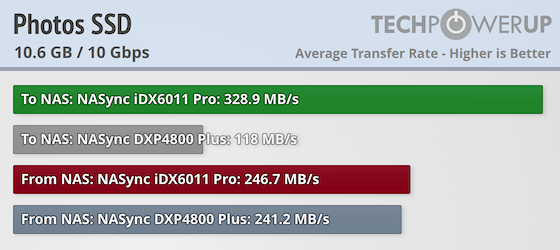
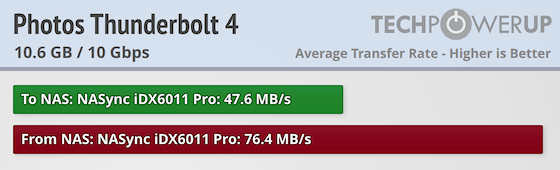
Our third and final test consists of 10.6 GB of photos across 4,084 files. This is where we expected the NASync iDX6011 Pro to really shine and although it was fast in many of the tests, we once again ran into some odd performance behavior, and no matter how many times we re-ran the tests, we ended up with similar results. Once again it seems like SSD caching is having some problems when it comes to reading data from the NAS, but as we showed on Page 6 of this review, the SSDs aren't the issue, which once again leads us back to UGOS. Hopefully Ugreen will have time to iron out all these glitches before the NASync iDX6011 Pro ships.
Nov 13th, 2026 23:44 CST
change timezone
Latest GPU Drivers
New Forum Posts
- What are you playing? (26216)
- Tell me about your favourite graphics card (33)
- no "PhysX" workable (9)
- AI generated images... (224)
- Crimson Desert (31)
- RenoDX HDR - how to view the differnce Before&After in game? (0)
- Displayport DP80 3M (10ft) cable that can achieve 80gbps stable? (5)
- I'll flash a ASUS ROG Strix RX480 O8G in Cause of Code 43, as a Newbie (1)
- Opinion on Monitor Replacement (6)
- TMOG - post your benchmark results here (16)
Popular Reviews
- AMD Zen 6 Technical Deep Dive
- Corsair HX1000i Shift Crystal Review
- NZXT C1200 Platinum Review
- Upcoming Hardware Launches 2027 (Updated Nov 2026)
- ASUS ROG Strix B850-I Gaming Wi-Fi7 W Review
- Montech King 95 3D PRO Review
- NZXT H7 RGB+ Review
- NZXT H5 Review
- Phantom Blade Zero Performance Benchmark Review - 35 GPUs Tested
- XPG NIMBUS PLUS Review - Mid-range Chair With Strong Competitors
TPU on YouTube
Controversial News Posts
- NVIDIA Co-Founder and CEO Jensen Huang Officially Resigns (380)
- OpenAI CEO Argues Home PCs Waste the World's Limited DRAM Supply (152)
- NVIDIA Launches Investigation Into Jensen Huang's Relationship With Suspected Chinese Spy (136)
- Intel "Raptor Lake Next" 16-Core and 20-Core CPUs Surface (130)
- Legendary Game Studio BioWare Shuts Down Following EA Layoffs (104)
- Dell CEO Says the Memory Shortage Will Get Worse in 2027 (95)
- NVIDIA GeForce RTX 50-Series Scheduled for up to $500 Price Hike This Week (89)
- Modder Fits RTX 5090 With Four 8-Pin Connectors, Halving Current per Wire (80)