 2
UPERFECT BE22BQ Review - A Bigger Kind of Portable
Controls & OSD »Connectivity
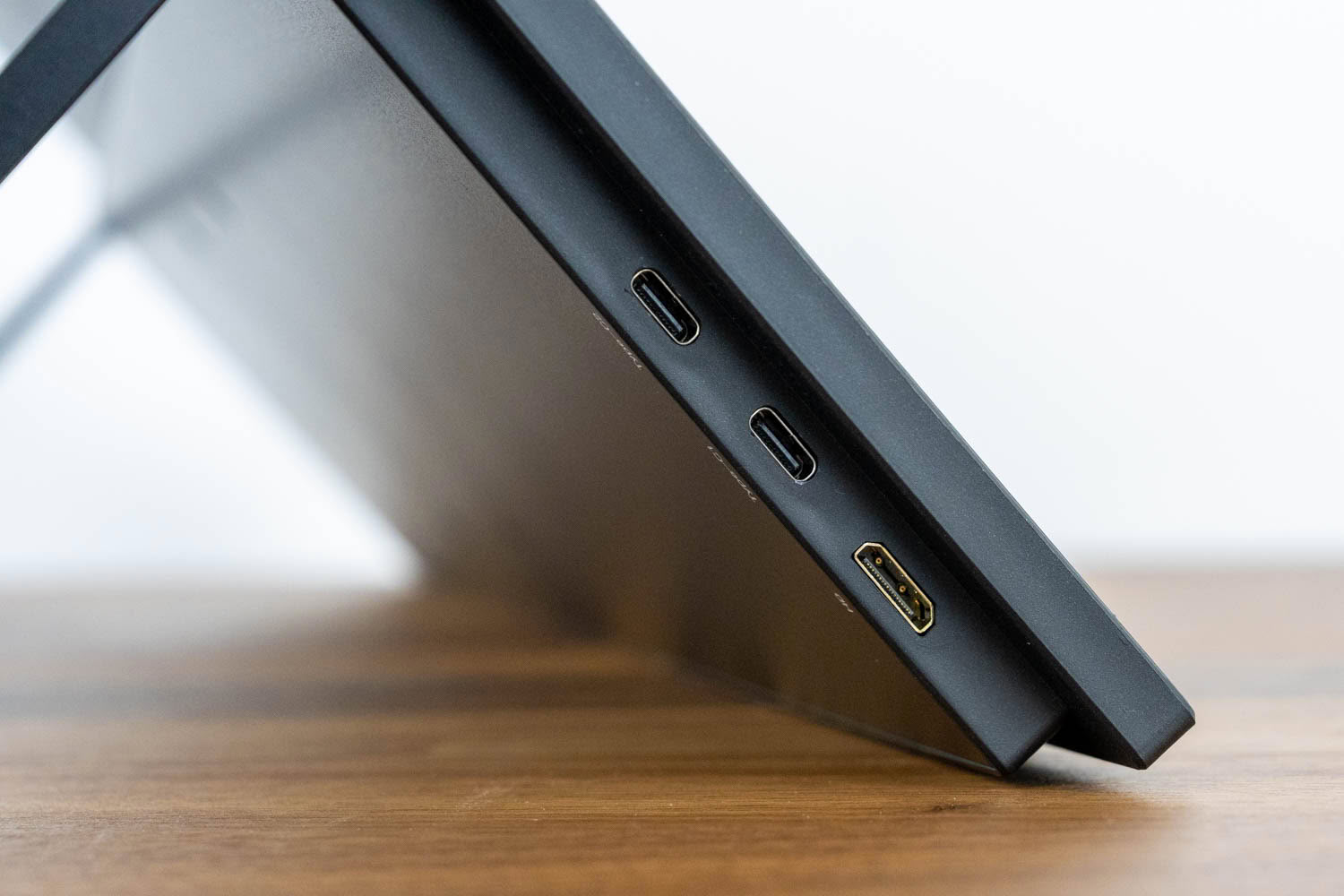
All of the video inputs are on the left edge. You get two USB-C 3.1 ports, both of which accept DisplayPort Alt Mode, and a Mini-HDMI port for audio and video. Over USB-C the monitor works much as you would hope, with two things to know. The good news first: a single USB-C cable from a laptop to the monitor's top USB-C port carries both the picture and the touch data, so you really can run video and touch over one lead. The wrinkle is that this only holds for the top port. Plug the same cable into the lower USB-C port, and you get video but no touch, which is an easy trap to fall into and is not signposted anywhere on the chassis.
The second thing to know is power. On bus power alone, brightness is heavily capped. Connected to a Lenovo ThinkBook G4 over USB-C, the panel refused to climb above 132 cd/m² even with brightness set to 100%, and it stayed there even after I plugged the laptop into its own charger. It only reached normal levels once I fed external power into the second USB-C port. So the clean, everyday setup is one USB-C from the laptop to the top port for video and touch, plus the bundled adapter into the other USB-C port for full brightness, which is the familiar data-plus-power pairing most USB-C portables rely on rather than a true single-cable dock. It is worth stressing that the 132 cd/m² you get on bus power alone is a last-resort brightness: usable indoors in controlled lighting only, and hopeless outdoors, where you will barely see the image at all.
If your source only offers HDMI, things get messier. The mini-HDMI input handles video, but HDMI carries neither power nor touch, so you end up running the adapter into a USB-C port and a separate USB cable for touch on top of the HDMI lead, three cables for one screen. Touch is not supported on game consoles such as the Xbox, PS5, Switch, or Steam Deck, so treat those as display-only devices.
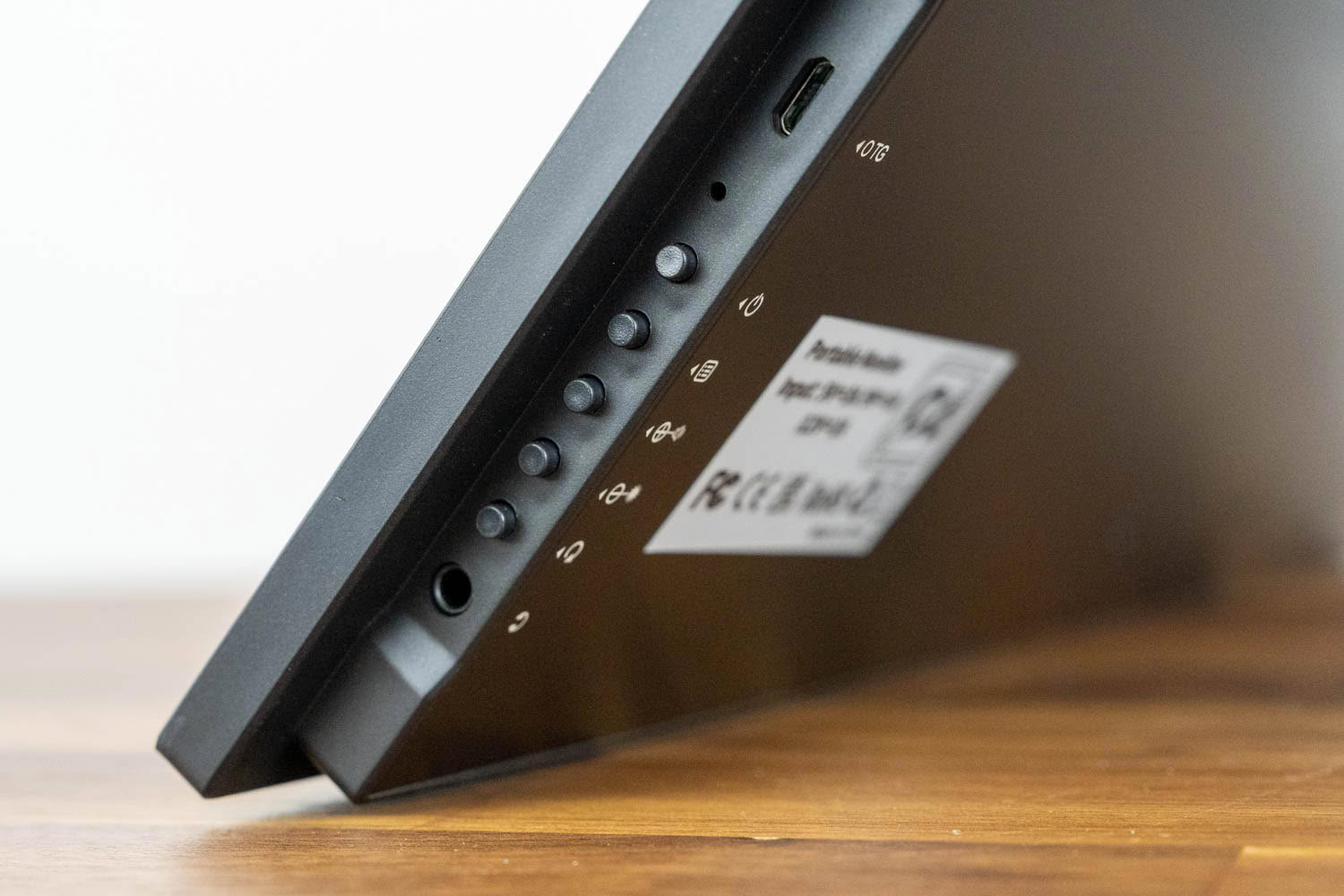
The right edge holds the rest of the interface. A Micro-USB OTG port lets you plug a keyboard, mouse, or USB drive directly into the monitor, which is genuinely useful when you are using the BE22BQ as a standalone touch device rather than as a laptop's second screen. Below it sits the control cluster, a row of physical buttons for power, menu, volume up, brightness down, and return/source, followed by the 3.5 mm headphone jack at the bottom. The 3.5 mm jack feeds headphones or powered speakers. Two 1 W speakers are also built in, which are fine for system sounds and the odd video clip but nowhere near enough for music or anything you would call immersive.
There is no USB hub in the traditional sense and no KVM here, which is expected for a portable at this price. The OTG port covers basic peripheral needs, and while USB-C docking does carry both video and touch over the top port, the brightness cap means one USB-C usually ends up handling power from the adapter while the other carries video and touch.
Power Consumption
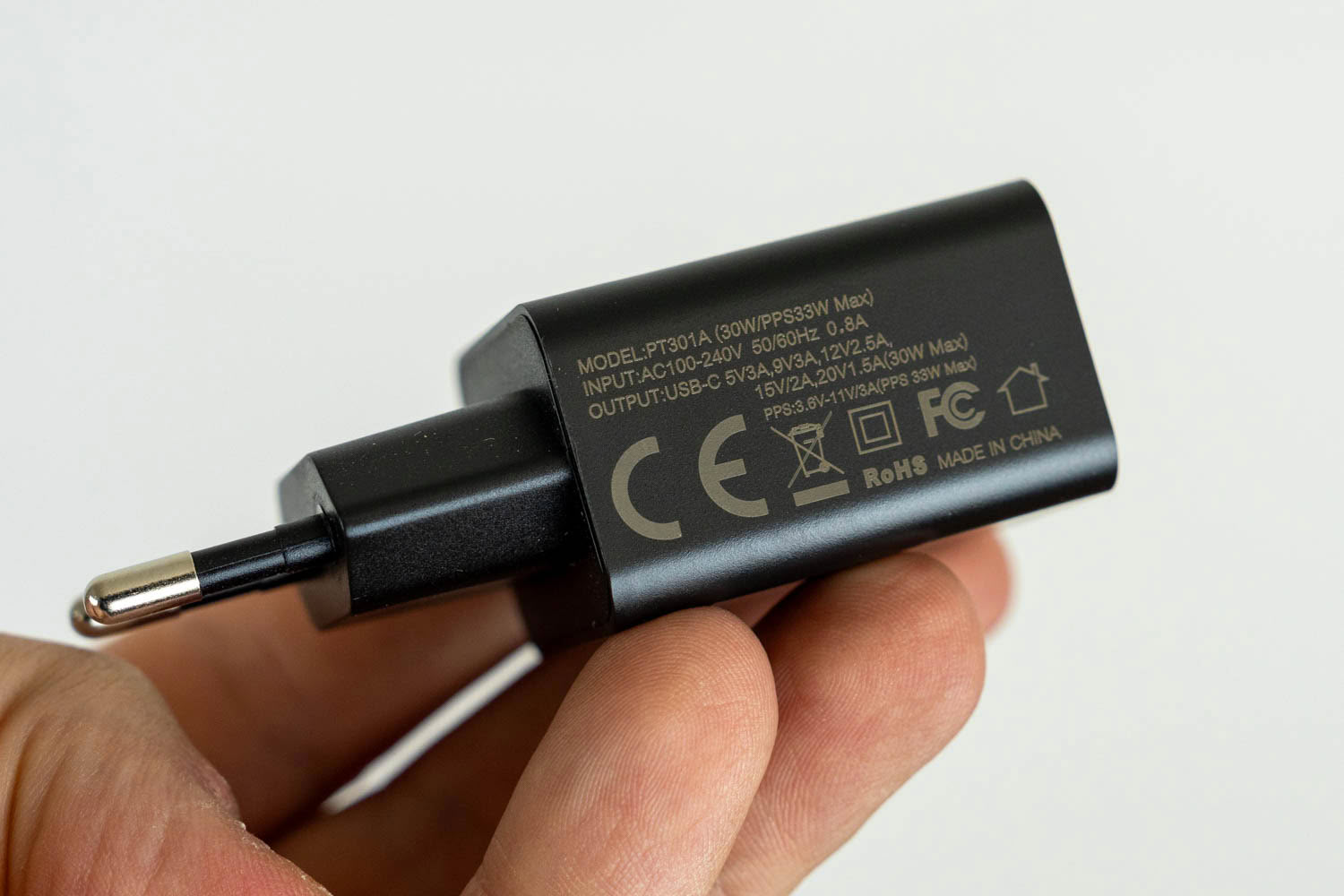
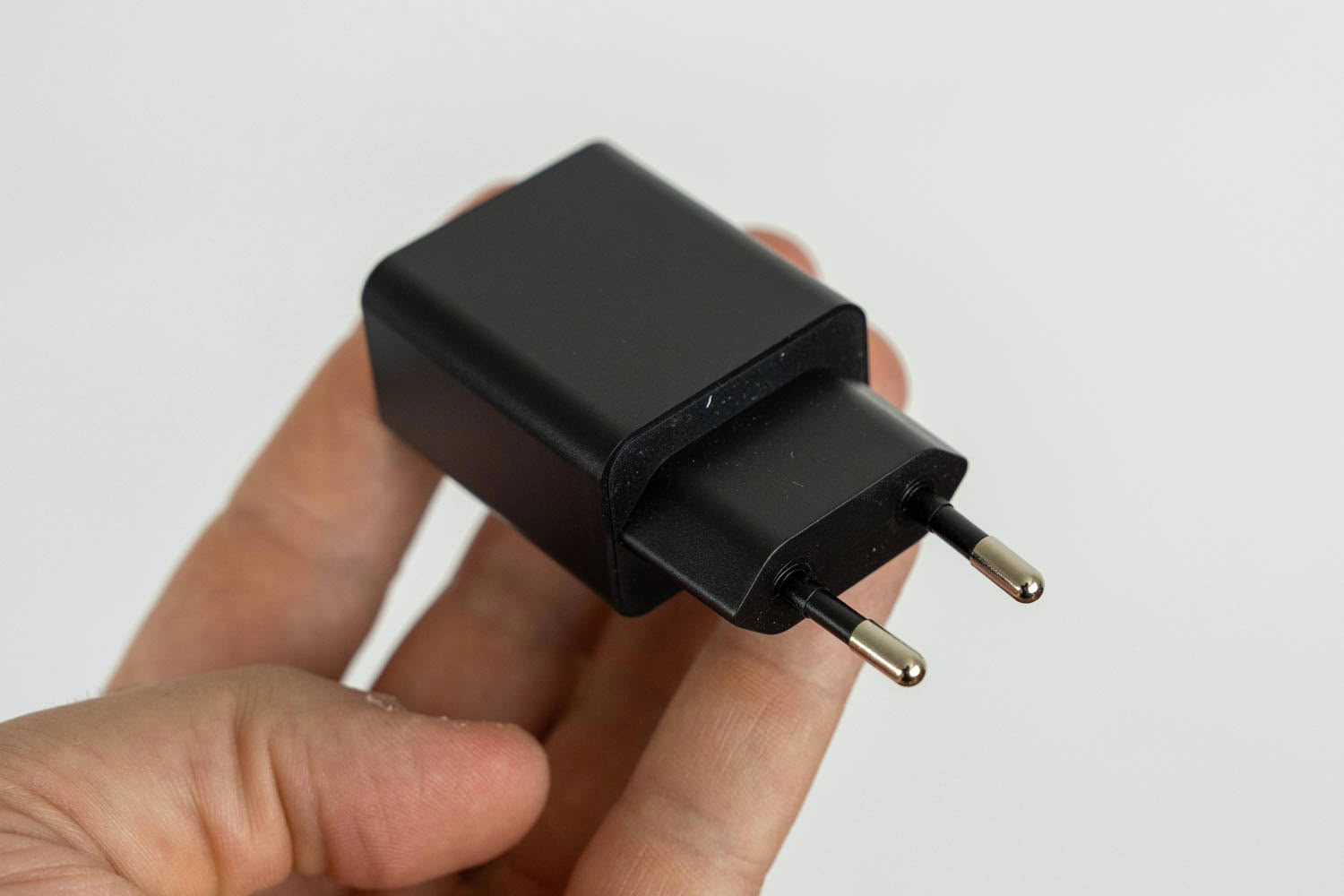
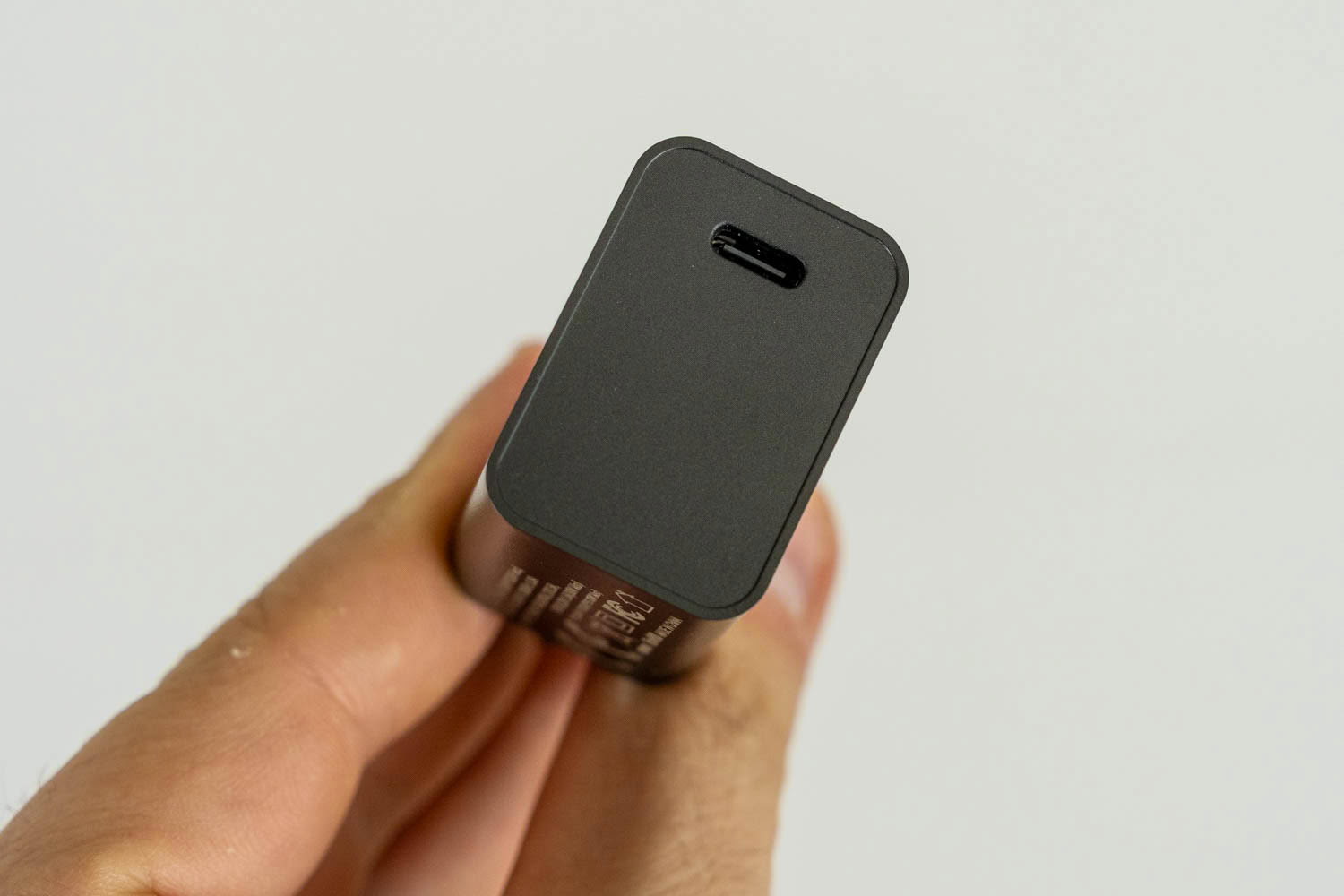
The BE22BQ draws its power over USB-C, either from the bundled 30 W adapter or from a host port. The bundled brick is a PT301A rated at 30 W (PPS 33 W max), with a EU plug (other markets get the appropriate plug) and a single USB-C output that negotiates 5 V/3 A, 9 V/3 A, 12 V/2.5 A, 15 V/2 A, and 20 V/1.5 A. Since the monitor tops out around 21 W in use, the adapter has comfortable headroom and never runs warm.
As I've already mentioned, bus power from a laptop alone is not enough to unlock full brightness, so for anything past that capped 132 cd/m² you will want the adapter, or another powered USB-C source, plugged into the monitor. Power consumption was measured with the Meross MSS315 Matter Smart Wi-Fi Plug and its companion app after resetting the monitor to factory defaults, with external power supplied, so the panel could reach its full brightness range.
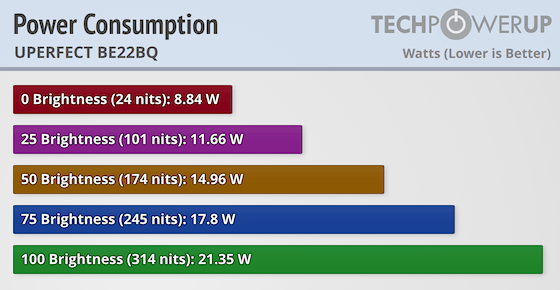
The numbers are very tame, which is one benefit of a smaller portable IPS panel. At minimum brightness the monitor pulls approximately 8.8 W, climbing to 11.7 W at 25%, 15.0 W at 50%, 17.8 W at 75%, and 21.4 W at full brightness. That maximum corresponds to a measured 314 cd/m², so the panel comfortably beats its rated 300 cd/m² while still sipping around 21 W. The gentle, roughly 12.5 W spread across the whole brightness range is exactly the kind of efficiency that makes the monitor easy to run off a modest USB-C power bank or the bundled adapter.
Nov 20th, 2026 13:47 PST
change timezone
Latest GPU Drivers
New Forum Posts
- Honestly, do you care about GTA VI? (208)
- When you could finally run Crysis maxed out? (63)
- WarpCoreBench scores! (80)
- GTA VI (20)
- Anthrophics IPO (25)
- GeekMagic Ultra Smart WiFi Weather Station (8)
- Very unusual two gaming-pc scenarios. (35)
- Can i play GTA 6 now? (Joke) (14)
- How to prevent OLED burn damage due to PC freezes or power outtages? (47)
- Zen 3 IF/IMC degradation (239)
Popular Reviews
- AMD Zen 6 Technical Deep Dive
- Ugreen NASync DXP4800 GT Review
- Microsoft Surface Laptop Ultra Review - The Next-gen Arm Laptop
- Corsair RM1200e (Second Generation) Review
- Acemagic Retro X3 Review
- Upcoming Hardware Launches 2027 (Updated Nov 2026)
- Pulsar Office Tour & First Look at P1 Dual-Sensor Mouse
- Biwin Black Opal NV7400 2 TB Review
- AMD Ryzen 7 9800X3D Memory Performance Scaling
- AMD Ryzen 7 9800X3D Review - The Best Gaming Processor
TPU on YouTube
Controversial News Posts
- NVIDIA Co-Founder and CEO Jensen Huang Officially Resigns (490)
- Report: Jensen Huang Eyes NVIDIA Comeback (255)
- Open Letter Asking NVIDIA to Reinstate Jensen Huang Passes 115,000 Signatures (184)
- OpenAI CEO Argues Home PCs Waste the World's Limited DRAM Supply (152)
- NVIDIA Launches Investigation Into Jensen Huang's Relationship With Suspected Chinese Spy (136)
- Intel "Raptor Lake Next" 16-Core and 20-Core CPUs Surface (130)
- Legendary Game Studio BioWare Shuts Down Following EA Layoffs (104)
- Dell CEO Says the Memory Shortage Will Get Worse in 2027 (95)