 4
UPERFECT GR14BU Review - A Touch-Enabled OLED for the Road
Response Time, Input Lag & Motion Blur »Picture Quality
The UPERFECT GR14BU uses a 14-inch OLED panel with a native resolution of 2880×1800, an 8-bit + FRC color depth, and a glossy finish. Being OLED, it doesn't rely on a backlight, so every pixel emits its own light and switches off completely when displaying black. Contrast is effectively infinite, and dark content looks the way it should, without any gray glow.To test picture quality, I used an X-Rite i1Display Pro colorimeter with both Calman Ultimate, the industry-standard suite for display testing and calibration, and DisplayCAL - a free, powerful display calibration and profiling tool. The monitor was powered by the included 30 W adapter during all measurements.
Picture Quality at Factory Settings
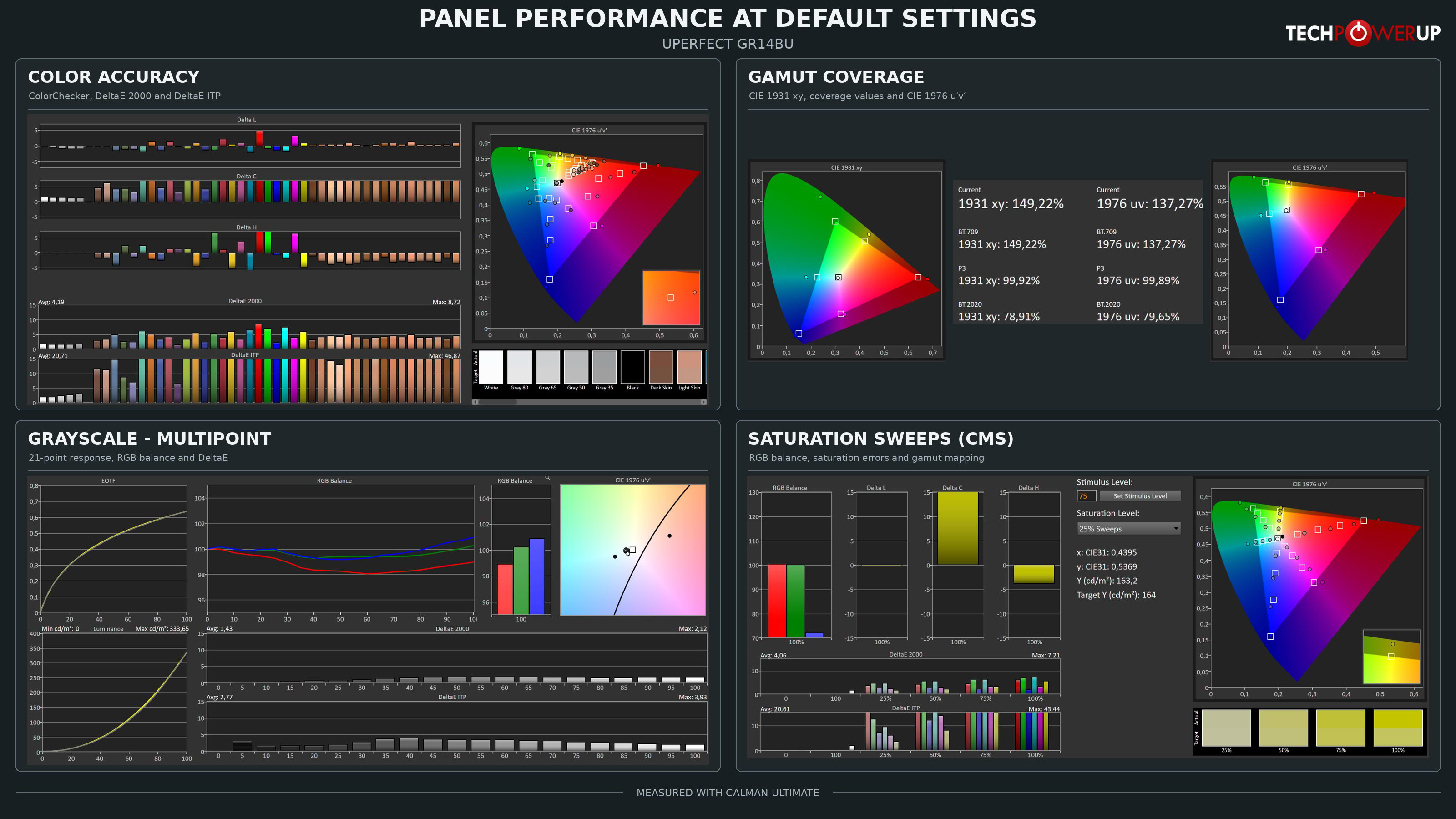
The GR14BU ships with the Standard ECO preset and the User color temperature with all three RGB gains set to 50. The panel always runs in its full native color gamut, and that gamut is very wide. Measured coverage reaches 149.22% of sRGB in CIE 1931 xy (137.27% in CIE 1976 uv), 99.92% of DCI-P3 (99.89% uv), and 78.91% of BT.2020 (79.65% uv). In other words, the GR14BU covers the DCI-P3 color space practically completely. UPERFECT's 109.9% and 120% DCI-P3 figures most likely describe the size of the gamut area relative to DCI-P3 rather than coverage, so they can't be compared directly with my numbers, but there's no doubt that this is a true wide gamut panel.
Grayscale tracking is the highlight of the factory settings. The average grayscale ∆E is just 1.43 with a maximum of 2.12, the EOTF closely follows the 2.2 gamma target, and the RGB balance stays within about two percent of neutral throughout the range. There's a slight lean toward blue and green in the brightest shades, but it's so small that you won't notice it. Peak luminance at default settings measured 333.65 cd/m².
Color accuracy is a different story, and the reason is simple. There's no sRGB mode in the OSD, so standard sRGB content, which covers most of what you see on a desktop and on the web, is stretched to the panel's native gamut and looks oversaturated. The color accuracy test returns an average ∆E of 4.19 with a maximum of 8.72, and the chroma error graph shows practically every colored patch landing beyond its target. Saturation sweeps paint the same picture, with an average ∆E of 4.06 and a maximum of 7.21. UPERFECT's "∆E<2" claim, then, only holds true for the grayscale. Skin tones and saturated primaries alike land beyond their targets. For movies, games, and casual browsing, this punchy look is often welcome. For editing photos intended for the web, not so much.
Picture Quality with Modified Settings
I'd normally try to improve the picture with a few OSD adjustments at this point, but the GR14BU doesn't leave much room for that. Without an sRGB mode, the oversaturation can't be corrected through the monitor's OSD. Even the smallest change in any of the gains results in a jump in channel balance that's too big to land closer to neutral than the factory settings already are. Since the grayscale is already very good out of the box, the GR14BU is a monitor you simply connect, set to your preferred brightness, and use. If you're aiming for a typical indoor brightness of around 250 cd/m², set Brightness to 62. Without an sRGB emulation mode in the OSD, accurate reproduction of sRGB content requires color management on the source device, typically using a measured ICC profile and color-managed applications. Windows Auto Color Management may also help on supported systems.The brightness range is wide. With external power connected, the GR14BU reaches 398 cd/m² in SDR, which makes it usable even in fairly bright environments—glossy screen permitting—and you can go as low as 14 cd/m² for working in the dark.
HDR
The GR14BU accepts an HDR10 signal, but not by default. The HDR Mode setting is hidden in the Reset section of the OSD, which is a strange place to put it, and it's set to Off from the factory. In that state, the monitor doesn't recognize the HDR signal at all. Once you switch it to Auto (Reset > HDR Mode > Auto), the monitor detects the HDR signal properly and switches between SDR and HDR modes on its own.
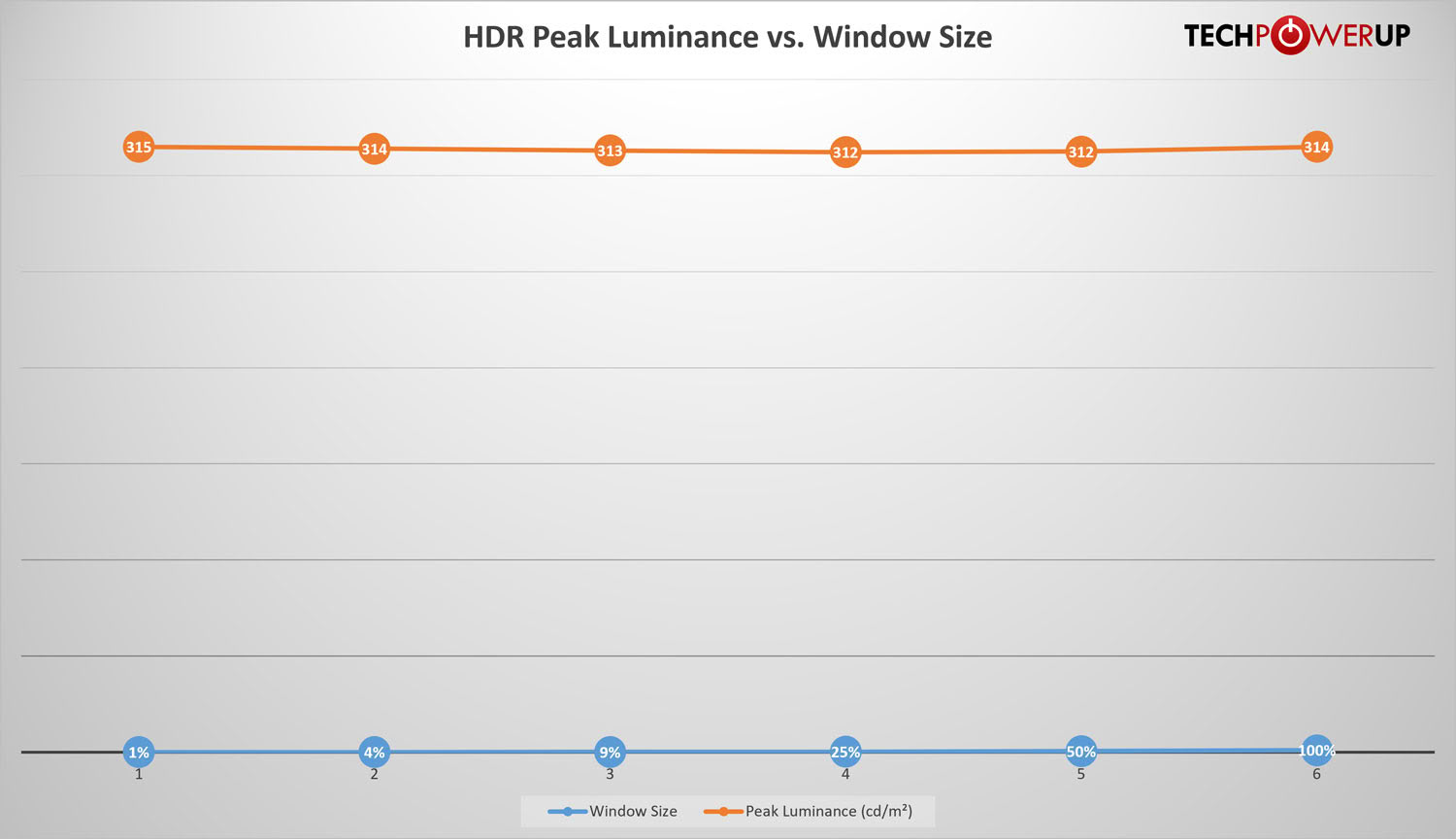
However, the measurements show that this isn't real HDR. Peak luminance measures between 312 and 315 cd/m² across all window sizes, from 1% to 100%. In other words, the curve is completely flat. The monitor understands the HDR10 signal and maps it to the panel, but it doesn't drive small highlights any brighter than a full white screen, and its HDR ceiling is actually lower than the 398 cd/m² the panel reaches in SDR. What makes HDR on OLED panels impressive is the contrast between perfect blacks and bright, intense highlights, and without the extra headroom for those highlights, HDR content looks flatter and duller than it should. UPERFECT is honest about this in its spec table, which states that HDR isn't supported. The HDR Mode is therefore best described as HDR signal compatibility. If you connect a device that outputs HDR, it'll work, but you're better off sticking with SDR.
Luminance, Contrast and Color Uniformity
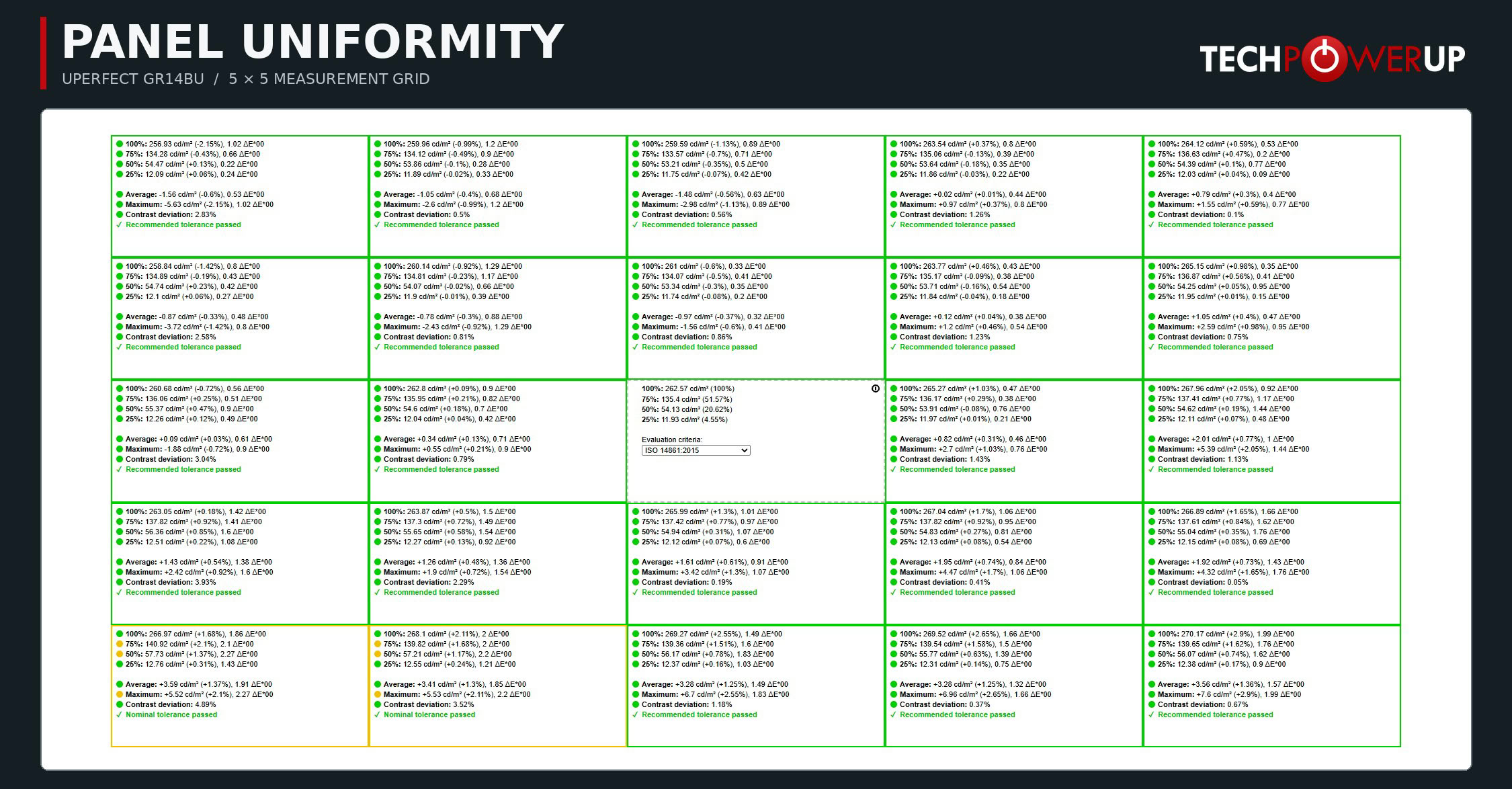
As expected from an OLED panel, uniformity is excellent. With the center measuring 262.57 cd/m², the largest luminance deviation across the 25 measured zones is just +2.9% in the bottom right corner, while the darkest zone measures 2.15% below the center. Color deviation is equally low, with the worst zone reaching 2.27 ∆E. All zones pass DisplayCAL's recommended tolerance, except for the two zones in the bottom left corner, which pass the nominal tolerance. To the naked eye, the panel looks perfectly even, with no visible tint or brightness variations.
Viewing Angles
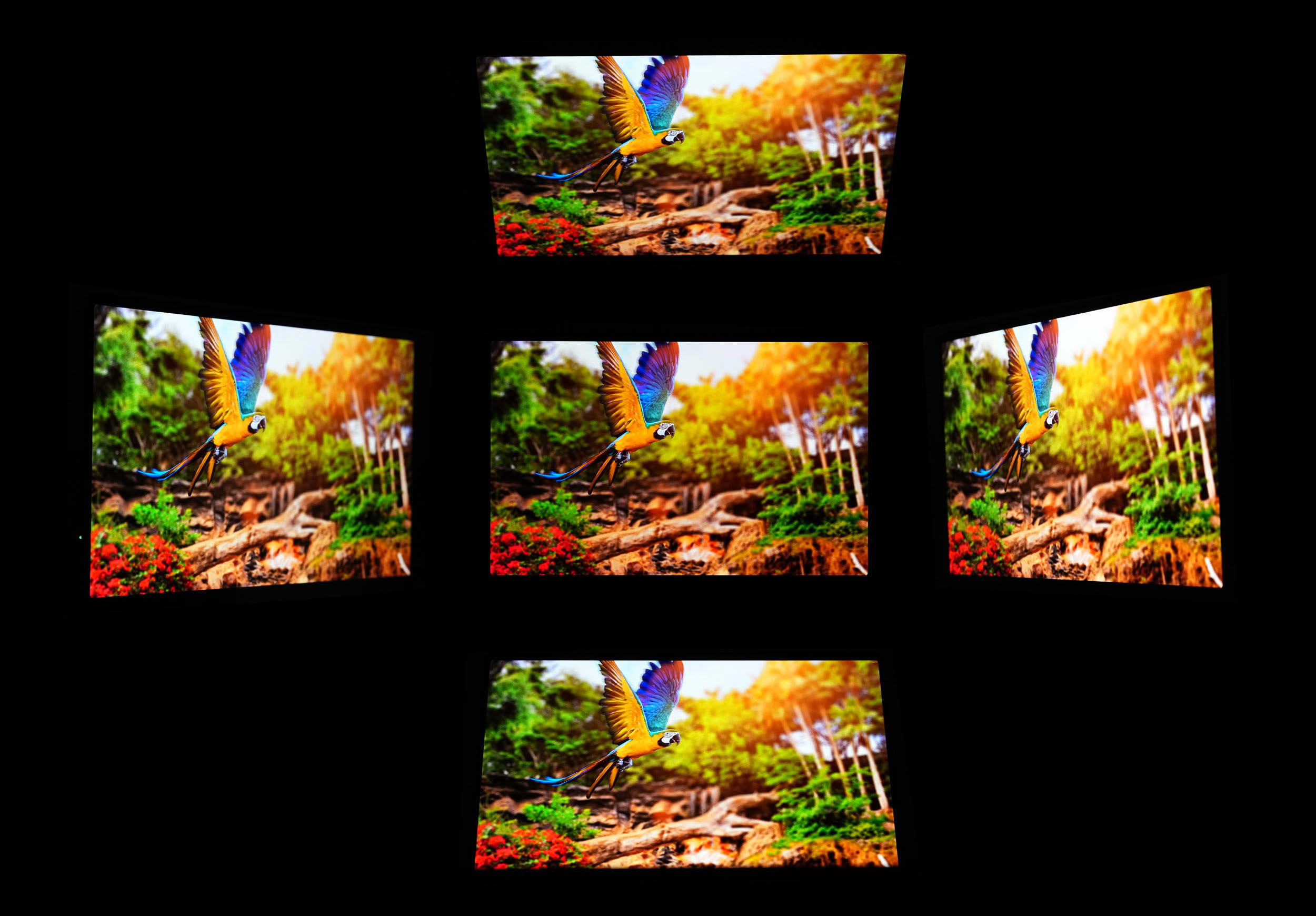
Viewing angles are excellent, as expected from an OLED panel. Even at steep horizontal and vertical angles, the GR14BU maintains vibrant colors, deep blacks, and strong contrast, with only a slight reduction in perceived brightness. There's no noticeable color shifting or washing out of the image, making the monitor easy to share with someone sitting beside you. In practice, reflections from the glossy glass surface are more likely to be an issue than the viewing angles themselves.
Nov 18th, 2026 13:24 PST
change timezone
Latest GPU Drivers
New Forum Posts
- Can i play GTA 6 now? (Joke) (5)
- Very unusual two gaming-pc scenarios. (11)
- Dell Workstation Owners Club (3513)
- Any other old-timers here planning to play WoW Forever? (151)
- Time to upgrade CPU and MOBO (33)
- The Filthy, Rotten, Nasty, Helpdesk-Nightmare picture clubhouse (2876)
- WarpCoreBench scores! (67)
- Honestly, do you care about GTA VI? (144)
- Acer Predator BiFrost Radeon RX 9070 OC (9)
- DTS DCH Driver for Realtek HDA [DTS:X APO4 + DTS Interactive] (2814)
Popular Reviews
- Acemagic Retro X3 Review
- Upcoming Hardware Launches 2027 (Updated Nov 2026)
- AMD Zen 6 Technical Deep Dive
- ASUS ROG Strix B850-I Gaming Wi-Fi7 W Review
- Corsair HX1000i Shift Crystal Review
- Biwin Black Opal NV7400 2 TB Review
- Chieftec Iceberg PRO 360 DARK Review
- AMD Ryzen 7 9800X3D Review - The Best Gaming Processor
- Phantom Blade Zero Performance Benchmark Review - 35 GPUs Tested
- Pulsar Office Tour & First Look at P1 Dual-Sensor Mouse
TPU on YouTube
Controversial News Posts
- NVIDIA Co-Founder and CEO Jensen Huang Officially Resigns (478)
- Report: Jensen Huang Eyes NVIDIA Comeback (187)
- Open Letter Asking NVIDIA to Reinstate Jensen Huang Passes 115,000 Signatures (184)
- OpenAI CEO Argues Home PCs Waste the World's Limited DRAM Supply (152)
- NVIDIA Launches Investigation Into Jensen Huang's Relationship With Suspected Chinese Spy (136)
- Intel "Raptor Lake Next" 16-Core and 20-Core CPUs Surface (130)
- Legendary Game Studio BioWare Shuts Down Following EA Layoffs (104)
- Dell CEO Says the Memory Shortage Will Get Worse in 2027 (95)