 4
Zaopin ZPW Max Review
Value & Conclusion »Software


The ZPW Max comes with its own lightweight software. All options are accessible through three different tabs. The first page allows for button remapping to mouse, keyboard, media, and macro functions, along with the ability to adjust debounce time, which effectively controls click latency, at a range of 0 to 30 ms in increments of 1 ms. Profile management is present as well. The second page houses CPI adjustment settings for up to six color-coded levels, ranging from 50 to 30,000 CPI in increments of 50 CPI. Values cannot be put in directly, as this function appears to be bugged. Also included are polling rate (125, 250, 500, 1000 Hz, with 2000, 4000, and 8000 Hz being exclusive to wireless operation), LOD (0.7/1/2 mm), and angle snapping (on/off) adjustment options. "Ripple control" is disabled by default, but can be enabled to apply smoothing, which lessens jitter at higher CPI steps at the cost of increased motion delay. "MotionSync" can be turned on or off, which turning on synchronizes SPI reads with USB polls at the cost of a motion penalty equal to half of the set polling interval. Furthermore, a setting that allows modifying the sensor mode is present. If plugged in, the sensor mode will default to "corded" with no way of changing it. In wireless mode, one can choose between "LP" (low power) and "HP" (high performance) modes, which determine the sensor run mode and therefore battery life, albeit only for polling rates of 1000 Hz and under. Lastly, "Peak Performance" defines after how much idle time sleep mode is entered. A macro editor can be found on the third page.
All setting changes are saved to the on-board memory, so the software does not need to be running (or even installed) all the time. On my system, the software had a RAM footprint of anywhere between 33 and 63 MB on average when running in the foreground, which changes depending on which page is open, and which doesn't change when minimized to the system tray, coupled with considerable CPU usage upon changing the page. Upon exiting the application, all processes are terminated, as they should be.

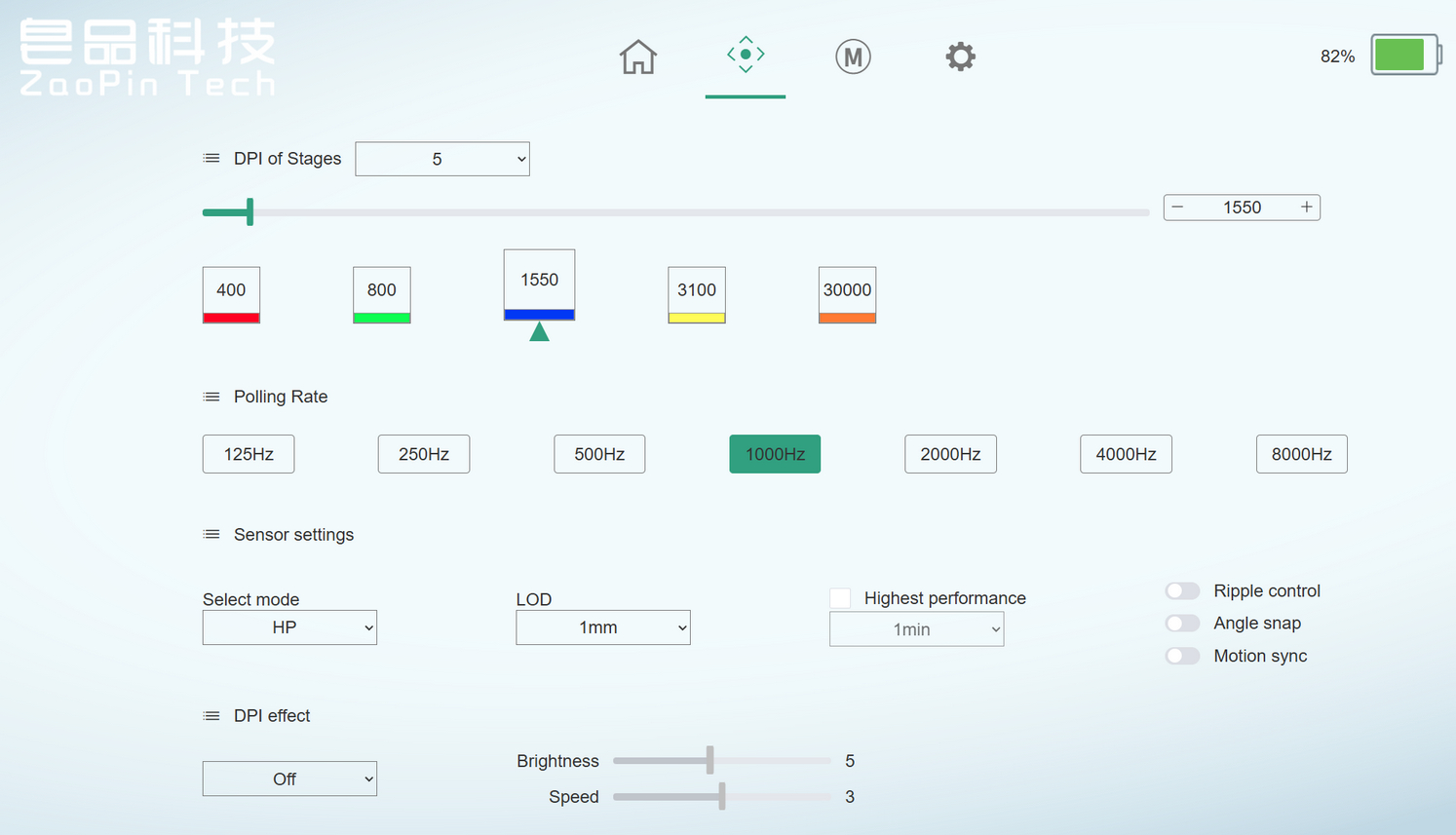
As an alternative to the regular software, the ZPW Max may also be configured through a web driver, which connects through WebHID and therefore will, at least as of now, only work on Chromium-based browsers such as Chrome, Edge, and Opera (desktop). Aside from a different look, the web driver is functionally identical. Previous Zaopin releases such as the Z2 and Z2 Mini are also able to connect to the web driver.
Battery Life
Zaopin does not provide any battery life numbers. While the software includes a percentage-based battery life indicator, its accuracy and reliability is rather limited. For the record, after two and a half hours of continuous usage at 8000 Hz, the indicator showed 85% charge, but did not change further after an additional two hours of usage at 1000 Hz. If we only consider the former usage, then roughly 15 hours of battery life at 8000 Hz could be expected.Sleep mode is entered after ten seconds of inactivity by default, but this can be adjusted within the software.
Using the included USB Type-A to Type-C charging cable, I measured the charging speed during the constant current stage, which sits at 0.377 A when lifted and 0.364 A when not lifted. The battery has a capacity of 300 mAh (3.7 V) and utilizes a 3-pin JST connector.
Nov 14th, 2026 20:05 CST
change timezone
Latest GPU Drivers
New Forum Posts
- Optical Disc Drive owners club (208)
- Planning for Prolonged High Prices and Maintaining What You Already Have (67)
- Game Soundtracks You Love (1287)
- WarpCoreBench scores! (35)
- Tell me about your favourite graphics card (80)
- 9070 GRE 3.9ghz validation reached. (11)
- Honestly, do you care about GTA VI? (20)
- AI generated images... (226)
- What is in your fleet, size and contents? (28)
- X79 and/or rampage IV OC'ing thread for those of us still left.... (2452)
Popular Reviews
- AMD Zen 6 Technical Deep Dive
- ASUS ROG Strix B850-I Gaming Wi-Fi7 W Review
- Corsair HX1000i Shift Crystal Review
- Upcoming Hardware Launches 2027 (Updated Nov 2026)
- Montech King 95 3D PRO Review
- NZXT C1200 Platinum Review
- NZXT H7 RGB+ Review
- NZXT H5 Review
- Phantom Blade Zero Performance Benchmark Review - 35 GPUs Tested
- AMD Ryzen 7 9800X3D Review - The Best Gaming Processor
TPU on YouTube
Controversial News Posts
- NVIDIA Co-Founder and CEO Jensen Huang Officially Resigns (406)
- OpenAI CEO Argues Home PCs Waste the World's Limited DRAM Supply (152)
- NVIDIA Launches Investigation Into Jensen Huang's Relationship With Suspected Chinese Spy (136)
- Intel "Raptor Lake Next" 16-Core and 20-Core CPUs Surface (130)
- Legendary Game Studio BioWare Shuts Down Following EA Layoffs (104)
- Dell CEO Says the Memory Shortage Will Get Worse in 2027 (95)
- NVIDIA GeForce RTX 50-Series Scheduled for up to $500 Price Hike This Week (89)
- Modder Fits RTX 5090 With Four 8-Pin Connectors, Halving Current per Wire (80)