Wednesday, September 24th 2025

LG Intros UltraGear 27GX704A: 26.5" WOLED Gaming Monitor with 240Hz/0.03ms Specs
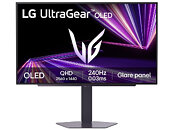
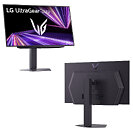
LG has introduced the UltraGear 27GX704A, a 26.5-inch WOLED gaming display with a native resolution of 2560×1440 and a panel that delivers a 240 Hz refresh rate alongside a lightning-fast 0.03 ms GtG response time. The UltraGear 27GX704A makes use of LG's third-generation WOLED panel with a 3-stack design incorporating META Technology 2.0 and Micro Lens Array+ for improved efficiency and brightness. Color reproduction covers 98.5% of the DCI-P3 gamut with 10-bit color depth. Brightness is rated at 275 nits typical and up to 1300 nits peak, paired with a 1,500,000:1 contrast ratio. HDR certification includes DisplayHDR 400 True Black and HDR10. The glossy panel comes in a borderless design on all four edges. I/O options consist of two HDMI 2.1 ports, one DisplayPort 1.4, USB Type-B upstream, multiple USB Type-A downstream ports, and a 3.5 mm headphone jack.
Gamers will find adaptive sync support covering both AMD FreeSync Premium Pro and NVIDIA G-SYNC. Gaming extras include crosshair overlays, Black Stabilizer, Dynamic Action Sync, FPS counter, and RGB lighting. LG also includes factory calibration, flicker-free operation, and a reader mode. The monitor measures 605.2 × 351 × 45.3 mm without the stand and weighs 4.8 kg. Controls are handled by a joystick located beneath the bottom bezel. Standard accessories ship with the package include HDMI, DisplayPort, and USB Type-A to Type-B cables. Currently, the 27GX704A is listed exclusively on LG's Japanese website, with pricing and availability yet to be confirmed.
 LG UltraGear 27GX704A Specifications
Sources:
Notebookcheck, IT Home, LG Japan
Gamers will find adaptive sync support covering both AMD FreeSync Premium Pro and NVIDIA G-SYNC. Gaming extras include crosshair overlays, Black Stabilizer, Dynamic Action Sync, FPS counter, and RGB lighting. LG also includes factory calibration, flicker-free operation, and a reader mode. The monitor measures 605.2 × 351 × 45.3 mm without the stand and weighs 4.8 kg. Controls are handled by a joystick located beneath the bottom bezel. Standard accessories ship with the package include HDMI, DisplayPort, and USB Type-A to Type-B cables. Currently, the 27GX704A is listed exclusively on LG's Japanese website, with pricing and availability yet to be confirmed.


- Panel: 26.5-inch WOLED, glossy, borderless
- Resolution: 2560 × 1440 (QHD)
- Refresh Rate: 240 Hz
- Response Time: 0.03 ms GtG
- Panel Tech: 3rd-gen WOLED, 3-stack, META 2.0 + MLA+
- Color Coverage: 98.5% DCI-P3, 10-bit
- Brightness: 275 cd/m² (typical), 1300 cd/m² (peak)
- Contrast Ratio: 1,500,000:1 (static)
- HDR: DisplayHDR 400 True Black, HDR10
- Sync: AMD FreeSync Premium Pro, NVIDIA G-SYNC Compatible
- Connectivity: 2× HDMI 2.1, 1× DisplayPort 1.4, 1× USB-B upstream, USB-A downstream, 3.5 mm audio
- Features: Crosshair overlay, Dynamic Action Sync, FPS counter, Black Stabilizer, RGB lighting, factory calibration, flicker-free, reader mode
- Dimensions: (W×H×D) 605.2 × 351 × 45.3 mm (without stand)
- Weight: 4.8 kg
- Controls: Joystick (bottom bezel)
- Accessories: HDMI cable, DisplayPort cable, USB-A to USB-B cable
12 Comments on LG Intros UltraGear 27GX704A: 26.5" WOLED Gaming Monitor with 240Hz/0.03ms Specs
Here is the link to that video:
OLEDs are good for gaming while IPS for static / work / mixed use. IPS is definitely more reliable though, they can be put into service for decades without issue in nearly any environment.
The RTINGS video was on a bunch of different TVs, not monitors, so they have a totally different usage scenario vs dedicated monitors. Also the displays are all at least two generations old, since they test has been running for over 2 years. They were somewhat torture tested at 20 hrs of operation a day, but with compensation cycles. They are of numerous display techs (oled, lcd, qled, etc) and very few WOLED or QD-OLED).
For the lazy/ignorant, see the test parameters and updates in links below which are included in that video:
www.rtings.com/tv/tests/longevity-test
www.rtings.com/tv/tests/longevity-burn-in-test-updates-and-results
Also see this post regarding OLED image retention/burn in. Decent amount on older panels, but RTINGS also messed up the compensation cycles (or the scheduling wasn't done correctly by the panel itself).
www.rtings.com/tv/learn/longevity-results-after-10-months
The aforementioned HWUB/MUB videos do a much better job of showing OLED burn in risk, for more typical usage
As stated above the response is never gonna be as fast as OLED, there's still blooming and lower contrast, and the colors aren't as vibrant so all negatives to gamers. The strengths of Mini-LED are the risk of burn in, higher peak brightness and price. But the first two aren't as important to gamers vs the cons, and price is even going by the wayside with $500 OLED becoming the norm.
ips / mini-led certainly doesn't have the contrast but tend to have better color accuracy, especially as the panel ages.I cannot say I'm surprised, given the low effort vendors are putting into their mini-led designs. It's hard to justify the price of a $500 mini-LED when you can get a $160 1440p 240 Hz fast-IPS screen with good colors. The HDR experience of those displays ins't good enough to justify the price increase and the more money than sense folks are buying the $800+ OLEDs.
The limit is like 200Hz for 10bit color 2560x1440 over DP 1.4
HDMI 2.1 can do it but who tf wants to use that on PC.I read glossy and got excited then very quickly uninterested after reading DP 1.4 lol