Thursday, October 9th 2025

Philips Announces the Evnia 25M2N3200U A High-Performance eSports Monitor
On 9 October 2025, Philips Monitors is pleased to announce the launch of the new Philips Evnia 25M2N3200U. Created for competitive gamers who want to get the most out of every gaming session, this monitor offers the triple advantage of speed, precision, and visual clarity, all at an affordable price.
"The Philips Evnia 25M2N3200U gives competitive and eSports players everything they need to enjoy games where speed and precision are non-negotiable. The monitor reflects Philips Evnia's commitment to gamers' experience, whether in terms of features, benefits, or comfort. For those seeking a high-quality all-around gaming experience at an affordable price, this monitor is the answer," commented Cesar Reyes Acosta, Lead Product Manager, Consumer Monitors, in MMD.
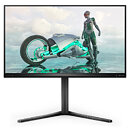
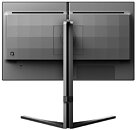
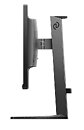
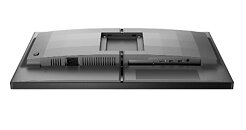 A winning combination
Today's gamers don't just want a monitor, they want an ally—and the Philips Evnia 25M2N3200U is the ideal candidate. By uniting multiple technologies designed to enhance the gaming experience, this model ensures peak performance in competitive gaming and eSports, making every session as exhilarating as it can be.
In terms of speed, its 25-inch Fast IPS panel, overclockable 310 Hz refresh rate, and 0.3 ms ultra-fast Smart MBR guarantee ultra-smooth gameplay and flawlessly crisp images in every frame. Players get a true edge thanks to lag-free, blur-free visuals and a significantly faster refresh rate than standard displays, while low input lag provides peak performance in action-packed, twitch-sensitive games where every half-second counts.
In terms of precision and visual clarity, its 16:9 Full HD display with SmartContrast delivers visuals that are bold, bright, and detailed, with contrast and backlighting that automatically adjust to best suit the contents on the screen. The added power of DisplayHDR 400 means players enjoy vibrant, nuanced, true-to-life images that make every game more engaging and more immersive.
In terms of performance, the Philips Evnia 25M2N3200U provides gamers with a generous selection of features designed specifically to give them an advantage over the competition. SmartImage Game mode gives them quick access OSD with multiple options fine-tuned to fit every genre, including First-Person Shooting, Racing, Real-Time Strategy, and more. Smart Crosshair chooses a complementary color to players' crosshair, enhancing aiming accuracy, while Smart Sniper improves players control whenever they zoom in their target to keep their aim steady and precise. And Stark ShadowBoost boosts dark scenes without overexposing lighter ones so that players see accurately regardless of the brightness of the scene.
In addition to these many features, the monitor includes Evnia Precision Center, which allows users to optimize and personalize their monitor to reflect their unique gaming style. Finally, gamers can rest assured that their physical well-being is accounted for as well, thanks to a fully adjustable stand for maximal comfort and eye-protecting technologies like Flicker-Free and LowBlue Mode, which prevent eye fatigue during long, intense gaming sessions.
Key features
Source:
Philips
"The Philips Evnia 25M2N3200U gives competitive and eSports players everything they need to enjoy games where speed and precision are non-negotiable. The monitor reflects Philips Evnia's commitment to gamers' experience, whether in terms of features, benefits, or comfort. For those seeking a high-quality all-around gaming experience at an affordable price, this monitor is the answer," commented Cesar Reyes Acosta, Lead Product Manager, Consumer Monitors, in MMD.


Today's gamers don't just want a monitor, they want an ally—and the Philips Evnia 25M2N3200U is the ideal candidate. By uniting multiple technologies designed to enhance the gaming experience, this model ensures peak performance in competitive gaming and eSports, making every session as exhilarating as it can be.
In terms of speed, its 25-inch Fast IPS panel, overclockable 310 Hz refresh rate, and 0.3 ms ultra-fast Smart MBR guarantee ultra-smooth gameplay and flawlessly crisp images in every frame. Players get a true edge thanks to lag-free, blur-free visuals and a significantly faster refresh rate than standard displays, while low input lag provides peak performance in action-packed, twitch-sensitive games where every half-second counts.
In terms of precision and visual clarity, its 16:9 Full HD display with SmartContrast delivers visuals that are bold, bright, and detailed, with contrast and backlighting that automatically adjust to best suit the contents on the screen. The added power of DisplayHDR 400 means players enjoy vibrant, nuanced, true-to-life images that make every game more engaging and more immersive.
In terms of performance, the Philips Evnia 25M2N3200U provides gamers with a generous selection of features designed specifically to give them an advantage over the competition. SmartImage Game mode gives them quick access OSD with multiple options fine-tuned to fit every genre, including First-Person Shooting, Racing, Real-Time Strategy, and more. Smart Crosshair chooses a complementary color to players' crosshair, enhancing aiming accuracy, while Smart Sniper improves players control whenever they zoom in their target to keep their aim steady and precise. And Stark ShadowBoost boosts dark scenes without overexposing lighter ones so that players see accurately regardless of the brightness of the scene.
In addition to these many features, the monitor includes Evnia Precision Center, which allows users to optimize and personalize their monitor to reflect their unique gaming style. Finally, gamers can rest assured that their physical well-being is accounted for as well, thanks to a fully adjustable stand for maximal comfort and eye-protecting technologies like Flicker-Free and LowBlue Mode, which prevent eye fatigue during long, intense gaming sessions.
Key features
- 310 Hz OC refresh rate (300 Hz native) for ultra-smooth gameplay
- 0.3 ms Smart MBR for sharp, precise visuals
- Fast IPS FHD display (24.5" for action-packed gaming)
- HDR400 for superior brightness, contrast, and colors
- Ergonomic stand and eye-protective features for comfort and well-being
- Precision Center for added control and personalization
5 Comments on Philips Announces the Evnia 25M2N3200U A High-Performance eSports Monitor
I hope it's better in person.
My work Dell P2425H has same (near the controlstick) and it's ok and WAY better than these old stupid buttons on bottom.:kookoo::banghead::cry:
The other "software" problem is that both IPS and VA displays struggled with overdrive to the point that I wasn't able to find any combination of refresh rate (fixed/VRR), or overdrive mode that delivered an acceptable high-refresh experience. I returned the 260Hz IPS panel because it was just wildly overdriven from about 100Hz to 260Hz with massive amounts of inverse trails. Reducing the overdrive just one notch essentially made it a usable 60Hz or 75Hz monitor, and too smeary for anything faster.
The 32" I kept - it is a previous-gen 5500 model of some description with a curved 240Hz quantum-dot VA panel that is decent in all aspects except for the overdrive again. There's no sweet spot - it's either far too aggressive with inverse ghosting, or far too slow for anything much above 120Hz. On the "faster" setting using VRR and setting games with a 120Hz frame limit, it's nice enough for the money. Maybe I'm spoiled by previously great Dell Ultrasharps and my current Odyssey G7 32" that just handle VA motion really well, but it's been about 6-7 years since I saw overdrive this bad from any monitor brand, regardless of price.
My guess is that some PHB at Philips told the engineers to make a 240Hz 1ms MPRT monitor with a 144Hz panel. It's entirely possible if you just overdrive it and overclock it to the moon, and technically it meets the claimed specs, if you ignore the 90% overdrive error rates! At 144Hz it was actually a nice image. I've only used two Evnia monitors, so take this report of my experience with a grain of salt, but the poor OSD layout, controls, ergonomics, and bad overdrive behaviour are likely to occur across all models because the same team of people are probably responsible for the software side of every model in the Evnia range :\It's not. On both the 27" and 32" Evnia I bought this weird placement was awkward and really uncomforatable to use. It's exactly as bad as it looks, and you spend much longer in this awkward and uncomfortable position because the OSD's UI is godawful and lacks a centre click for "OK" like every other joystick system. As a result, "next", "previous", "ok" and "cancel" are random, depending on the exact sub menu. Actually, it's unfair to associate the word "menu" with this OSD. It has horizontal tabs and vertical menu lists per tab but don't expect left/right to switch tabs and up/down to move through the menu list - that would be too easy!
But yeah thanks for confirming what I was thinking @Chrispy_ it's not that Philips make bad products even their cheap 34M2C3500L 3440x1440pixel monitor comes with like 94% DCI-P3, 125 sRGB, 105% NTSC and 103% Adobe colour gamut which ain't bad for the price really.