Tuesday, October 21st 2025

Almost Nobody Uses Paid Third-Party Antivirus: TechPowerUp Frontpage Poll

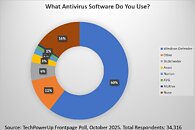
Almost nobody cares about third-party antivirus applications, much less pay for them, a surprising set of TechPowerUp Frontpage Poll results show. There was a time when you couldn't have a reliable PC experience without a solid third-party antivirus software, paying protection money each year for subscription to updates. Then Microsoft decided to significantly up the ante with endpoint security. It began with Windows Defender, a free antivirus that's part of Windows that you used if you had nothing else. Over the years, Microsoft hardened Windows with features such as Malware Removal Tool, Secure Boot, BitLocker, TPM-based root of trust, and Virtualization-based Security, which ran the whole user-space in a secure enclave, as a virtual machine, which couldn't let malware break its host. All these mean that endpoints are safer than ever, and this reflects in our poll results. Our poll had a total of 34,316 responses.

A comfortable majority of 60.5% voted for Windows Defender as their AV software of choice. A small but not insignificant percentage of 15.7% says that it has no antivirus software installed whatsoever, which is difficult if not impossible as Windows runs Defender in some limited form. A combined 24% of the responses say they use third-party AV software. The biggest choice is "Other," which includes brands not covered in the poll. A good share of these could include Kaspersky. 6.1% of the total responses say they use Bitdefender. This is followed by Avast at a surprisingly low 2.9% given that it has a free version; and an even more surprising 1% for AVG. Among the known paid-only applications, Bitdefender is followed by Norton at 1.9%, and McAfee at 0.7%.
Add your own comment

70 Comments on Almost Nobody Uses Paid Third-Party Antivirus: TechPowerUp Frontpage Poll

#26
R-T-B
TomorrowAssuming windows honors Group Policy settings. In my case it didn't and i had to manually delete Defender folder.
It's not supposed to I don't think outside of Enterprise SKUs (forgot that detail in my reply). If you kill/disable the defender service in safe mode it'll stick though, as an alternative.

Also you have to make sure tamper protection is off when you apply that setting, or it'll revert it for "tampering."

Anyways methods abound.
Posted on Reply
#27
Guwapo77
Shiiiidddd, I have a family and I use Bitdefender. It has easily helped keep things stable in my household.
Posted on Reply
#28
Tomorrow
R-T-BIt's not supposed to I don't think outside of Enterprise SKUs (forgot that detail in my reply). If you kill/disable the defender service in safe mode it'll stick though, as an alternative.

Also you have to make sure tamper protection is off when you apply that setting, or it'll revert it for "tampering."

Anyways methods abound.
That explains it. Im running standard Pro version. Tamper Protection along with myriad of other security settings are off. This a desktop computer that only i use so i dont feel the need for top notch security so long as i keep Firefox up to date. Ironically since Chrome has such a big market share malware makers target that and often wont bother with Firefox.
Posted on Reply
#29
DBGT
The "other" is likely Kaspersky, just because it is not available in the US does not mean that the whole world are not using it.
Posted on Reply
#30
johnspack
Here For Good!
Well normally I'd say I run Arch, so who cares... but I also run win11... and defender does just fine for the few hours a week I actually use windows....
Posted on Reply
#31
trparky
GeoffreyASurprised AVG was that low, considering its popularity as the "free" antivirus back in the day.
AVG may have been good in the past but once they were bought by Avast, it went down hill. And then when Avast was bought by the same company that bought Norton, the shit really hit the fan.
TheinsanegamerNUblock origin is the best antivirus
For me, it's AdGuard for Windows along with AdGuard DNS. AdGuard for Windows filters out a lot of ads before one byte of HTML code even reaches the web browser while AdGuard DNS blocks a whole lot of domains known for serving up ads and malware.
Posted on Reply
#32
GeoffreyA
trparkyAVG may have been good in the past but once they were bought by Avast, it went down hill. And then when Avast was bought by the same company that bought Norton, the shit really hit the fan.

For me, it's AdGuard for Windows along with AdGuard DNS. AdGuard for Windows filters out a lot of ads before one byte of HTML code even reaches the web browser while AdGuard DNS blocks a whole lot of domains known for serving up ads and malware.
I find the false positives are too much, but other than that, it works all right and is fairly transparent.

AdGuard DNS does a good job on Android too, blocking ads across the OS.
Posted on Reply
#33
Chaitanya
MrDweezilNobody under 80 years old has gotten a computer virus in 20 years.
During my college days I used to keep Live Linux on a flash drive just to keep out malwares from infecting my PC and some of those malwares were undetectable with one or other anti-virus program. So unless you had 2-3 different anti-virus running your PC certainly would get infected from sharing project files or study material between college mates or print shops. This was back in 08-09 and I had to format my PC atleast once a year during my 1st 2 years of college before I started with Live Linux and then infection rate dropped to 0.
Posted on Reply
#34
W1zzard
R-T-BYeah TPU, not sure what you are smoking but there are gpedit keys you can set to completely disable defender. They are there for legal reasons, aren't hard to use, and work.
No, these no longer work, you have to install another antivirus is the only way to reliably disable Defender. Happy to try any method you suggest
Posted on Reply
#35
sudothelinuxwizard
A small but not insignificant percentage of 15.7% says that it has no antivirus software installed whatsoever, which is difficult if not impossible as Windows runs Defender in some limited form.
.... Linux?
Posted on Reply
#36
R-T-B
W1zzardNo, these no longer work, you have to install another antivirus is the only way to reliably disable Defender. Happy to try any method you suggest
Indeed, they don't work on their own. You need to delete the WinDefend service before these keys even stick, my mistake. I just found my notes on this and forgot that part.

Still, that is effective in disabling defender, so not really sure it's impossible as claimed. Just boot to safe mode, delete the service via regedit, set the key, and done. These steps well reliably disable Defender, I've been running this way without it reenabling for so many years now I literally forgot a key step, lol.
Posted on Reply
#37
azrael
It kind of worries me how non-chalant most people in this thread are with regard to AV software. I suppose it's because most use their PC only for gaming. I've been using ESET for many years and it's given me peace of mind. Well, to a point, because even the best AV software can't save you from PEBCAK.
Posted on Reply
#38
Mr. Stein
Bitdefender does have a freebie version...you have to dig around to find it though. FYI
Posted on Reply
#39
Tomorrow
azraelIt kind of worries me how non-chalant most people in this thread are with regard to AV software. I suppose it's because most use their PC only for gaming. I've been using ESET for many years and it's given me peace of mind. Well, to a point, because even the best AV software can't save you from PEBCAK.
That is because people answering here are enthusiasts who most of the time know what they're doing.
Im not saying that makes them immune to malware as even security researches have fallen for malware when tired/distracted.

As always the best defense or the weakest link sits between the monitor and the chair. The best malware defense in the world cant protect an utter idiot who believes and clicks everything they see on the internet, and those who know what they're doing can safely run decades without even using the built in defender.

That being said it's always good practice to run anti-virus software periodically. I too run ESET with my custom config (exclusions etc) about once a quarter to have a peace of mind, but running it 24/7 would be pointless.
Posted on Reply
#40
trparky
Well, when one has a good adblocker and you use several well-known adblocking lists that not only block ads in the browser but also at the network level where you blacklist known domains that are associated with distributing malware, one seriously shrinks the odds of getting infected to near zero.

I've been running this kind of setup for years and have never been infected.
Posted on Reply
#41
INSTG8R
Vanguard Beta Tester
It's not needed and will always be bloatware and with their "live protections" pronably annoying about "something"
Win Defender and am occasional run of MBAM is all you should ever meed. oh and obcvioiusly some good commen sense, thats really the best AV
Posted on Reply
#42
W1zzard
R-T-Bfor so many years now
24H2 or 25H2? I wouldn't be surprised if they added a "medic" service recently like for updater
Posted on Reply
#43
Nergal
Thank you those for not using 3th party AV. It makes it more likely criminal elements won't need to bother if they are detected by 3th party AV or not, making it more secure for the "others". My combination of AVG and MBAM seems overkill now 🤖
Posted on Reply
#44
R-T-B
W1zzard24H2 or 25H2? I wouldn't be surprised if they added a "medic" service recently like for updater
I'm using it right now on my 25H2 install. Still dead. Had this install since W11's first launch.

The updater gpedit keys have never given me any trouble either. I suspect it must be because I run enterprise.


That's from an IoT trial machine in my IT room (closest machine, I really need to reimage it because the trial is almost up and IoT costs a fortune) but the other regular enterprise machines are similar. Even the 25H2 workstation I personally use. I don't really want to screenshot it because it's uh, currently apart on my desk. :laugh:
Posted on Reply
#45
W1zzard
R-T-Bbecause I run enterprise.
I'm sure things are different with Enterprise or IoT
Posted on Reply
#46
slyphnier
TomorrowThat explains it. Im running standard Pro version. Tamper Protection along with myriad of other security settings are off. This a desktop computer that only i use so i dont feel the need for top notch security so long as i keep Firefox up to date. Ironically since Chrome has such a big market share malware makers target that and often wont bother with Firefox.
isnt firefox using google-safe for their filtering list ?
not sure if firefox is safer because low market share, its can actually opposite, as current internet revolve google services alot, google security should detect most threat sooner and patch earlier

but i think it just different now, what in past people getting viruses, now is ransom-ware
what in past viruses doing various damage, now its more like gather & stealing private-information
Posted on Reply
#47
Unregistered
A small but not insignificant percentage of 15.7% says that it has no antivirus software installed whatsoever, which is difficult if not impossible as Windows runs Defender in some limited form.
for me I use Defender Control by Sordum to disable it, which sets some registry keys for the group policies and a few other things, I've had Defender disabled since it was first introduced with Win7, No background tasks for the antimalware services, and I block smartscreen from even being able to launch itself on my system.

If I recall theres like 5-6 methods to fully disable it, including a smart way by means of a "fake antivirus" called DefendNot which is available on github.
Posted on Edit | Reply
#48
R-T-B
W1zzardI'm sure things are different with Enterprise or IoT
Likely with IoT yes but my understanding is the Pro inage behaves identically to enterprise. It's literally binary the same. I guess there could be gp enforcement differences based on SKU but back when I was running pro, that didn't seem true outside of the telemetry keys.
Shadowizedfor me I use Defender Control by Sordum to disable it, which sets some registry keys for the group policies and a few other things, I've had Defender disabled since it was first introduced with Win7, No background tasks for the antimalware services, and I block smartscreen from even being able to launch itself on my system.

If I recall theres like 5-6 methods to fully disable it, including a smart way by means of a "fake antivirus" called DefendNot which is available on github.
Yeah the point is, if you want it disabled, it isn't hard really. Solutions abound.
Posted on Reply
#49
Unregistered
R-T-BYeah the point is, if you want it disabled, it isn't hard really. Solutions abound.
yeah, we're not in disagreement at all here it's very simple to do and only the people unwilling to take 30 seconds of a google search would think otherwise.
Posted on Edit | Reply
#50
R-T-B
Shadowizedyeah, we're not in disagreement at all here it's very simple to do and only the people unwilling to take 30 seconds of a google search would think otherwise.
Well, w1zzard the owner of this site was contesting it, so I don't want to say it's THAT common of knowledge, but yeah...
Posted on Reply
Add your own comment
Nov 24th, 2026 23:25 CST change timezone

New Forum Posts

Popular Reviews

TPU on YouTube

Controversial News Posts