Tuesday, October 21st 2025

Almost Nobody Uses Paid Third-Party Antivirus: TechPowerUp Frontpage Poll
Almost nobody cares about third-party antivirus applications, much less pay for them, a surprising set of TechPowerUp Frontpage Poll results show. There was a time when you couldn't have a reliable PC experience without a solid third-party antivirus software, paying protection money each year for subscription to updates. Then Microsoft decided to significantly up the ante with endpoint security. It began with Windows Defender, a free antivirus that's part of Windows that you used if you had nothing else. Over the years, Microsoft hardened Windows with features such as Malware Removal Tool, Secure Boot, BitLocker, TPM-based root of trust, and Virtualization-based Security, which ran the whole user-space in a secure enclave, as a virtual machine, which couldn't let malware break its host. All these mean that endpoints are safer than ever, and this reflects in our poll results. Our poll had a total of 34,316 responses.
A comfortable majority of 60.5% voted for Windows Defender as their AV software of choice. A small but not insignificant percentage of 15.7% says that it has no antivirus software installed whatsoever, which is difficult if not impossible as Windows runs Defender in some limited form. A combined 24% of the responses say they use third-party AV software. The biggest choice is "Other," which includes brands not covered in the poll. A good share of these could include Kaspersky. 6.1% of the total responses say they use Bitdefender. This is followed by Avast at a surprisingly low 2.9% given that it has a free version; and an even more surprising 1% for AVG. Among the known paid-only applications, Bitdefender is followed by Norton at 1.9%, and McAfee at 0.7%.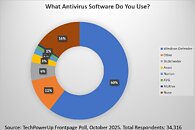
A comfortable majority of 60.5% voted for Windows Defender as their AV software of choice. A small but not insignificant percentage of 15.7% says that it has no antivirus software installed whatsoever, which is difficult if not impossible as Windows runs Defender in some limited form. A combined 24% of the responses say they use third-party AV software. The biggest choice is "Other," which includes brands not covered in the poll. A good share of these could include Kaspersky. 6.1% of the total responses say they use Bitdefender. This is followed by Avast at a surprisingly low 2.9% given that it has a free version; and an even more surprising 1% for AVG. Among the known paid-only applications, Bitdefender is followed by Norton at 1.9%, and McAfee at 0.7%.

70 Comments on Almost Nobody Uses Paid Third-Party Antivirus: TechPowerUp Frontpage Poll
Defender control emulates being an a/v, so it can be used to disable defender without installing another a/v.
If you feel like testing, download page here, will need latest version for latest 11. www.sordum.org/9480/defender-control-v2-1/
Credit to shadowized for posting it before me.
Disabling the Defender Firewall service means it throws an (nondescript) error when trying to download and install anything from the store. Including updating already installed apps.
Malwarebytes premium also has an active shield that defends from run by viruses and acts just like any other AV. The free version is just a scanner though, a second opinion essentially and can be run alongside an antivirus.
You don't need to click a download button or actively put info into a field to get infected, you can just go to close the thing and it infects you, it might infect you just by visiting a website, an email that looks like a legit website, say microsoft or ebay or paypal might infect you if you clock on any of the links, etc...
Not having AV is a disaster waiting to happen, now you might only visit 5 websites and never visit any other ones and never open an email, etc... but for any normal users having an AV is essential, even if its just windows defender.
And Windows defender is okay, tons better than no AV, but its quite bad in terms of zero day or newer malware.
Biggest risk to the pc/software is and will remain the idiot behind the keybord :roll: , me included :D.
I have the plus package Which includes an unlimited VPN.
sadly the app itself has become a bit bloated over the years.
it is not essential
my windows 11 pro defender is 3 or more months oudated. root cause: monthly w11 pro update package does not contain defender updates.
duct tape = antivirus is the wrong fix for the issue.
i maybe used one or two years avira antivirus in my hole life since the intel 286 cpu. this was my early uneducated days when i still was using windows 95.
i also bothered with clamav. i ditched it after a few months. i consider this as evulation phase. it is not needed.
what are you doing to need protection software? are you visiting and downloading stuff which is not legal? list those websites and contents why you need antivirus. in w98 days illegal game downloads were sometimes full with bad code.
You think you don't need one, because you've had one ever since windows 7, even if it wasn't very good 10+ years ago!
You can get malware from anywhere, downloading a program you think its legit, but its been injected with malware or downloading a new program that you wanted to try out or opening an email or an attachment or clicking on a google ad or just visiting an infected website.
Not having AV is like going out and leaving the door open, could be nothing happens, but one of the times you might have someone go in and steal.
Ignoring the fact that you could also be shot in an arm or a leg or especially the head. You could be hit by a car. You could be poisoned, stabbed, robbed etc.
AV is like a bulletproof vest that only protects you from one specific thing, not myriad of other things that could happen to you and where it would be utterly useless.
Here's some light reading for you:
- Advanced persistent threat
- Zero-day vulnerability don't forget to follow the link to Market for zero-day exploits
- Shodan
And here you can find very detailed information about that arm I mentioned. That one is not light reading.There's more to staying safe online than just running an AV.
Besides if a person has poor online hygiene than no amount of security will help anyway.
This comes down to several things like what OS and browser you use. How up to date these are. What sites you visit. Where you download your software etc.
Given the prevalence of social media and phishing it's also important what you do on various social networks.
All of these things matter. Some people act like "i have AV and now im safe."
Or attack those who dont use AV with nonsense like "you have a virus and you dont even know it".
I stopped using my main rig to surf the net back around vista, back then it was more about not wanting to wear out expensive hardware like monitors. But eventually I developed an airgapped and highly compartmentalised system.
There is a big misconception that the net is a very safe place nowadays, because of how many use it and online buying etc. But that isnt entirely true. The internet has become highly monetised and censored and so what ever you search on the surface is absolute biased news, AI slop, slop articles with ads, slop in general, shills making videos, and just indoctrination in general. So if you want to go in the wild and see the real stuff that isn't filtered where the net is free and unspoiled you have to visits places that are more dangerous and so that brings risks. So claiming that the modern net is safe is misleading and biased and makesunwarranted assumptions on the user. Some files I download can only ever be assessed inside dummy machines spanning many months-years before you have some idea if they really are safe.
The cold reality is malware, ransomware in particular, is truly insidious and once you get struck you had better hope you have a large buffer with your data backups. This is why the cybercrime is a billion dollar industry. Folks get hacked all the time. Back ups (OS included) is the only way to defeat it. As we should all know by now the internet and news is censored massively and so we literally don't see what is going on out there and just how many hacker groups there are and how many get hacked and how many actually pay the ransom. It's crazy when you read reports and statistics. As I said its a billion dollar industry.
The second big misconception is that all you need is to stay updated, have an AV, stay off bad sites, don't click on email links etc and your safe. While that is true as far as large numbers go, there are still people getting hacked, as I said its a billion dollar industry. Large numbers are indifferent to the small victims. Windows has many many vulnerabilities, in fact its been called a major threat to national security by experts for a reason. It's not a matter of if, but a matter of when.
Yet another misconception is malware. People think its easy to detect and get rid of. Absolute foolish unfounded beliefs, some of which is parroted by IT experts. Malware is, or can be very very insidious and slimy. That is partly why they get into businesses and big companies. So to protect yourself you actually need to constantly monitor your system, processes, disk activity, internet activity, etc. You have to know what to look for and it's not easy. A good firewall (NOT WINDOWS!) and basic tools like systools and wireshark etc go a great way to keep you safe. Malware gets into the kernels and hides in your memory, you most likely will never see any direct evidence of it. Most realworld reports of it always say the same thing; the AV never detected anything or only when it was to late and the system was comprimised. Oh gee, who would have thought! What about Root kits, Bootkits??? should we go on?
So for myself, I cannot take that ransomware risk nor can I tolerate dealing with malware in general because I dont have the nerve or the time, and so I keep my main rig off the net entirely. Further, keeping my main system online is totally unacceptable as nowadays there are quite literally at any given time dozens and dozens of nefarious processes and services in windows and apps that spy on you, phone home, and change shit behind your back. It's one of those situations where all you can do is laugh and say we couldn't make this shit up even if we tried. I already learnt long ago that there is a very strong correlation between keeping your rig online and having system instability and crashes. It's not just the malware, it's also the fact that so many software devs quite frankly do what ever the **** they like and overtime things become corrupted and no longer work properly. That is a pro secret to getting many many years of stable computer life, STAY OFF THE NET!
So to safe guard myself against malware and hacks I employ various tactics:
1-Keep my main rig for my private use and data back ups completely airgapped, and it only sees the internet for essential software updates, which for me is very rare. I dont game online because I refuse to accept Steam or anything like it. Any files I need off the net I get from a dedicated clean machine fitting requirement #4. Any files of questionable origin should ideally be "trailed" as per above and to mitigate the risk have backs ups spanning many years ideally.
2- Make sure my data is backed up in such a way that any ransomware cannot get to it all, so have many copies spanned over a few months/years etc. This is what IT pros do, if their smart.
3- Make sure any funds like CC is physically limited to a small amount. So if i get hacked it's not a big deal.
4- Have strong passwords and multi verification in online buying. Use passwords of at least 20-30 very random characters.
5-Privacy focused browser with strong ad blocker. Ads are ways hackers can get in.
6-Do all online buying on a clean dedicated machine that gets its OS periodically wiped. The bigger the spending, the bigger the risk.
7-Periodically wipe windows on any browsing machine by reinstalling OS image. Takes about 10mins with a USB cable.
8-Practice good digital hygiene. Don't allow stray usbs from other machines on main machine for example.
9-Use VMs for sand boxing for certain browsing activities and with certain risky sites.
10- Stay privacy conscious, use a VPN (a good one and not a free one that sells your data).
11-Stay off Social nonsense.
12-Compartmentalise activities. Keep general web activity completely separate to gaming for example.
I have been doing this since windows 7 days and haven't paid a cent for security and never will. In the long run I will come out much further. You think MS give two hoots if you loose your data? Not even in the slightest. In their eyes you are a statistic.