Thursday, September 17th 2026

PSA: Windows is Reporting Fake "Defender Antivirus Turned Off" Warnings

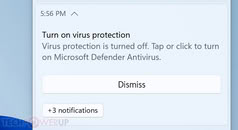
After installing the latest Defender Antivirus update for Windows 11, users have started reporting that their operating system is sending notifications stating "Microsoft Defender Antivirus is turned off." Despite the Defender Antivirus protection working correctly, Windows has been pushing these notifications to users, with many of the TechPowerUp staff experiencing the error themselves. These notifications typically appear when the operating system is freshly booted up or immediately afterward. Interestingly, Defender Antivirus can send out notifications even when notification settings are turned off, and all versions of Windows or Windows Server are affected. Microsoft acknowledged the issue, stating:
MicrosoftWe are working to release a resolution in a future Microsoft Defender Antivirus update and will provide more information when it is available.
For those running the Windows Defender August update with Platform number 4.18.26080.3, Engine version 1.1.26080.3, and Security intelligence number 1.1.159.11.0, be sure to check for more updates in the coming weeks. Microsoft has been focusing on improving security threat detection and increasing scanning, which inadvertently affected notification settings. Especially since the company is now dealing with hundreds of AI-discovered vulnerabilities, keeping Defender Antivirus up to date is a good idea.
Source: Microsoft
Add your own comment

47 Comments on PSA: Windows is Reporting Fake "Defender Antivirus Turned Off" Warnings

#1
TheLostSwede
News Editor
Been having this for a few days now, very annoying.
Posted on Reply
#2
mb194dc
More vibe coded winning or just the usual incompetence ?
Posted on Reply
#4
Athanasius
Yup, I just ran into this, I was puzzled by the notification, because I knew I had it activated last I checked... and then checking again, it was all active
Posted on Reply
#5
notoperable
M$ is keeping on their promise, its a reliable - once a week f**kup delivery!
Posted on Reply
#6
Hyderz
At this stage windows update is pretty much Microsoft playing unlimited whack a mole.. fix one or two and a few sprung up again…
Posted on Reply
#7
sam_86314
Yep, had this on my work machine this morning. Caught me off guard, but I checked and didn't see anything wrong, so I went on with my day.
Posted on Reply
#8
MysticalShip
turn on hibernate when on a laptop and the message goes away until you shutdown or restart windows 11.
Posted on Reply
#9
Raiden85
Safer playing Russian roulette than updating Windows these days because they always break something on every update.
Posted on Reply
#10
ZoneDymo
TheLostSwedeBeen having this for a few days now, very annoying.
Yep same
Posted on Reply
#11
Athena
also does this on win 10...

to see if everything is on as it should be, in a powershell, type this in, it should tell you true for both
Get-MpComputerStatus | Select-Object AntivirusEnabled,RealTimeProtectionEnabled
it seems to be trivial to fix this, but, it's strange that it's taking MS weeks to fix
Posted on Reply
#12
MysticalShip
PS C:\WINDOWS\system32> Get-MpComputerStatus | Select-Object AntivirusEnabled,RealTimeProtectionEnabled

AntivirusEnabled RealTimeProtectionEnabled
---------------- -------------------------
True True
Posted on Reply
#13
Hilux SSRG
mb194dcMore vibe coded winning or just the usual incompetence ?
Usual incompetence of not testing prior to release.

No wonder people are trying Linux and SteamOS as alternative.
Posted on Reply
#14
Grimling
At this point, is there anything in Windows 11 left that is still working as intended?
It seems to me MS is trying desperately to bury its own OS Business, by sabotaging W11 into an completely unusable state, to force everyone to abandon it.
Posted on Reply
#15
dgianstefani
TPU Proofreader
theonlyrobertThis hasn't happened to me on LTSC.
Same here, no issues.

On the laptop it sometimes has "tamper protection is turned off" etc., but that's not a new problem.
Posted on Reply
#16
RejZoR
Microsoft just can't stop vibe coding their shit. It's pissing me off. After years of using 3rd party antiviruses I've decided to just stick with Windows Defender and just now it decides to be utterly annoying with these stupid warnings even though everything is fine.

While Linux distros have various issues and problems, none of them feel this low effort and stupid as Microsoft's nonsense. They literally cannot go by with a single update that wouldn't break a fuck ton of things. Like, are they stupid or something? How hard can it be to just not introduce new things for 3 months and only focus on fixing problems? Very apparently.
Posted on Reply
#17
R-T-B
TheLostSwedeBeen having this for a few days now, very annoying.
Look for the gpedit.msc key Hide Windows Security Systray and set it to enabled. It will stop the notifications for now, although it does disable pretty much all security notifications...
Posted on Reply
#18
Darmok N Jalad
AleksandarKInterestingly, Defender Antivirus can send out notifications even when notification settings are turned off
This is standard MS behavior, where their own apps and services fail to follow the design rules laid out by Windows. They don’t “eat their own dog food,” as they say.
Posted on Reply
#19
zenlessyank
No issue here yet. Do they have a RNG for where the errors will pop up?
Posted on Reply
#20
AVATARAT
I use Norton, which completely disables Defender, so I don't get any notifications.
Posted on Reply
#21
TheinsanegamerN
Had this a few times. I think it was activating because other parts of the security tab were turned off. Dismissing the "you should set up file backups" and other warnings seemed to stop all notifications.
Darmok N JaladThis is standard MS behavior, where their own apps and services fail to follow the design rules laid out by Windows. They don’t “eat their own dog food,” as they say.
Yes, security systems are exempt from the notification system. You can set third party antivirus to do this too.
AVATARATI use Norton, which completely disables Defender, so I don't get any notifications.
I'm sorry to hear that.
RejZoRMicrosoft just can't stop vibe coding their shit. It's pissing me off. After years of using 3rd party antiviruses I've decided to just stick with Windows Defender and just now it decides to be utterly annoying with these stupid warnings even though everything is fine.

While Linux distros have various issues and problems, none of them feel this low effort and stupid as Microsoft's nonsense. They literally cannot go by with a single update that wouldn't break a fuck ton of things. Like, are they stupid or something? How hard can it be to just not introduce new things for 3 months and only focus on fixing problems? Very apparently.
If a notification makes you crash out this hard, maybe its time to turn off the computer and take a break, go outside, smell the fresh air, and reflect on life and if an errant notification is really THAT big of a deal.
Posted on Reply
#22
Tess
TheLostSwedeBeen having this for a few days now, very annoying.
I turned on Controlled Folder Access (the only thing that was ever off), let it senselessly bother me a few times, then turned it off again. Haven't had a "warning" since.

I'm surprised this is just now getting an article tho - I solved it over a month ago - after knowing about it for weeks prior to even that. <shrug>

After turning it on, interestingly, it caught some unknown person logging on to my machine using ScreenConnect probably in Backstage Mode. :D They were probably just helping with maintenance. Heh, I remember the days when a fairly large minority of people just left their systems (or some drive or folder) open to full control traffic for whatever purpose - telnet & FTP days in late 60's - way before gopher in the 90's or the BBS scene. I kinda still live with that spirit leaving WiFi totally open, free and unprotected. Mighta-be how they were connecting. :)
TheinsanegamerNHad this a few times. I think it was activating because other parts of the security tab were turned off. Dismissing the "you should set up file backups" and other warnings seemed to stop all notifications.

Yes, security systems are exempt from the notification system. You can set third party antivirus to do this too.

I'm sorry to hear that.

If a notification makes you crash out this hard, maybe its time to turn off the computer and take a break, go outside, smell the fresh air, and reflect on life and if an errant notification is really THAT big of a deal.
People take things WAY too seriously these days!
Posted on Reply
#23
AVATARAT
TheinsanegamerNI'm sorry to hear that.
Which one do you recommend? :)
Posted on Reply
#24
Athena
AVATARATWhich one do you recommend? :)
Windows Defender :D

Seriously though, Windows Defender is good enough for pretty much most users, if however you are downloading cracks/hacks/whatever like those, then you could be putting yourself at more risk, so then, virusscan.jotti.org/en or www.virustotal.com/gui/home/upload are good to check before running them, but they aren't perfect
Posted on Reply
#25
Tess
AthenaWindows Defender :D

Seriously though, Windows Defender is good enough for pretty much most users, if however you are downloading cracks/hacks/whatever like those, then you could be putting yourself at more risk, so then, virusscan.jotti.org/en or www.virustotal.com/gui/home/upload are good to check before running them, but they aren't perfect
I don't agree! It's not "good enough"...

it's way better than everything else! :D

Even if you're doing the warez thing - if you run into trouble just DL a stand-alone one-time cleaner to get rid of the problem. Installing 3rd party anti-virus and "protection" software hasn't been a good idea for decades now!
Posted on Reply
Add your own comment
Nov 17th, 2026 18:47 CST change timezone

New Forum Posts

Popular Reviews

TPU on YouTube

Controversial News Posts