Tuesday, January 27th 2026

Razer Launches Synapse Web Beta
Razer, the leading global lifestyle brand for gamers, today announced the beta release of Razer Synapse Web, a new lightweight web app that offers instant access to essential customization for Razer devices.
Designed for rapid adjustments in competitive and mobile environments, Synapse Web provides a streamlined tuning experience directly from Chromium-based browsers such as Google Chrome, Microsoft Edge, and Opera, without requiring software installation.
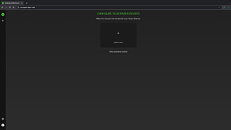
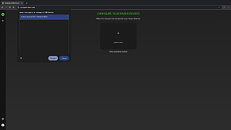
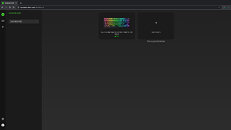
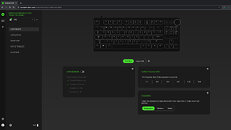 As the newest layer of Razer's Synapse ecosystem, Synapse Web brings pro-level control into a modern, web-native format. The Razer Huntsman V3 line of keyboards is the first device line supported at launch, with more to follow as the platform expands. Compatible devices include: Razer Huntsman V3 Pro 8KHz, Razer Huntsman V3 Pro TKL 8KHz, Razer Huntsman V3 Pro Mini.
Designed for the Essentials
When time is tight or systems are locked down, installing full software is not always possible. Synapse Web turns any Chromium-based browser into a lightweight tuning hub, perfect for quick changes, tournament setups, shared PCs, and LAN environments.
Focused on speed and simplicity, Synapse Web offers the core features gamers rely on most:
Flexibility Meets Control
Synapse Web complements Synapse 4 to give players the best of both worlds. Synapse Web offers a lightweight, practical alternative when a full installation is not feasible, while Synapse 4 remains the platform for advanced customization and deeper device integration like multi-device Chroma RGB sync and game specific profiles.
Razer Synapse Web is available now to beta test at synapse.razer.com.
Designed for rapid adjustments in competitive and mobile environments, Synapse Web provides a streamlined tuning experience directly from Chromium-based browsers such as Google Chrome, Microsoft Edge, and Opera, without requiring software installation.


Designed for the Essentials
When time is tight or systems are locked down, installing full software is not always possible. Synapse Web turns any Chromium-based browser into a lightweight tuning hub, perfect for quick changes, tournament setups, shared PCs, and LAN environments.
Focused on speed and simplicity, Synapse Web offers the core features gamers rely on most:
- Instant access: Configure supported devices on the fly with a browser. Ideal for LANs, esports tournaments, or switching between shared systems.
- Simplified controls: Adjust key settings and Chroma RGB Quick Effects through a clean, fast, and focused UI.
- On-board profiles: View, edit, and save profiles directly to device memory for consistent settings anywhere.
Flexibility Meets Control
Synapse Web complements Synapse 4 to give players the best of both worlds. Synapse Web offers a lightweight, practical alternative when a full installation is not feasible, while Synapse 4 remains the platform for advanced customization and deeper device integration like multi-device Chroma RGB sync and game specific profiles.
Razer Synapse Web is available now to beta test at synapse.razer.com.
21 Comments on Razer Launches Synapse Web Beta
I have a Deathadder essential mini, so thought to try it out. but like everything software related made by razer it dosen't work. In Firefox you click on the button 'add device' and nothing happens. So Tried in brave and I do then get a popup but no devices are listed.
I love this, no more synapse installed software (hopefully) and could be usable accross any OS win/mac/linux.
Maybe moving to a web based tool for their stuff will be a blessing in disguise for some, but for folks like me that were left with a bad taste in their mouth it's too little, too late. Razer is a big no go for me.
I've had great luck with Logitech. I have seen folks complain about them and their software, but it's no where near as bad as Razer's.
People (including myself) were seeing Razer as a non-option because of the bloat/spyware.
Primarily this is a good thing because it means you don't need to install some sort of device management app separately. The only disadvantage that I can think of is that if they make it locally run, they would need to integrate a small amount of memory on-board the device to store/host the local webserver files. Again this is if they make the configurator access offline.
The other thing they need to do is update the firmware on their devices to DISABLE the attempted auto-install of Synapse when you plug it on a Windows device. I'm not sure if its invoking Windows Update to prompt to download the installer (LG monitors do this too) or such, but this is quite annoying if you switch peripherals a lot. Especially since they had that Synapse issue years ago.
WebUSB does not care about your operating system. If only Mozilla would grow some sense and support it in firefox as well. Instead of just shutting it down.
Razer is the last company I'd have expected to do something like this.
When I found a Keychron keyboard at a thrift store and learned that everything was configured through a browser, I was completely sold on their products and ended up getting a mouse from them.
Of course, this also begs the question; what happens when they end support for these products or go under as a company? Maybe the webpage could be exported and run locally?
I think this is the case with most companies offering settings in browser, so if the company ever goes under you just find a download of the installer.
The Keychron Launcher is basically a bit tuned up VIA, with looks closer to Vial.
So their true selling point (besides the pretty nice boards and the huge selection) is QMK. :)
Positive: No need to install a 3rd party software that needs to be running in the background and such, easy to launch, EDIT: This also means you can configure stuff if you're on Linux, just need to use a Chromium-based browser and make sure to allow access (chmod) to whatever your device is on /dev/hidraw*
Negative: Possible security issue as it allows direct access to the hardware, which can be mitigated by asking permissions, but knowing the general public...