Thursday, May 28th 2026

Stream Deck Becomes the Action Layer for AI, Starting with NVIDIA G-Assist
Corsair Gaming, Inc. today announced that its Elgato brand is bringing MCP support to Stream Deck, opening the award-winning platform to AI assistants for the first time. Starting with NVIDIA G-Assist, AI tools and agentic workflows can now execute actions on a user's system. This takes AI out of the chat box and gives it a presence in the real world.
Most AI integrations today are screen-based. Chat windows, text fields, copilots that suggest things for you in a UI you're already in. While this has its place, agents are trapped in software. Stream Deck is different. It's a physical action layer connected to hundreds of integrations across your entire system: lights, audio, scenes, shortcuts, hardware, apps, automations. Model Context Protocol (MCP) is often described as a USB layer for AI, allowing any system to expose its full set of capabilities simply by plugging in. When an AI agent connects to Stream Deck through MCP, it inherits all of that.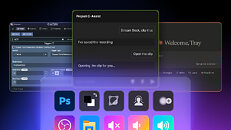
 One of the biggest open questions in AI deployment is the agent permission problem: how do you let an AI take real actions without giving it unchecked access? Stream Deck solves this by design. The user decides exactly which actions to expose. You fill your MCP Deck with the actions you want the agent to have, and nothing more. That's human-in-the-loop by design, not as an afterthought. Clear guardrails. Predictable behavior. You can see what every key does because the keys show you.
"The combination of broad system control, a user-curated permission model, and a physical interface with visual feedback makes Stream Deck a genuinely unique input layer for agentic workflows, not just for gaming and streaming, but for anyone building with AI agents that need to actually do things in the real world," said Thi La, Chief Executive Officer of Corsair. "Paired with our strategy of embedding the Stream Deck platform across a growing range of peripherals, Corsair offers one of the most valuable action layers for AI on the market today."
Initial launch partners include NVIDIA Project G-Assist, the on-device AI assistant for GeForce RTX PCs, and Aitum, a popular automation platform for streamers, with more partners on the way.
NVIDIA Project G-Assist
NVIDIA G-Assist is an on-device AI assistant for GeForce RTX PCs. Powered by a small but capable language model running locally on the GPU, it responds to voice and text commands, letting users optimize performance and manage their system on the fly.
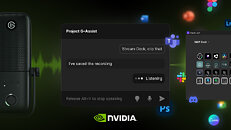
With Stream Deck integration, G-Assist's reach expands well beyond the desktop. Through a dedicated plugin, it connects to the user's MCP Deck, gaining access to every action on it. It also brings something entirely new to Stream Deck: voice control. For the first time, users can trigger Stream Deck actions just by speaking.
"Project G-Assist helps gamers and creators get more from their PCs. Stream Deck expands that even further, giving G-Assist access to a whole new range of actions beyond system settings," said Gerardo Delgado, Senior Director of Product Management at NVIDIA. "Press a button for a single action, or talk to G-Assist to trigger several at once. That's AI delivering real, everyday value."
Availability
Stream Deck's MCP support, a new plugin for NVIDIA Project G-Assist, and Aitum integration are available today. To get started, users need Stream Deck 7.4 or later and an existing Stream Deck device.
GeForce RTX owners can install G-Assist through the NVIDIA App, where the Stream Deck plugin comes pre-installed with v0.2.1. Setup also requires the Elgato MCP server, with a step-by-step guide available to help.
Most AI integrations today are screen-based. Chat windows, text fields, copilots that suggest things for you in a UI you're already in. While this has its place, agents are trapped in software. Stream Deck is different. It's a physical action layer connected to hundreds of integrations across your entire system: lights, audio, scenes, shortcuts, hardware, apps, automations. Model Context Protocol (MCP) is often described as a USB layer for AI, allowing any system to expose its full set of capabilities simply by plugging in. When an AI agent connects to Stream Deck through MCP, it inherits all of that.


"The combination of broad system control, a user-curated permission model, and a physical interface with visual feedback makes Stream Deck a genuinely unique input layer for agentic workflows, not just for gaming and streaming, but for anyone building with AI agents that need to actually do things in the real world," said Thi La, Chief Executive Officer of Corsair. "Paired with our strategy of embedding the Stream Deck platform across a growing range of peripherals, Corsair offers one of the most valuable action layers for AI on the market today."
Initial launch partners include NVIDIA Project G-Assist, the on-device AI assistant for GeForce RTX PCs, and Aitum, a popular automation platform for streamers, with more partners on the way.
NVIDIA Project G-Assist
NVIDIA G-Assist is an on-device AI assistant for GeForce RTX PCs. Powered by a small but capable language model running locally on the GPU, it responds to voice and text commands, letting users optimize performance and manage their system on the fly.
With Stream Deck integration, G-Assist's reach expands well beyond the desktop. Through a dedicated plugin, it connects to the user's MCP Deck, gaining access to every action on it. It also brings something entirely new to Stream Deck: voice control. For the first time, users can trigger Stream Deck actions just by speaking.
"Project G-Assist helps gamers and creators get more from their PCs. Stream Deck expands that even further, giving G-Assist access to a whole new range of actions beyond system settings," said Gerardo Delgado, Senior Director of Product Management at NVIDIA. "Press a button for a single action, or talk to G-Assist to trigger several at once. That's AI delivering real, everyday value."
Availability
Stream Deck's MCP support, a new plugin for NVIDIA Project G-Assist, and Aitum integration are available today. To get started, users need Stream Deck 7.4 or later and an existing Stream Deck device.
GeForce RTX owners can install G-Assist through the NVIDIA App, where the Stream Deck plugin comes pre-installed with v0.2.1. Setup also requires the Elgato MCP server, with a step-by-step guide available to help.
3 Comments on Stream Deck Becomes the Action Layer for AI, Starting with NVIDIA G-Assist
exactly what purpose does it serve? you could already do that, all of the examples provided are two and a half clicks away from getting set up, none of this requires an AI agent to do
open OBS, save a clip, change lights, whatever... that's 30 seconds in an action editor and an inexpensive, instantaneous process when a button is pressed, they're trying to market something that any streamer with barebones knowledge could do, but done with AI as a revolution
now when pressing the button, it's gonna call for an NPU or the GPU's AI accelerators PLUS some RAM usage and disk space to do the same thing -with higher latency since it'll compute away to process what it is being asked to do- with a potential for mistakes, like shut down the stream instead of clipping the last 90 seconds (I don't trust the "only the actions the user wants the AI to have access to" part, so many claims of that which ended in localized catastrophes because it wasn't as limited as advertised)