 284
AMD FSR 5 Scarlet Cortex Preview - Published April 1st
Adaptive Learning »How It Works — Driver-Level Pipeline
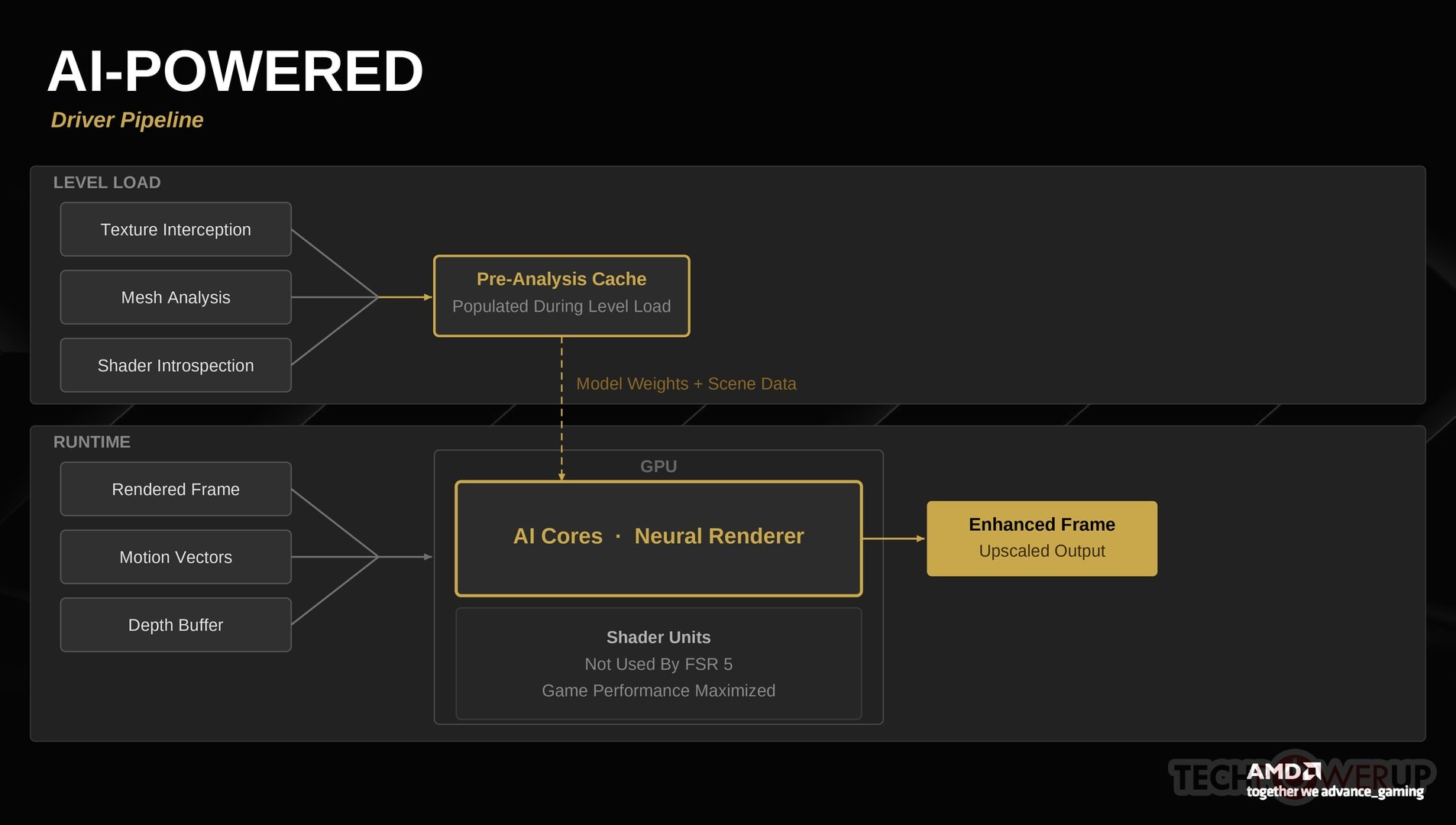
One of the most impressive aspects of FSR 5 is how much the driver can figure out about a game's rendering intent without any developer cooperation. AMD's driver already sits in the middle of every draw call, every texture upload, and every shader compilation—Scarlet Cortex simply puts that position to use.
Texture Interception
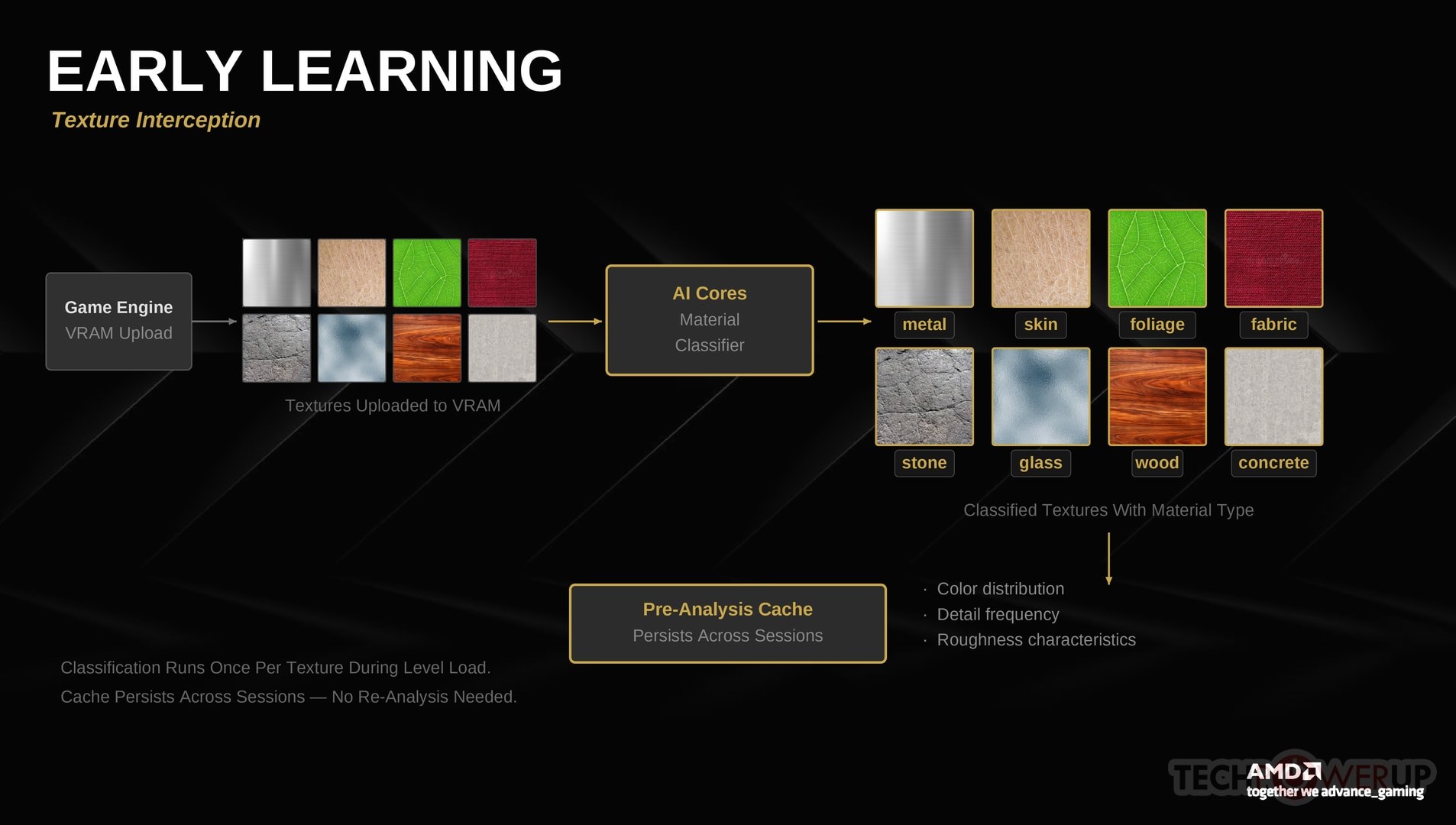
When a game loads textures into VRAM—typically during level loading or streaming—the FSR 5 driver hooks intercept each upload and run a lightweight classification pass on the AI cores. This classifier categorizes textures by material type (metal, skin, foliage, fabric, stone, glass, etc.) and extracts properties like color distribution, detail frequency, and roughness characteristics. The results are stored in a per-game pre-analysis cache that persists across sessions, so the analysis only needs to run once per texture.
This pre-analysis means the neural renderer already understands the game's material palette before the first frame is drawn. It knows that this particular brown texture is leather, not wood, or that the shiny surface over there is wet concrete, not polished metal. This material awareness is what allows FSR 5 to apply physically plausible lighting enhancements from the very first frame, even before the adaptive learning system has had time to converge.
Mesh Topology Analysis
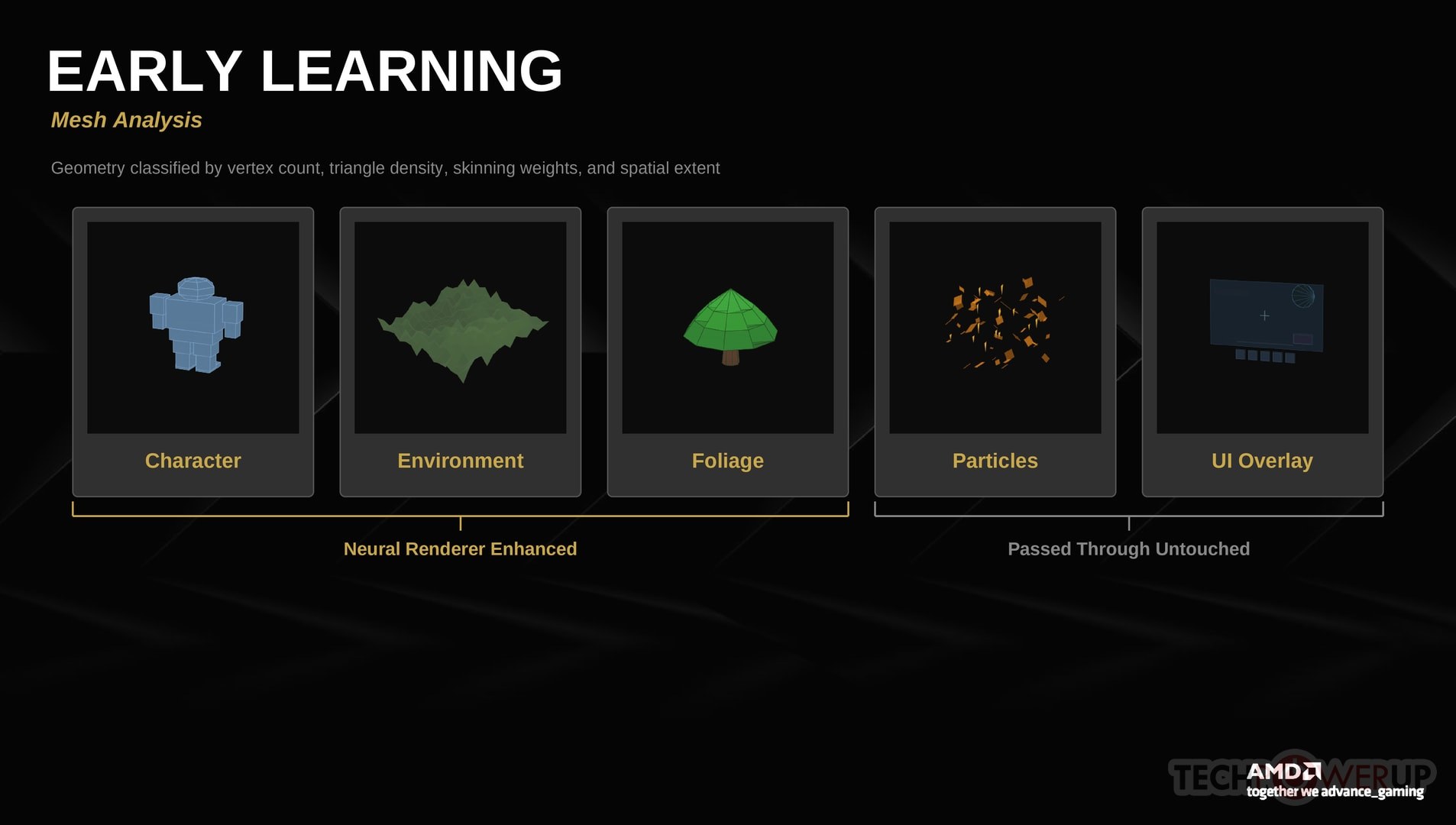
When vertex buffers and index data are uploaded to GPU memory, FSR 5 analyzes the mesh topology to classify geometry into categories: character models, environment geometry, foliage, particle systems, UI elements, and so on. The classifier looks at vertex count, triangle density, the presence of skinning weights (which indicate animated characters), and spatial extent to make these determinations.
This geometric context helps the neural renderer understand what it's looking at in each frame. A cluster of high-density skinned meshes is probably a character; a massive low-detail mesh is probably terrain. This classification feeds directly into the enhancement pipeline—the model knows to treat skin surfaces differently from concrete walls, and to leave particle effects and UI overlays completely untouched. This is important: game UI elements like health bars, minimaps, subtitles, and menus are never processed by the neural renderer, so they remain pixel-perfect regardless of which quality mode you use. Typically UI elements are textures, not geometry, or very simple rectangles, so this is less of a problem than you might think at first.
Shader Introspection
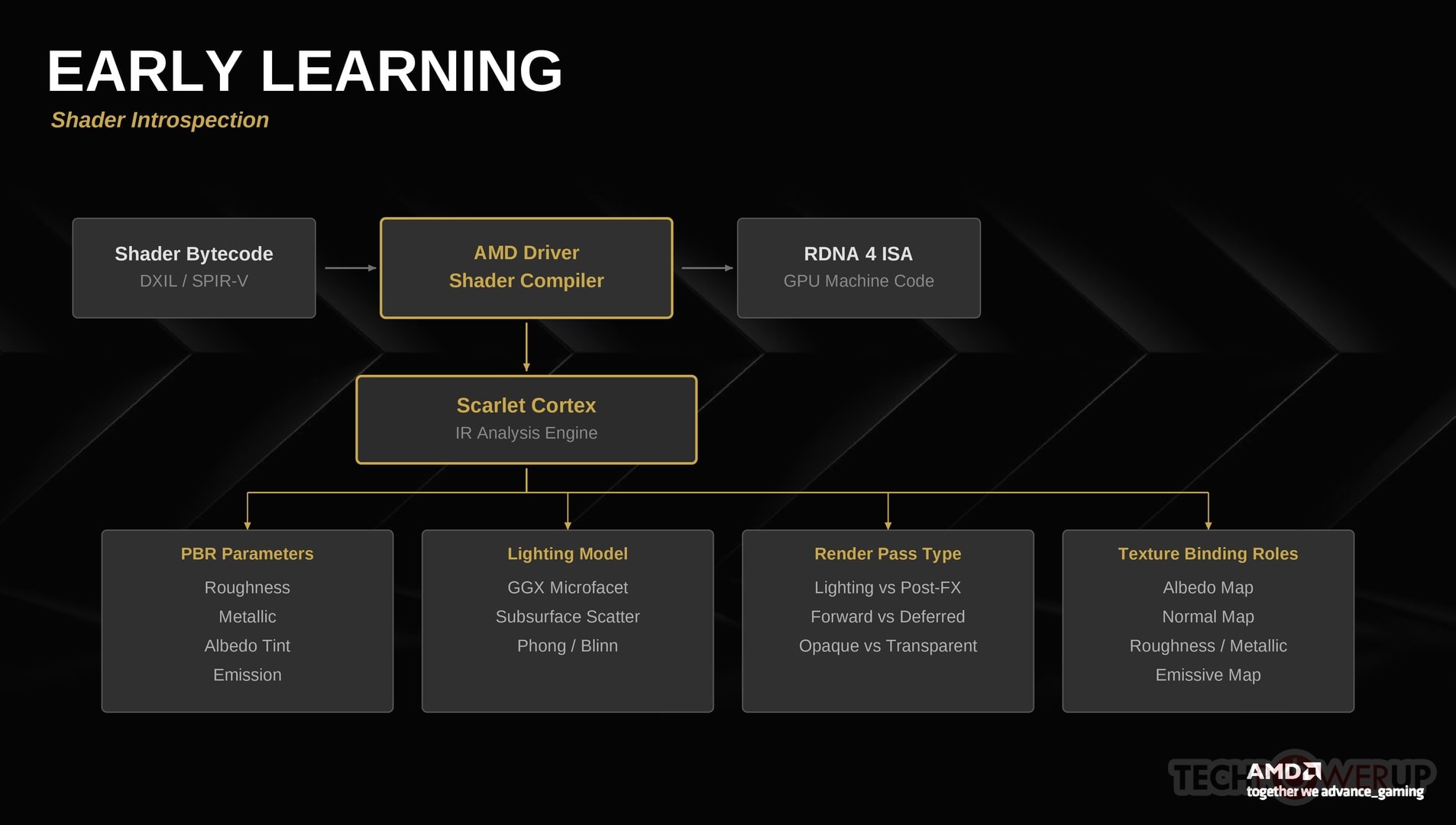
This is arguably the most clever part of the system. AMD's driver already compiles every game shader from intermediate representations like DXIL (DirectX 12) down to RDNA 4 machine code—the current launch targets DirectX 12, with Vulkan and DirectX 11 support planned for a future update. FSR 5 hooks into this compilation pipeline to analyze the shader programs themselves. From the shader bytecode, the system can:
- Identify PBR material parameters from shader constant bindings—detecting which constants control roughness, metallic, albedo tint, and emission.
- Detect which render passes are lighting calculations versus post-processing effects like bloom, depth of field, or tone mapping—critical for knowing what to enhance and what to leave alone.
- Recognize lighting models (GGX microfacet BRDF, subsurface scattering, simple Phong) to understand the game's intended light behavior and stay consistent with it.
- Map shader resource bindings to classify which texture slots contain albedo, normal maps, roughness/metallic, and emissive maps—effectively reconstructing G-buffer semantics without developer input.
- Distinguish forward rendering passes from deferred passes, and opaque geometry from transparent geometry.
Runtime Neural Rendering
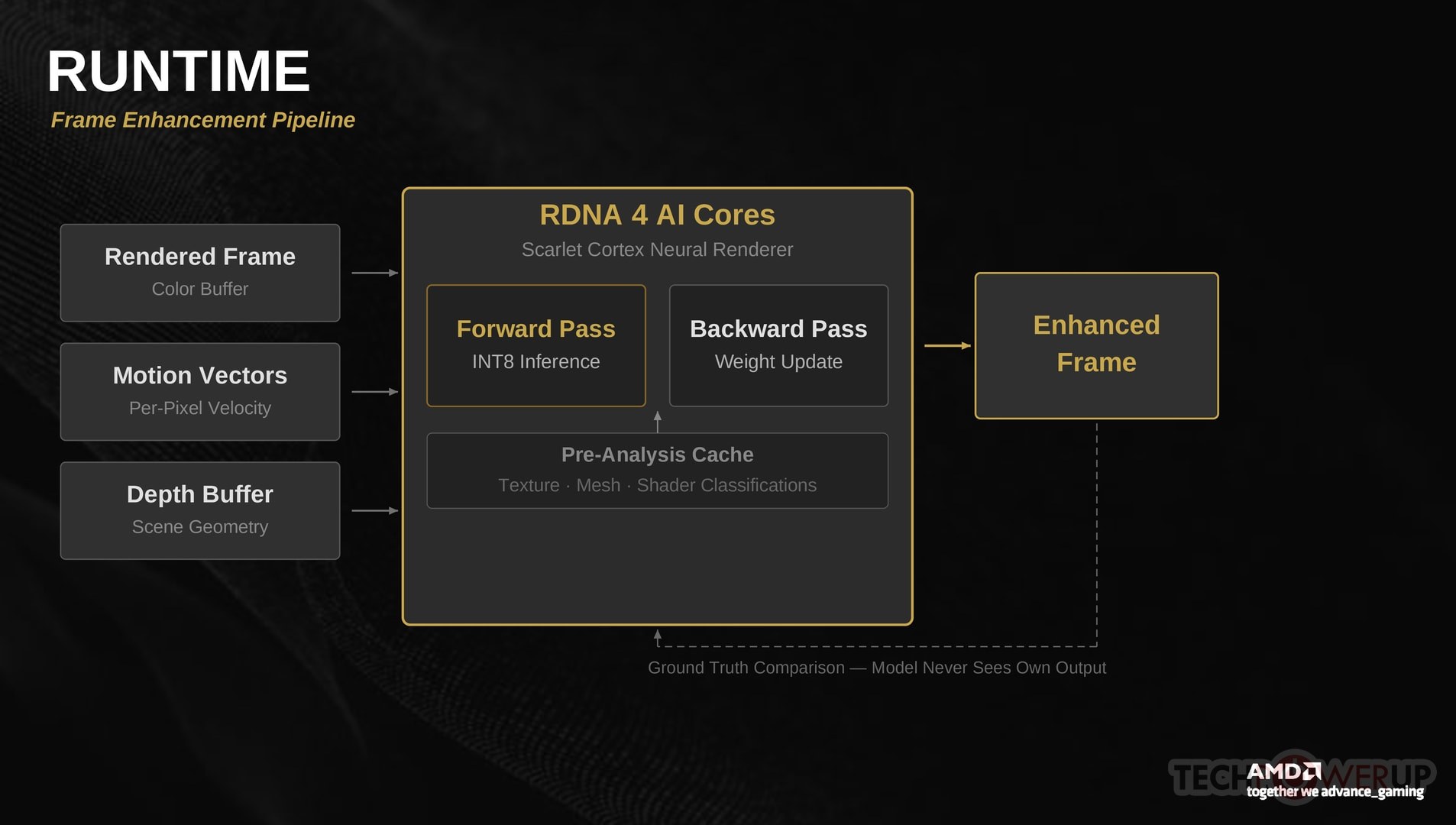
At runtime, once the game has finished rendering each frame, FSR 5 takes the final color buffer, motion vectors, and depth buffer as input. What's important is that the system always receives the original, unmodified frames from the engine. Although the player sees the enhanced output, the learning pipeline and inference input consistently use the game's own rendering. This ensures the model is always training on ground truth data from the engine rather than on its own output, which would lead to feedback loops and quality degradation over time. Combined with the pre-analysis data from texture, mesh, and shader classification, the neural renderer produces an enhanced frame with improved lighting, material detail, and atmospheric effects.
The model architecture is a lightweight convolutional network quantized to INT8, designed to run within a strict latency budget on the dedicated AI cores. Two key operations happen simultaneously: forward inference to produce the enhanced output (at every frame), and a backward pass to update the model's weights based on how well its predictions match the game's actual rendering, at a lower priority and lower rate, to improve the output quality over time. This dual inference-plus-training loop is what makes the adaptive learning possible, and it's why RDNA 4's AI accelerators are essential—older hardware simply cannot run both passes fast enough.
The three quality modes control the trade-off between visual quality and performance:
| Mode | Performance Cost | Inference Resolution | Adaptation Rate | VRAM Overhead |
|---|---|---|---|---|
| Quality | ~8–10% | Native | Every frame | ~400 MB |
| Balanced | ~4–5% | 66% | Every 4th frame | ~250 MB |
| Performance | ~2–3% | 50% | Every 8th frame | ~150 MB |
In Balanced and Performance modes, the neural renderer runs inference at reduced resolution and blends the result with the original frame. The adaptation rate also drops—the weight update pass runs less frequently, which saves AI core bandwidth but means the model takes longer to converge on a new game or scene. In practice, Quality mode is fully converged within about five minutes of gameplay, while Performance mode takes closer to 10–15 minutes.
Nov 14th, 2026 23:02 PST
change timezone
Latest GPU Drivers
New Forum Posts
- WarpCoreBench scores! (46)
- Honestly, do you care about GTA VI? (27)
- Optical Disc Drive owners club (209)
- Bought MAX-P495 - Which model? (32)
- "Legacy Control Panel" won't install (1)
- Tell me about your favourite graphics card (84)
- Planning for Prolonged High Prices and Maintaining What You Already Have (72)
- What can the FX 8320 do today? Here is the answer. (47)
- Recommendations Wanted - Affordable Enterprise SSD for Boot (3)
- [INTEL]-How To Update Your Microcode for Intel HX 13/14th Gen. CPUs Laptops/Mobile Easily. (260)
Popular Reviews
- AMD Zen 6 Technical Deep Dive
- ASUS ROG Strix B850-I Gaming Wi-Fi7 W Review
- Corsair HX1000i Shift Crystal Review
- Upcoming Hardware Launches 2027 (Updated Nov 2026)
- Montech King 95 3D PRO Review
- NZXT C1200 Platinum Review
- NZXT H7 RGB+ Review
- NZXT H5 Review
- Phantom Blade Zero Performance Benchmark Review - 35 GPUs Tested
- AMD Ryzen 7 9800X3D Review - The Best Gaming Processor
TPU on YouTube
Controversial News Posts
- NVIDIA Co-Founder and CEO Jensen Huang Officially Resigns (408)
- OpenAI CEO Argues Home PCs Waste the World's Limited DRAM Supply (152)
- NVIDIA Launches Investigation Into Jensen Huang's Relationship With Suspected Chinese Spy (136)
- Intel "Raptor Lake Next" 16-Core and 20-Core CPUs Surface (130)
- Legendary Game Studio BioWare Shuts Down Following EA Layoffs (104)
- Dell CEO Says the Memory Shortage Will Get Worse in 2027 (95)
- NVIDIA GeForce RTX 50-Series Scheduled for up to $500 Price Hike This Week (89)
- Modder Fits RTX 5090 With Four 8-Pin Connectors, Halving Current per Wire (80)