 284
AMD FSR 5 Scarlet Cortex Preview - Published April 1st
SDK Integration & Multiplayer »Adaptive Learning
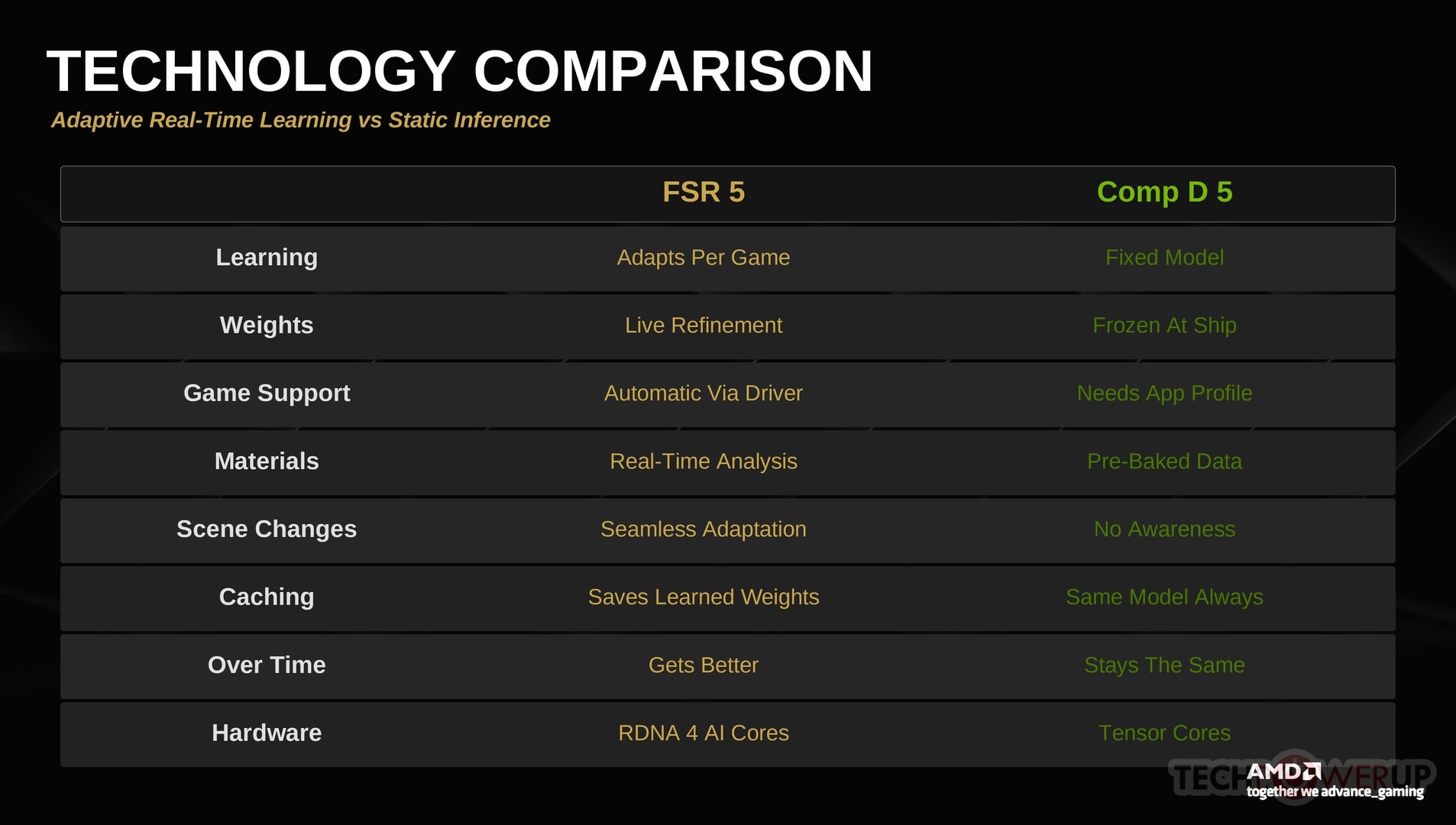
The most novel aspect of Scarlet Cortex is its adaptive learning system. Unlike DLSS 5's static pre-trained model, Scarlet Cortex starts from a set of general-purpose baseline weights and then progressively refines them based on what the game is actually rendering. This section examines how that process works and what it looks like in practice.
Convergence Behavior
When you first launch a supported game with FSR 5 enabled, the model begins with its baseline weights—trained on a broad dataset of general rendering patterns. Even at this stage, the enhancement is noticeable: lighting gains a subtle warmth, and material surfaces pick up a bit of additional depth. But the real magic happens over the next few minutes, as the model continuously observes the original unmodified frames from the engine and learns how this particular game looks. The player only ever sees the enhanced output, but the model always trains on the raw engine frames—a critical design choice that prevents the system from drifting or amplifying its own artifacts over time.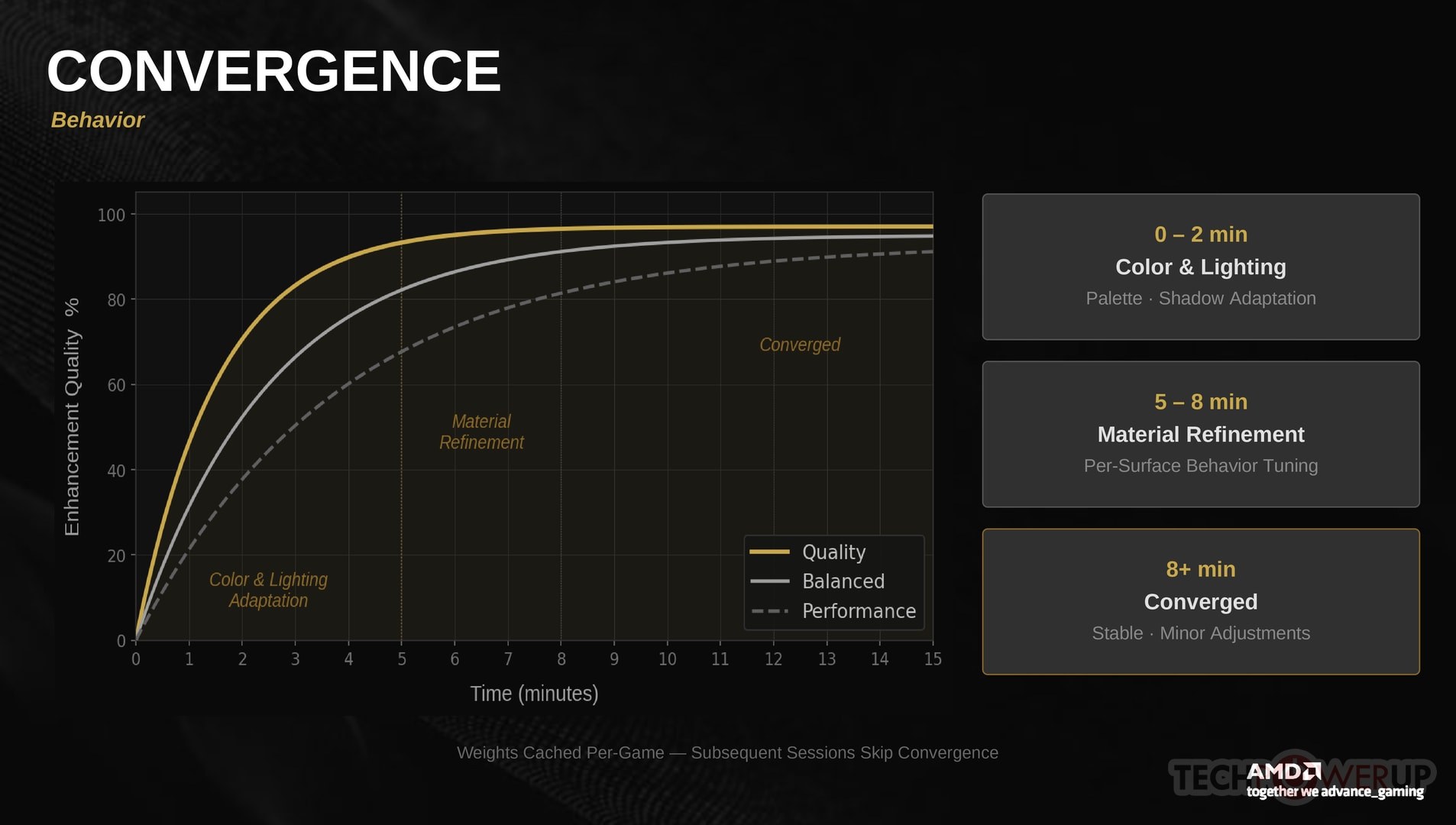
During the first 1–2 minutes, the model is primarily learning the game's color palette and overall lighting language. You'll see the most rapid improvement during this window—shadows become more natural, specular highlights become more consistent with the surrounding environment, and the general "look" of the enhancement starts to match the game's aesthetic rather than feeling like a generic filter.
Between 2 and 5 minutes, the model begins refining material-specific behavior. This is where the texture and shader pre-analysis data pays off—the model already knows what each surface is made of, and now it's learning how the game's renderer treats those materials. Leather starts to look more like the game's leather, metal reflections match the game's reflection model more closely, and subsurface scattering on skin becomes more realistic.
One important detail: even though the model may learn something new within a few seconds, FSR 5 deliberately holds back from applying changes instantly. New enhancements are blended in gradually over several frames, ensuring that the player never sees an abrupt shift in visual quality. AMD told us they spent significant engineering effort on this—making the transition look smooth to human eyes is prioritized over applying the latest training data as fast as possible. The result is that improvements feel like they materialize naturally, almost like your eyes are adjusting to a scene, rather than a filter snapping on.
By the 5–10 minute mark (in Quality mode), the model has effectively converged. At this point, the enhancements are stable and consistent, and the model is primarily performing minor adjustments to handle new lighting conditions or environments as you move through the game. The learned weights are saved to a per-game cache on disk, so subsequent sessions start from a much better baseline—essentially skipping the convergence period after the first play session.
Scene Transitions and Dynamic Adaptation
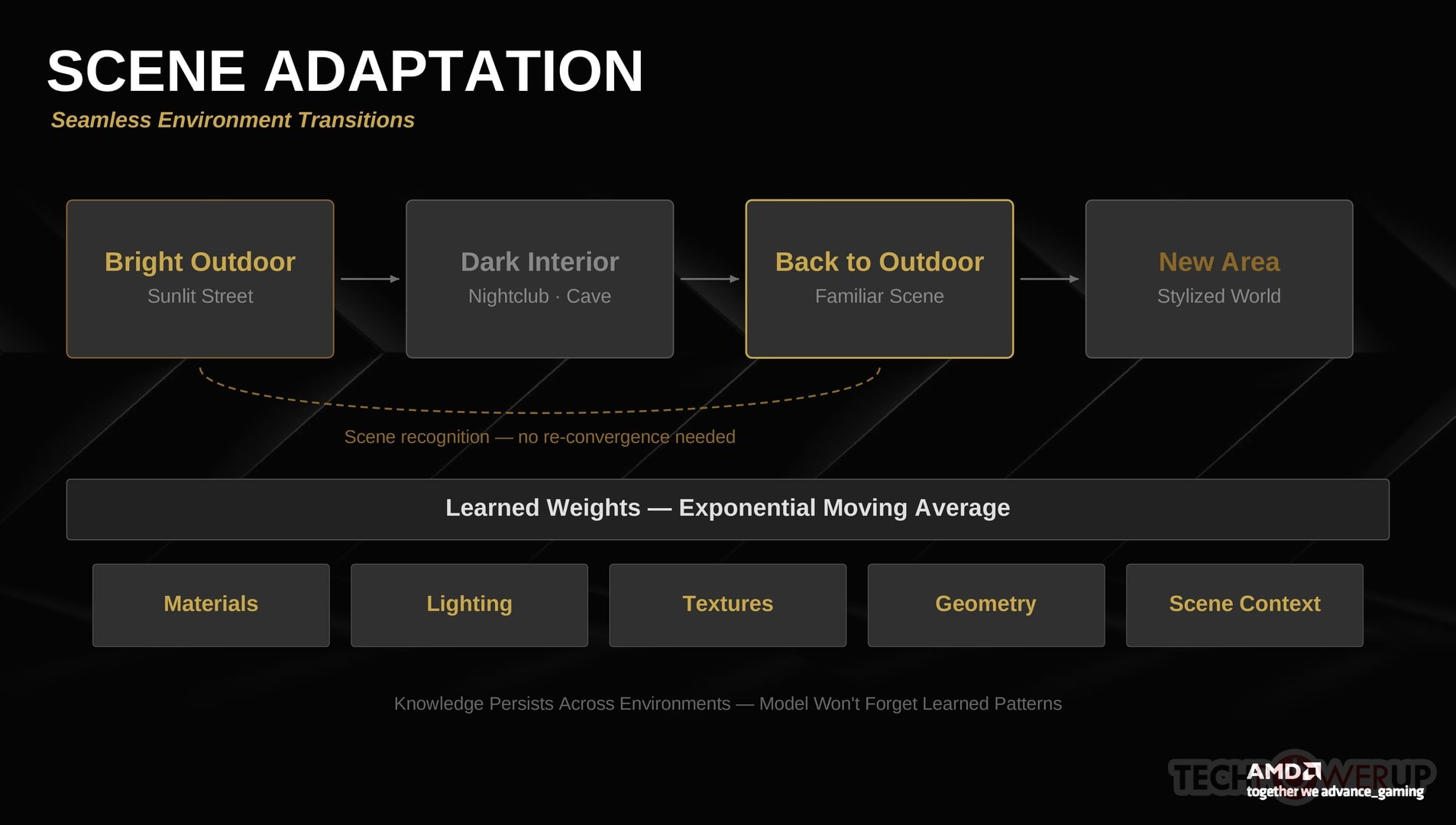
A natural question is what happens when the game's visual conditions change dramatically—moving from a bright outdoor environment to a dark interior, or from a realistic modern city to a stylized fantasy area. I tested this extensively and was impressed by how gracefully FSR 5 handles transitions.
The system uses an exponential moving average for weight updates, which means it doesn't forget what it's learned when the scene changes. Instead, it smoothly blends new observations with its existing knowledge. Crucially, because FSR 5 knows what textures and mesh types are present in any given scene (from the driver-level pre-analysis), it can recognize environments it has seen before. If you walk back into a forest area after spending 20 minutes in a city, the model recognizes the combination of tree meshes and foliage textures and can immediately apply what it learned about that type of environment earlier—there's no re-convergence needed for familiar scene compositions. Moving from a sunlit street into a dark nightclub in Cyberpunk 2077, for example, the model adjusted within about 10–15 seconds to the new lighting conditions without any visible flickering or oscillation. The material knowledge it learned outdoors (metal, glass, concrete) carried over perfectly since those materials appear in both environments.
Games with highly varied art styles—think Hogwarts Legacy's mix of stone castle interiors, lush outdoor environments, and fantastical spell effects—actually benefit the most from the adaptive system, because the model learns a broader vocabulary of visual patterns over time. After about 20 minutes in Hogwarts Legacy, FSR 5 was handling everything from candle-lit hallways to open fields seamlessly.
Stylized vs. Photorealistic Games
One concern with any AI rendering enhancement is that it might push everything toward the same "photorealistic" look, flattening artistic variety. This is one of the main criticisms aimed at NVIDIA's preview of DLSS 5, which was trained on cinematic reference material and tends to impose that aesthetic on everything it touches.FSR 5 avoids this by design. Because the model learns from the game's own rendering output, it naturally adapts to whatever style the game uses. In our testing with F1 25 (photorealistic), Cyberpunk 2077 (stylized-realistic with strong color grading), and Hogwarts Legacy (fantasy with painterly elements), the enhancements felt appropriate to each game's visual identity. The model was adding depth and richness to the game's existing style, not replacing it with something else.
That said, the effect is more dramatic in photorealistic games where there's more room for lighting and material refinement. In heavily stylized games, the improvements are subtler—which is arguably the correct behavior.
Nov 15th, 2026 00:51 CST
change timezone
Latest GPU Drivers
New Forum Posts
- Optical Disc Drive owners club (209)
- Honestly, do you care about GTA VI? (26)
- Bought MAX-P495 - Which model? (32)
- "Legacy Control Panel" won't install (1)
- Tell me about your favourite graphics card (84)
- WarpCoreBench scores! (45)
- Planning for Prolonged High Prices and Maintaining What You Already Have (72)
- What can the FX 8320 do today? Here is the answer. (47)
- Recommendations Wanted - Affordable Enterprise SSD for Boot (3)
- [INTEL]-How To Update Your Microcode for Intel HX 13/14th Gen. CPUs Laptops/Mobile Easily. (260)
Popular Reviews
- AMD Zen 6 Technical Deep Dive
- ASUS ROG Strix B850-I Gaming Wi-Fi7 W Review
- Corsair HX1000i Shift Crystal Review
- Upcoming Hardware Launches 2027 (Updated Nov 2026)
- Montech King 95 3D PRO Review
- NZXT C1200 Platinum Review
- NZXT H7 RGB+ Review
- NZXT H5 Review
- Phantom Blade Zero Performance Benchmark Review - 35 GPUs Tested
- AMD Ryzen 7 9800X3D Review - The Best Gaming Processor
TPU on YouTube
Controversial News Posts
- NVIDIA Co-Founder and CEO Jensen Huang Officially Resigns (408)
- OpenAI CEO Argues Home PCs Waste the World's Limited DRAM Supply (152)
- NVIDIA Launches Investigation Into Jensen Huang's Relationship With Suspected Chinese Spy (136)
- Intel "Raptor Lake Next" 16-Core and 20-Core CPUs Surface (130)
- Legendary Game Studio BioWare Shuts Down Following EA Layoffs (104)
- Dell CEO Says the Memory Shortage Will Get Worse in 2027 (95)
- NVIDIA GeForce RTX 50-Series Scheduled for up to $500 Price Hike This Week (89)
- Modder Fits RTX 5090 With Four 8-Pin Connectors, Halving Current per Wire (80)