 31
Corsair Xeneon Edge Review - The Widget Specialist
The Package »Introduction

Corsair has expanded its Xeneon monitor lineup with an unexpected and somewhat unusual addition—the Xeneon Edge, a 14.5-inch, 2560×720 (32:9 screen ratio) touchscreen panel that can technically be used as a second monitor, but is far more suited for displaying system loads and temperatures, Twitch chat, Windows notifications, custom GIFs and animations, and/or various other widgets. All of this while being mounted inside a PC case, thanks to its compatibility with standard 360 mm fan mounts, or positioned above, below, or to either side of the main screen on the desktop.
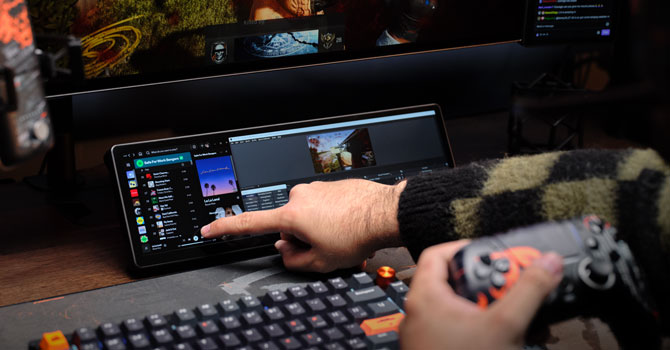
If it's not already obvious, versatility is one of the Xeneon Edge's key features, getting creative with its placement and use case is what this monitor is all about. It supports both HDMI and USB-C (DP Alt Mode) for video input and uses the same USB-C connection for power. Corsair opted for a 60 Hz AHVA panel with a 5-point touch-sensitive layer, allowing you to interact with widgets or swipe between "screens" using your fingers. Corsair also implemented virtual Stream Deck support, significantly expanding the Xeneon Edge's functionality. A large touchscreen with customizable virtual buttons is exactly the kind of feature that could convince many users to take the plunge on the $250 Xeneon Edge.
Specifications
| Corsair Xeneon Edge | |
|---|---|
| Screen Size | 14.5" touchscreen |
| Native Resolution | 2560×720 (32:9), 183.4 PPI |
| Panel Technology | AHVA (8-bit) |
| Refresh Rate | 60 Hz |
| Curvature | No |
| Screen Coating | Glossy |
| Supported Adaptive Synchronization Technologies | - |
| Brightness | 350 cd/m² |
| Contrast | Not specified |
| Viewing Angles | 178° (horizontal) / 178° (vertical) |
| Response Time | Not specified |
| HDR | - |
| Adjustability | Desktop stand (provided) |
| Video Inputs | 1x USB-C DP Alt Mode, 1x HDMI |
| Video Outputs | - |
| USB Ports | - |
| Other Ports | - |
| Speakers | - |
| VESA Mounting | - |
| Dimensions | 372 x 120 x 20 mm |
| Supplied Cables | 1x USB Type-C to USB Type-C (1.8 m/6 ft), 1x HDMI to DisplayPort (1.8 m/6 ft), internal USB-C cable (70 cm/2.3 ft) |
Nov 12th, 2026 07:07 PST
change timezone
New Forum Posts
- Youtube channel video downloader, not playlist. (1)
- Unallocated space in ssd , is it normal? (15)
- Can you guess Which game it is? (316)
- Your PC ATM (36406)
- budget home NAS – X79, X99 or another platform? (139)
- Hey all my intro & love for retro computers (102)
- TPU's Nostalgic Hardware Club (22147)
- What are you playing? (26207)
- So I fixed the r36s “k36” variant and clone with an Onn 128gb sd card and the Onn sd card reader and it BOOTED..so real neat! Take a look. (2)
- When you could finally run Crysis maxed out? (49)
Popular Reviews
- AMD Zen 6 Technical Deep Dive
- Upcoming Hardware Launches 2027 (Updated Nov 2026)
- NZXT C1200 Platinum Review
- XPG NIMBUS PLUS Review - Mid-range Chair With Strong Competitors
- NZXT H7 RGB+ Review
- Montech King 95 3D PRO Review
- NZXT H5 Review
- Phantom Blade Zero Performance Benchmark Review - 35 GPUs Tested
- Gigabyte Z890I Aorus Ultra Review
- INNOCN 45C1R Review - Two QHD Screens, Zero Bezels
TPU on YouTube
Controversial News Posts
- OpenAI CEO Argues Home PCs Waste the World's Limited DRAM Supply (152)
- NVIDIA Launches Investigation Into Jensen Huang's Relationship With Suspected Chinese Spy (136)
- Intel "Raptor Lake Next" 16-Core and 20-Core CPUs Surface (130)
- Legendary Game Studio BioWare Shuts Down Following EA Layoffs (104)
- Dell CEO Says the Memory Shortage Will Get Worse in 2027 (95)
- NVIDIA GeForce RTX 50-Series Scheduled for up to $500 Price Hike This Week (89)
- AMD Radeon Owners Can Now Run Nearly Every DLSS Feature Through Fan-Made Mod (80)
- Modder Fits RTX 5090 With Four 8-Pin Connectors, Halving Current per Wire (80)