 6
The Blood of Dawnwalker Handheld Performance Review
Out-of-Box Experience »Graphics Settings
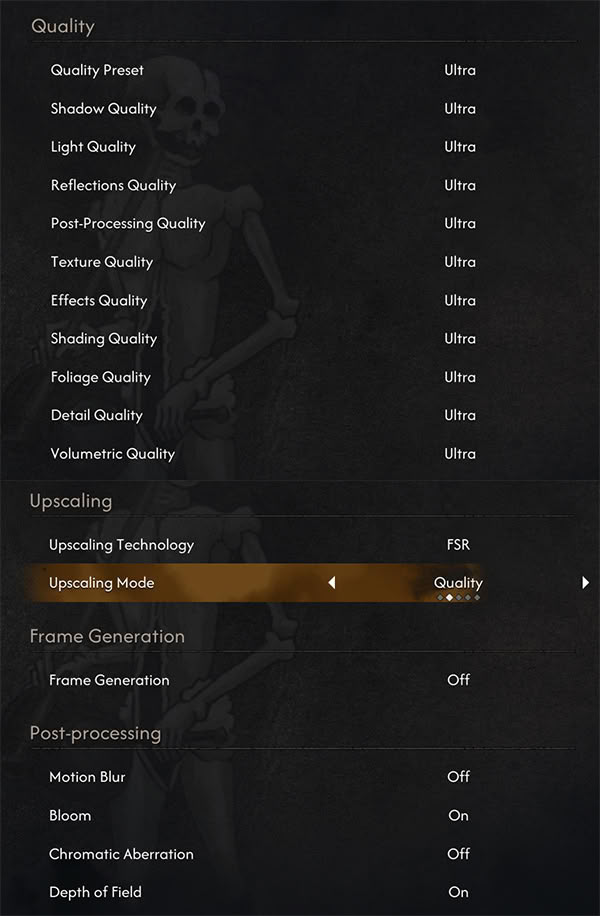
- The game includes two settings menus: you can adjust visual quality in the Quality menu and a resolution and a few other settings such as VSync and Frame Rate Limit in the Display menu.
- You can pick between four different presets: Low, Medium, High, and Ultra, with Ultra maxing out every option available.
- The game supports FSR, XeSS, and DLSS upscaling, along with FSR and DLSS Frame Generation. Unfortunately, there's no XeSS Frame Generation or UE5's TSR upscaler.
- You can freely disable Motion Blur, Chromatic Aberration, and Depth of Field.
- From our experience, XeSS looks much better than FSR even on AMD handhelds, while providing about the same performance improvements, so we recommend using it instead of FSR.
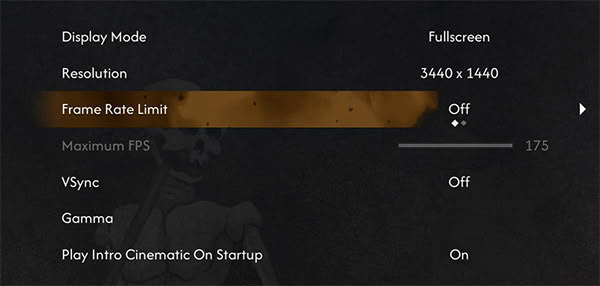
- You can choose between dedicated Fullscreen, Windowed Fullscreen, and Windowed modes, but since the game suffers from performance issues in the latter two modes, we strongly recommend using Fullscreen.
- The game supports a granular framerate limit control in 1 FPS steps, ranging from 30 to whatever your monitor's native refresh rate is.
- There's no hidden FPS lock.
- Cutscenes are capped to 30 FPS, though, and are quite stuttery.
- There's support for ultrawide monitors, but no native HDR support, at least not on PC.
Test Devices
We tested the public Steam version of The Blood of Dawnwalker.- The Steam Deck LCD was running SteamOS version 3.8.16, build 20260716.1.
- Our ROG Xbox Ally X had Armoury Crate 2.2.17.0 installed along with BIOS 317.
- The ROG Ally X had the latest Armoury Crate version installed at the time of testing (2.2.17.0), along with BIOS 312.
- The MSI Claw 8 AI+ A2VM had MSI Center M 2.0.2606.2501 installed along with BIOS E1T52IMS.112.
- The MSI Claw 8 EX AI+ CG3EM had MSI Center M 2.0.2608.1201 installed along with BIOS E1T91IMS.10A.
| Gaming Handhelds Used for Testing | |
|---|---|
| Steam Deck LCD | SteamOS version 3.8.16 build 20260716.1 |
| ASUS ROG Xbox Ally X | Armoury Crate 2.2.17.0 BIOS 317 GPU driver version: 32.0.31019.2002 Windows 11 Home 25H2 VBS disabled |
| ASUS ROG Ally X | Armoury Crate 2.2.17.0 BIOS 312 GPU driver version: 32.0.31007.6002 Windows 11 Home 25H2 VBS disabled |
| Claw 8 AI+ A2VM | MSI Center M 2.0.2606.2501 BIOS E1T52IMS.112 GPU driver version: 32.0.101.8992 Windows 11 Home 25H2 VBS disabled |
| Claw 8 AI+ EX CG3EM | MSI Center M 2.0.2608.1201 E1T91IMS.10A GPU driver version: 32.0.101.8992 Windows 11 Home 25H2 VBS disabled |
Nov 11th, 2026 18:45 CST
change timezone
New Forum Posts
- Samsung 870 EVO - Beware, certain batches prone to failure! (1487)
- Request - revert LFC behaviour to old patch. (0)
- GeekMagic Ultra Smart WiFi Weather Station (4)
- When you could finally run Crysis maxed out? (44)
- WarpCoreBench scores! (14)
- Warning for Windows 10 and 11 users running newer AMD GPU drivers (49)
- Bought MAX-P495 - Which model? (29)
- DTS DCH Driver for Realtek HDA [DTS:X APO4 + DTS Interactive] (2809)
- Rare GPUs / Unreleased GPUs (2271)
- Windows new update 26H2 - Throttlestop (10)
Popular Reviews
- AMD Zen 6 Technical Deep Dive
- Upcoming Hardware Launches 2027 (Updated Nov 2026)
- XPG NIMBUS PLUS Review - Mid-range Chair With Strong Competitors
- NZXT H7 RGB+ Review
- NZXT H5 Review
- NZXT C1200 Platinum Review
- Phantom Blade Zero Performance Benchmark Review - 35 GPUs Tested
- Montech King 95 3D PRO Review
- Gigabyte Z890I Aorus Ultra Review
- INNOCN 45C1R Review - Two QHD Screens, Zero Bezels
TPU on YouTube
Controversial News Posts
- OpenAI CEO Argues Home PCs Waste the World's Limited DRAM Supply (152)
- NVIDIA Launches Investigation Into Jensen Huang's Relationship With Suspected Chinese Spy (136)
- Intel "Raptor Lake Next" 16-Core and 20-Core CPUs Surface (130)
- Legendary Game Studio BioWare Shuts Down Following EA Layoffs (104)
- Dell CEO Says the Memory Shortage Will Get Worse in 2027 (95)
- NVIDIA GeForce RTX 50-Series Scheduled for up to $500 Price Hike This Week (89)
- AMD Radeon Owners Can Now Run Nearly Every DLSS Feature Through Fan-Made Mod (80)
- Modder Fits RTX 5090 With Four 8-Pin Connectors, Halving Current per Wire (80)