Wednesday, February 17th 2021

NVIDIA GPUs Have Hotspot Temperature Sensors Like AMD

NVIDIA GeForce GPUs feature hotspot temperature measurement akin to AMD Radeon ones, according to an investigative report by Igor's Lab. A beta version of HWInfo already supports hotspot measurement. As its name suggests, the hotspot is the hottest spot on the GPU, measured from a network of thermal sensors across the GPU die, unlike conventional "GPU Temperature" sensors, which reads off a single physical location of the GPU die. AMD refers to this static sensor as "Edge temperature." In some cases, the reported temperature of this sensor could differ from the hotspot by as much as 20°C, which underscores the importance of hotspot. The sensor with the highest temperature measurement becomes the hotspot.

GPU manufacturers rarely disclose the physical locations of on-die thermal sensors, but during the AMD Radeon VII, we got a rare glimpse at this, in a company slide, with the sensors being located near components that can get the hottest, such as the compute units (pictured below). Igor's Lab put out measurements of the deviation between the hotspot and "GPU temperature" sensors on a GeForce RTX 3090 Founders Edition card. There's a much narrower deviation between the two (between 11-14°C), and than the one between hotspot and Edge temperature on an MSI Radeon RX 6800 XT Gaming X Trio (which posts a 12-20°C difference).
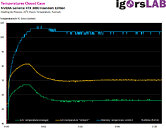
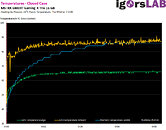
Source: Igor's Lab
Add your own comment

44 Comments on NVIDIA GPUs Have Hotspot Temperature Sensors Like AMD

#26
Max(IT)
Oh my... this will start another web drama about “how hot is my card? Will it break?”
Posted on Reply
#27
DeathtoGnomes
qubitI've always known that hotspots can be much hotter than what a single sensor can read and 20C is huge. This is why I always buy cards with powerful coolers such as my current one (see specs) which can keep temperatures down under even the biggest loads. It does it silently, too.
also can indicate where TIM is too thin or not spread thoroughly.
Max(IT)Oh my... this will start another web drama about “how hot is my card? Will it break?”
Forever the Drama Queen? :p :p :p :p :eek:
Posted on Reply
#28
skizzo
I noticed between air cooling and water cooling my RX 5700 XT, water cooling has a much higher differential between GPU temp and hot spot temp. For ex, when hot spot temp can reach 110*C, the GPU temp might only be 68*C. That is an enormous differential. When on air, it was in line with what is reported here, such as 12*C - 20*C range. For example, GPU hot spot at 90*C would mean maybe GPU temp is 72*C

I believe the higher differential on water is from an aggressive OC though, and when the card is pushed to its limits
Posted on Reply
#29
DeathtoGnomes
skizzoI noticed between air cooling and water cooling my RX 5700 XT, water cooling has a much higher differential between GPU temp and hot spot temp. For ex, when hot spot temp can reach 110*C, the GPU temp might only be 68*C. That is an enormous differential. When on air, it was in line with what is reported here, such as 12*C - 20*C range. For example, GPU hot spot at 90*C would mean maybe GPU temp is 72*C

I believe the higher differential on water is from an aggressive OC though, and when the card is pushed to its limits
could that be because of the water block not fully covering the GPU or lack of TIM? Compare surfaces between the air cooler and the water block, or maybe the water channel isnt cut close enough to that spot.
Posted on Reply
#30
qubit
Overclocked quantum bit
DeathtoGnomesalso can indicate where TIM is too thin or not spread thoroughly.
Yeah, good point.
Posted on Reply
#31
blu3dragon
toilet pepperThe delta from the main GPU temp ain't that bad.

Is that with a water block or stock cooler?
Posted on Reply
#32
Midland Dog
PunkenjoyNot even close
ok fair interpretation of my statement. what i meant to say is lower hotspot to edge temp. the whole aim of designing a chip is to distribute the heat evenly over it. if intel puts all of the avx 512 units right next to the imc the imc is going to be a turd and not do good clocks and timings. having the heat relatively the same across the die is the goal of any sillicon designer, hence ampere is a better circuit design
Posted on Reply
#33
AusWolf
Nothing new here. Every boost algorithm uses hotspot temperature data (among others). Only that there hasn't been a way to monitor it on nvidia cards until now.
Midland Dogok fair interpretation of my statement. what i meant to say is lower hotspot to edge temp. the whole aim of designing a chip is to distribute the heat evenly over it. if intel puts all of the avx 512 units right next to the imc the imc is going to be a turd and not do good clocks and timings. having the heat relatively the same across the die is the goal of any sillicon designer, hence ampere is a better circuit design
With that analogy, a single-threaded workload should be distributed evenly across a CPU for better heat distribution. Instead, the reality looks something like this:


My conclusion is that we can't conclude anything related to chip design based on the difference between edge temp and hotspot temp.
Posted on Reply
#34
Zubasa
Midland Dogok fair interpretation of my statement. what i meant to say is lower hotspot to edge temp. the whole aim of designing a chip is to distribute the heat evenly over it. if intel puts all of the avx 512 units right next to the imc the imc is going to be a turd and not do good clocks and timings. having the heat relatively the same across the die is the goal of any sillicon designer, hence ampere is a better circuit design
Most importantly, the 2 chips are not under the same cooler, it can just be the nVidia's FE cooler having a more even mounting pressure compare to that particualr MSI model.
It is not that simple, GA102 being a much bigger die also aids with thermal transfer because of the larger surface area, and lower thermal density.

Also for IC designs, generally the smaller die that achieve similar performance is considered more efficient.
Smaller die-area = higher yields etc. Although Samsung 8nm and TSMC 7nm are very different processes, thus not directly comparable.
Posted on Reply
#35
Vayra86
qubitI've always known that hotspots can be much hotter than what a single sensor can read and 20C is huge. This is why I always buy cards with powerful coolers such as my current one (see specs) which can keep temperatures down under even the biggest loads. It does it silently, too.
Irrelevant, if you miss a pad or a sensor somewhere you'll still have a hot spot but you just never saw it. What other use does cooling have... it keeps the GPU within spec. Which means hotspot peak spec among other parameters.

Good cooling does not prevent hot spots even if the other areas are well below spec, and on top of that, if you are air cooling Nvidia GPUs, you'll run into high temps anyway because of GPU Boost unless you handicap your card.
Midland Doglower edge temp than amd indicates better circuit design
Nah its clearly because the GPUs are not that edgy o_O:kookoo:

Its going well here. Jesus christ.
Posted on Reply
#36
qubit
Overclocked quantum bit
Vayra86Irrelevant, if you miss a pad or a sensor somewhere you'll still have a hot spot but you just never saw it. What other use does cooling have... it keeps the GPU within spec. Which means hotspot peak spec among other parameters.

Good cooling does not prevent hot spots even if the other areas are well below spec, and on top of that, if you are air cooling Nvidia GPUs, you'll run into high temps anyway because of GPU Boost unless you handicap your card.
Not irrelevant.

The better the cooler, the lower the temps will be overall, including any hotspots, whether you have a sensor there or not, so it matters very much.

Imagine the scenario where the overall temp is 50C, but a hotspot is 20C higher. That still only makes 70C, so the chip is within spec and won't overheat, because of that powerful cooler.

Now imagine that same chip with an inferior cooler. The overall temp is now 70C, but the hotspot has hit a whopping 90C, or maybe even more, so the chip could be overheating, or very close to its limit.
Posted on Reply
#37
Vayra86
qubitNot irrelevant.

The better the cooler, the lower the temps will be overall, including any hotspots, whether you have a sensor there or not, so it matters very much.

Imagine the scenario where the overall temp is 50C, but a hotspot is 20C higher. That still only makes 70C, so the chip is within spec and won't overheat, because of that powerful cooler.

Now imagine that same chip with an inferior cooler. The overall temp is now 70C, but the hotspot has hit a whopping 90C, or maybe even more, so the chip could be overheating, or very close to its limit.
The idea that you have GPUs running well below spec is a fallacy. They don't and neither does yours, because Nvidia develops an algorithm called GPU Boost that will boost based on temp limits.

They only do if you undervolt them and AIBs develop coolers sized to what the board can put through and the components can take. You're dreaming if you think a stock air cooler will do anything positive for hot spot temps. It'll just boost higher, because you can market boost clocks. And if a cooler stays far below, its a waste of money.
Posted on Reply
#38
AusWolf
Vayra86The idea that you have GPUs running well below spec is a fallacy. They don't and neither does yours, because Nvidia develops an algorithm called GPU Boost that will boost based on temp limits.

They only do if you undervolt them and AIBs develop coolers sized to what the board can put through and the components can take. You're dreaming if you think a stock air cooler will do anything positive for hot spot temps. It'll just boost higher, because you can market boost clocks. And if a cooler stays far below, its a waste of money.
Well said. Coolers are not designed to run cards as cool as possible. They're designed to keep the card within spec.

My Asus Strix RX 5700 XT runs at 75 C edge temp and 95 C hotspot temp on stock settings. Decreasing the power limit by 25% lowers the GPU voltage and clocks, but also the fan speed, resulting in the exact same temperatures (with less noise). It's not wrong, it's designed this way.
Posted on Reply
#39
Upgrayedd
I mean nice test but why use two different loads?... the cards didn't go through the same stress loads.. what a weird decision
Posted on Reply
#40
toilet pepper
blu3dragonIs that with a water block or stock cooler?
That's with a deshrouded stock cooler.
Posted on Reply
#41
Punkenjoy
Midland Dogok fair interpretation of my statement. what i meant to say is lower hotspot to edge temp. the whole aim of designing a chip is to distribute the heat evenly over it. if intel puts all of the avx 512 units right next to the imc the imc is going to be a turd and not do good clocks and timings. having the heat relatively the same across the die is the goal of any sillicon designer, hence ampere is a better circuit design
But you can have an unit that is bottlenecking the whole system while still not being able to fully use that unit. This would not lead to high delta between hotspot and gpu temp but that will not mean the Chip design is great.

A specific load could lead to a very large delta between hotspot/GPU temp on a specific architecture but if that give huge performance, that is not a bad chip design.

The end goal of chip design is performance/watt/cost. Having a small delta between hotspot and GPU temp isn't really something that make a chip good. I get your point but doing a very bad design like putting all the hot stuff together would lead in the end in a bad performance/watt/cost ratio. So we are back to that.
Posted on Reply
#42
Raiden85
Tested my Asus Strix 3090 OC and it's showing about a 12c average higher temp over the main core temp on the hotspot sensor after 20mins of gaming, not too bad (original air cooler). I did re-paste the card a month ago so it has Thermal Grizzly Kryonaut paste now. Card is running in the low 70s as I'm using the quiet BIOS, way too noisy on performance mode for pretty much zero gain in performance and 5c lower temps.

Posted on Reply
#43
R-T-B
rusTORKWhy this "feature for everyone to use" pop-up right now? Why not during release (or short time after)? Because NVIDIA & Co start worry about returning back their "cooked" cards? Maybe NVIDIA worry about class action lawsuit against them for hide important information from user which may prevent damage product?

Feature is AWESOME, but why now?
Becauase it still isn't public, but was literally just discovered via research?

Your stretching. Majorly.
Posted on Reply
#44
skizzo
DeathtoGnomescould that be because of the water block not fully covering the GPU or lack of TIM? Compare surfaces between the air cooler and the water block, or maybe the water channel isnt cut close enough to that spot.
It has been reinstalled multiple times for standard maintenance, and have not had different results from any of them. I always check TIM coverage by installing, pulling apart, inspecting, OK LOOKS GOOD, and reinstall for good. GPU temp is in normal range, as is hot spot, this is just an observation that was different from expectation. its an EK water block, and believe it was built fine. I didn't expect the hot spot differential to be greater on H20, but it seems to be related to an aggressive OC using max settings where the card is stable. ~20*C differential on air that I saw is normal on water also when using stock settings....and in fact, I was undervolting when it was on air which should have made it less. So had I not undervolted, I bet the differential would be higher there too....so all seems normal to me. I also should mention these are the max readings, so just momentary spikes, and not where the card runs for the majority of the time. Also only get those max hot spot temps when doing something stupid like trying to play a game at 4K max ultra settings when it should be on 3200x188, or 2K or even 1080p lol.
Posted on Reply
Add your own comment
Nov 19th, 2026 05:16 PST change timezone

New Forum Posts

Popular Reviews

TPU on YouTube

Controversial News Posts