Friday, April 28th 2023

AMD Ryzen 7000X3D Power Consumption Spiking Beyond 100 W in Idle Mode
According to investigations undertaken by Igor's Lab and Hardware Busters this week it seems that AMD's problematic lineup of Ryzen 7000 & Ryzen 7000X3D CPUs are consuming unexpected levels of power in short bursts when running in idle mode. In conducting more in-depth tests over the past few days, Igor Wallossek and (outgoing TPU PSU expert) Aristeidis Bitziopoulos have both found that that the aforementioned AMD processors are producing (to the testers' slight concern) power spikes in situations involving minimal computing activity. It is not currently known whether the sharp climbs in power consumption are in any way related to the burnout issues experienced by unlucky overclockers this week.
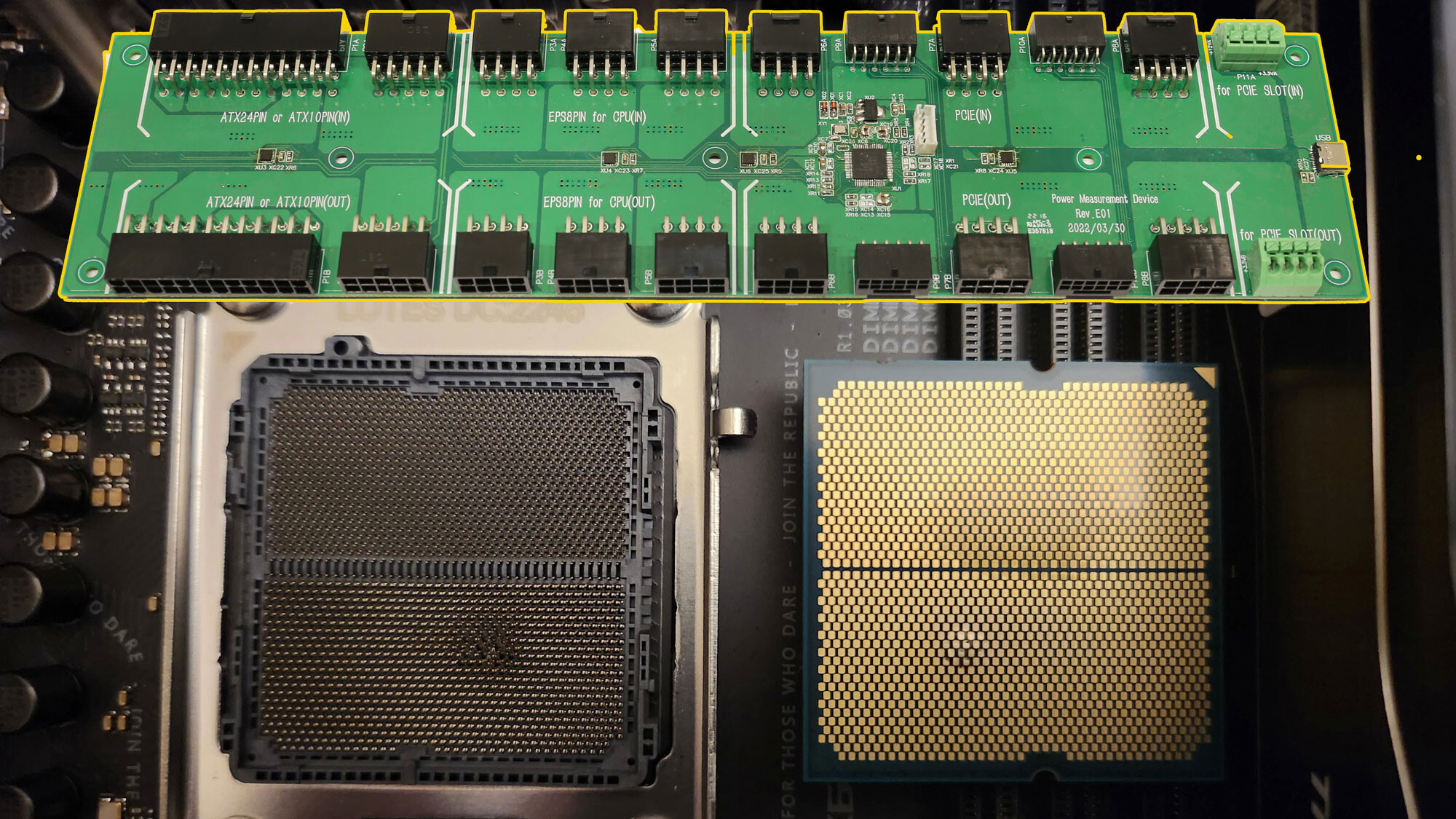
Aris/crmaris (at Hardware Busters) says that he has tested many of the affected processors in the past, but was not privy to any major problems relating to burnout or power consumption spikes. By running new tests this week, using his own Powenetics v2 board, Aris has found out that: "There are some interesting facts here, which I didn't pay much attention to during the reviews because I only look at the average values and not the peak ones in idle. In the 7950X3D, there is a high spike during idle at 130 W, which is unjustified because the peak CPU load is only 3.53%. Even with the Curve Optimized enabled and a -15 setting, the idle power spike is close to 125 W, so something is happening there. On the 7800X3D, the spike during idle stays low, but this is not the case for the 7900X, which has an idle power spike at 109 W, while the peak CPU load at idle was at 5.12%, so these 109 W are not justified, either."
 Video coverage of the matter has been provided by Hardware Busters in their "AMD Ryzen 7000 Series burn issues? Our Findings!" upload to YouTube:
Igor does not get dramatic about the latest findings, and suggests that AMD should not be judged too harshly: "Aris (crmaris) and I are of the opinion that these load peaks (which I could reproduce 1:1 in the meantime, by the way), primarily have nothing to do with the described CPU dying - we put a lot of emphasis on that to avoid a false panic. But on the other hand, such transients are nothing you need for a really stable system. Aris has also already spoken to some of his industry contacts, who have told him that the overall RMA rates of the 7000 series are actually lower than those of the 5000 series. This should avoid panic and also not discourage anyone from buying a new AMD CPU."
Sources:
Hardware Busters, Igor's Lab DE
Aris/crmaris (at Hardware Busters) says that he has tested many of the affected processors in the past, but was not privy to any major problems relating to burnout or power consumption spikes. By running new tests this week, using his own Powenetics v2 board, Aris has found out that: "There are some interesting facts here, which I didn't pay much attention to during the reviews because I only look at the average values and not the peak ones in idle. In the 7950X3D, there is a high spike during idle at 130 W, which is unjustified because the peak CPU load is only 3.53%. Even with the Curve Optimized enabled and a -15 setting, the idle power spike is close to 125 W, so something is happening there. On the 7800X3D, the spike during idle stays low, but this is not the case for the 7900X, which has an idle power spike at 109 W, while the peak CPU load at idle was at 5.12%, so these 109 W are not justified, either."

Igor does not get dramatic about the latest findings, and suggests that AMD should not be judged too harshly: "Aris (crmaris) and I are of the opinion that these load peaks (which I could reproduce 1:1 in the meantime, by the way), primarily have nothing to do with the described CPU dying - we put a lot of emphasis on that to avoid a false panic. But on the other hand, such transients are nothing you need for a really stable system. Aris has also already spoken to some of his industry contacts, who have told him that the overall RMA rates of the 7000 series are actually lower than those of the 5000 series. This should avoid panic and also not discourage anyone from buying a new AMD CPU."
58 Comments on AMD Ryzen 7000X3D Power Consumption Spiking Beyond 100 W in Idle Mode
Quote: "In this context it is surely also interesting, and this information comes from Igor, that e.g. MSI had hastily added a beta BIOS on 04/14/2023, which is supposed to fix problems with the temperature monitoring, which can always occur when the PC “wakes up” from the so-called S3 sleep mode. It also happened to him that the temperature feedbacks for the CPU all remained without a value, i.e. returned “zero”. The consequence was that the fans of the installed AiO (the mainboard regulates this via the CPU temperature) stopped.
Normally, when the CPU overheats, the self-protection mechanism kicks in, which takes a number of measures to prevent the CPU from burning out and being destroyed. Igor only noticed the problem because the CPU became extremely slow and the screen almost froze. However, we can only speculate whether these sporadic dropouts are related to the damage mentioned on Reddit. However, one can only advise every user to flash an up-to-date BIOS that corrects this error. It is absolutely not the time to spread panic, but the circumstances have to be investigated and evaluated first."
This could explain why only a few CPU's went up in ashes. You need to use hibernation, it needs to wake up from it while unattended & keep cooking itself for some time. And you need to have a CPU cooler that is fan controlled by the BIOS. It does also explain why temp control didn't kick in. :) So if these where the issues we can check the checkbox for /fixed. What it doesn't explain are the idle power spikes, so that's something that still needs to be investigated.It's very common that power consumption varies hugely depending on mainboard. ;) All these supa dupa overclocker boards take a fair share extra watts compared to boards with less "features".That's a good point. :) They should re-run the tests with Linux & Win10. Just to rule out that it's not one of the many Win11 bugs.
I couldn't find a info about what BIOS version they used, but I guess they used the latest available. Might be worth to re-test with a updated BIOS.
A lot of kinks to iron out here, it seems... and whoever greenlit the last AGESA release needs to be fired.
They will have litterally no effect and you will never notice them.
You're getting worked up into a lather over what is pretty much a minor bug somewhere.
One that should've been fixed before launch of course. But that is true of all bugs.
LLC going too high, with VRM's too slow to smooth out the transitions between low and high loads, much like the SoC related issues that plagued AM4 with high RAM speeds (but in reverse, where the voltages dropped and we had USB/PCI-E disconnects)200ms is very slow for this sort of thing when ryzen CPU's update their power states every 1ms, since Zen2
Whatever these two agree on, carries series weight as to what's happening
Igor Wallossek / Aristeidis Bitziopoulos
Even if i can't pronounce their names.
Edit: Isn't this something that the PBO values like EDC would prevent? It's there to prevent high amperage spikes at low loads (with TDC for sustained load and PPT for max wattages)
Does this issue only exist with PBO enabled and maximum values set? (even if they default to those values)
Now if its happening during some sort've load like gaming or whatever (which would probably cause micro stuttering) that is a different story but that doesn't seem to be the case.
*not caring about it in practical sense. Its a bug it should get fixed. But there are already dozens of bugs all through out any given system or OS even with the latest updates and hardware. Freaking out about them all the time is pointless and exhausting if they're effectively unnoticeable, don't effect performance, stability, lifespan, or security.
With edge open (15 tabs) discord, steam, afterburner, etc.
And my 3700x
Looking at external sources since TPU reviews don't include CPU idle wattages - outside of HEDT setups, they all seem pretty even? Unsure what your complaint is there
AMD include a few more things in the CPU than the motherboard (Like a SATA controller) that move some power consumption off the motherboard and to the CPU, so the total system wattages need to be considered here, not just CPU alone
I know if you ran an all-core OC the "intel way" you could disable power saving and waste juice at idle, per-CCX overclocking was the correct method there that not everyone used
Even the windows power plan chosen can screw with that, especially on Zen2 as you needed the chipset drivers power plan for them.
As we've learned from other reports, one should watch out for unnecessarily high SoC voltages when EXPO is enabled.
Ok Windows is not perfect, neither is AMD but you can lower your system power consumption & CPU usage by being a bit more informed, easily! If you're a software developer do you also neglect some rando process/thread running on that (company) server?
I never checked the underside of the CPU after I first installed it back in November, but I guess I would have noticed it during use if it had burned itself in a power spike.
Edit: One more thing... a single power spike of 130 W is well within the CPU's TDP (PPT) limit, so it shouldn't be able to cause any damage.
So there is no point in pulling out the processor to inspect it from time to time.
This issue woldn't cause any damage. So far as anyone can tell it causes some increased power usage at idle. Which isn't ideal at all, it needs fixing, but it won't damage anything or cause instability or effect performance or security.
Currently it seems the damaged processors that have shown up are due to EXPO or XMP being enabled and the BIOS (its not clear to me if its the AGESA or the mobo OEM who sets this) volts for the SOC being set WAY too high automatically. To something like 1.4-1.5v. Apparently 1.3v or less is considered safe going by others comments who know more than me.
Steven from GN sounds like he'll have a good video on the subject coming out in a few days so we'll know more then.
You could read that as 5.3W 21W or 33.6W for the CPU, depending on which sensor reading you use - all are accurate, but all give a totally different reading.
(5.4W for the CPU Cores, 15W for my OC'd SoC, and the rest for whatever else isn't already counted like the USB and SATA ports i guess -I cant find a solid answer on this, but 10W goes to something else in the CPU package and always has)
Edit from HWinfo website:
Zen 3 Package Power | HWiNFO Forum
They estimate higher than they are, since theres no direct measurement for the total reading.
On the AM5 recent problems, It looks like a mix of a few problems so far:
MSI: A hibernate bug stopping coolers working
Gigabyte/Aorus: SoC voltages being set high no matter what the user sets (and not reporting those values to the user in BIOS/software)
Asus: Automatically boosted SoC way too high to "help" overclock
Even the fixed BIOS is kicking to 1.350v when the users are finding 1.25 works fine
Is it enabling EXPO that does this, or PBO at "motherboard levels" (which are always balls to the wall stupidity) ?
However, with a 1.2 VSoC (same as before), my idle power consumption rose from 20-22 W to around 25 W, and with that, my idle temperature is 45 °C whereas it was around 39 °C before with the same fan curve.
So far, I'm not happy.
Sadly no bangers like Project X for soundtrack this time around
Going by what GN is saying not many will be effected by it but that its happened at all is stupid and AMD and the mobo vendors gotta get their crap together.EXPO has nothing to do with voltages. Its in effect a more advanced form of XMP that does a better job of setting secondary and tertiary timings and Steve says as much in the vid.
The problem is that these motherboards would set key voltages way too high for no good reason when XMP/EXPO were used. Basically either the AGESA or mobo vendors voltage tables weren't right for some reason.
Given that AMD has said they've released new AGESA's that limit the volts you can set it does look like AMD can have some control over this.
I also remember though back a few years ago when mobo vendors were cranking volts up real high on Intel 8000 and 9000 series chips and Intel eventually had to put their foot down on that.
Yeah GN did a vid on that too, looks like they were still doing in it for the Intel 10000 series:
I don't think anyone had their chips burnt out but the motherboard guys were clearly seeing how far they could push the limits back then and I can't help but wonder if they did so again here.
IMO even if AMD's AGESA isn't at fault Steve is right that AMD should've done something about this before it became a issue.
With multiple vendors exhibiting the problem, it displays at the very minimum poor communication and lack of certification, as well as poor quality control by AMD. Launching a new brand to compete with XMP, alongside newer CPUs and a new memory standard, AMD should have had the foresight to establish a certification board and publish detailed guidelines. Gigabyte's board surviving shows that they've been the closest to right in a situation that is so wrong that there's no excuse for this.
Karmic rebalance complete, though. I just hope that all parties affected have their products replaced ASAP, with as little bureaucracy and questions asked as possible.
If they're not then its the mobo vendors who were setting the volt tables wrong.
AMD's screw up in that case would be a failure to communicate and QC, not the AGESA, which is what Steve has said in the vid.