Tuesday, September 8th 2026

Redditor's AMD Ryzen 9 9950X3D Reportedly Dies Shortly After Changing Motherboards

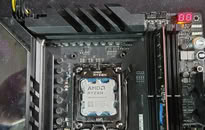
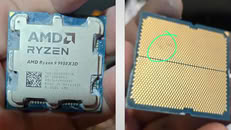
A Ryzen 9 9950X3D has reportedly died just an hour after being moved into an ASUS ROG Crosshair X670E Hero motherboard. According to Reddit user SpecialistConcept423, posting in r/GamersNexus, the chip had been running fine for about a year and a half in an ASRock X670E Taichi Carrara before the swap. After switching to the new board, no manual overclocking or voltage tweaks were applied; only one of the board's built-in memory presets was enabled for a set of SK hynix 6200 MHz modules. After saving that setting and rebooting, the board threw a "00" Q-Code and refused to post. Pulling the CPU and inspecting it revealed two brown marks on its contacts, which all but confirmed the catastrophic failure.

Things got stranger when the user resorted to an older Ryzen 5 8500G that had previously worked fine on the same board. That chip apparently now throws a "4D" code too, pointing at the motherboard itself as the culprit, not just the CPU. There's no confirmation yet on whether a faulty BIOS, a bad batch of boards, or something else is to blame, and ASUS hasn't commented on this specific case. It is worth noting that the ASUS board was not new, and it had undergone USB-related repairs and a BIOS rewrite. The user has since contacted AMD in Brazil for an RMA, but has shared no updates yet.
Interestingly, this isn't the first CPU failure tied to this exact board either. We covered a Ryzen 7 7800X3D that swelled and burned on the same ROG Crosshair X670E Hero model just days ago, and last year ASRock also admitted that overly aggressive PBO current limits fried a wave of Ryzen 9000 chips on its own boards. It's too early to say if these share a root cause, but there is certainly a pattern here. In this particular case, the X670E Hero claimed not one but two CPUs, and it only needed a single setting change to do so.
Source: Reddit
Add your own comment

207 Comments on Redditor's AMD Ryzen 9 9950X3D Reportedly Dies Shortly After Changing Motherboards

#1
Chaitanya
Shitsus 600 series of boards did kill a lot of 7000 X3D CPUs but with latest firmware that should have been resolved so its possible Asrock board already had pushed that CPU to edge before board was switched.
Posted on Reply
#2
freeagent
Good luck on quick and timely RMA from AMD. Pretty sure I have been waiting 3 weeks for an approval or even just a reply. I just checked before making this post and still nothing.
Posted on Reply
#3
Athena
It is worth noting that the ASUS board was not new, and it had undergone USB-related repairs and a BIOS rewrite.
The user has since contacted AMD in Brazil for an RMA
I'm confused, why would AMD do anything here, since it wasn't a CPU fault, it was working fine before...

if anything, it could have been a botched USB related repair, and flashing the wrong BIOS in it...
heck, it could have also been user error with a standoff shorting out something on the motherboard
Posted on Reply
#4
user556
Definitely user error, or a prank. The bottom side of the CPU is damaged on multiple edges, with it crushed at nearest edge to the burnt contacts.
And then the mobo is all smoked up like it's been rescued from a fire. And the CPU looks all gunked top side too, as if he'd used way too much thermal paste - which also looks to be the electrically conductive type.
Posted on Reply
#5
MikOnTopGG
Sounds like it might have been a slight overvoltage if some of the pins were in that condition. *not exactly sure*
user556Definitely user error, or a prank. The bottom side of the CPU is damaged on multiple edges, with it crushed at nearest edge to the burnt contacts.
And then the mobo is all smoked up like it's been rescued from a fire. And the CPU looks all gunked top side too, as if he'd used way too much thermal paste - which also looks to be the electrically conductive type.
Yeah that also sounds reasonable.
Posted on Reply
#6
AusWolf
no manual overclocking or voltage tweaks were applied; only one of the board's built-in memory presets was enabled for a set of SK Hynix 6200 MHz modules.
That is overclocking. What a clickbait!

At least we're onto something regarding the other exploding X3Ds. Maybe they were also "one click overclocked"?
Posted on Reply
#7
Dr. Dro
I read about this case earlier today, was doomscrolling FB and small world - it turns out the bespoke redditor is actually a personal friend of mine.

She uses this system for work, and the reason for the motherboard swap is that when she was using the processor with the AsRock motherboard, the system was experiencing instability such as USB dropouts and audio skipping. The refurbished ROG board was actually working fine with the 8500G, so the problem must already have been developing slowly in the AsRock and, if my theory is correct, the "generous" (although not entirely unsafe) voltages of the ASUS baseline presets probably finished the job.

A Q-Code "00" on an ASUS motherboard means "No CPU detected" - my best guess being, there is some sort of runaway condition that causes rapid degradation of a very specific circuit in the processor, the way AsRock programmed its BIOS routines seem to trigger the issue with particular ease and for whatever reason, AGESA's hardware safeties fail. 4D on the other hand is an initialization failure, which means either the power line to the CPU is toast (which COULD be caused by attempting to operate a damaged processor), or some other initialization related error, such as NVRAM still expecting a 9950X - I have no idea.

In any case, there was no overclocking involved.
AthenaI'm confused, why would AMD do anything here, since it wasn't a CPU fault, it was working fine before...

if anything, it could have been a botched USB related repair, and flashing the wrong BIOS in it...
heck, it could have also been user error with a standoff shorting out something on the motherboard
No, there are multiple documented cases of this issue occurring across multiple motherboards from numerous vendors. Most noteworthy in this particular case is that she was using BIOS 3902, which contains AGESA 1.3.0.1B Patch A, which means the issue is not yet resolved.

The community has been speculating that this problem might happen due to excessive voltage and current being applied on the CPU VDDIO line, both XMP/EXPO presets and motherboard reference presets seem to overshoot VDDIO and VDDQ quite high, in the 1.4V range. However, this alone doesn't justify the hardware physically bulging as it we have been seeing, it clearly means that some safety that the hardware should have is clearly not working. The replacement of the USB chipset should not affect any CPU-related functionality, and remember: there are two motherboards involved.

Since her CPU did not suffer some catastrophic physical bulge or extreme scorch marks like most documented cases thus far, we can correlate her dead chip with the socket AM5 pinout - the damaged pins seem to be related to MEM VDDIO and VSS (Row N 20 or thereabouts? Please help, my eyesight is no good). Too many little squares lol, but I will leave you with the reference:


user556Definitely user error. The bottom side of the CPU is damaged on multiple edges, with it crushed at nearest edge to the burnt contacts.
And then the mobo is all smoked up like it's been rescued from a fire. And the CPU looks all gunked top side too, as if he'd used way too much thermal paste - which also looks to be the conductive type.
There is no pre-existing physical damage on that processor, what you are seeing there is just some thermal paste, her CPU was quite dirty and since it is non-conductive, nor touching any of the pads underside, there is no technical reason for any issues to arise due to that fact.

Ryzen flame up problem has been around for a long time, it just never got the same wrath of Raptor Lake because it is much, much rarer and seems to occur in poorly understood ways
AusWolfThat is overclocking. What a clickbait!

At least we're onto something regarding the other exploding X3Ds. Maybe they were also "one click overclocked"?
FWIW, my A620A motherboard has no features that are considered "overclocking", like PBO, XFR, Curve Optimizer, etc. - but even this lowly motherboard does contain EXPO settings and ASUS memory presets section, so that is something that greatly weighs in the favor of those affected by this problem IMHO
Posted on Reply
#8
Solaris17
Super Dainty Moderator
AusWolfThat is overclocking. What a clickbait!

At least we're onto something regarding the other exploding X3Ds. Maybe they were also "one click overclocked"?
"I ONLY selected PERFORMANCE OVERDRIVE and ONLY SET CPU perfomance profile to ENTHUSIAST".
Dr. DroRow N 20 or thereabouts? Please help, my eyesight is no good
T9: VDDCR
P12: VSS
P13: VDDCR_SOC

The original SVG is much better.

upload.wikimedia.org/wikipedia/commons/2/2d/Socket_AM5_pinmap.svg?utm_source=commons.wikimedia.org&utm_campaign=index&utm_content=original
Posted on Reply
#9
Crackong
DrUsmanSaleemIt is worth noting that the ASUS board was not new, and it had undergone USB-related repairs and a BIOS rewrite.
So what is the lesson here?
Do not buy second-handed not officially refurbished motherboards?

Posted on Reply
#10
AsRock
TPU addict
AusWolfThat is overclocking. What a clickbait!

At least we're onto something regarding the other exploding X3Ds. Maybe they were also "one click overclocked"?
I think he needed more thermal paste hahaha.

But yeah who knows what happened.
Posted on Reply
#11
Dr. Dro
Solaris17"I ONLY selected PERFORMANCE OVERDRIVE and ONLY SET CPU perfomance profile to ENTHUSIAST".


T9: VDDCR
P12: VSS
P13: VDDCR_SOC

The original SVG is much better.

upload.wikimedia.org/wikipedia/commons/2/2d/Socket_AM5_pinmap.svg?utm_source=commons.wikimedia.org&utm_campaign=index&utm_content=original
Oooh thanks. That does make sense given the speculation I read about the flare ups being caused by high memory auxiliary voltages, though. I'm a total newb when it comes to AM5, though, having my own for like only a couple of weeks now, so I'm still reading a lot about it. And I need my insulin shot so I can get the double vision under control :shadedshu:
CrackongSo what is the lesson here?
Do not buy second-handed not officially refurbished motherboards?

I don't think the ASUS board here is at fault at all, but I can tell you this CPU was used for pretty much its entire lifetime on the Taichi Carrara
Posted on Reply
#12
AusWolf
Dr. DroFWIW, my A620A motherboard has no features that are considered "overclocking", like PBO, XFR, Curve Optimizer, etc. - but even this lowly motherboard does contain EXPO settings and ASUS memory presets section, so that is something that greatly weighs in the favor of those affected by this problem IMHO
My board has a setting called "memory try it" which is just a whole bunch of pre-baked memory presets, I imagine similar to the ones the article mentions. I have no reason to believe that random presets for random configurations randomly put into your BIOS by a random motherboard maker are worth experimenting with. I mean, considering how different everyone's config is, why would a motherboard maker make random profiles for imaginary configs and expect them to work? How could they even work? Why not just trust EXPO to do its job?

What's even more mind boggling is that my motherboard also has a setting called "memory overvoltage". Just... Why?

I wouldn't be surprised if it turned out that such settings were behind all these CPU deaths.
Solaris17"I ONLY selected PERFORMANCE OVERDRIVE and ONLY SET CPU perfomance profile to ENTHUSIAST".
Yes. Considering that even EXPO is considered overclocking... :)

The maximum officially supported memory speed is 5200 MHz on 7000 and 5600 MHz on 9000 series Ryzen. Somehow everybody seems to forget this.
Posted on Reply
#13
Dr. Dro
AusWolfMy board has a setting called "memory try it" which is just a whole bunch of pre-baked memory presets, I imagine similar to the ones the article mentions. I have no reason to believe that random presets for random configurations randomly put into your BIOS by a random motherboard maker are worth experimenting with. I mean, considering how different everyone's config is, why would a motherboard maker make random profiles for imaginary configs and expect them to work? How could they even work? Why not just trust EXPO to do its job?

What's even more mind boggling is that my motherboard also has a setting called "memory overvoltage". Just... Why?

I wouldn't be surprised if it turned out that such settings were behind all these CPU deaths.


Yes. Considering that even EXPO is considered overclocking... :)

The maximum officially supported memory speed is 5200 MHz on 7000 and 5600 MHz on 9000 series Ryzen. Somehow everybody seems to forget this.
It's plausible, certainly merits investigation. VDDCR is core voltage, VDDCR_SOC is for the SoC, and if what I'm reading is right, VSS is a ground pin. SoC is certainly stimulated when changing memory settings. These presets are actually templates that you can use to help hand-optimize your memory timings down to the tertiaries, but they do come with the nasty side effect of setting your SoC, VDDIO, MC voltage, etc. all very high, not in the danger zone but certainly on the quick n dirty realm.
Posted on Reply
#14
AusWolf
Dr. DroIt's plausible, certainly merits investigation. VDDCR is core voltage, VDDCR_SOC is for the SoC, and if what I'm reading is right, VSS is a ground pin. SoC is certainly stimulated when changing memory settings. These presets are actually templates that you can use to help hand-optimize your memory timings down to the tertiaries, but they do come with the nasty side effect of setting your SoC, VDDIO, MC voltage, etc. all very high, not in the danger zone but certainly on the quick n dirty realm.
I'm gonna think this one step further... When AMD issued the updated AGESA with the 1.3 V SOC limit for EXPO, did motherboard makers put that into these templates as well? What if they didn't?
Posted on Reply
#15
Dr. Dro
AusWolfI'm gonna think this one step further... When AMD issued the updated AGESA with the 1.3 V SOC limit for EXPO, did motherboard makers put that into these templates as well? What if they didn't?
I wouldn't know, but sure would be a killer oversight
Posted on Reply
#16
N3utro
@Dr. Dro

Here is a log of a hardware monitoring I did on my Asus X670E crosshair hero (bios 3902, latest, as well) with stock voltages / EXPO 6000 enabled while stress testing CPU (7800X3D) and RAM with a full pass of all tests of ycruncher (see attached file). You can use log visualizer to open it and view every sensors readings over time.

Also added a screenshot of HWI window for a quick look of average / min / high as well.

Voltages are a bit on the high side of safe ranges but still not borderlining or past anything dangerous afaik.

From what you explained your friend's CPU could have been degrading and switching it to another motherboard could have precipitated its death. The origin of this degradation could very well have been the Asrock motherboard too. It could be worth checking the stock voltages it uses as well. But the fact that your friend's crosshair was refurbished might not be a coincidence too.
Posted on Reply
#18
lexluthermiester
This confirms it's not an AsRock problem. When a user switches from an AsRock board that was working fine to an Asus board and the CPU fries, the focus then becomes AMD. I would bet real money that CPU was one of the bad batch units.
DrUsmanSaleemand last year ASRock also admitted that overly aggressive PBO current limits fried a wave of Ryzen 9000 chips on its own boards.
Acknowledgement and admittance are two very different words and have different meanings. Just sayin..
Posted on Reply
#19
AusWolf
lexluthermiesterThis confirms it's not an AsRock problem. When a user switches from an AsRock board that was working fine to an Asus board and the CPU fries, the focus then becomes AMD. I would bet real money that CPU was one of the bad batch units.
I recommend taking a look at this part in the article:
no manual overclocking or voltage tweaks were applied; only one of the board's built-in memory presets was enabled for a set of SK Hynix 6200 MHz modules.
That is some hefty memory overclock for a dual rank kit on AMD. Who knows what else was in that built-in preset. Motherboard makers aren't exactly famous for their deep concern for safety.
Posted on Reply
#20
lexluthermiester
AusWolfThat is some hefty memory overclock for a dual rank kit on AMD.
6200 is hefty? For DDR5? Since when? No. 7200, 8000 on up? Yeah, THAT'S starting to get "hefty". 6200 is no more hefty than 6400, which is what I sell as a standard for all of my DDR5 based systems. That RAM, nor the settings associated with it, were the cause of the problem. I'd bet my swinging cod-piece on it.
Posted on Reply
#21
Visible Noise
lexluthermiesterThis confirms it's not an AsRock problem.
People still thought that?

Delusional people I guess.
Posted on Reply
#22
AusWolf
lexluthermiester6200 is hefty? For DDR5? Since when? No. 7200, 8000 on up? Yeah, THAT'S starting to get "hefty". 6200 is no more hefty than 6400, which is what I sell as a standard for all of my DDR5 based systems. That RAM, nor the settings associated with it, were the cause of the problem. I'd bet my swinging cod-piece on it.
Since the highest officially supported speed is 5200 on 7000 and 5600 MHz on 9000 series Ryzen, with 6000 being the recommended "sweet spot" overclock. This is AMD, not Intel. High speeds come with high, often unsafe voltages.

Also, God knows what Asus put into that memory profile that could have killed that CPU.
Visible NoisePeople still thought that?

Delusional people I guess.
Great! Thanks for coming. :)
Posted on Reply
#23
Dr. Dro
AusWolfSince the highest officially supported speed is 5200 on 7000 and 5600 MHz on 9000 series Ryzen, with 6000 being the recommended "sweet spot" overclock. This is AMD, not Intel. High speeds come with high, often unsafe voltages.
This is the really the most conservative speed guaranteed under the most adverse conditions, any CPU that fails to meet this mark should be considered defective. 6000-6400 is not even close to the yellow zone on DDR5 (imo 7200-7600), this misconception stems from the fabric limitations on current AM5 CPUs that make this range the sweet spot. You start to redline at 8000 for UDIMMs IMHO, it's achievable as long as you have a CPU with a decent MC, adequate motherboard and a good quality Hynix A sticc, it takes some effort, but the result is fantastic, at least on Intel.
lexluthermiester6200 is hefty? For DDR5? Since when? No. 7200, 8000 on up? Yeah, THAT'S starting to get "hefty". 6200 is no more hefty than 6400, which is what I sell as a standard for all of my DDR5 based systems. That RAM, nor the settings associated with it, were the cause of the problem. I'd bet my swinging cod-piece on it.
The RAM is fine, the settings are not extreme or anything. Presets set "high" volts, but it's mostly just more than the average setting required for that to work on most configurations, it's not in the danger zone for 6000-6400 range, even with the "generous" presets this shouldn't cause any issues with a CPU that does not have preexisting conditions.

I don't think I ever asked if she had a TPU account, but I'll ask and send the thread anyways, hopefully she can answer some of you guys' questions
Posted on Reply
#25
lexluthermiester
AusWolfSince the highest officially supported speed is 5200 on 7000 and 5600 MHz on 9000 series Ryzen, with 6000 being the recommended "sweet spot" overclock. This is AMD, not Intel. High speeds come with high, often unsafe voltages.
That has not been the experiences I've seen.
Visible NoisePeople still thought that?

Delusional people I guess.
Right?
Posted on Reply
Add your own comment
Nov 11th, 2026 03:13 CST change timezone

New Forum Posts

Popular Reviews

TPU on YouTube

Controversial News Posts