Tuesday, July 22nd 2025
Keychron's Scissor-Switch B Series Keyboards Get High-Profile Versions for a More Traditional Feel
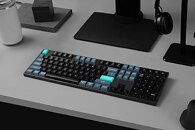
Keychron has seemingly taken a break from making prebuilt mechanical keyboards and once again stepped into the realm of more affordable, more conventional scissor switch keyboards with the launch of the Keychron B33 and B36 wireless keyboards. The B33 features a more compact TKL layout, while the B36 has a full-size design for those who like num pads and navigation clusters. Unlike the previous Keychron B1, B2, and B6 Pro ultraslim keyboards, the Keychron B36 and B33 have full-height keycaps—in what looks to be similar to the Cherry profile that has become ubiquitous in the mechanical keyboard space—and 3.5 mm of keycap travel. Keychron's main selling points for these new keyboards are the longer-travel scissor mechanisms, relatively low price of $34.99 and $39.99 for the B33 and B36 respectively, customization, and versatile connectivity options. Keychron claims that the scissor switches deliver "silent typing," which is likely in response to users looking for the mechanical keyboard look and key travel without having to contend with loud bottom outs.
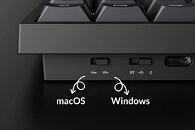
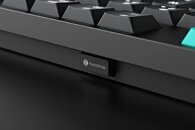
Both new Keychron B series keyboards still connect via the typical trio of 2.4 GHz, Bluetooth 5.2, and USB-C, and both keyboards also support Keychron Launcher for key remapping, macro creation, and firmware updates. Keychron has not specified whether the B33 and B36 run on ZMK firmware like the B Pro series keyboards, but the 300+ hours of claimed battery life suggests that this may be the case. The 2.4 GHz and USB-C connection both boast polling rates of 1,000 Hz, theoretically enabling the low latency necessary for gaming applications, although the lack of NKRO will likely put a stop to any serious gaming ambitions. The B33 and B36 are both also fairly lightweight, coming in at just 550 g and 650 g, thanks to the ABS construction and keycaps. Despite the lofty battery life claims, the B33 and B36 are both powered by comparatively miniscule 800 mAh batteries—this generally means faster charging and less weight—and neither keyboard features backlighting to add to the battery drain. In terms of ergonomics, the B33 and B36 both have flip-out feet for angle adjustment, sporting 5°, 6.5°, and 9° typing angles. The B33 and B36 also feature the convenient OS and connectivity mode switches typical of Keychron keyboards, and both keyboards have built-in storage slots for the 2.4 GHz USB Type-A dongles.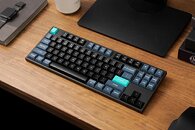
Sources:
Keychron, Keychron
Both new Keychron B series keyboards still connect via the typical trio of 2.4 GHz, Bluetooth 5.2, and USB-C, and both keyboards also support Keychron Launcher for key remapping, macro creation, and firmware updates. Keychron has not specified whether the B33 and B36 run on ZMK firmware like the B Pro series keyboards, but the 300+ hours of claimed battery life suggests that this may be the case. The 2.4 GHz and USB-C connection both boast polling rates of 1,000 Hz, theoretically enabling the low latency necessary for gaming applications, although the lack of NKRO will likely put a stop to any serious gaming ambitions. The B33 and B36 are both also fairly lightweight, coming in at just 550 g and 650 g, thanks to the ABS construction and keycaps. Despite the lofty battery life claims, the B33 and B36 are both powered by comparatively miniscule 800 mAh batteries—this generally means faster charging and less weight—and neither keyboard features backlighting to add to the battery drain. In terms of ergonomics, the B33 and B36 both have flip-out feet for angle adjustment, sporting 5°, 6.5°, and 9° typing angles. The B33 and B36 also feature the convenient OS and connectivity mode switches typical of Keychron keyboards, and both keyboards have built-in storage slots for the 2.4 GHz USB Type-A dongles.


5 Comments on Keychron's Scissor-Switch B Series Keyboards Get High-Profile Versions for a More Traditional Feel
We needed that. An overpriced membrane keyboard with no backlight or NKey Rollover
If I hit Ctrl Alt Q and then Ctrl Shift A will it register it?
Probably not. So not even fit for Office work