Tuesday, August 12th 2025

New AMD Radeon GPU Tool Allows Users to Force-Enable FSR 4 in More Games
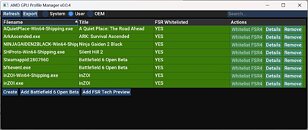
AMD Radeon GPU owners can now attempt to enable FSR 4 in more games, thanks to a new "AMD GPU Profile Manager" community tool that overrides the driver whitelist. Published on GitHub by developer Mikhail and demonstrated by content creators including Ancient Gameplays, the utility exposes AMD Adrenalin profile databases. It allows users to add or modify entries that typically require official driver support. The manager targets Radeon RX 9000 series cards and works by allowing titles that already support FSR 3.1 to try FSR 4. Users can enable FSR 3 first, either in the game or before launch, and then watch Adrenalin for signs that FSR 4 injection is active. The tool also offers quick add buttons for recent test builds and a one-click option to import profiles from AMD tech preview drivers, which is particularly handy for those who have reverted to older drivers and lost newly added entries. It aims to restore functionality and give power users a way to experiment while AMD completes its official whitelisting process.
There are important cautions alongside the convenience. The utility does not guarantee success in every title, and forcing FSR 4 into games with anti-cheat protections or online multiplayer can cause crashes, false positives, or account penalties. Community-maintained lists, demonstrations, and project notes highlight which games are confirmed to work and which are incompatible. Users are advised to back up driver profiles before making changes and to avoid applying forced profiles in competitive environments until developers add official support. The developer says more profile editing features are planned, and the project could grow into a general profile manager similar to well-known tools in other GPU ecosystems.
Sources:
AMD GPU Profile Manager, via VideoCardz
There are important cautions alongside the convenience. The utility does not guarantee success in every title, and forcing FSR 4 into games with anti-cheat protections or online multiplayer can cause crashes, false positives, or account penalties. Community-maintained lists, demonstrations, and project notes highlight which games are confirmed to work and which are incompatible. Users are advised to back up driver profiles before making changes and to avoid applying forced profiles in competitive environments until developers add official support. The developer says more profile editing features are planned, and the project could grow into a general profile manager similar to well-known tools in other GPU ecosystems.


10 Comments on New AMD Radeon GPU Tool Allows Users to Force-Enable FSR 4 in More Games
Edit: Yes, I admit that I didn't read the description well enough (interestingly, the app itself does open on the older gpu, so it seems that it only looks for a valid AMD driver in general, even though FSR 4 is for 90xx series), I just meant that it would be nice if the developer expanded the program later to cover, so it would work like NVPI. Also I know that you can tweak settings in Adrenaline, it's just that there are some minor annoyances, such as FRTC being a global setting only, while frame caps for individual games can only be set with Radeon Chill (I know you can just set both the lower and upper limit to the same value for a constant limit, but it would have been nice if AMD allowed you to set a single value like Nvidia does).
set your freesync monitor range properly in the amd gpu driver // tehse days it is reported correctly
i bought on purpose something which has only afaik 37-75 fps freesync range
I play personally at a target fps rate of ~50. I do not see any difference with freesync mode with 74/75 fps from my asus pa278qv monitor.
make per game a game profile in advance mode. save it. stop the game. stop epic game launcher. than launch the game. this bug is not fixed and will be not fixed. at least 3 yerars old and several times reported here. (that is something i had to figure out myself)
Vsync, frame cap ... thats all in the options. Works for years. I really wonder why you ask? I, even as a non windows user, could figure it out without an external guide.
--
off topic
battelfield demands features which i refuse to activate for Cheater protection. Here we see a few days after the open beta that cheaters hacked the game with libaries replacement. I did not check the git code. The screenshot suggests EA battlefield was heavily tempered with. When someone can hack the game for better visual the cheating issue and secure boot and tpm feature will not aid anything.
EA = well done, on cheating protection with forced active TPM2 and secure boot.