Tuesday, September 2nd 2025
Kazeta: New Linux OS Transforms PCs into Retro Game Consoles
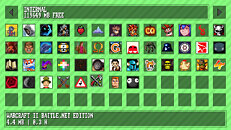
ChimeraOS developer Alesh Slovak has revealed Kazeta, a Linux-based OS that aims to bring back the ease of classic gaming consoles on PCs. After six months of development, the project addresses growing frustrations with complex digital storefronts and aims to preserve gaming collections through physical media. The system operates by loading DRM-free games onto SD cards that function as cartridges. Users simply insert a card and power on their PC to boot directly into the game, eliminating accounts, online requirements, and cloud dependencies. The system stores save data on internal storage while game cartridges stay read-only to preserve them. When users don't insert a cartridge, Kazeta shows a retro-style BIOS menu to manage game saves similar to 1990s consoles. The OS works with both new PC games and old games through emulation supporting DRM-free content from sites like GOG and itch.io.
Slovak created Kazeta after he saw non-tech-savvy users having trouble with Steam's complex layout and he grew tired of digital distribution himself. His renewed appreciation for physical media and concern over long-term game preservation drove the project's philosophy.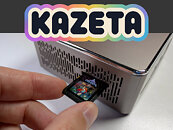
 Current limitations include no dual-boot support, virtual machine compatibility, hybrid graphics, multiple monitor support, or Bluetooth controllers—though the latter is planned for future releases. Each SD card must contain only one game and requires manual preparation including formatting and file copying.
People can now download the operating system, with full instructions available on GitHub for those who meet the basic system needs.
Requirements
Sources:
Liliputing, GamingOnLinux
Slovak created Kazeta after he saw non-tech-savvy users having trouble with Steam's complex layout and he grew tired of digital distribution himself. His renewed appreciation for physical media and concern over long-term game preservation drove the project's philosophy.


People can now download the operating system, with full instructions available on GitHub for those who meet the basic system needs.
Requirements
- 4 GB or more RAM
- 32 GB or larger internal storage device
- AMD Radeon RX 400 series or newer GPU required (Strongly recommended for the best experience)
- NVIDIA GTX 1600 series or newer GPU required
- Intel GPUs released since 2017 may work, but have poor game compatibility
- A single connected TV or monitor
- Hybrid graphics are not supported
- Virtual machines are not supported
- A keyboard is usually required to select the boot disk and start the installer
- Dual booting from the same disk is not supported
- Secure boot must be disabled
- Intel RST (Rapid Storage Technology) must be disabled
- Legacy/bios is not supported
- Geekom A5 2025 Edition Mini PC
- 8Bitdo Ultimate 2C Wireless Controller connected wirelessly via the included dongle or wired
- Other controllers can work, but may have minor issues.
Connecting controllers via Bluetooth is not supported.
10 Comments on Kazeta: New Linux OS Transforms PCs into Retro Game Consoles
We need to reduce our waste, not increase it.
This is so close to being that, but it misses the mark by adding extra features and limitations in the name of nostalgia.
--
github.com/kazetaos/kazeta/wiki/Sample-Carts
Only a single Kart
90MB game unpacked is for sure demanding.
Just a textfile which changes the directory and starts a binary.
If you wonder - yes it runs and it starts in full screen by default.
I did not bother getting my stashed away usb controller to test further.
for the nerds: 6.16.4 gnu gentoo linux / amd 64 / amdgpu video driver / xorg-server / openrc.
Pressing button c -> several times.
direction keys on my usb keyboard works to move.
Note: I disabled earlier full screen mode. You will only see the game by default.
~20€ store.steampowered.com/app/504230/Celeste/
Do not worry, I have Celeste in my Epic library: 16€ store.epicgames.com/en-US/p/celeste
I guess it could have many but load automatically for single game SD cards.
Or the system could let you set a file on the card to autoboot, still allowing to manually select others.
Seems interesting and I will probably check this out.
The idea is to have one physical carddridge wiht one label for each game.
The settings are stored somewhere else.
--
I doubt an ordinary user will be able to extract a complicated zipped archive(i used engrampa), format a sd, push the files on it and put a label on the sd card.
Far too complicated. Installing such system on a host with far overpowered specs reduces the userspace even more.
--
- Dual booting from the same disk is not supported
My new MSI mainboard forgets on every firmware flash the boot entry. This will be very fun for the audience than to fix that boot record.There is no technical limitation to not have several partitions on the same disk. There is no technical limitation to boot something else with UEFI. MBR is not supported.
I use the UEFI bootloader and no external bootloader. Except windows 11 pro which may ship it's own bootloader. (outdated design!)