Thursday, October 2nd 2025

Razer Expands 4000 Hz Hyperpolling To Select Blackwidow Keyboards
Razer, the leading global lifestyle brand for gamers, today announced expanded availability for its breakthrough 4000 Hz wireless HyperPolling technology. The Razer HyperPolling Wireless Dongle now powers select BlackWidow keyboards with true 4000 Hz wireless polling, delivering lightning-fast input and unmatched control for competitive play.
Previously introduced with the BlackWidow V4 Pro 75%, 4000 Hz HyperPolling is now available on: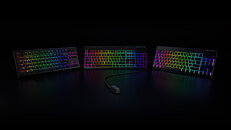
 Further Enhancing Wireless Performance
In today's gaming landscape, every millisecond counts. Razer's continued pursuit for technological excellence, combined with the earnest feedback from the global gaming community, drives innovation at the highest level.
With 4000 Hz HyperPolling Wireless technology now available on select BlackWidow keyboards, players gain the speed and responsiveness needed to stay locked in and execute clutch plays with confidence.
True 4000 Hz Wireless Polling: Built for Split-Second Plays
Razer continues to push the boundaries of wireless gaming technology with its latest upgrade to the HyperPolling Wireless Dongle for supported Razer keyboards.
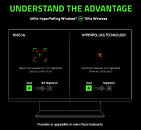
While the industry standard polling rate for gaming keyboards is 1000 Hz (1 ms response time), Razer's 4000 Hz wireless polling transmits up to four times more data per second, cutting latency to a theoretical maximum of just 0.25 ms. Paired with Razer HyperSpeed Wireless, this breakthrough ensures sharper movement, faster execution, and a competitive edge when it matters most.
Unlock The Speed: Activating 4000 Hz Wireless Polling
To enable 4000 Hz wireless polling on supported Razer BlackWidow keyboards, users simply need to update their keyboard to the latest firmware via Razer Synapse 4 and initiate the pairing process with the HyperPolling Wireless Dongle.
Steps:
Source:
Razer
Previously introduced with the BlackWidow V4 Pro 75%, 4000 Hz HyperPolling is now available on:
- Razer BlackWidow V4 Tenkeyless HyperSpeed
- Razer BlackWidow V4 Low-profile HyperSpeed
- Razer BlackWidow V4 Low-profile Tenkeyless HyperSpeed


In today's gaming landscape, every millisecond counts. Razer's continued pursuit for technological excellence, combined with the earnest feedback from the global gaming community, drives innovation at the highest level.
With 4000 Hz HyperPolling Wireless technology now available on select BlackWidow keyboards, players gain the speed and responsiveness needed to stay locked in and execute clutch plays with confidence.
True 4000 Hz Wireless Polling: Built for Split-Second Plays
Razer continues to push the boundaries of wireless gaming technology with its latest upgrade to the HyperPolling Wireless Dongle for supported Razer keyboards.
While the industry standard polling rate for gaming keyboards is 1000 Hz (1 ms response time), Razer's 4000 Hz wireless polling transmits up to four times more data per second, cutting latency to a theoretical maximum of just 0.25 ms. Paired with Razer HyperSpeed Wireless, this breakthrough ensures sharper movement, faster execution, and a competitive edge when it matters most.
Unlock The Speed: Activating 4000 Hz Wireless Polling
To enable 4000 Hz wireless polling on supported Razer BlackWidow keyboards, users simply need to update their keyboard to the latest firmware via Razer Synapse 4 and initiate the pairing process with the HyperPolling Wireless Dongle.
Steps:
- Update to The Latest Firmware
- Launch Razer Synapse 4.
- Look for a prompt in the top-right corner or through a "Firmware update available" link under the keyboard tab.
- Follow the link to the Razer Support site "Software and Firmware Updates for Razer Peripherals" to download and install the necessary updates for your supported keyboard model.
- Pair with HyperPolling Wireless Dongle
- Ensure Synapse 4 is updated to the latest.
- Navigate to the HyperPolling Wireless Dongle tab, initiate the pairing process.
- Select "compatible keyboard" in the new interface.
- Synapse will check and update the dongle's firmware where necessary.
- Once updated, follow the guided steps to complete pairing process.
21 Comments on Razer Expands 4000 Hz Hyperpolling To Select Blackwidow Keyboards
The difference between 1khz and 4khz polling rate would only be felt by a tiny amount of people.
Hall effect > 4kHz poll
Company with snakes for a logo selling snake oil. Gotta stay true to tour brand, I guess…
Guess the HyperPolling dongles and Mouse Dock Pro cannot work in multiple rate at the same time, though.
Meanwhile we have Logitech out here pushing "new" mice 125 hz and think it's acceptable just because it isn't part of their "gaming line".
- Fast switches (Hall Effect / optical / low-latency)
- Good firmware/input engine (low actual latency)
- Stable signal with no artificial debounce
In short: for mice it makes sense, for keyboards it’s mostly marketing.A long, long time ago, on an old laptop...I made the mistake of buying a DeathAdder Chroma v1. For gamers... When I built my PacMan Nightmare PC in 2017... I made the mistake of buying the Black Widow Chroma V2 keyboard. For gamers... I didn't want to miss the opportunity to buy the Kraken Tournament Edition (black, please) so that the same bloatware could manage all my stuff. For gamers... Soon after, that bloatware told me my mouse was obsolete. For gamers... Some time later, in 2021, the left click on my mouse went to hell, the vegan leather on the keyboard pad started peeling. The headband and ear cushions on my headphones suffered the same fate. I discovered that rubbing all the vegan leather on my peripherals with a Scotch-Brite pad gave me a uniform, matte textile finish that was cooler than the glossy finish of the original vegan leather. I thought... I'm going to buy the Deathadder V2 on sale. For gamers... For gamers... Assholes.
1000 hz = 1000 refreshes per second.
You can do the rest.