Thursday, October 23rd 2025

Copilot for Gaming Screenshots Your Games, Uploads Them to MS, Enabled by Default

Microsoft is experimenting with integrating Copilot AI functionality across various platforms. However, this time the company is doing something that many users might not be aware of. The Gaming Copilot AI is being trained by default using users' screengrabs, performing OCR on the screenshots, and sending the extracted text back to Microsoft servers to train its large language models—all without users being informed of this process. A Resetera forum member, "RedbullCola," discovered this through network traffic analysis, noticing that the Gaming Copilot AI app was transmitting data to Microsoft servers without his knowledge. To make matters worse, this occurred while he was testing a game under an NDA. This situation raises multiple security concerns, as it could potentially breach the NDA agreement between the user and the game company, risking the leakage of text from the unreleased game.

We verified this ourselves and can confirm that the feature is indeed enabled by default. The only option you can opt-in for is model training on your voice chats, which is thankfully disabled by default. To check whether your setting for training text models from your screenshots is being used, go to Game Bar, open Gaming Copilot, head to Settings, and click on Privacy. There, you can uncheck the training slider to prevent your screen records from being sent to Microsoft for LLM training. For example, under the GDPR, using EU users' personal data to train AI requires a transparent notice. Automatically enabling screenshot collection for model training without an appropriate legal basis or explicit informed consent could breach the law, and invoke a lawsuit from EU's governing body.
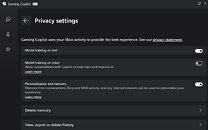
While setting up the Gaming Copilot, there were no options to inform a user whether this feature would be enabled by default. There should at least be a screen that prompts users before enrolling them in a data collection program aimed at assisting gamers in the future. This is particularly important for those working in the game industry, as this feature could potentially leak game content that is protected by years of work and non-disclosure agreements. We are awaiting to see if Microsoft will make a statement regarding collecting text from gamer's screenshots, or the case will remain in point.
Source: Resetera
Add your own comment

71 Comments on Copilot for Gaming Screenshots Your Games, Uploads Them to MS, Enabled by Default

#51
Ascalaphus
Yeah I disabled and uninstalled all that Xbox gamebar crap/co pilot eons ago with powershell scripts. Glad I did.
Posted on Reply
#52
INSTG8R
Vanguard Beta Tester
What version of WIin is this whole Co-Pilot nonsense on? I am 25H2 and I am not seeing anything, I mean it offers me the option to see what AI features are installed and Gamebar is the only thing but I went through it and saw nothing untoward, I mean I don't even use it to begin with...
Posted on Reply
#53
lexluthermiester
INSTG8RWhat version of WIin is this whole Co-Pilot nonsense on?
All. They're pushing out to all deployed consumer home and pro versions of 11. 22H2 is not being feature updated.
Posted on Reply
#54
INSTG8R
Vanguard Beta Tester
lexluthermiesterAll. They're pushing out to all deployed consumer home and pro versions of 11. 22H2 is not being feature updated.
I'm on 25H2 Pro I am pretty sure it updated to that in past week or so in fact it appears to have done it on the 29th, if I follow the link to the "Preview Update" that was installed. I mean I am NOT interesested in the least in any kinda AI nonsense I am just wondering what/when I should be ready to try to get rid of it...

support.microsoft.com/en-us/topic/october-28-2025-kb5067036-os-builds-26200-7019-and-26100-7019-preview-ec3da7dc-63ba-4b1d-ac41-cf2494d2123a
Posted on Reply
#55
lexluthermiester
INSTG8RI'm on 25H2 Pro I am pretty sure it updated to that in past week or so in fact it appears to have done it on the 29th, if I follow the link to the "Preview Update" that was installed. I mean I am NOT interesested in the least in any kinda AI nonsense I am just wondering what/when I should be ready to try to get rid of it...

support.microsoft.com/en-us/topic/october-28-2025-kb5067036-os-builds-26200-7019-and-26100-7019-preview-ec3da7dc-63ba-4b1d-ac41-cf2494d2123a
On the systems I've been building, Copilot is installed by default on non-customized ISOs/Images. The fact that you dodged it means that you have a setting that is preventing it from being pushed to your system.
Posted on Reply
#56
INSTG8R
Vanguard Beta Tester
lexluthermiesterOn the systems I've been building, Copilot is installed by default on non0customized ISOs/Images. The fact that you dodged it means that you have a setting that is preventing it from being pushed to your system.
Perhaps because I am in the EU Zone? GPDT? I mean my Smart TV doesn't allow Alexa?
Posted on Reply
#57
lexluthermiester
INSTG8RPerhaps because I am in the EU Zone? GPDT? I mean my Smart TV doesn't allow Alexa?
That could very well be it. I'd guess very likely. You folks in the EU are very lucky!
Posted on Reply
#58
INSTG8R
Vanguard Beta Tester
lexluthermiesterThat could very well be it. I'd guess very likely. You folks in the EU are very lucky!
I would assume it has to do with the stronger privacy laws preventing it well, because of incidents like this...
Posted on Reply
#59
R-T-B
PaganstompWelcome to the internet... I hate it. I feel bipolar.
We were so optimistic in the early 90s and 2000s. We had no idea the chain reaction of shit we'd actually started.
Posted on Reply
#60
lexluthermiester
INSTG8RI would assume it has to do with the stronger privacy laws preventing it well, because of incidents like this...
Seems very reasonable. I REALLY wish the US lawmakers would pull their heads out of their butts and start passing similar laws.
R-T-BWe were so optimistic in the early 90s and 2000s. We had no idea the chain reaction of shit we'd actually started.
Right?!?
Posted on Reply
#61
rapidrush
This is only a problem if you have Copilot installed.

Posted on Reply
#62
INSTG8R
Vanguard Beta Tester
rapidrushThis is only a problem if you have Copilot installed.

LOL I just had to double check and yeah....Me too...
Posted on Reply
#63
FR3D1
Ninja Cat
@AleksandarK
Today, when I opened the Game Bar, a setup wizard for “Gaming Copilot” popped up. Of course, I immediately clicked ‘Skip’ because I had previously deselected that widget/deactivated its services. However, recording by “Gaming Copilot” was reactivated without my knowledge.


With a friendly smile,
Fred.
Posted on Reply
#64
AleksandarK
News Editor
FR3D1@AleksandarK
Today, when I opened the Game Bar, a setup wizard for “Gaming Copilot” popped up. Of course, I immediately clicked ‘Skip’ because I had previously deselected that widget/deactivated its services. However, recording by “Gaming Copilot” was reactivated without my knowledge.


With a friendly smile,
Fred.
Very anti-consumer behaviour... I am sure you love it...
Posted on Reply
#65
AVATARAT
FR3D1@AleksandarK
Today, when I opened the Game Bar, a setup wizard for “Gaming Copilot” popped up. Of course, I immediately clicked ‘Skip’ because I had previously deselected that widget/deactivated its services. However, recording by “Gaming Copilot” was reactivated without my knowledge.


With a friendly smile,
Fred.
There is no way to stop Edge Game Assist in Game Bar.
You can uninstall it but only for 1-3 days and it will be on again.
The only way to stop it is to remove the entire Game Bar. I did it and now I use EarTrumpet.
Posted on Reply
#66
FR3D1
Ninja Cat
AVATARATThere is no way to stop Edge Game Assist in Game Bar.
Are we talking about “Gaming Copilot” Beta here? Two different worlds! Are you secretly Patrick Star and living under a rock? End of amusement.😁 However, yes, in my opinion, disabling the co-pilot under Settings/Additional Settings/Widgets should result in it being disabled. At the very least, it can then no longer be activated via the Game Bar.
AVATARATYou can uninstall it but only for 1-3 days and it will be on again.
No. At least not for me.

With a friendly smile,
Fred.
AVATARATI did it and now I use EarTrumpet.
Volume control for Windows?
Posted on Reply
#67
AVATARAT
FR3D1Are we talking about “Gaming Copilot” Beta here? Two different worlds! Are you secretly Patrick Star and living under a rock? End of amusement.😁 However, yes, in my opinion, disabling the co-pilot under Settings/Additional Settings/Widgets should result in it being disabled. At the very least, it can then no longer be activated via the Game Bar.


No. At least not for me.

With a friendly smile,
Fred.


Volume control for Windows?
I can only assume they changed the name.

Yes, I can set a key combination to open it when needed.
Not as comfortable as Game Bar, but my computer works better without Game Bar anyway.
Posted on Reply
#68
FR3D1
Ninja Cat
AVATARATI can only assume they changed the name.
Unfortunately, no.

With a friendly smile,
Fred.
Posted on Reply
#69
AVATARAT
FR3D1Unfortunately, no.

With a friendly smile,
Fred.
This is via Game Bar Wigets Store (Edge based), if this screenshot is from your machine, you can see the Copilot icon top right and it works on your machine no matter what you have declined.
You can remove it the same way as Game Assist, from what I can see they work in a similar way.
Posted on Reply
#70
FR3D1
Ninja Cat
AVATARATYou can remove it the same way as Game Assist
Unfortunately not.

With a friendly smile,
Fred.
Posted on Reply
#71
lexluthermiester
AVATARATThere is no way to stop Edge Game Assist in Game Bar.
You can uninstall it but only for 1-3 days and it will be on again.
Yes there is: Uninstall Edge and security lock it's folders.
AVATARATThe only way to stop it is to remove the entire Game Bar.
This too.
Posted on Reply
Add your own comment
Nov 21st, 2026 05:37 PST change timezone

New Forum Posts

Popular Reviews

TPU on YouTube

Controversial News Posts