Tuesday, December 23rd 2025

Windows 11 25H2 Includes a Faster NVMe Driver Needing Manual Installation
Although Windows has had awareness of the NVMe storage media protocol since Windows 8.1, it turns out that the stock Microsoft driver for NVMe devices, disk.sys, offers suboptimal performance. This driver dates back to 2006, and is part of Microsoft's oldest internal basic drivers. Disk.sys appears to treat NVMe devices like SCSI drives. Microsoft released a new native driver with a greater degree of awareness of NVMe with Windows 11 25H2 (client) and Windows 2025 (server) operating systems, called nvmedisk.sys. The easiest way to check if your drive is using the older driver would be to bring up Device Manager, collapse "Disk Drives," open the Properties of your drive, go to the Driver tab, and click on the "driver details" button.
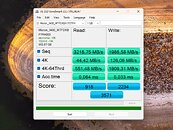
Notebookcheck made a fascinating discovery that has the potential to unlock greater performance with your NVMe drives, if they are compatible. Apparently, nvmedisk.sys significantly improves performance, both in sequential and random workloads. Using this driver, however, is fraught with risks. Not all NVMe SSDs support it, and if incompatible, it could break Windows 11 boot. The publication put out a guide on how to get Windows 11 to use nvmedisk.sys. This involves changing three Windows Registry values. It would be a good idea to image or backup your data before you tinker with this, so you can perform a full image restore if it breaks Windows booting. The guide can be found in the source links below, use it at your own risk.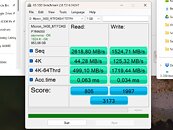
Sources:
Notebookcheck, HotHardware
Notebookcheck made a fascinating discovery that has the potential to unlock greater performance with your NVMe drives, if they are compatible. Apparently, nvmedisk.sys significantly improves performance, both in sequential and random workloads. Using this driver, however, is fraught with risks. Not all NVMe SSDs support it, and if incompatible, it could break Windows 11 boot. The publication put out a guide on how to get Windows 11 to use nvmedisk.sys. This involves changing three Windows Registry values. It would be a good idea to image or backup your data before you tinker with this, so you can perform a full image restore if it breaks Windows booting. The guide can be found in the source links below, use it at your own risk.


115 Comments on Windows 11 25H2 Includes a Faster NVMe Driver Needing Manual Installation
From Raymond Chen's blog on the issue:The default NVMe driver's inefficiency is nothing new. Samsung used to provide their own NVMe driver for improved performance, but stopped doing that since 980 series.
Crazy we've been limited by those SCSi commands for so long on these lol wonder what other 'wonders' windows is holding
For a while, yes, you did have manufacturers having drivers of their own to "do better" on their products than Microsoft's standard driver, but it really did not catch on.
If I'm not mistaken, AMD had a storage driver of their own for the motherboards starting with AM4.
Old driver v new gen 5. up and down old on left. System in Specs
Also we have been able to upgrade the nvme drivers for years at this point, so this is NOT news worthy.
EDIT: I wonder if this finally also makes the energy profile rules apply, because Windows has a set of NVMe-specific rules that I've never been able to get to work right.
By the way, successfully activated on Windows 11 IoT Enterprise LTSC 24H2 (26100.7462) on a “Lexar NM710 2TB.”
@btarunr
The teaser implies that it only works with 25H2, which is not correct.
With a friendly smile,
Fred.Please disable this junk. Especially if you didn't install Windows on a platter. Because this stupid feature dates back to that time. The reason Redmond continues to carry it along and activate it automatically is due to its complete incompetence.
@Jtuck9 "Fast Boot" and "Fast Startup" are two different things. I think you are speaking about "Fast Startup", which is a Windows setting and you can disable it (along with hibernation) running an elevated CMD and the command [ICODE]powercfg -h off[/ICODE]
"Fast Boot" is a setting in UEFI and it just skips some steps to get to the bootloader faster, like hardware detection, RAM checks, etc. These days, might as well be off anyway, UEFI checks the whole system fast enough.
980 Pro - disk.sys
990 Pro - disk.sys
Windows 11 Pro 24H2 (build 26100.7462)
So, yeah... old one.
Works with the new driver
Thanks For this usefull informations.
I Got it Working with Samsung SSD EVO 970 and WD Black SN770
Only thing Strange is ?
Windows 11 cannot find standard Folders like %temp% yet? on these SSD?
Probably have to Change Settings somewhere?
Don't try this SSD Speedup if your not comfortable with Deeper Windows Settings!!
It works for all NVMe drives.
990 Pro verdict: Some minor losses in 8t sequential write and a major gain in 1t sequential write tho considering that this was abnormally low on disk.sys compared to my other drives im willing to chalk this up to a fluke on the single test run.
980 Pro OEM verdict: Sequentials are pretty much the same. Randoms have gained beyond run to run variance tho.
S70 Blade verdict: Sequentials are pretty much the same. Randoms have gained beyond run to run variance.
AIDA64 doesn't see these NVME drives under SMART data, but that could also because im using an older version of the program.
It's possible the new version sees them. Not sure about other utilities reading SMART data.
Overall other numbers improved and widows does seem snappier in terms of startup. No issue finding %temp% etc.
TRIM also sees them and TRIM works.
I dont understand why on earth is this not the default.
Another strange decision by MS leaving performance on the table.
I cant even imagine how many other settings are there similar to this where potential gains could be had if MS was not so focused on fiddling around with meaningless AI junk. Now i wonder if 25H2 update removes those registry values so i have to add them again.
Also those values in the notebook article are broken. Dont copy them 1:1. The key name should be Overrides, but in that article it reads Over and then goes into values. This is the correct .reg way of adding these values without using commandline.
Make a restore point just in case before executing.
Save as .reg and doubleclick to execute and make sure to restart afterwards:
I think the driver is missing in windows 10 I was able to find it from another source
Just not sure I should continue messing around to try and get it working.