Monday, October 5th 2026

Windows 11 26H2 Update Lowers RAM Consumption
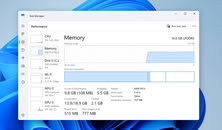
When Microsoft released its Windows 11 26H2 update last week, it didn't include many under-the-hood changes that would affect everyday users. However, according to Windows Latest and several Reddit users, the update reportedly reduces RAM consumption when the system is idle, and even when does better management of RAM when applications are loaded. This improvement wasn't advertised by Microsoft, but it seems to be a welcome change for those who prefer lower RAM usage when not running any tasks. On Reddit, users are reporting a reduction in memory consumption of around 2 GB, with some experiencing up to a 3 GB decrease in idle RAM usage. Testing by Windows Latest on a laptop with 16 GB of RAM shows that, whereas it usually idled at 10 GB of usage, it now consumes 7 GB, with 4 GB of that cached and 8.8 GB available.
The update also introduces features like the Low Latency Profile, which is expanding to nearly all applications and could potentially make software launch faster on weaker hardware. Previously available for Microsoft-branded "in-box" applications, this feature boosts the CPU to its maximum frequency for 1-3 seconds, resulting in noticeably smoother app launches during testing. Launching Microsoft applications like Edge and Outlook is about 40% faster, and other applications, such as the Start Menu and context menus across the operating system, may be up to 70% faster. Now, other applications are receiving this update, which means the overall experience will be much smoother.
 Finally, it is worth pointing out that when Windows loads something in the background, it doesn't necessarily mean that the RAM consumption is wasted. Windows caches services and applications in RAM to ensure that once a user needs a service, the application is already loaded in the background, providing an instantaneous response. This, however, doesn't mean that Windows is perfect and unnecessary telemetry isn't present, but Microsoft has surely made optimizations to find a balance between needed background applications to operate smoothly and just enough space to free up some capacity.
Sources:
Windows Latest, Reddit
The update also introduces features like the Low Latency Profile, which is expanding to nearly all applications and could potentially make software launch faster on weaker hardware. Previously available for Microsoft-branded "in-box" applications, this feature boosts the CPU to its maximum frequency for 1-3 seconds, resulting in noticeably smoother app launches during testing. Launching Microsoft applications like Edge and Outlook is about 40% faster, and other applications, such as the Start Menu and context menus across the operating system, may be up to 70% faster. Now, other applications are receiving this update, which means the overall experience will be much smoother.


76 Comments on Windows 11 26H2 Update Lowers RAM Consumption
Closing all background soft, puts mine on 7.5GB.
Thank you for this educational post on the matters I already am aware on. It will also
use memory more aggressively the more the system has of it, yea. Problem is - cached memory set is separate, it’s not what is displayed in the actively used number.
Like, it’s right there. On the screenshot from Task Manager in this very news article. It’s not the cache. It’s ostensibly an idling system using almost 10 gigabytes. In no world is this normal and is absolutely NOT a usual Win 11 behavior in my experience.
Windows online updates were done an hour ago.
download at your own risk windowsreport.com/windows-11-26h2-kb5121794-enablement-package-ekb-direct-download-for-offline-installer-msu/
Far too high DRAM consumption after reboot
Okay unfair you opened a www-client. Far too much DRAM consumption, no apps opened, except taskmgr.exe
My referecne values are 512MIB for a plain desktop, and 2GIB dram when vivaldi is open. those are unoptimised DRAM usage wihtout any extra filles written to disk.
In my point of view, i see much more DRAM consumption. i expect the kenrel to destroy bar sections and free them instantly.
DRAM which is blocked can not be used by anything else.
My work laptop is the same
There's no significant inherent advantage in having x amount of empty RAM space, beyond fewer CPU handles, unless the RAM ISN'T freed up if it's needed for something not cached etc, but mostly the benefit in theory would be that you don't first have to unload something, to load something else. That happens on the order of nanoseconds though. Selective suspend means that the application in RAM is also using mimimal/no CPU resources most of the time, and springs into action if needed.
I do think people should chase reducing CPU handles/load, alongside network optimisation and reduction of bloat, than trying to keep as much free RAM as possible for no other reason than chasing smallest numbers possible.Edge is cancer, agreed (unless it's your preferred browser and all you need). The rest of the bloat should basically be removed either manually or though careful selection of OS version.
I understand your point about reducing SWAP usage, and that's valid. I guess the point I'm making is that not much is being swapped and written to SSD, unless it was actively used software. A cached application already has a copy on the drive, so there's nothing to swap, and if it's new data that needs swapping, well, that was something you were actually using then, wasn't it?
The point I'm making is that out of x "used" memory, a large proportion of it wasn't actually "used", it's just ready for use in a way that doesn't require it to first be loaded into RAM. Since, again, unused RAM is wasted RAM, and the OS is actually pretty smart about this stuff.
Windows 10 average 4GB idle RAM
You know, the way a proper engineer would design it.
For me on another system with a unmodified W11 install, no difference with with 26H2.