Friday, July 17th 2026

iFixit Slams ASUS ROG Flow Z13's 10/10 Repairability Score
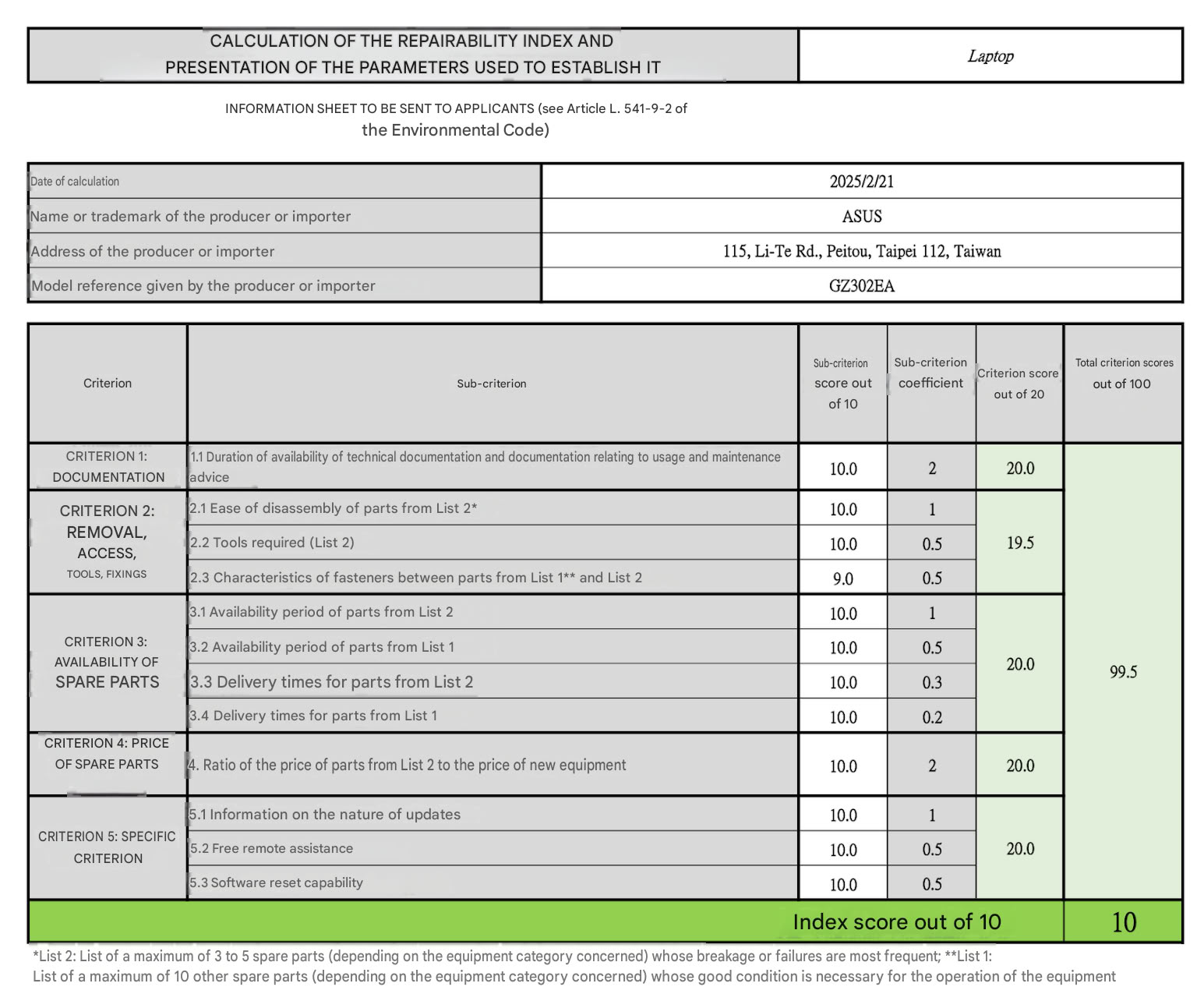
When ASUS launched the ROG Flow Z13 gaming 2-in-1 in 2025, it proudly boasted about the convertible's 10/10 repairability score—a self-reported score that evaluates the repairability of a product based on the availability of parts, documentation, repair cost, and how easy it is to access the internals for parts replacement.
Just recently, iFixit, the popular repair and right-to-repair activism company, got its hands on the Flow Z13 for one of its teardown repairability analyses, and after taking the device apart, iFixit gave the Flow Z13 a much more reserved 7/10 repairability score. Of course, this is still a reasonably high score, especially considering how compact the Flow Z13 is, but it's nowhere close to the 10/10 that ASUS gave itself based on the French index.
 Part of iFixit's criticism in the teardown video has to do with how the different aspects are weighted. Where iFixit gives hardware design the highest weight, occupying 80% of the overall repairability score, the French Indice de Réparabilité weighs hardware design at just 20% of the overall score.
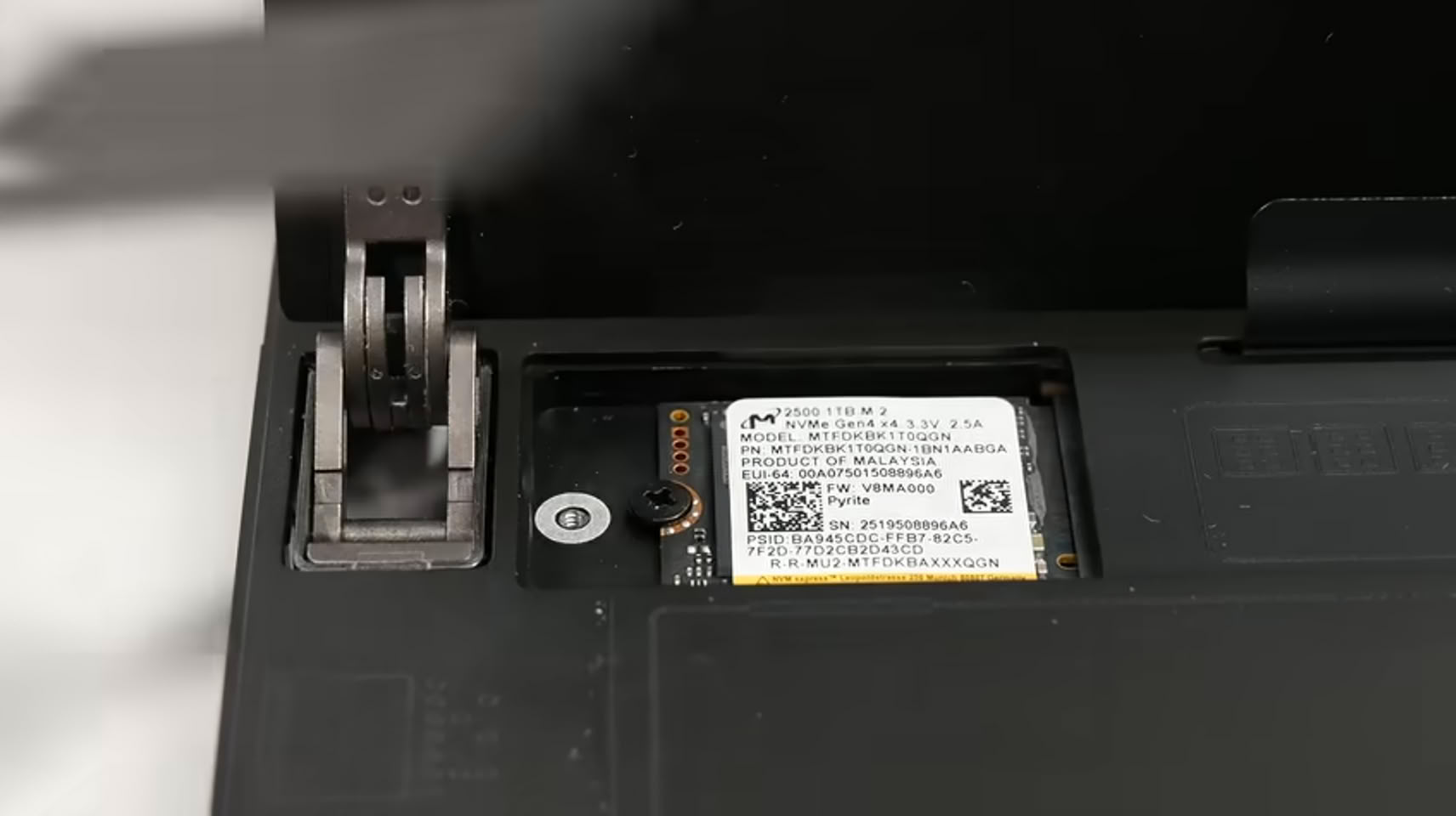
This high weighting on the hardware design front leads iFixit to praise certain design aspects that make disassembly and repair significantly easier. The display is screwed down, not glued down; the SSD is accessible without taking the device apart, the battery is held down with screws and not glue, and both the front and back camera modules are both easily accessible and modular. While the speakers are also modular, they are less easily accessible, which is true for both the microSD card slot and the I/O board.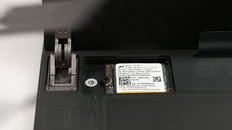 There are other design features that are less admirable, like a complicated fan replacement that requires removing the heat-sink and replacing the liquid metal on the CPU. Further, the wireless card, ports, and RAM are all soldered to the motherboard, meaning that failures of any of those components will require removal and resoldering a new individual component—or alternatively a motherboard replacement—to repair it. iFixit argues that, even based on the less strict French scoring system, ASUS should have lost points based on those soldered components. Additionally, the repair outlet argues that the manual ASUS supplies is incomplete, since it is missing details about troubleshooting and board-level repair.
Repairs availability is also questionable, mostly justified by the high cost of the device, although spares are available directly from ASUS. As iFixit points out, the ASUS repairability score on the device's Amazon page is 9.3, which is lower than the score on the official ASUS online store and product page.
iFixit argues that this is more indicative of a systemic problem with unaudited, self-reported repair scores, because it lets manufacturers circumvent or bend the rules to their liking.
Source:
iFixit on YouTube
Just recently, iFixit, the popular repair and right-to-repair activism company, got its hands on the Flow Z13 for one of its teardown repairability analyses, and after taking the device apart, iFixit gave the Flow Z13 a much more reserved 7/10 repairability score. Of course, this is still a reasonably high score, especially considering how compact the Flow Z13 is, but it's nowhere close to the 10/10 that ASUS gave itself based on the French index.


This high weighting on the hardware design front leads iFixit to praise certain design aspects that make disassembly and repair significantly easier. The display is screwed down, not glued down; the SSD is accessible without taking the device apart, the battery is held down with screws and not glue, and both the front and back camera modules are both easily accessible and modular. While the speakers are also modular, they are less easily accessible, which is true for both the microSD card slot and the I/O board.
Repairs availability is also questionable, mostly justified by the high cost of the device, although spares are available directly from ASUS. As iFixit points out, the ASUS repairability score on the device's Amazon page is 9.3, which is lower than the score on the official ASUS online store and product page.
iFixit argues that this is more indicative of a systemic problem with unaudited, self-reported repair scores, because it lets manufacturers circumvent or bend the rules to their liking.
17 Comments on iFixit Slams ASUS ROG Flow Z13's 10/10 Repairability Score
I can not give a soldered cpu and gpu motherboard which costs more than 80€ on a high end modell a better score of 3/10.
There is no need to solder the cpu and gpu and dram and wlan and storage.
a repair it myself score of 7 of 10 is a joke on a soldered motherboard. Seing a 10 of 10 is a typical asus - they are off the reality.
The score should be 2/10 for RAM soldered to the motherboard, and I think that is being generous.
I would blame ASUS just for the soldered ports and M.2 2230-only slot, but a competent technician should be able to de-solder easily.
Framework was considering LPCAMM for their Strix Halo desktop, they didn't say it would not work but the design would have been sub-optimal. It's just not possible to place two LPCAMM modules close enough to the APU and achieve the highest speed.
I use G-Helper in Windows and ryzenadj in Linux and you can go up to 120W, but it will never reach that due to thermal throttling. Max I've gotten is 102W with a chiller hitting the back of my tablet.
IGPUs are part of the CPU, bot separate chips.Repairability is not the same as upgradeableability. I think you may be a bit off the reality yourself.
A skilled technician does not repair 20€ worth devices. he does graphic cards where the money is at home. He does it only as a service as the risk of repairs is up to the customer than.
I think we should focus on the "do it yourself" repair score. People do forget all the tools you need. I collected quite a bit of tools. except the vacuum suction tool, and the 50°C heat plate, heat plate, hot air station i probably own most of the tools.
When stuff is out of the warranty, it is opened and savaged for parts, technology and of course a repair attempt.
One of the usb-a ports start to fail on my refurbished lenovo L15 device. I checked a few hours ago the service tag etc and did not bother looking further. Lenovo asks 80€ average per part for a 200€ device bought 14 months ago. ASUS and lenovo kills the repair scene with their insane spare part costs. Regardless of the new EU regulations. Spare parts should be sold at some point in time at the self cost price for the companies + 20% only.
I would have standardised the parts ages ago and enforced the use of those. Taxes on top of such e-waste / can not be salvaged - repurposed devices would fix a lot. Some stuff is the same for years in most devices, no reason for all those brands to make it per device only unique. Speakers, batteries, power supply, usb expansion ports, io panels, etc. You an also use desktop cpus and gpus. There are no real recycling fees and material fees in the products. I see it from the job perspective for those who repair devices, the planet is only an arguement which no one really cares. Everything which uses e.g. usb inside has to have a common connector, etc. and common size. mechanical parts like base, hinges etc, bezel, screen sizes, screens, screen connectors, screen cables, etc. should be all standardised and exchangeable over all devices. ifixit is a joke. you can give a score with an explanation. If you argue these are different companies, well than as a first step lenovo e.g. uses teh same parts from now. You have to use the brain to make a product with a fancy shell with common parts.
-- I just saw, the battery is glued inside. Never ever repair score of 7/10.
But I'm not mixing anything up here, RAM and storage can fail, soldering it to the motherboard adds a lot of cost to replace when it fails. And I wouldn't expect every technician to have the knowledge or tools to do BGA soldering repair, it's a very cost and time intensive process to perform.
Firstly, it's a tablet, where space is extremely tight. Are you going to fault an iPad for having soldered RAM?
Secondly, the chip used in it pretty much demands soldered RAM. Strix Halo has massive bandwidth requirements to supply both the CPU and the beefy GPU in it. Requirements which socketed memory cannot achieve. iFixit even accepted the soldered RAM in their Framework Desktop teardown, which uses the same chip. So seeing them take away points here is kinda hypocritical.