Tuesday, September 1st 2026

NVIDIA GPU Frame Interpolation Support Lands in FFmpeg
NVIDIA's GPU-accelerated frame interpolation support has been integrated into FFmpeg through a Vulkan API, as announced by the project's developers. For those unfamiliar, FFmpeg is a widely used software suite that powers much of the world's modern multimedia processing, including platforms like YouTube and many other services and applications. This tool now leverages NVIDIA GeForce RTX GPUs to predict and generate the next frame without involving the traditional graphics rendering pipeline. NVIDIA is extending this capability to video encoding, allowing users to increase the frame rate of their videos through frame generation technology. The Optical Flow Accelerator (NVOFA) in NVIDIA GPUs applies the same Optical Flow logic used in graphics rendering to videos, predicting the next frame and enhancing frame rates through AI-generated frames. NVIDIA calls this process Engine-assisted Frame-rate Up Conversion (FRUC).
FRUC is more than a conventional frame-smoothing algorithm, as it uses NVIDIA's dedicated Optical Flow Accelerator to calculate motion between consecutive source frames. NVENC provides the encoder-side frame data, while the optical flow hardware generates motion vectors that describe how objects move between frames. FFmpeg can then use that motion information to synthesize an intermediate frame, effectively increasing the video's frame rate without re-rendering the original content. This is also more efficient than software-based interpolation, which can place significantly higher computational demands on the CPU. The new Vulkan implementation gives FFmpeg direct access to the NVIDIA hardware while avoiding the proprietary software dependency that prevented the earlier 2023 patch from being merged.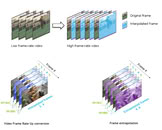 The Optical Flow Accelerator was originally introduced during the era of NVIDIA's GeForce RTX 20-Series "Turing." However, this Vulkan API-based implementation officially supports only NVIDIA's GeForce RTX 30-Series "Ampere" and newer. This means that owners of the GeForce RTX 30, RTX 40, and RTX 50 series can benefit from the new feature. Video frame rates will now be doubled, allowing 30 FPS videos to be displayed at 60 FPS, and cinematic 24 FPS videos to be shown at 48 FPS with GPU-assisted frame interpolation. To take advantage of this, you simply need to run the FFmpeg tool on your end.
Sources:
Phoronix, via VideoCardz
FRUC is more than a conventional frame-smoothing algorithm, as it uses NVIDIA's dedicated Optical Flow Accelerator to calculate motion between consecutive source frames. NVENC provides the encoder-side frame data, while the optical flow hardware generates motion vectors that describe how objects move between frames. FFmpeg can then use that motion information to synthesize an intermediate frame, effectively increasing the video's frame rate without re-rendering the original content. This is also more efficient than software-based interpolation, which can place significantly higher computational demands on the CPU. The new Vulkan implementation gives FFmpeg direct access to the NVIDIA hardware while avoiding the proprietary software dependency that prevented the earlier 2023 patch from being merged.

12 Comments on NVIDIA GPU Frame Interpolation Support Lands in FFmpeg
So yeah I wouldnt say its impossible for what you say to be the future.
The big deal with DLSS is that it didn't need to rely upon optic flow (which has many flaws) because it could source motion vectors straight from the graphics engine.
I was using vector motion and interpolation frame generation since the 2000's
Then it started being sold with things like PowerDVD, before that there were codec packs that would enable it, and AMD had the feature for 24FPS content up/down sampling on some of their AIW products that was exposed in their driver control or by third party software. hothardware.com/reviews/ati-allinwonder-hd I used a tuner card and could play GTA4 on one screen with audio output while the wife watched TV on the big screen in the living room while it was also recording another show, or watch Netflix or Hulu right through Windows Media Center.
They just removed it all and are now selling it back to us as "improvements".
But later versions dropped this need iirc (not sure if it was 3.5 or 4).
Remember when The Hobbit part 1 was available in 48fps through being shot at 48fps? I went for one of the 48fps screenings specifically to see what was up with the 48fps (since the movie itself was not very good, and critics were panning the 48fps-ness of it), and my experience was that after about 20 minutes or so of feeling weird, it just felt perfectly normal.
The actual problem I had with that 48fps screening did not hit until I was back home from the theater: for weeks afterwards every 23-30fps movie, TV show or animated media felt like a late PS3-era blurry, laggy, stuttery mess.