Tuesday, October 13th 2026

NVIDIA Unveils "Preset C "DLSS Frame Generation with up to 35% Faster Generation
NVIDIA has updated its DLSS Frame Generation algorithm to be faster and more efficient. In the latest NVIDIA App beta update, rolling out today, the company introduced "Preset C," the fastest Performance Mode for DLSS Frame Generation. NVIDIA demonstrates that this mode can make frame generation up to 35% faster on the GeForce RTX 5060, with minimal trade-offs in image quality. This improvement applies to the GeForce RTX 40-Series, GeForce RTX 50-Series, and RTX Spark.
According to NVIDIA, there are two models for DLSS: Multi-Frame Generation and Frame Generation. The first model uses a standard AI approach that inputs motion vectors and depth to understand how two rendered frames are constructed. The second model employs optical flow for in-game elements like UI and ray tracing. Today, NVIDIA replaced this optical flow model with a much faster and lighter AI algorithm that boosts FPS across DLSS Frame Generation, Multi-Frame Generation, and Dynamic Multi-Frame Generation. This new model is available for download through the NVIDIA App beta update, so ensure you're running the latest beta version to try out the "Preset C" setting.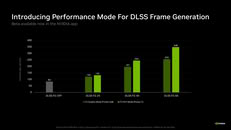 To apply Preset C to your games:
Source:
NVIDIA
According to NVIDIA, there are two models for DLSS: Multi-Frame Generation and Frame Generation. The first model uses a standard AI approach that inputs motion vectors and depth to understand how two rendered frames are constructed. The second model employs optical flow for in-game elements like UI and ray tracing. Today, NVIDIA replaced this optical flow model with a much faster and lighter AI algorithm that boosts FPS across DLSS Frame Generation, Multi-Frame Generation, and Dynamic Multi-Frame Generation. This new model is available for download through the NVIDIA App beta update, so ensure you're running the latest beta version to try out the "Preset C" setting.

- 1. Download and install the latest NVIDIA App update from official website or within the app itself.
- 2. Open the app, go to Settings > About, and check "Opt in to access Beta or experimental features."
- 3. Wait for the beta update to download, then click the on-screen message to install it.
- 4. Once installed, open the "Graphics" section of the new NVIDIA app beta and select a supported Frame Generation, Multi-Frame Generation, or Dynamic Frame Generation game. Alternatively, select "Global Settings" at the top of the window to apply it to every supported game in your library.
- 5. Scroll to "Driver Settings."
- 6. Click "DLSS Override - Model Presets."
- 7. Click "Custom."
- 8. Open the "Frame Generation" drop-down and choose "Preset C."
- 9. Click "Apply."
13 Comments on NVIDIA Unveils "Preset C "DLSS Frame Generation with up to 35% Faster Generation
I'm using it without the beta;
see for yourself:
Regards,
RTX. It's On.
New updates:Regards,
RTX. It's On.
When are the older cards getting official support then?
Here is how nVidia worded it in Their Announcement:Still not entirely clear, but it seems more likely that it is still using the optical flow accelerator.
That said, I could swear that I read a while back that they switched from the hardware optical flow to a software based one 🤔
Edit:
Also from the NV release...
an houralmost two hours digging around, and all I can confirm is that they are using an AI Optical Flow Model now, and not the hardware optical flow accellerators.Unfortunately, I could find absolutly no information about how they quantized the AI model :confused:FP8 makes sense, though, as it was first added in the Gen 4 Tensor Cores (Hopper/Ada Lovelance).
If I had to guess then, the modders that are getting FG to run on RTX 20 and RTX 30 cards are probably just packing the FP8 instructions into FP16, and spoffing the driver into thinking the GPU supports the format natively.
Looking around the web a bit, it looks like there are some Emulation Librabraries out there, that get you ~84%ish of native FP8 performance from FP16 hardware :cool:
Frame Generation - Preset C
Super Resolution - Preset M
Ray Reconstruction - Preset F
FG C working flawless on my MSI RTX 4080 Super 16G SUPRIM X on MSI MEG Optix MEG381CQR Plus 3840x1600 144Hz G-Sync Ultimate.
All my games maxed out @144fps ❤️🔥
I love the fact that Nvidia still supporting my old 2022 AD103 GPU Technology in 2026 still flawlessly running everything.
Nvidia $5 Trillion dollar company is years ahead of its compilation but unfortunately they have a stupid Monopoly with the unlimited retail and development cash flow.