Wednesday, October 28th 2026
Mausstudio Announced As Custom Gaming Mouse Designer for 3D Printing
It seems as though the mouse modding scene has been on a winning streak lately, with brands like Keychron publishing a catalogue of free 3D models of its mouse shells, and projects like Openmouse providing brand-agnostic, open-source mouse customization and remapping. The latest eye-catching project comes from a small 3D printing outfit called Unskilled Design, who recently introduced Mausstudio. Mausstudio is a work-in-progress custom mouse design tool that helps users design custom mouse shells for 3D printing.
As described in a recent demo on X, Mausstudio allows users to import an STL of an existing mouse PCB, define the positions of core features, like screw holes, switches, the scroll wheel, and sensor position, and then generate a shell around it using custom parameters. Currently, it supports custom dimensions for the basics, like width, length, and height, as well as more niche customizations, like left-handed side button placements, base structure (lightweight or solid), hump position, honeycomb cutouts for lightweight shells, and battery positioning.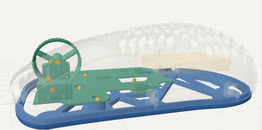
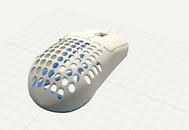
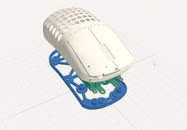 After the shell is created, Mausstudio can automatically add screw holes for the PCB and create a cutout for the scroll wheel to fit through. The developer has a neat walkthrough of the available features in the demo reel on X, although it's unclear when exactly the project will be ready for launch or whether it will be a paid project or something like a browser-based utility. The creator behind the project, Bastian, is also careful to note that the actual shell being created is based on maths, with no generative AI involved in the 3D model's creation. It's unclear if generative AI was used to create the project itself, however.
Source:
@UnskilledCast on X
As described in a recent demo on X, Mausstudio allows users to import an STL of an existing mouse PCB, define the positions of core features, like screw holes, switches, the scroll wheel, and sensor position, and then generate a shell around it using custom parameters. Currently, it supports custom dimensions for the basics, like width, length, and height, as well as more niche customizations, like left-handed side button placements, base structure (lightweight or solid), hump position, honeycomb cutouts for lightweight shells, and battery positioning.


9 Comments on Mausstudio Announced As Custom Gaming Mouse Designer for 3D Printing
It makes all cutouts on its own. It finds screwholen, Switches, Scrollwheel on it own and builds the shell arround it :)
I'm confused...
I should’ve explained that better 😅
You import an STL/3MF model of the PCB and its components. MausStudio analyses the geometry and suggests mounting holes, switches and scroll-wheel positions. You check or correct those assignments, then it generates the shell, supports and cutouts around them. Missing components can be added using measured dimensions.
You can customise the length, width, height, hump position and button length, choose symmetrical or left/right ergonomic shapes, and adjust battery space and lightweight patterns.
Think of it as the RAT’s “adjust everything” philosophy, except the tiny toolbox has been replaced with sliders and a 3D printer 😄
Yes it is real, yes it just got announced.
I think it may not be possible with this mouse (or any RAT with side buttons?). The side buttons on the X3 for example are inset holes a plastic pin needs to poke - think is cylinder and piston kind of thing. The micro-switches for RMB and LMB are not on the PWB at all but are in separate attacked modular parts. Etc.
I assume of course you've made more than a few of these shells, yeah? How hard is it to get just simple PWB mounted micro-switched to line up with the printed button leaves?
Im planning on implementing the side button stuff after that. And yes, it might be impossible, because im basing the whole tool around most common pcbs and mices. Where the 2 Side button Switches are just on a small pcb with a flex cable.