Saturday, October 31st 2026

AMD Radeon RX 9070 GRE Hits 3.9 GHz OC, But Only with a Custom DirectX 9 Workload
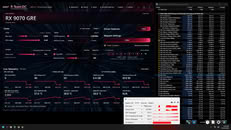
AMD's Radeon RX 9070 GRE graphics card, initially designed for customers in China and later sold in more markets, has officially reached a frequency of 3.9 GHz. TechPowerUp Forum user "ShrimpBrime" created custom tools for Radeon GPUs called "R-Team OC" and "GPU Frequency Generator." Using the stock XFX Radeon RX 9070 GRE Swift GPU without any VBIOS modifications, specialized cooling, or other hardware changes, the overclock was stable for some time. However, the driver crashed and recovered shortly after the screenshots were taken. Utilizing the custom-developed RTOC tool for Radeon tuning and monitoring, the GPU was loaded with regular triangles in DirectX 9 instead of a demanding 3D title, meaning that this OC is not applicable in real-world testing, but serves as a proof of concept.
Using a customized GPU frequency generator built in DirectX 9, the GPU rendered a simple scene containing 2,048 triangles per draw call and 2,048 draw calls per frame, totaling 4,194,304 triangles. This is light work for modern graphics cards but just enough to maintain a high frequency. The developer says the 3.9 GHz reading was maintained under load rather than appearing as a momentary telemetry spike, while approximately 3.85 GHz was reproduced repeatedly, including with AMD's own Radeon Software overclocking controls. To verify the readings, ShrimpBrime compared GPU-Z and HWiNFO64 with telemetry gathered through AMD's ADL and ADLX interfaces. RTOC polls shared monitoring data every 2 ms, although fresh power-management telemetry reportedly arrives roughly every 15.5 ms.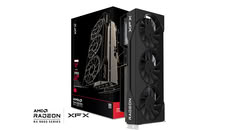
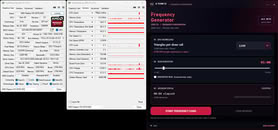 However, there is an important disclaimer. The reported GFXCLK is a driver-provided value and does not necessarily reflect the actual effective clock speed. This is a frequency experiment, not proof of improved gaming performance or sustained stability. Not much has been gained in terms of real-world performance; it simply serves as a playground to see how far RDNA 4 GPUs can be pushed. Specifically, it shows that the Radeon RX 9070 GRE can sustain much higher frequencies, but only for a brief period.
Source:
TechPowerUp Forums
Using a customized GPU frequency generator built in DirectX 9, the GPU rendered a simple scene containing 2,048 triangles per draw call and 2,048 draw calls per frame, totaling 4,194,304 triangles. This is light work for modern graphics cards but just enough to maintain a high frequency. The developer says the 3.9 GHz reading was maintained under load rather than appearing as a momentary telemetry spike, while approximately 3.85 GHz was reproduced repeatedly, including with AMD's own Radeon Software overclocking controls. To verify the readings, ShrimpBrime compared GPU-Z and HWiNFO64 with telemetry gathered through AMD's ADL and ADLX interfaces. RTOC polls shared monitoring data every 2 ms, although fresh power-management telemetry reportedly arrives roughly every 15.5 ms.


22 Comments on AMD Radeon RX 9070 GRE Hits 3.9 GHz OC, But Only with a Custom DirectX 9 Workload
Now lets throw it in front of a real test. And you'll see it will peak out at whatever it's set for with respect of thermals, load, currents and all that.
Amd, nvidia, intel, all of them pretty much found ways to extract already everything for you what's in the silicon. OC'ing is a niche product now; if you don't run freezing stuff it's pointless.
Now, OP is looking for a positive feedback, not a repeat of what was already mentioned! If you would be so kind anyways....
This is maybe 0.1% that would benefit from targeting raising clocks that high, and esp in DX9 applications.
I prefer to see power limits being increased outside of the drivers 10% hard lock. Something like MPT used todo with the 6x00 series.
So in RTOC, I did install a +5% increase over the 10% given. What that does is simply ask the driver kindly if we can have a little more. The answer has always been no, but we hope someone has a buggy driver and the setting actually clamps while the driver may report not applied.
Besides that, the hard lock resides in several places, not just by the driver. So getting around the hard lock is extremely difficult without doing mods.
this method works decently, I was able to Sustain 3.8ghz clock speeds while the Frequency Generator is active for more than just a few seconds, which is much better than people reporting transients, we can now confirm the GPU may have a lot more head room than AMD gives.
Apart from that, it's extremely unlikely you will find a 9070XT or so that is capable of doing 3.2Ghz sustained unless your running it really cold. Your hitting a wall and it's likely caused by AMD's own internal optimizing of the chip.
Chip's today are already maxed out within specified values. There's not much you can do. frankly the 6x00 series where the last where Morepowertools "used" to work on. With just one click raise the power bar from 180W up to 275W and get a sustained 2.7 / 2.8Ghz core clock instead of slinging up and down in heavy scenes. But that did not came with the use of, quite more power.
"what is this useful for".
Satisfying a personal itch, which I've been chasing for months. Because of screenshots I was seeing during actual benchmarking (you know what benching is for right?, the usefulness part?), and in this example I'm leaving below demonstrates a reported 3840mhz clock speed IN THE BENCHMARK RUN, which I found completely fascinating.
Here's 9070XT reporting 3840mhz verified by benchmate utilizing hwinfo64.
Notice that's 4 minutes, the longer run. That GPU had only it's stock cooler installed. I will admit the ambient air was probably cool that day, considering this was done in the garage. But nothing below freezing here to claim some glorious stunts where pulled.
I deliberately shared the opportunity for anybody to try it out. Maybe it could help bin GPUs, who knows...
I saw the post earlier on the tablet. Anyway.
@ShrimpBrime Congratulation, you were put on the front page as a news item. Good job.
I do enjoy DRAM overclocking in recent years. CPU and GPU are not my field of expertise. The joy of overclocking should not be criticised.I disagree. I accept your statement but i disagree on the information content.
AMD locked away the overclocking features of my 7800xt. i shared it, others discovered it, i verified it only. i most likely found it as i was searching 12 / 2025 for more proper sensor readouts. I do not talk about a single FPS gain, it was more than a single FPS gain. Hard fact.
--
My Acer Predator Biforst 9070 OC (whatever - check the topic i posted may 2026 in gpu section) comes with factory overclock. Afaik 20 to 40 Watts extra. And the card is too cool. MY gpu could take more power with the stock cooler in my badly ventialted fractal design meshify 2. I do not have the one case i forgot or the fractal torrent case which would give me much better thermals.
Other then that,
- There's barely difference in between a reference board based VRM setup vs a custom one.
- All chips pretty much have the same clock walls; meaning 3.1 ~ 3.2Ghz and the fun is over.
- Even if you reach 3.2Ghz, it's still more efficient at the intended or designed clock.
- In the past memory used to be a thing, one would use better quality, faster chips but we're getting the same over the last years now. It's either Hynix or Samsung. And the attempt of the use of HBM was rewarded with over time degradation while running at certain speeds.
Oc'ing now is a niche product. If you don't have exotic cooling your going to be restraint to whatever limit you run into. And even from that end they don't give us that much anymore. Yes we can undervolt, but those margins only exist because cards are to be guaranteed to work in any condition. Not everyone has a good optimized case with decent airflow. Or not everyone lives in a hotter/cooler climate with/without aircon.
As much as i liked the Oc'ing back in the days, it's something from the past. You now just buy the performance you are looking for and call it a day pretty much.
Binning is a complete different thing then just looking at what clocks a graphics card can be stable or not stable. Signal integrity, quality, stability, all those things matter more then just brute force clocks. As i said in what scenario do you really need 3.8Ghz clocks in DX9?
I'm pretty sure the same could be reproduced for a simple 486 locked at 66Mhz - that suddenly can operate at 200Mhz if the workload is light enough.
Not trying to ruin your ambition here or anything but there's not a lot you can do either.
Maybe, it's not what the GPU is restricted at, but how programs are coded, the instruction sets and the amount of power required to process everything.
So, I've taken the curiosity away from the "Transient" clock frequencies that people report. "Not sustained."
I found a way to sustain it, with a specialized workload. And thus, can Maintain the frequency, and verify it.
SO, if you could develop a trading app that uses very super low over-head, but can keep the GPU excited to generate a 3.8ghz frequency sustained, Maybe the latency could be a lot lower. A very useful aspect to trading.
So taking note, the GPU was around 130w during these loads, it's not sitting there just doing nothing as you propose. It's doing calculations on a specialized workload. Nothing more.
It's the what if's, and curiosity that drives the ideas. Can I implement this into something else? Quite possibly.
So it's not a useless discovery by any means. If anything, we are learning that AMD allows your GPU to boost some really decent clocks on certain workloads. Maybe it could be up to everyone else to figure that out for their uses instead of me? Not sure.
A thing like Curve optimizer for your GPU. Where it decides if this is a light light super light workload it should raise the clocks to up to whatever it can reach for, and not stick with a hard limit.
But these are graphics cards, with either rendering graphics or doing compute, based on how you look at it. And they would likely fail anyway once a real legitimate workload is thrown against it. That clock would drop back to your average 3 Ghz.
Again, if someone created a workload that is useful to replicate this scenario, in a useful way. To themselve's, to you, me too... then great.
It's a frequency grab. People have been doing it for years with CPUs. My maximum frequency on a cpu is 7685mhz and now today, my maximum on a GPU is 3900 Mhz +
Either way, I think you understand it. There could be a useful way to utilize 130w at around a sustained 3800mhz. What the work load is, I'm not entirely sure.
Now show us the result done under DOS!
And the reason they do it really doesn't matter to me, it's just sad.
When I run the Freq Gen at defaults, that max clock is 3214mhz PMU peaks 3227mhz.
The Auto OC for this GRE only gives 102mhz and +6% Power. This is nothing on the couple of GPUs I've tested. That could have been the base clocks really.
If I was to ask for something from AMD, maybe not higher power limits, but a couple more notches of v-core. Then, we could really see better heavy performance figures.
In your case i would hard mod a potentiometer and call it a day. You can have all the voltage increases you want.
Problem is a slight voltage increase can push these chips faster to degradation then ever. These are not 55 ~ 22nm chips anymore.
Simple lookup on a random 9070xt OC table:
They all fall within the same ranges. Hundreds of Mhz only yielding a few usable FPS. These cards are already at their performance limit(s).
Never minding these antics anyways, at least you are consistent.
I was able to provide you with,
Transparency of a specialized work load
Noted NOT an indicator of a gaming performance increase
Complete telemetry with screen shots
Sustained loads instead of peak telemetry spikes or transients
Opportunity to better understand how telemetry works in RTOC
Alternative to Adrenaline software tooling, Main feature, ultra lightweight.
_________________________________________________
If you wanted an app that works on getting better gaming performance, perhaps you should browse my library and chooseStability TrackerInstead.
bring new life into a Atitool. A self running automated OC'ing thing that both can test, core, memory while running some sort of Furmark screen.
The issue with the design is the workloads. Just because the workload I design is heavy, doesn't mean it's going to create a compatible overclock that would suit all video games.
But development takes a lot of time, so right now, we have a frequency generator app from some discoveries, and a lightweight overclock app. With possibly a tool that can OC the entire card, including the fan profile.
Then there's liabilities involved. The work load from the Frequency Generator app is very lightweight. So very low risk. But now I release a tool that overclocks while the GPU is doing loads between adjustments to keep the card warm and pass self checks, gets me into the higher tier of liabilities. Not Always EULA saves a persons video card from destruction.
So, yeah, great ideas from your end, many many factors to consider on mine.
I wrote about ithere on TPU.