News Posts matching #Xbox Insiders

Return to Keyword Browsing

New Xbox PC App Claims 60% Faster Launch Times and UX Improvements

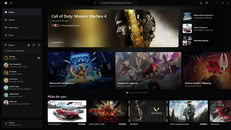
Epic Games's recent proclamation of significantly faster launch times on its new vibe-coded Epic Games Launcher, followed by a Steam update making similar performance improvements, seems to have inspired Microsoft's Xbox to put in the work to improve its Xbox app for PCs, with a new announcement making several claims about improved performance.

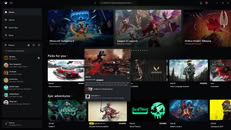
Although the claims for the new Xbox App for PC are more ambiguous, with no startup times claimed and no test data supplied, Microsoft says that the new Xbox App launches up to 60% faster, while Home, Store, and Game Pass pages load up to 50% faster, and in-app windows are claimed to launch 65% faster. Perhaps more important than the performance improvements, however, Xbox has streamlined the app, with "simpler navigation, updated filters, and new ways to organize your games," in addition to a more prominent placement for the Friends tab, wider search that covers installed games, add-ons, and people, as well as a cleaner aesthetic that "make the app easier to scan and navigate."
Xbox Cloud Gaming Goes Prepaid, Prices Start at $3.99

Microsoft has started selling Xbox Cloud Gaming time to people who don't pay for Game Pass. Starting today, Xbox Insiders without an active subscription can buy prepaid playtime and stream games on supported devices, with a broader rollout planned for November. There are three packs at what Microsoft calls introductory launch pricing: 10 hours for $3.99, 25 hours for $7.99, and 50 hours for $11.99. The packs are ad-free and come with shorter wait times, and the purchased hours don't expire until they are used up. Insiders can also keep using the free, ad-supported option Microsoft began testing in July. These pay-as-you-go plans arrive right before the monthly hour limits Microsoft announced in September kick in.

Starting in November, Game Pass Ultimate ($22.99) includes 15 hours of cloud gaming per month, Premium ($14.99) gets 10 hours, and Essential ($9.99) gets just five. Microsoft expects the caps to affect around 4% of subscribers, and said those who run out will be able to buy extra playtime through the Xbox Store. It seems likely these packs will double as top-ups for subscribers, though Microsoft hasn't confirmed that yet. On paper, $11.99 gets you more than three times the streaming hours Ultimate includes each month. Of course, Ultimate also comes with the Game Pass library, while the packs are meant for streaming eligible games you already own. More details on eligible games and market availability should follow in November. Since the current prices are labeled introductory, they could very well change later.

Microsoft Is Testing a Faster Xbox PC App Codenamed "Garrison"

Microsoft is working on a rebuilt version of the Xbox PC app, codenamed "Garrison," and Windows Central's Jez Corden has gone hands-on with an early build. The current app has a reputation for being slow, especially when loading big libraries or the store, and that seems to be the main thing Microsoft is trying to fix. Corden says the new app is a lot faster, even with his library of over 1,400 Xbox titles. He did not share any load time numbers, however. The Verge's Tom Warren also posted screenshots on X, saying the design is "coming along nicely" and that performance is definitely better.

Game listings and store listings now share a single page, although store pages aren't fully working in this build. The app also makes it clearer which games can be installed locally and which can only be streamed through Xbox Cloud Gaming. There are layouts for both mouse and keyboard and controllers, and the app can apparently be set as the default home screen when Windows 11 boots into its gaming mode. That is probably a reference to Xbox mode, which Microsoft expanded to laptops, desktops, and tablets in April.

Xbox Disc-To-Digital Officially Exits Testing

The Xbox Disc-to-Digital licensing program recently launched to insiders, effectively paving the way to a discless future for Xbox, while still allowing the brand to market its console as backwards compatible. Following just over a month of public testing, Microsoft has just announced that the Disc-to-Digital program has officially launched for everyone, not just Xbox Insiders.

The launch also comes with some updates and a more robust support page that details a few notable features, terms, and conditions. Most notably, it seems as though the Disc-to-Digital licensing is not guaranteed. Microsoft notes that "Not all Xbox One or Xbox Series X game discs are eligible for disc to digital licensing. Eligibility may change over time, and varies due to technical, licensing, publishing, manufacturing, and other factors," suggesting that games may be added and removed from the program at Microsoft's whim. In the announcement post on X, the fine print also notes that all digital game licenses are revokable.

Microsoft Surveys Insiders About Physical Discs for Next-Gen Xbox Console

Microsoft is reportedly surveying gamers about the importance of physical disc media for its next-generation Xbox console. According to findings from Power Up Gaming, Microsoft is conducting this survey through the Xbox Insider Hub application, where a select group of Xbox Insiders are asked about their stance on various topics. Microsoft will later use this feedback to analyze and make decisions. One question asks whether the console should allow users to install games from physical discs, with response options including "Not Necessary," "Nice to Have," and "Must Have."

Considering that Microsoft recently launched its disc-to-digital program, an initiative to promote a digital-only future for Xbox consoles, the viability of physical media is now up for debate. With disc-to-digital, players can insert their game discs into the console to convert them into digital licenses. When the disc is scanned, Microsoft uses the unique key to create a digital license, which prevents the disc from being activated on third-party consoles and stops it from being rented, borrowed, or sold to others.

Xbox Disc-to-Digital Launch Confirms All-Digital Helix Console

A new disc-to-digital attestation program has long been rumored to be launching around the time of the next-gen Xbox Helix game console, but, confirming the most recent leaks, Xbox's Jason Ronald, VP of Next Generation, has announced the launch of the disc-to-digital program in a new post on Xbox Wire.

The digital license attestation program will be available for "most Xbox One and Xbox Series X disc-based games," and it will allow players to claim a digital entitlement by inserting a supported disc into the Xbox One or Series X and launching the game. After that, the game will be playable on the console as well as via Xbox Play Anywhere and Xbox Cloud Gaming. Xbox claims that this new program is part of its "broader commitment to game preservation," and the program basically serves as a test run for the Helix console, which is expected to launch with full backwards compatibility, despite not having a physical disc drive.

Xbox Tests Free, Ad-Supported Game Streaming

We reported previously that Microsoft was planning an ad-supported version of its Xbox Cloud streaming service, and a new post by Xbox Wire confirms that this rumor is finally coming to fruition, with Xbox Insiders now gaining access to free, ad-supported game streaming via their Xbox accounts.

Ad-supported game streaming will be limited to games that players own already and free-to-play games, and gaming sessions will be limited to an hour. Microsoft explains that ads will play at the beginning of gaming sessions, seemingly exclusively, and that it will be available on any device where Xbox Cloud streaming is available. Judging by the blog post, there don't appear to be any other limitations, aside from the 1440p resolution limit.

February Xbox Update Brings 1440p Streaming, ROG Xbox Ally Updates, Controller Responsiveness on PC and More

February was a big month as we launched a lot of new features and updates, all with one thought in mind: improving your Xbox gaming experience. Xbox Game Pass Ultimate members can now stream their favorite games at up to 1440p resolution on Xbox Series X|S, Xbox One X and Xbox One S consoles. On the Xbox PC app, we've added new sounds to help improve your controller navigation responsiveness. We've also listened to your feedback and added several new updates to the ROG Xbox Ally, including the ability to easily format your removable storage.

And, in case you missed it, we recently released Postgame Recaps to Xbox Insiders, which provides a recap of your recent gameplay on your PC, and the updated Xbox Cloud Gaming web experience is now in public preview for Insiders. Read all about these exciting updates, including new game additions, below.

Xbox Insiders on PC Now Preview Postgame Recaps in the Xbox App

Microsoft's Xbox Insider program lets gamers experience the newest Xbox-related technologies, software updates, and overall improvements. Today, Xbox Insiders are getting an update for their Xbox App on Windows 11 that lets users access postgame recaps. This means that after significant gaming sessions, you can see a recap of your achievements where all the session highlights are recorded, including Xbox Game Bar screenshots and clips, which you can later check out. You also get game recommendations when you first enter a game and a quick overview of the best gaming moments/achievements you have made during your session. Microsoft notes that the feature is now only available in the preview phase to Xbox Insiders, but it is gearing up for a wide release in the Xbox App in the coming weeks.

Users can choose what they wish to see through additional customizations, and these features can be turned off completely. If you head to Settings > App > Postgame recaps, you can tailor the entire user experience and how you want the new feature to work within your PC. Interestingly, if you opt out of all postgame recap types and features, the Xbox App will not start in the system tray when you start the game, but only when you turn it on. Microsoft notes that the company has made various optimizations to minimize the memory usage of another system overlay, with little to no performance impact on the system.

Xbox Full Screen Experience Comes to Every Windows PC

After expanding the Xbox Full Screen Experience (FSE) to third-party handhelds, Microsoft is now offering regular Windows PCs the opportunity to play games using Xbox FSE. With the release of Windows 11 Insider Preview Build 26220.7271 (KB5070307) to the Dev and Beta channels, Xbox FSE can now be accessed on laptops, desktops, and tablets that aren't traditional handhelds like the ASUS ROG Xbox Ally. Users with KB5070307 and the Xbox app installed can navigate to Game Bar > Settings or press Win + F11 to toggle Xbox FSE. This feature can take over the screen at startup, hiding the desktop and minimizing background tasks, creating a console-like experience on your desktop.

The interface is designed to be minimalistic, with game tiles filling the entire display. Navigation is controlled by a game controller, and typical Windows elements are hidden to keep the focus on the game. Microsoft states that this mode also pauses maintenance activities and mutes notifications to ensure consistent frame delivery, whether you're on a bus, sofa, or in front of a TV. Task View and Game Bar provide a way to return to the desktop if needed, so you can manage your regular PC tasks alongside gaming.

Gaming Copilot (Beta) is Coming to Windows PC and Xbox on Mobile

AI has the potential to unlock new and exciting possibilities in how we work, learn, and play. At Xbox, we're focused on how our innovations in AI can enhance and create more personalized experiences for players, save them time, and ultimately let them focus more on playing the games they love. Today marks a major step in our journey to bring these AI-powered experiences to players. We're excited to announce that Gaming Copilot, your personal gaming sidekick - which provides recommendations, help, insights, and more - is officially coming to Windows PC and Xbox on mobile.

Starting today, PC players will begin seeing Gaming Copilot integrated directly into their Game Bar experience as the feature rolls out gradually over the next few weeks. It will then come to the Xbox mobile app on Apple and Android next month, where players will be able to access this personalized companion via a second screen without distracting from their gameplay.

Xbox Insiders with Game Pass Ultimate Can Stream Games on the Xbox PC App

Exciting updates for PC players! Starting today, Xbox Insiders in the PC Gaming Preview who are also Game Pass Ultimate members can stream select console games they own beyond the Game Pass catalog on the Xbox PC app in the 28 countries where Xbox Cloud Gaming (Beta) is supported. Earlier this year, we rolled the "Stream your own game" feature out to Game Pass Ultimate members on Xbox Series X/S and Xbox One consoles, TVs, Meta Quest Headsets as well as other browser supported devices like PCs, smartphones and tablets. Now, we're bringing that same flexibility to PC, allowing you to stream eligible games you already own without needing to install them directly from the Xbox PC app. This saves time, conserves hard drive space, and gives you more flexible access to your library through cloud gaming.

Even better, this feature includes console-only games that previously couldn't be played using the Xbox PC app. Just head to the Cloud Gaming section in the Xbox PC app, look for the Stream your own game catalog, choose a supported title you own, and start playing instantly. You can see the full list of over 250+ supported games here. You can expect even more games including console-only games and Xbox Play Anywhere titles to be added to the collection over time. You choose how and where to play. We're just making it easier to get there—with more flexibility, more access, and more games at your fingertips.
Return to Keyword Browsing
Nov 11th, 2026 03:59 CST change timezone

New Forum Posts

Popular Reviews

TPU on YouTube

Controversial News Posts
