Friday, April 17th 2026

Microsoft Expands Xbox Mode to Windows Laptops, PCs, and Tablets
We recently reported on Microsoft renaming the Xbox Full-Screen Experience to Xbox mode and subsequently updating the gaming UI with new display options for gaming handhelds. Most recently, though, Microsoft has announced that it will be bringing that console-like UI to more devices. Many of these devices mentioned by Microsoft in the most recent update notes are powered by the same APUs and iGPUs as most gaming handhelds, where Xbox mode has been most prevalent until now, so it makes sense to keep it rolling on similarly capable devices, too.
According to a new Windows Insider update in the Canary channel (build 29570.1000), Windows Xbox mode is now available "on Windows 11 PCs, including laptops, desktops, and tablets." Gamers looking to take advantage of Xbox mode on their Windows 11 systems can access it via the Xbox app, Game Bar settings, or by pressing Win + F11. This isn't the first time we're seeing Microsoft doing something like this. Before it started testing Xbox mode on gaming handhelds, it had rolled out the Full-Screen Experience to other form factors as early as November 2025. It's unclear when this feature will reach the mainline Windows version, but it will likely not take too long, given Microsoft is feeling the pressure from the Linux-based SteamOS and the many similar desktop environments that have spun up in its wake.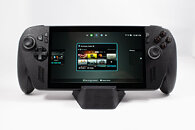
Source:
Windows Insider updates
According to a new Windows Insider update in the Canary channel (build 29570.1000), Windows Xbox mode is now available "on Windows 11 PCs, including laptops, desktops, and tablets." Gamers looking to take advantage of Xbox mode on their Windows 11 systems can access it via the Xbox app, Game Bar settings, or by pressing Win + F11. This isn't the first time we're seeing Microsoft doing something like this. Before it started testing Xbox mode on gaming handhelds, it had rolled out the Full-Screen Experience to other form factors as early as November 2025. It's unclear when this feature will reach the mainline Windows version, but it will likely not take too long, given Microsoft is feeling the pressure from the Linux-based SteamOS and the many similar desktop environments that have spun up in its wake.

19 Comments on Microsoft Expands Xbox Mode to Windows Laptops, PCs, and Tablets
TLDR: windows laptops and pc users can play more optimized games without having to pay for Xbox, and tablet players aw two bwusy pwaying wobox and smashing their jawbones because they are gen alpha
Awesome mode to use your gaming PC
You won't see Windows and just play your games with the gamepad without touching de mouse (if you don't want to)
Just someone release a bios with poweon on PC on Gamepad wakeup please
Cause IF I wanna play X-blox gamz, or any others for that matter (I don't & never ever will), I would just buy a friggin dedicated gamin console, or maybe a gamin phone..
cause my peecee is for peecee'in stuff, and NOTHING else !
Yea, yea I know I'm in the minority here, but just sayin :D
Regards,
Fred.
No? okay... 😥
TBQH, I feel like anything short of running for-XBOX binaries on Windows PC, is flat-out false advertising and worthy of legal action.
Currently Gamebar detects if a game is running, and Windows will do the following if detected.
Hide notifications dependent on "focus assist" configuration in windows settings.
If optimise windowed mode games is enabled, it will force flip mode on for windowed games, including borderless windowed fake full screen, this gives windowed games exclusive full screen levels of performance and VRR. (windows 11 only, not windows 10, windows 10 needs specialk driver for same thing).
If optimise full screen mode for games is enabled, it will convert full screen exclusive to borderless windowed full screen with flip mode enabled, basically gets rid of the downsides of full screen exclusive whilst keeping the benefits. (Both windows 10 and 11).
AMD optimisation software also relies on Gamebar.
So I will be surprised if Xbox software is doing anything else on top of this for performance.
One area I think Microsoft need to look at is the task scheduler. That has a bunch of crap that runs when they deem the system to be idle. It probably worked ok when we had weak ass hardware, single core CPU's. Now days, you can be in a game on a 8/16 core system, and task scheduler still thinks your system is idle as some cores arent loaded, and starts things up, these can cause stutters. They really need to implement a game detection option, so hook it up to the gamebar system, and add an option for tasks so if a game is running then stay the **** asleep.
I am creating a script to start Steam, it kills task scheduler on launch, then when steam is closed, task scheduler is restarted.
i do not need shitbox on my work laptop which is running out of dram because the latest update needs even more of my 7.5GIB useable dram for windows 11 pro.
-- it seems windows will end up as 5 icons on hte desktop as the startemenu is shit, the operating system is shit and the dram usage is the worst I ever saw. Maybe this is the reason why the epic game store and the gog.com launcher always want to put an icon on the desktop for every game? Microsoft should communicate it more clearly, our operating system is shit, we can not do a start menu, place your 5 needed applications as an icon on the desktop.
1. It does nothing to resolve sleep issues with Windows. For example, I will press the power button to put the console to sleep, but does nothing more than just off the screen. I can still tell that the console is still running even after a 30 mins because the fan is still spinning and I can still feel hot air coming out. My battery also depletes rapidly in more taxing games even when it is supposedly in "Sleep" mode. And from time to time, after waking it from sleep, the control will not work, forcing me to use the touchscreen to restart Windows. And you are right, some times after I exit the console from sleep mode, the game stutters very badly because it seems to be loading something in the background.
2. During startup, Xbox mode will load up, followed by whatever launcher from Asus/ MSI/ Lenovo which is to me, a very disunited approach and a waste of resources. This mode also stops Steam from auto launching, so when you launch a game, you need to wait for Steam or any game launcher to load before the game will start. Windows just does not offer users a coherent experience.
The issue with the sleep function is by far the biggest problem for me. I cannot reliably bring the console out without shutting it down because it overheated once due to the unreliable sleep function. I had to force reset Windows a few times because the controller is not working no matter what I do. So compared to the experience I had with Steam OS, Windows is clearly far behind in terms of user experience even with this Xbox mode.