Friday, October 11th 2024

MSI OCLab Reveals Ryzen 9000X3D 11-13% Faster Than 7000X3D, AMD Set to Dominate "Arrow Lake" in Gaming

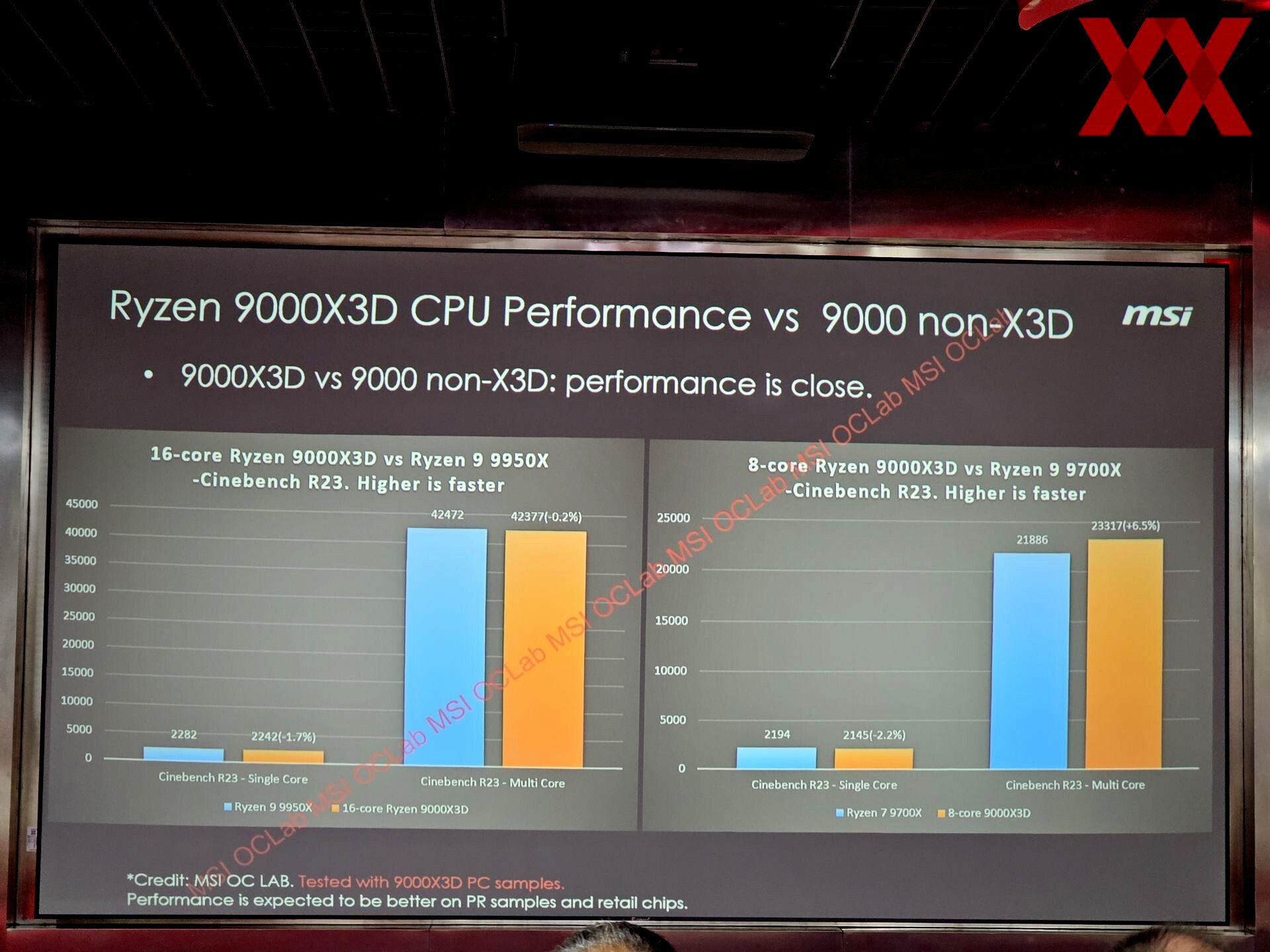
MSI OCLab made some groundbreaking disclosures about the gaming performance of upcoming AMD Ryzen 9000X3D processors. It looks like AMD is set to dominate the Intel Core Ultra 2-series "Arrow Lake-S" desktop processors in gaming performance, if these numbers hold up. In the games that MSI tested, namely "Far Cry 6," "Shadow of the Tomb Raider," and "Black Myth: Wukong," the "8-core 9000X3D" processor, or the Ryzen 7 9800X3D, is found to be 11% faster on average than the Ryzen 7 7800X3D. The "16-core 9000X3D" processor, which is expected to be the Ryzen 9 9950X3D, is an impressive 13% faster than its predecessor, the Ryzen 9 7950X3D.

Normally we'd expect bigger gen-on-gen gains for the 8-core part than the 16-core part, but the 16-core 9000X3D pulling ahead by that much over its predecessor hints at the possibility of AMD either giving it significantly higher clock speeds, or the rumor about AMD deploying both 3D V-cache on both its CCDs could be true after all. The 9950X3D could end up roughly on-par with the 9800X3D if this turns out to be true, given that the gaming performance delta between the 7800X3D and 7950X3D is roughly that much—2-3 percentage points. Intel earlier this week officially announced the Core Ultra 2-series desktop processors. As part of the announcement, the company put out some first-party gaming performance numbers, which put the top Core Ultra 9 285K either on-par with the Core i9-14900K, or faster by 2-3%, which means it should land behind even the 7950X3D in gaming performance, and AMD is set to dominate Intel in gaming performance with the 9000X3D series.
Sources: HardwareLuxx.de, Videocardz
Add your own comment

123 Comments on MSI OCLab Reveals Ryzen 9000X3D 11-13% Faster Than 7000X3D, AMD Set to Dominate "Arrow Lake" in Gaming

#101
Geofrancis
john_And to make it a little more personal (sorry in advance), I am pretty sure that you justified paying for those "G.SKILL Ripjaws S5 DDR5 6000 CL30-40-40-96 (F5-6000J3040F16GX2-RS5K)" that you have in your system specs, instead of going for cheaper 4800-5200-5600 RAM, even when the performance difference usually is not more than 2-3%.
with am5 ddr5 4800 to 6000 cl30 can be over a 20% improvement in gaming.
Posted on Reply
#102
AusWolf
Geofranciswith am5 ddr5 4800 to 6000 cl30 can be over a 20% improvement in gaming.
Yes... after extensive RAM tuning, and with a 4090 at 1080p. If you have a 4090, you probably game at 4K where the difference is a lot smaller, and if you play at 1080p, then you don't have a 4090, so you're GPU limited all the time. Therefore, the data in the chart is interesting, but pointless.
Posted on Reply
#103
HD64G
AusWolfYes... after extensive RAM tuning, and with a 4090 at 1080p. If you have a 4090, you probably game at 4K where the difference is a lot smaller, and if you play at 1080p, then you don't have a 4090, so you're GPU limited all the time. Therefore, the data in the chart is interesting, but pointless.
Smooth framerate though is more important than average when the latter is above 100FPS and that depends much more from the CPU even at 1440P.
Posted on Reply
#104
AusWolf
HD64GSmooth framerate though is more important than average when the latter is above 100FPS and that depends much more from the CPU even at 1440P.
The minimum in the above chart is 87 FPS with 4800 CL40, and 107 with 6000 CL32. I'd call both of these values pretty smooth (not to mention what I said above).

Edit: I can tell you, with a 6750 XT at 1440 UW, switching EXPO on and off on my RAM (4800 CL40 / 6000 CL36) does absolutely nothing in any game.
Posted on Reply
#105
Degreco
AusWolfYes... after extensive RAM tuning, and with a 4090 at 1080p. If you have a 4090, you probably game at 4K where the difference is a lot smaller, and if you play at 1080p, then you don't have a 4090, so you're GPU limited all the time. Therefore, the data in the chart is interesting, but pointless.
Yep, completely true.

And the same goes for most of the CPU testing (for gaming, of course). Most consumers can't understand artificially created CPU bottlenecks at 1080p and how they do NOT correspond 1:1 to their specific hardware setup and monitor resolution. At least for 99% of the users.

And nobody cares for a realistic gaming setup (testing a 4090 at 4k with eye candy on, like one would use it most of the time) as those will have a hard time to produce any differences between recent modern CPUs. So reviews seldom show them and consumers start dreaming of big FPS gains instead of thinking about the test setups. The upcoming 5090 @ 1080p or 720p reviews will make this certainly worse ;)
Posted on Reply
#106
Vayra86
phanbueyThey will release x3d at $500+.

They have no competition from ARL.
Yeah apparently in my neck of the woods the 'old' 7800X3D is back up to 450 EUR. If they release a better chip, and the competition cannot beat it, we get ye familiar Nvidia situation; price increase and giving customers 'the choice' of going with a 'cheaper' old CPU or 'expensive' newer CPU. Everybody wins... they say.

Look at this... retarded price gouging. I bought mine at the end of august at 349,-..

john_And to make it a little more personal (sorry in advance), I am pretty sure that you justified paying for those "G.SKILL Ripjaws S5 DDR5 6000 CL30-40-40-96 (F5-6000J3040F16GX2-RS5K)" that you have in your system specs, instead of going for cheaper 4800-5200-5600 RAM, even when the performance difference usually is not more than 2-3%.
Good attempt but bad example.

DDR5 with CL30/6000 is common and a no brainer with 7th gen X3D, and you'd be silly not to do it for the couple EUR of price difference to slower kits.

Posted on Reply
#107
529th
Looks like I should light-weight start sizing up X670E or X870E boards for a new gaming rig
Posted on Reply
#108
_roman_
You better look in the mainboard manual and not the webpage before you buy an amd mainboard. Especially the section about pcie lanes where they are used up. The AMD 650 mainboard should be also looked into. I went on purpose against the PCIE 5.0 feature on the PEG slot. There are 4 years left of the 5 years usage period for my mainboard. I doubt I'll need PCIE 5.0 for any expansion card in that period. PCIE 5.0 NVME work also on lower mainboards with e.g. X670 chipset.
Posted on Reply
#109
Kapone33
Blaeza11% isn't the increase I was hoping for. 10800X3D see you in a few years.

More interested in AMD's 8000 series GPU's catching up with CPU's.
That is the beauty of AM5. How many CPUs have been released since 7000 and now even this one can be skipped with just a CPU upgrade 2 years from now. The best though is that X670E boards have held their value more at the high end with 870e being more expensive and less flexible. The Godlike does not count lol.
Posted on Reply
#110
TheinsanegamerN
cfentonI don't think that's true. If it was, every gaming focused CPU review would just say buy a 7600X (or whatever). Baldur's Gate 3, Cities Skylines 2, and Warhammer Total War 3 scale with CPU performance at 1080p.

I want to know how a CPU will run games I might actually play. Being 10% faster at running Shadow of the Tomb Raider is irrelevant because anyone who wanted to play it did so years ago. I could see if it was using an engine that was still really popular, but no one is using the Foundation Engine. If it turns out that any CPU will work for new games because I'll always be GPU bound, then that's great because I can save money.
The purpose of CPU reviews is NOT to test your favorite Steam games.

The purpose is to test a variety of different game engines in a situation that puts the CPU as the limiting factor, to see which CPU is faster.

You can use this information to make informed purchasing decisions, a CPUt hat is consistently 10% faster then another CPU may not have any benefit NOW, but WILL in 5-10 year when those CPUs age and demand increases.

Somehow people really dont understand this simple concept. It'd be like me saying "well all my favorite games run at 60 FPS at 4k with a 4060, so there's no reason to test newer games on a 4090".
Posted on Reply
#111
Kapone33
TheinsanegamerNThe purpose of CPU reviews is NOT to test your favorite Steam games.

The purpose is to test a variety of different game engines in a situation that puts the CPU as the limiting factor, to see which CPU is faster.

You can use this information to make informed purchasing decisions, a CPUt hat is consistently 10% faster then another CPU may not have any benefit NOW, but WILL in 5-10 year when those CPUs age and demand increases.

Somehow people really dont understand this simple concept. It'd be like me saying "well all my favorite games run at 60 FPS at 4k with a 4060, so there's no reason to test newer games on a 4090".
CPUs (In my opinion) should be separated by their performance tier. X3D is obviously Gaming focused. Epyc Performance focused and X and Non X Computing focused. There was a lot of press around the 7000 to 9000 performance numbers and plenty of "Not as fast in Gaming as X3D" but something like an 11-15% bump in performance. If you look back at 1700-2700 it was about the same with a bump in Memory support from 2933 to 3200. Just like 6000 to 6400 on AM5.
Posted on Reply
#112
AusWolf
Vayra86Good attempt but bad example.

DDR5 with CL30/6000 is common and a no brainer with 7th gen X3D, and you'd be silly not to do it for the couple EUR of price difference to slower kits.
There's also the added SoC voltage, heat, boot time, MCR issues with some boards, etc. which no review seems to be talking about. It's an entirely different topic, though.
DegrecoYep, completely true.

And the same goes for most of the CPU testing (for gaming, of course). Most consumers can't understand artificially created CPU bottlenecks at 1080p and how they do NOT correspond 1:1 to their specific hardware setup and monitor resolution. At least for 99% of the users.

And nobody cares for a realistic gaming setup (testing a 4090 at 4k with eye candy on, like one would use it most of the time) as those will have a hard time to produce any differences between recent modern CPUs. So reviews seldom show them and consumers start dreaming of big FPS gains instead of thinking about the test setups. The upcoming 5090 @ 1080p or 720p reviews will make this certainly worse ;)
CPU tests at low resolutions have a point: they show you roughly what to expect later if you keep your CPU for a long time and only upgrade your GPU through the years. Most people fail to understand this, too.
Posted on Reply
#113
529th
_roman_You better look in the mainboard manual and not the webpage before you buy an amd mainboard. Especially the section about pcie lanes where they are used up. The AMD 650 mainboard should be also looked into.
That's good advice! I've been doing this for the past 15 some years or more.
Posted on Reply
#114
Scotter008
Makaveligoing to need more than 3 games.

And wukong is gpu bottlenecked so also not a good choice.


not skipping at all.

I'm going 5800X3D to 9800X3D that will be like a 30% gain in performance since the 7800X3D is on average 18% faster than a 5800X3D.

The ST performance improvement alone with be worth it as I do more than just play games on my rig.
I have a similar situation. I'm running CPU intensive workloads like UE5, Adobe suite, etc. My 5800X3D is amazing, but the ~40% gain in productivity and ~20% gain in gaming performance alongside the overclocking support etc. would be great for an enthusiast like me not yet willing to spend 800 dollars on the soon to be the monsterous 9950X3D flagship.
Posted on Reply
#115
Nater
john_And to make it a little more personal (sorry in advance), I am pretty sure that you justified paying for those "G.SKILL Ripjaws S5 DDR5 6000 CL30-40-40-96 (F5-6000J3040F16GX2-RS5K)" that you have in your system specs, instead of going for cheaper 4800-5200-5600 RAM, even when the performance difference usually is not more than 2-3%.
AMD is only competing with themselves with the X3D.

And value + resale value on the RAM choice. It wasn't that much more. You'll find all my DDR4 laying around is 3600-18 or 3200-16. Bang/buck.
Posted on Reply
#116
Geofrancis
AusWolfYes... after extensive RAM tuning, and with a 4090 at 1080p. If you have a 4090, you probably game at 4K where the difference is a lot smaller, and if you play at 1080p, then you don't have a 4090, so you're GPU limited all the time. Therefore, the data in the chart is interesting, but pointless.
You don't need a 4090 to hit a CPU bottleneck, im easily CPU limited when running games at low settings, I play shooters, so almost all settings are low or off and the CPU easily becomes the limit even on my 5700xt.
Posted on Reply
#117
Minus Infinity
Scotter008I have a similar situation. I'm running CPU intensive workloads like UE5, Adobe suite, etc. My 5800X3D is amazing, but the ~40% gain in productivity and ~20% gain in gaming performance alongside the overclocking support etc. would be great for an enthusiast like me not yet willing to spend 800 dollars on the soon to be the monsterous 9950X3D flagship.
I wonder if this gen the 9900X3D will actually be desirable? If they do put v-cache on both cores and we see the much higher all-core clocks than 7900X3D, to me it'd the perfect tweener. If that doesn't happen I'm jumingg from 5800X to 265K. I'll take weaker gaming over weaker productivity any day of the week as I'm happy wth my 5800X for gaming anyway and any of these will obliterate it in gaming any way. I don't care if I only 30% better frame rates rather than 40%. So sad we have to wait 3 months until 99xx X3D are announced as I want to upgrade by Xmas.
GeofrancisYou don't need a 4090 to hit a CPU bottleneck, im easily CPU limited when running games at low settings, I play shooters, so almost all settings are low or off and the CPU easily becomes the limit even on my 5700xt.
Even in the same game, depending on the scene, whether or not RTing is in use or upscaling etc, a game can switch from cpu to gpu bound. Eg in town with a lot of NPC's cpu can get hammered doing all the AI, but out of town with just the player cpu can be taking it easy and it's the gpu doing all the work.
Posted on Reply
#118
Geofrancis
Minus InfinityEven in the same game, depending on the scene, whether or not RTing is in use or upscaling etc, a game can switch from cpu to gpu bound. Eg in town with a lot of NPC's cpu can get hammered doing all the AI, but out of town with just the player cpu can be taking it easy and it's the gpu doing all the work.
Especially when you have a 144hz+ monitor,
Posted on Reply
#119
Macro Device
GeofrancisYou don't need a 4090 to hit a CPU bottleneck
Having a poorly optimised game is enough. xD

But yeah, I'm also CPU bottlenecked in some games because I switched from 4K60 to 1080p160 (took some effort, but I managed to optimise visuals in most games I play so I only get advantages from more FPS without suffering from quality loss).
Posted on Reply
#120
AusWolf
GeofrancisYou don't need a 4090 to hit a CPU bottleneck, im easily CPU limited when running games at low settings, I play shooters, so almost all settings are low or off and the CPU easily becomes the limit even on my 5700xt.
Are you anywhere near your monitor's max refresh rate by any chance? At low settings, I assume you should be.
Minus InfinityEven in the same game, depending on the scene, whether or not RTing is in use or upscaling etc, a game can switch from cpu to gpu bound. Eg in town with a lot of NPC's cpu can get hammered doing all the AI, but out of town with just the player cpu can be taking it easy and it's the gpu doing all the work.
I think you need a quite weak / much older CPU than your GPU to see that happen. With a 7800X3D and a 6750 XT, the only time the CPU holds me back is while shaders are still compiling. There is not a chance I could ever bottleneck this CPU without at least a 4080 and switching to lower resolutions.
Posted on Reply
#121
Frick
Fishfaced Nincompoop
Vayra86Yeah apparently in my neck of the woods the 'old' 7800X3D is back up to 450 EUR. If they release a better chip, and the competition cannot beat it, we get ye familiar Nvidia situation; price increase and giving customers 'the choice' of going with a 'cheaper' old CPU or 'expensive' newer CPU. Everybody wins... they say.

Look at this... retarded price gouging. I bought mine at the end of august at 349,-..
Looked at price history now and at its cheapest the 7800x3d was as much as the 9600X is now. Absolutely crazy.
Posted on Reply
#122
Geofrancis
AusWolfAre you anywhere near your monitor's max refresh rate by any chance? At low settings, I assume you should be.
thats the whole point, I want fps, to do that without GPU limits I usually run it at low settings meaning im usually CPU limited. Upscaling doesn't help when your CPU limited as it just pixelates without any actual performance benefit since its not GPU limited. so lowering the resolution then upscaling does nothing other than blur the image.
Posted on Reply
#123
RaceT3ch
1d10tNot surprising, at least to me. I guess we "should" get used to such small increment, hey at least is not a regression :D
I'll wait for the review, if the 9800X3D can improve efficiency, I might upgrade, after all it's just a drop in :rolleyes:
Might wanna ignore the slight regression in 7 ZIP, I heard the 9600X was slower than the 7600X in compress and decompress on Techspot.
Posted on Reply
Add your own comment
Nov 21st, 2026 12:25 PST change timezone

New Forum Posts

Popular Reviews

TPU on YouTube

Controversial News Posts