Wednesday, July 16th 2025

Lexar Launches the NM990 PCIe 5.0 SSD Series with Up to 14 GB/s Sequential Reads
Lexar, a leading global brand of flash memory solutions, is thrilled to debut its new next-gen solid-state drive—the NM990 M.2 2280 PCIe 5.0 NVMe SSD, engineered for High-end gamers, professional creators and AI developers.
Leveraging next-generation PCIe 5.0 technology, the NM990 PCIe 5.0 SSD delivers speeds up to 14,000 MB/s read and 11,000 MB/s write, almost two times faster than typical Gen 4 SSDs. It provides superior performance for serious gamers and professional rendering.
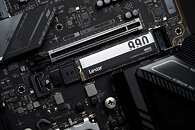
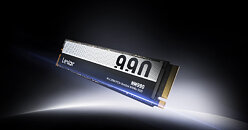 The NM990 PCIe 5.0 SSD includes Thermal Defender Technology, and is integrated 8-channel controller and graphite heat dissipation decals to deliver up to 23% better power consumption management, ensuring smoother and more efficient performance.
The drive features DRAM Cache and SLC dynamic cache delivers random read/write speeds up to 2000/1500K IOPS, significantly enhancing data transfer speeds to reduce wait times and improve system responsiveness whether you're blazing through an AAA game, refining high-res renders, or deftly processing your most comprehensive AI projects.
With a rated capacity of up to 3000 TBW (4 TB) ensuring excellent reliability for heavy workloads over the years and support for Microsoft DirectStorage, this drive offers faster load times and elevate the overall gaming experience to new levels. Moreover, users can use the Lexar DiskMaster SSD Management tool to perform firmware updates, manage the drive and its data, and monitor drive health.
The NM990 M.2 2280 PCIe 5.0 NVMe SSD is available from 1 TB to 4 TB, and users can expect to get even more space than a standard SSD of the same listed capacity.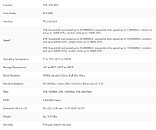
Source:
Lexar
Leveraging next-generation PCIe 5.0 technology, the NM990 PCIe 5.0 SSD delivers speeds up to 14,000 MB/s read and 11,000 MB/s write, almost two times faster than typical Gen 4 SSDs. It provides superior performance for serious gamers and professional rendering.


The drive features DRAM Cache and SLC dynamic cache delivers random read/write speeds up to 2000/1500K IOPS, significantly enhancing data transfer speeds to reduce wait times and improve system responsiveness whether you're blazing through an AAA game, refining high-res renders, or deftly processing your most comprehensive AI projects.
With a rated capacity of up to 3000 TBW (4 TB) ensuring excellent reliability for heavy workloads over the years and support for Microsoft DirectStorage, this drive offers faster load times and elevate the overall gaming experience to new levels. Moreover, users can use the Lexar DiskMaster SSD Management tool to perform firmware updates, manage the drive and its data, and monitor drive health.
The NM990 M.2 2280 PCIe 5.0 NVMe SSD is available from 1 TB to 4 TB, and users can expect to get even more space than a standard SSD of the same listed capacity.

9 Comments on Lexar Launches the NM990 PCIe 5.0 SSD Series with Up to 14 GB/s Sequential Reads
Should be using MAP1806
Maybe I'm just missing something here, but isn't a TB (1024GB) just a TB (also 1024GB), at least when measured the same way ????????
Marketing/PR folks, gotta luv 'em :D
I've seen comments like this on various drives in my searches, but I've never seen a proper explanation.
So to sum up, if you need an OS boot drive, get TLC, even if you have to spend $10 or $15 more. If you want a secondary drive for non-OS use, QLC is ok.
BTW, Welcome to TPU! :toast:
If they beat around the bush with phrases like "quality 3D NAND" you know what they actually mean