Friday, October 17th 2025

Microsoft PowerToys Adds Automatic Light/Dark Mode Switching Based on Time of Day
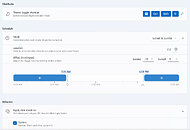
It has been over six years since we last covered an update for Microsoft PowerToys. PowerToys date all the way back to the Windows 95 era, offering a set of utilities for power users to enhance and streamline their Windows experience for greater productivity. Modern PowerToys, initially released in 2019, are a collection of tools and apps that allow users to customize the user interface and user experience. The latest PowerToys update, version 0.95.0, introduces features like automatic switching between light and dark modes in the Windows 11 UI, depending on the time of day. Users can schedule light mode to be active during the day and have the tool automatically switch to dark mode when the sun sets.
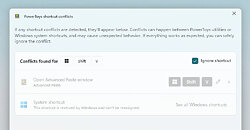
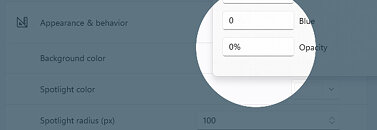
Another notable improvement is the speed enhancement of the Command Palette, reducing latency by hundreds of milliseconds in real-world scenarios. Additionally, the Peek function, which allows users to preview files without opening apps, is now accessible by simply pressing the space key on your keyboard. For those eager to apply these changes, the Find My Mouse highlight can be made fully transparent and adjusted using a built-in slider. Other features, such as ignoring shortcut conflicts and unassigning shortcuts, are also available.
 Here is the remaining list of improvements:
Source:
Microsoft
Another notable improvement is the speed enhancement of the Command Palette, reducing latency by hundreds of milliseconds in real-world scenarios. Additionally, the Peek function, which allows users to preview files without opening apps, is now accessible by simply pressing the space key on your keyboard. For those eager to apply these changes, the Find My Mouse highlight can be made fully transparent and adjusted using a built-in slider. Other features, such as ignoring shortcut conflicts and unassigning shortcuts, are also available.


- Mouse Pointer Crosshairs now lets you show only the horizontal line, vertical line, or both.
- Added support for Desired State Configuration (DSC) v3, so it's easier to setup a new device with the same settings.
- Gliding Cursor can now be canceled with the Esc key.
- Added a Welsh layout with acute, grave, and dieresis variants for vowels in Quick Accent.
- ZoomIt now supports smooth image zooming.
14 Comments on Microsoft PowerToys Adds Automatic Light/Dark Mode Switching Based on Time of Day
www.techpowerup.com/341976/microsoft-breaks-localhost-with-windows-11-october-update-users-forced-to-revert
These features: FINALLY! But are we playing catch-up with othet OS'es? 😅
Yes, the Command Pallete needed performance tweaking. For a year or so, it wasn't that better in speed than windows' own search, just better results and Mac-OS-like usability. Same goes for this file preview, closes the gap between both OS'es.
The dark/light mode, I'm confused. Night light has been on Windows 10 since 1703 or something, customizable by time manually or dusk/dawn (req. Location to be on). Dark mode since 1607, but despite being implemented earlier was never upgraded to include the time customizability.
So it took 8 to 9 years to make it to the top of a prio list, still not native? 😄
After all UI is already moving toward "modern" screen space waste.
What would actually be usefull is the ability to force classic programs into dark mode...
:):p:D