Monday, January 5th 2026

Windows and Office Now Require Microsoft Account Sign-In as Phone Activation Ends

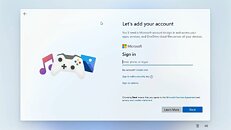
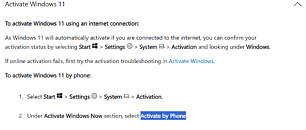
For users of older or mission-critical offline systems, the end of offline Windows activation has arrived. The traditional method of validating Windows and Office licenses offline has been unofficially phased out. Microsoft now directs users to an online activation portal that requires a Microsoft account. Even when users call the activation numbers for a phone activation option, they encounter an automated message that redirects them to the website instead of providing an offline confirmation code. This change removes the last straightforward option for users with older software to activate without an internet connection or an account. This is contradicting Microsoft's support documents which still show the option as available even for Windows 11.

This was spotted by a content creator Ben Kleinberg, who tested the process using a physical OEM license for Windows 7. After making the activation call, he received a text message with a link to the Product Activation Portal. Although a temporary browser compatibility issue interrupted the process, switching browsers allowed him to complete the activation for both Windows 7 and Office 2010 through the web interface. Thus, the phone line now merely directs users to the web portal instead of serving as an independent activation method. In early October, the ability to create a local account during the modern Windows 11 setup experience (OOBE) was removed. Commands such as "oobe/bypassnro" and "ms-cxh:localonly" no longer work as workarounds, as Microsoft has patched these options as well.
Source: via Tom's Hardware
Add your own comment

20 Comments on Windows and Office Now Require Microsoft Account Sign-In as Phone Activation Ends

#1
lexluthermiester
AleksandarKFor users of older or mission-critical offline systems, the end of offline Windows activation has arrived. The traditional method of validating Windows and Office licenses offline has been unofficially phased out.
Um, phone activation still works. I just tried it. No issues. It's also legally dubious for them to try this as such a move would effectively promote several forms of unlawful discrimination, at least here in the states, and I suspect the EU.
AleksandarKCommands such as "oobe/bypassnro" and "ms-cxh:localonly" no longer work as workarounds
This is also incorrect, depending on the version of Windows.
Posted on Reply
#2
AusWolf
They seem to be doing everything they can to make even more people jump ship. Congratulations, Microsoft! Keep up the good work. :laugh:
Posted on Reply
#3
FR3D1
Ninja Cat
lexluthermiesterI just tried it. No issues.
The phone numbers required for offline activation in my case are either disconnected, there is no call forwarding, or a message about online activation is played.
069 22 22 54 94 (old hotline – disconnected)
089 24 44 50 93 (new hotline – online activation)
0800 284 82 83 (online activation)
01806 672255 (no call forwarding! – mobile phone?)
With a friendly smile,
Fred.
Posted on Reply
#4
sepheronx
AusWolfThey seem to be doing everything they can to make even more people jump ship. Congratulations, Microsoft! Keep up the good work. :laugh:
I am hoping this will create the golden age for linux. More game developers and integration of software is much needed. Only way is with more adoption.
Posted on Reply
#5
lexluthermiester
FR3D1The phone numbers required for offline activation in my case are either disconnected, there is no call forwarding, or a message about online activation is played.


With a friendly smile,
Fred.
Maybe this is a staggered thing?

If they are actually doing this, it represents an unacceptable and intolerable activity.
sepheronxI am hoping this will create the golden age for linux.
It might.
Posted on Reply
#6
Darmok N Jalad
A few months ago, I tried to do a phone activation of W11, and there was no “United States” in the drop down list, so I couldn’t even get to a phone number to call. For whatever reason, the list failed to cover the entire alphabet of nations, stopping somewhere around the letter N, IIRC. Maybe a bug, or a harbinger of things to come.

Again, you can still use a Mac with a local account. You can even do so on iPad and maybe iPhone, though that means no app downloads. On a Mac, it just means no iCloud services.
Posted on Reply
#7
King Mustard
Bit late to the game on this news, TechPowerUp.
Posted on Reply
#8
Tomorrow
I just tested 25H2 in a VM yesterday. Unmodified ISO. Selecting Pro edition and then selecting School or Work account type and then Domain Join in OOBE worked just fine to create a local account. No workaround necessary. In the domain join box i just entered a few random letters. Internet was enabled the whole time.
Posted on Reply
#9
aktpu
Darmok N JaladOn a Mac, it just means no iCloud services.
No App Store either, which is the only way some apps are distributed nowadays :(
Posted on Reply
#10
Darmok N Jalad
aktpuNo App Store either, which is the only way some apps are distributed nowadays :(
Hmm, I’ve yet to run into that, but I’m a simple man. :D I think you can still just sign in to the App Store on a Mac for software downloads, unless that policy has changed. It used to be that you had to sign in to each app on Mac, but that has certainly changed.
Posted on Reply
#11
qlum
Alternatively you defer activation till after installation and download the activator from a microsoft website (Github)...
I mean, we all know it, I won't link it but it is very much public knowledge.

Of course, you could also hopefully just not use Windows at all, even better.
Posted on Reply
#12
FierceRed
AleksandarKIn early October, the ability to create a local account during the modern Windows 11 setup experience (OOBE) was removed.
Wait, isn't this still possible with Rufus?
Or was Rufus using these workarounds and now a custom installation won't work?
Posted on Reply
#13
Tomorrow
FierceRedWait, isn't this still possible with Rufus?
Or was Rufus using these workarounds and now a custom installation won't work?
Only on Home version. Pro still offers numerous workarounds: domain join, Rufus, MicroWin etc.
Posted on Reply
#14
FierceRed
TomorrowOnly on Home version. Pro still offers numerous workarounds: domain join, Rufus, MicroWin etc.
Whew, dodged a bullet. About to install LTSC later this week.
Posted on Reply
#15
aktpu
Darmok N Jaladit used to be that you had to sign in to each app on Mac, but that has certainly changed
Oh, I meant that you have to sign in similar way into your Apple account if you want to use icloud services or app store. You don't have to do the forced cloud login to mac stuff (yet), though they try really hard to get you to do it
Posted on Reply
#16
Robin Seina
lexluthermiesterUm, phone activation still works. I just tried it. No issues. It's also legally dubious for them to try this as such a move would effectively promote several forms of unlawful discrimination, at least here in the states, and I suspect the EU.

This is also incorrect, depending on the version of Windows.
Sadly, in Czech republic, the free activation number 800 100 074 refers customers to online page for activation no matter the windows version.
Posted on Reply
#17
AleXXX666
Darmok N JaladAgain, you can still use a Mac with a local account. You can even do so on iPad and maybe iPhone, though that means no app downloads. On a Mac, it just means no iCloud services.
I don't f..n need iCloud on a MAC. I prefer to treat a PC (with whatever OS) as a PC, not as stupid tablet or phone (which needs stupid accounts for normal usage these days):rolleyes::oops::kookoo:
aktpuNo App Store either, which is the only way some apps are distributed nowadays :(
lmfao there are plenty of "normal" mac stuff to use perfectly everyday:rolleyes::)
Posted on Reply
#18
AusWolf
AleXXX666I don't f..n need iCloud on a MAC. I prefer to treat a PC (with whatever OS) as a PC, not as stupid tablet or phone (which needs stupid accounts for normal usage these days):rolleyes::oops::kookoo:

lmfao there are plenty of "normal" mac stuff to use perfectly everyday:rolleyes::)
There isn't a single Linux app store out there that needs an online login. If a free OS can do this, then I don't see why multimillion $ companies can't (or don't want to) with their OSes. Anonymity on the internet should be a basic human right. As long as it isn't, we can't call ourselves a civilised society.
Posted on Reply
#19
Unregistered
FierceRedWait, isn't this still possible with Rufus?
It is with my Win11 Home Edition 24H2 ISO. This is where I'm at and this is where I'll stay, until some modicum of sanity and customer service returns to Microslop.

Will good change happen at Microslop in our lifetime?? I wouldn't count on it...
lexluthermiesterIf they are actually doing this, it represents an unacceptable and intolerable activity.
When has doing something that is unacceptable and intolerable stopped Microslop from trying to shove this crap down our throats with a jackhammer??
#20
Rover4444
Just did a few installs of Windows 11 IOT LTSC Enterprise and I've got no problems. Intelligent and law-abiding people buy enterprise keys online.
Posted on Reply
Add your own comment
Nov 26th, 2026 17:36 CST change timezone

New Forum Posts

Popular Reviews

TPU on YouTube

Controversial News Posts